Help customers reach the right team with phone menus
With phone menus, you can provide self-service routing paths that help your customers reach the right team member faster. Provide a clear list of menu options so they can avoid multiple call transfers or long wait times. For example, ‘Press one for Sales’ and ‘Press two for Support’ To set up a phone menu in Quo:- In the call flow builder, drag in the Phone menu step from the side panel.
- Configure your phone menu greeting.
- Assign numbers 0-9 to destinations.
- Add voice keywords for each option.
- Configure up to 10 different paths.
Best practices for setting up your phone menu
Design a phone menu that’s easy for your callers to navigate. Here’s how: 1. Keep it simple: Stick to 3-4 menu options so that callers aren’t spending time waiting for their option. Put the popular options first. And be sure to avoid using industry-specific or technical terms for the sake of clarity. 2. Have a clear menu greeting: Create a short menu greeting of no longer than 20 seconds and let customers know who they’ve called by mentioning your company’s name. Make sure to offer a way out of the menu in the greeting. For example, “If you know your party’s extension, you may dial it at any time.” 3. Route calls instead of repeating the menu: Send callers to your default ring group, even if they don’t choose a specific menu option. You can reduce your missed calls and automatically connect callers with your team.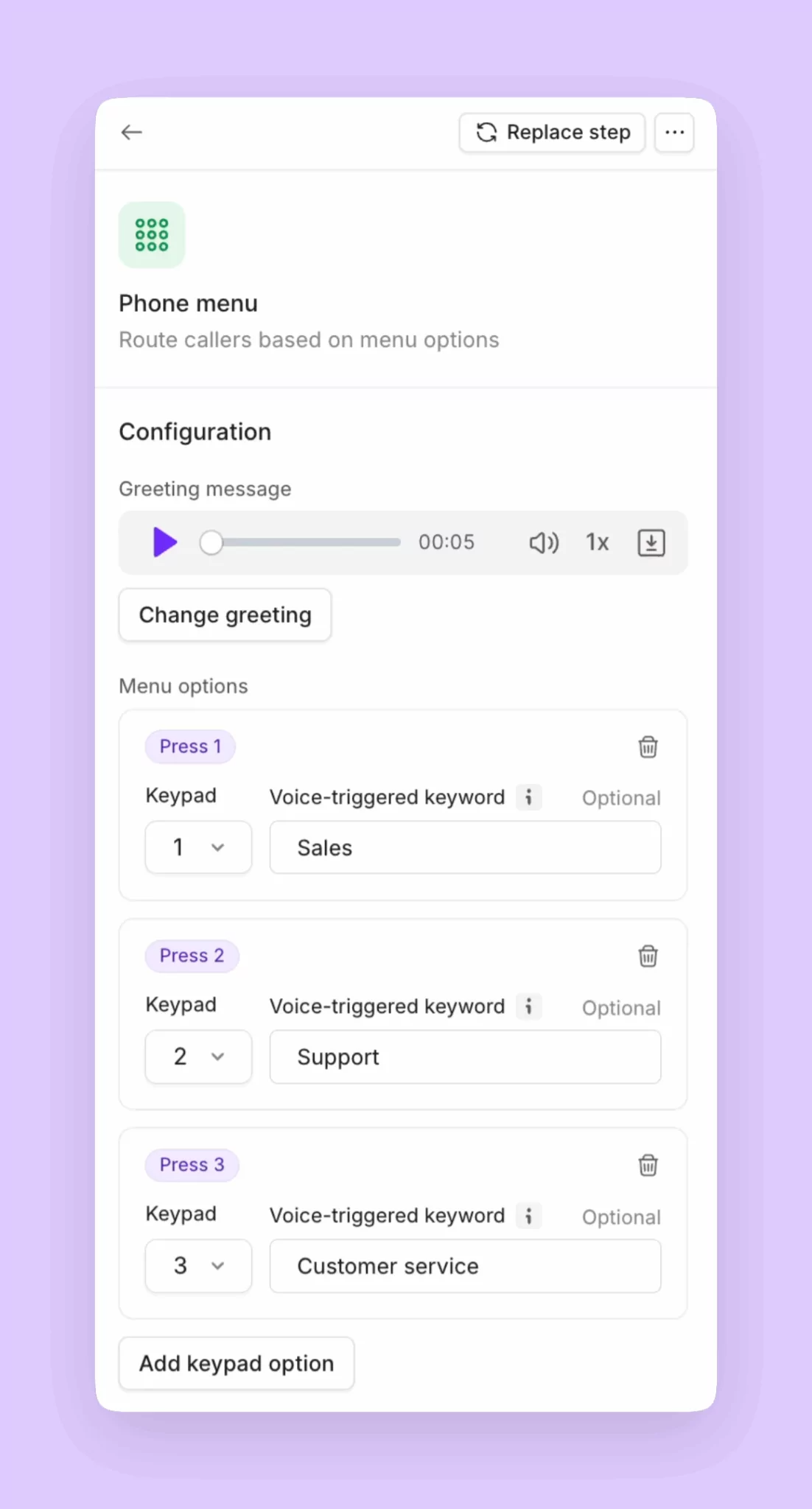
Reduce missed calls with ring groups
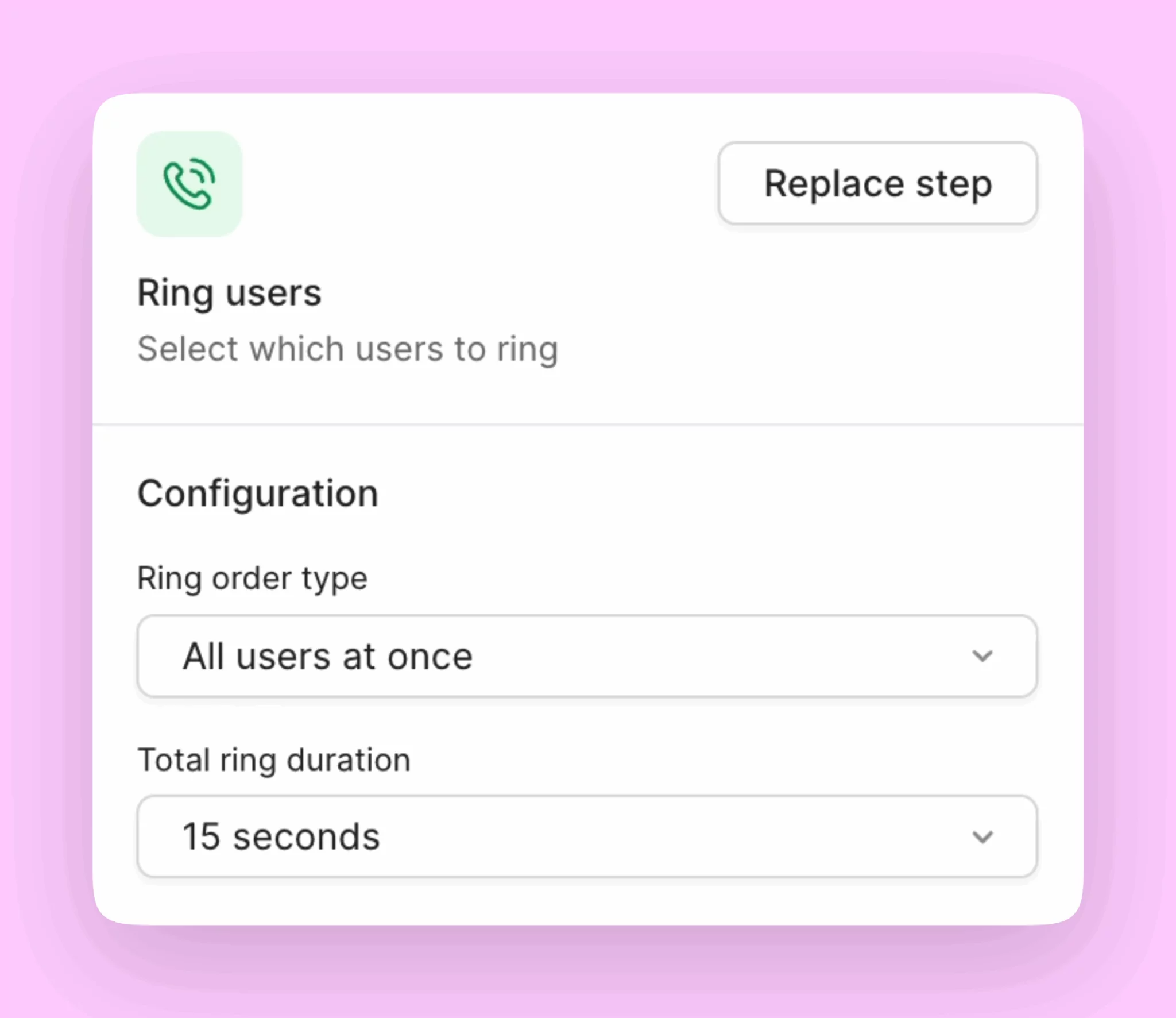
For startups, having a main office number that connects to a receptionist can unintentionally bottleneck incoming calls and messages. Ring groups help your team share responsibility for incoming calls. It’s a business phone feature that allows incoming calls to be directed to multiple people at the same time who have access to your shared number. To set up a ring group on your Quo number:- Add business hours if you haven’t already under your specific phone number’s settings.
- Open the call flow builder.
- Drag Ring users step into the canvas under During hours.
- Select All at once from the dropdown.
- Set a minimum ring duration of 15 seconds if you plan to ring all your team members so the call has time to register.
- All users with number access are included automatically if they don’t have Do Not Disturb enabled or a specific number muted.
Answer customer calls 24/7 with Sona
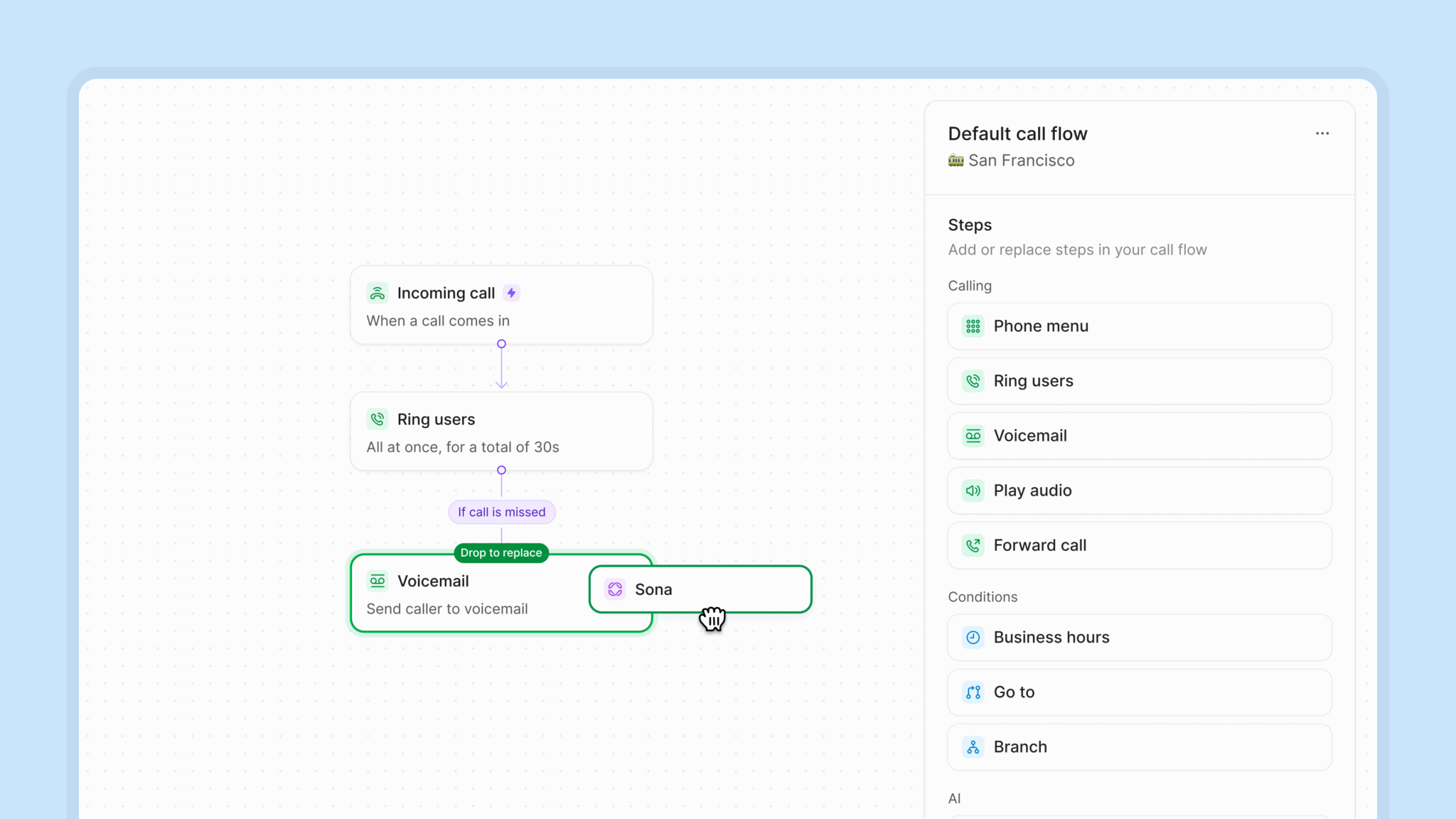
Missed calls can lead to missed opportunities for fast-growing teams. With our 24/7 AI agent Sona, you never have to miss an incoming call again. Sona helps you collect new leads and qualify them during or after business hours. Gather details from leads about their role, company, and pain points so that you can tailor your pitch when you follow up. And with our HubSpot, Salesforce, and Jobber integrations, you can automatically log Sona calls in your CRM. To set up Sona to qualify leads, you can create a custom Sona job:- Select Sona in your call flow.
- Click Add job in the Sona settings window.
- Select Create new job.
- Provide details about how you would like Sona to qualify leads, like keywords and phrases to look for and information it should collect. For example, you can instruct Sona to ask for company headcount, pain points, a timeline, the product they’re interested in, etc.
- Select Create job.
Example lead qualification job
Example lead qualification job
Job title: SaaS lead qualificationJob description: Qualify inbound leads by assessing their business needs, budget, decision-making authority, and timeline to determine if they’re a good fit for our software solution.Instructions:The caller is inquiring about the software, requesting a demo, asking about pricing, wanting to learn more about features, or expressing interest in how the solution can help their business.Respond with the following script:Thanks for your interest in [Company Name]! I’d be happy to help you explore whether our solution would be a good fit for your needs. Let me ask you a few questions to better understand your requirements. This will help our team have a more productive consultation with you. 1. BUILDING RAPPORT & GATHERING CONTACT INFORMATIONFirst, may I have your name, please? [After they provide name]Great to meet you, [Name]. And what company are you with? [After company name]What’s your role at [Company]? [After role]Perfect. Could you share your business email address? I’d like to send you relevant information based on our conversation today. [After email]And what’s the best phone number to reach you at for any follow-up? [After phone number]Just out of curiosity, how did you hear about [Company Name]? [If referral/specific source, acknowledge appropriately]2. UNDERSTANDING BUSINESS CONTEXT & PAIN POINTSNow, [Name], could you tell me a bit about your business? What does [Company] do? [Listen and identify industry/business model]What’s driving your interest in looking for a solution like ours right now? [Listen for specific pain points, challenges, or triggers]Are you currently using any software or tools to handle [relevant process based on their answer]? [If yes] How’s that working for you? What would you like to see improved? [If no] How are you managing this process today? Is it manual, spreadsheets, or another method?What are the main challenges you’re facing with your current approach?If you could wave a magic wand and fix one thing about [process/challenge they mentioned], what would it be?3. QUALIFYING QUESTIONS BY KEY CRITERIACOMPANY SIZE & SCALETo ensure our solution scales appropriately for your needs:How many employees does your company have? [Note if they fall within the target company size]How many people would potentially use this software?For [relevant metric based on product]:
- How many [customers/transactions/projects/users] do you typically handle per [month/quarter]?
- What does your current [volume/growth rate] look like?
- Our team will review the information you’ve provided
- A specialist will reach out within one business day to schedule your personalized demo
- They’ll show you how our solution addresses [specific challenges mentioned]
- You’ll have a chance to ask any detailed questions
- Our team can send you some helpful resources about [specific challenges mentioned]
- We can schedule a follow-up when you’re closer to making a decision
- In the meantime, you’ll have access to our resource library
- Your main challenges with [summarize pain points]
- Your timeline of [timeline]
- Your key requirements around [main requirements]
Best practices for training Sona
Setting up Sona can take practice to get right. Here are a few tips to help you train Sona and write clear and effective instructions for jobs:1. Format your knowledge pages to train Sona effectively
Sona is a language-based AI agent that uses your business information to have detailed conversations with your customers. How you format your knowledge pages matters for Sona to perform effectively. Here are a few formatting tips:- Write FAQs in a Q&A format. Create a dedicated knowledge page for FAQs to make information easier for Sona to reference.
- Add website URLs for each page you want Sona to ingest. Sona can’t visit page links. You’ll need to paste every website URL you think it should know.
- Avoid writing conversation scripts in Sona knowledge pages. Use scripts in jobs instead.
2. Use jobs like mini instruction manuals
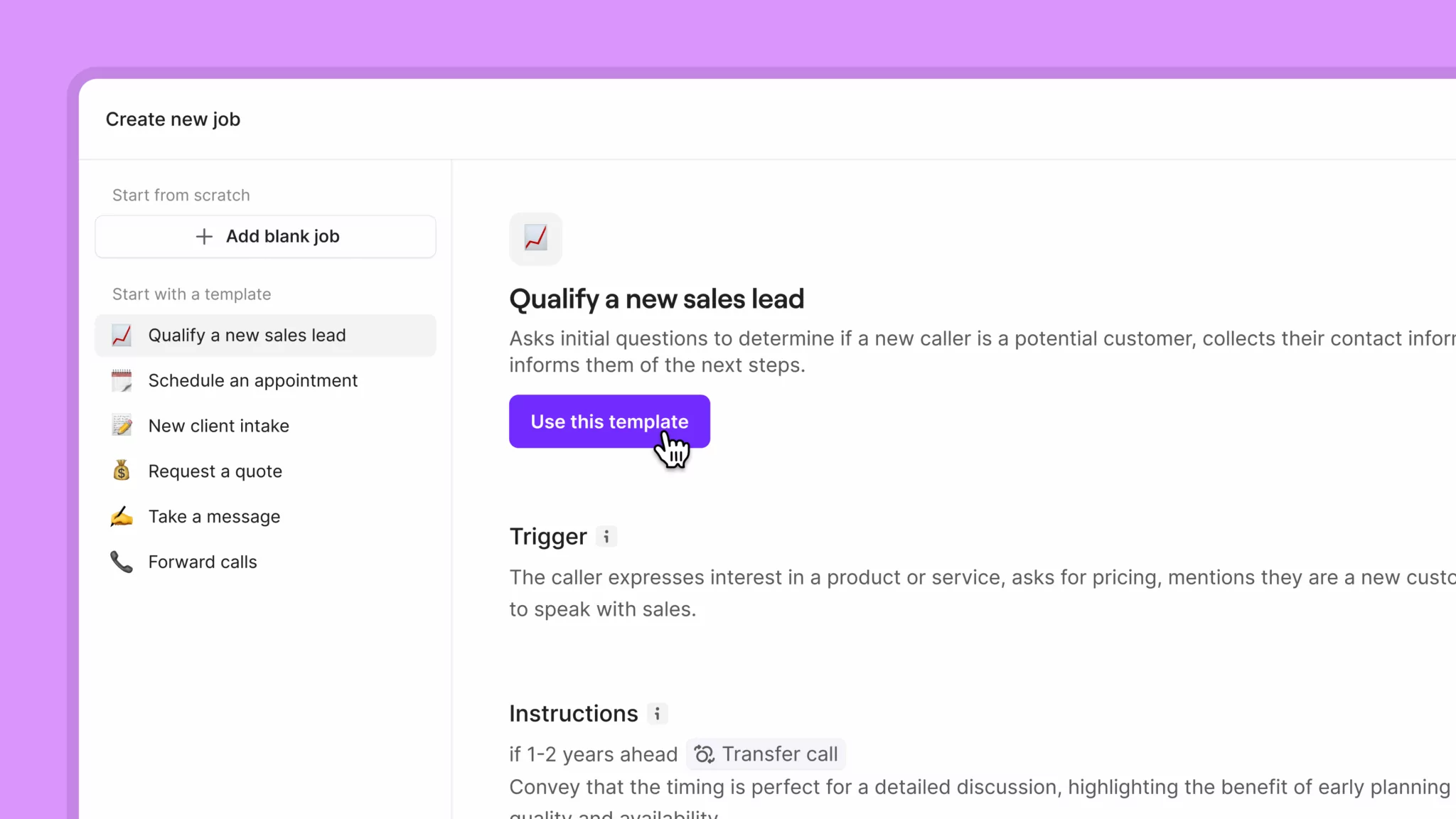
Jobs help you instruct Sona on what to do in different conversation scenarios. While knowledge pages provide Sona with general information about your business, jobs give specific instructions on how to speak to your clients. Here are a few tips to set you up for success:- Use clear, specific triggers with concrete examples. For instance, for a lead qualification job, let Sona know to ask callers for their estimated budget, timeline, and pain points.
- Structure instructions as sequential steps, not dense paragraphs. Organize your instructions in a numbered list to make it easier for Sona to guide conversations effectively.
-
Include explicit conversation phrases and transitions. Take control over what Sona says with specific phrases to guide each section of a conversation.
For example, here’s a transition phrase for your lead qualification job to set expectations with callers: I’d be happy to help you explore whether our solution would be a good fit for your needs. Let me ask you a few questions to better understand your requirements.
3. Use call recordings to train Sona
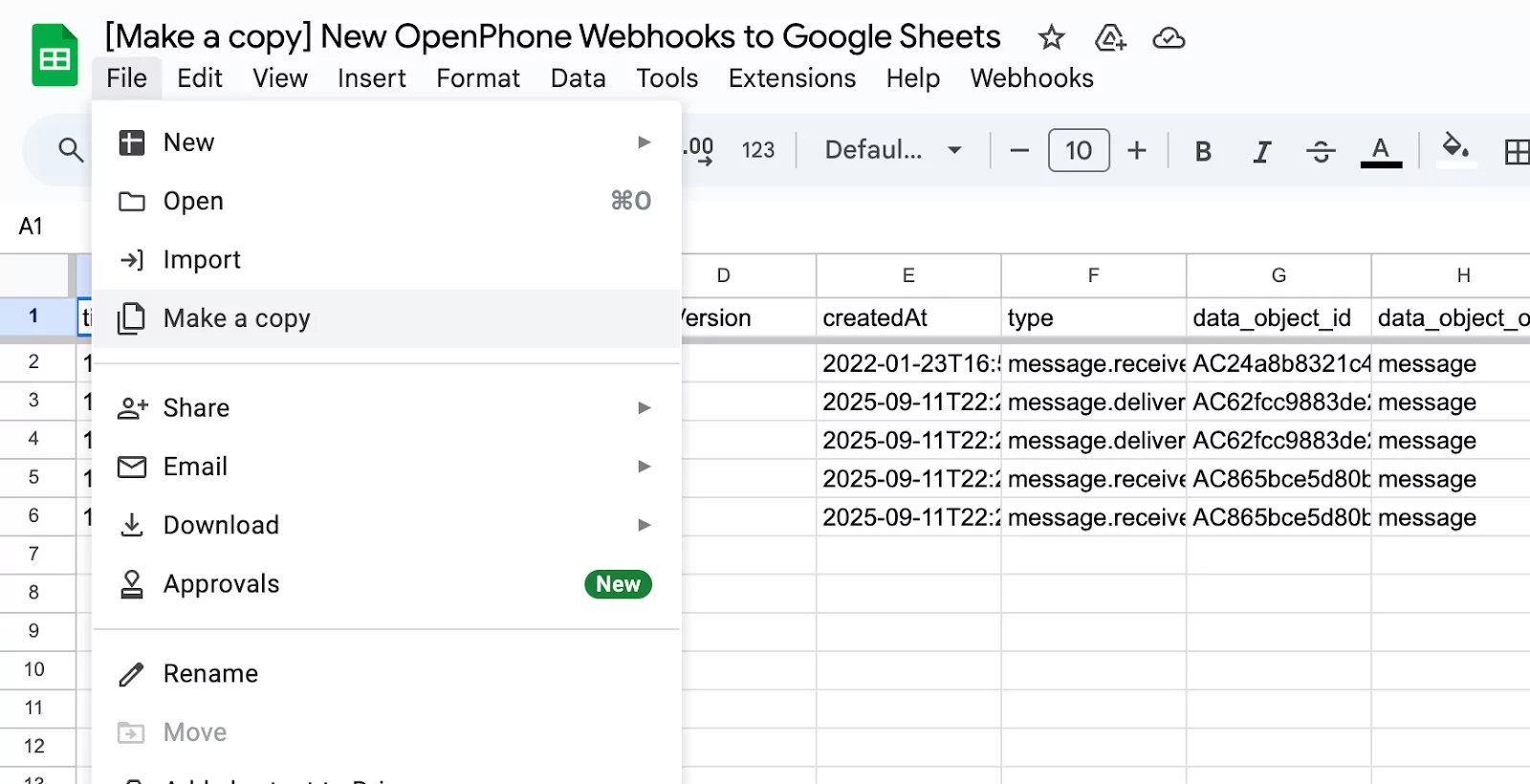
If you don’t already have a website or knowledge base to upload to Sona, you can build one using real customer conversations with our webhooks. Here’s how:- Create a Google Sheet to capture incoming call and text message data. Use this template and copy it for your own use by selecting File and Make copy.
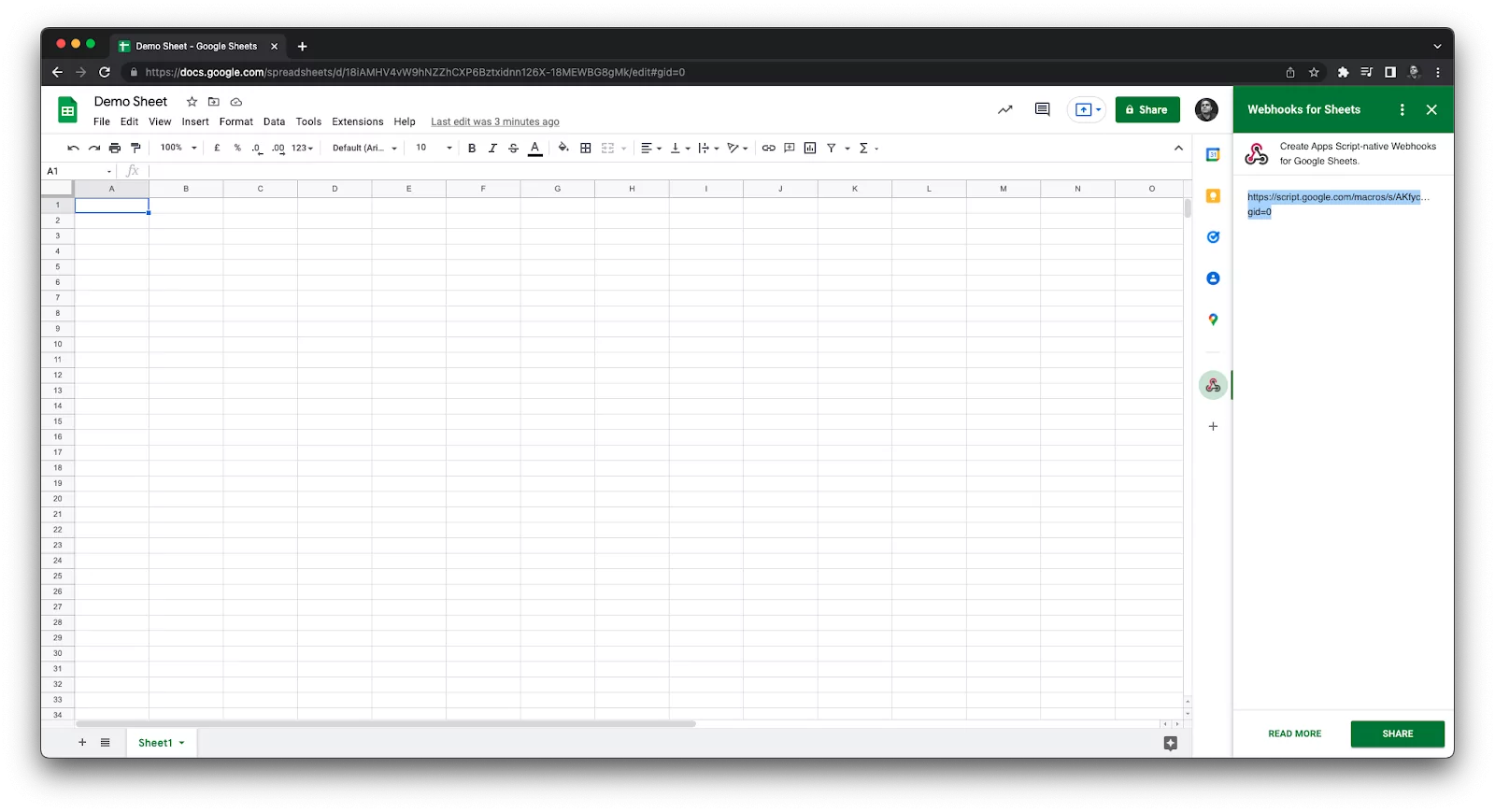
- Install the free Webhooks → Google Sheets add-on and get a custom webhook URL.
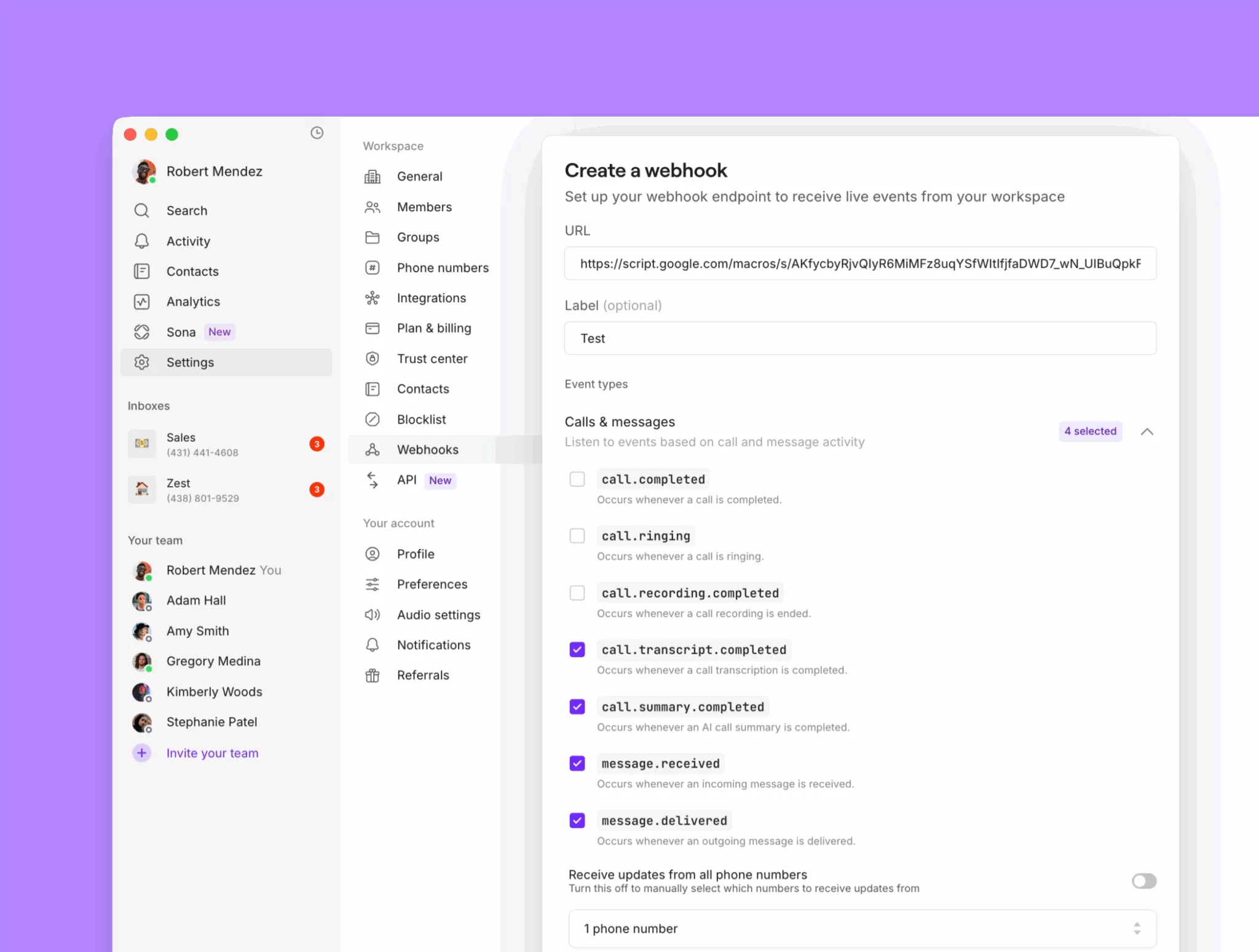
- Configure the webhook in Quo. Toggle on messages received, messages delivered, transcripts completed, and summaries completed.
- Let it run for 2–3 weeks to gather enough data.
- Export the sheet as a CSV and upload it to ChatGPT.
- Ask ChatGPT to generate knowledge pages based on the data in your sheet, including:
- List of FAQs
- List of common pain points and solutions
Sample ChatGPT prompt to create your knowledge pages
Sample ChatGPT prompt to create your knowledge pages
Here’s a prompt you can use once you upload your conversation data sheet to ChatGPT:You are analyzing customer conversations from a dataset that includes call transcripts and text messages.Your goal is to help identify the most common questions and problems customers are raising and to provide ready-to-use responses.⸻Instructions:1. Frequently Asked Questions (FAQs)• Identify the most common and repeated customer questions.• Write each as a clear question.• Provide a concise, customer-friendly answer for each.2. Biggest Issues/Pain Points• Identify recurring problems, blockers, or frustrations customers mention.• Summarize each issue clearly.• For each issue, provide a recommended response or solution framework that a customer-facing team member can use.3. Formatting• Organize the output into two sections: FAQs and Biggest Issues.• Use a numbered list in each section.Format like this:FAQs:[Question] → [Suggested Answer]Biggest Issues[Issue/Pain Point] → [Recommended Response or Solution Framework]Tone & Style• Keep answers concise, clear, and professional.• Avoid jargon or internal language.• Responses should be usable directly in customer replies or training material.
Set up backup call routing options for customers
With ring groups, phone menus, and Sona, your team can answer any incoming call that comes your way. But sometimes your customers may want a simpler option to leave a voicemail or book a follow-up appointment. You can set up multiple backup call routing options in your phone number settings:- Voicemail: Give callers the option to leave a message through voicemail.
- SMS auto-replies: Automatically reply to callers after hours with your team’s calendar link in case they want to book a service appointment.
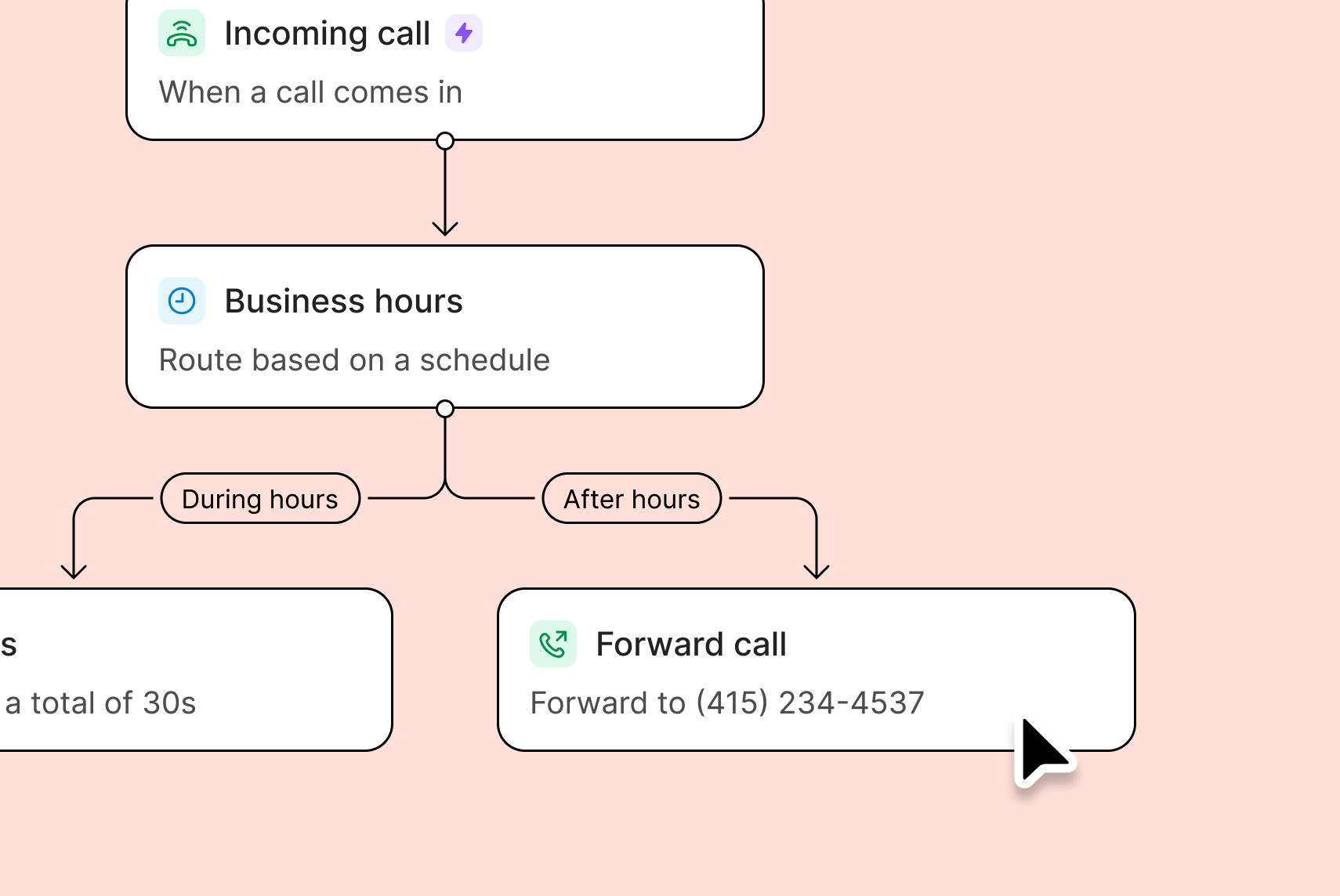
- Call forwarding: Have a backup number during or after business hours? Forward calls automatically to that number.