Help clients reach the right attorney with phone menus
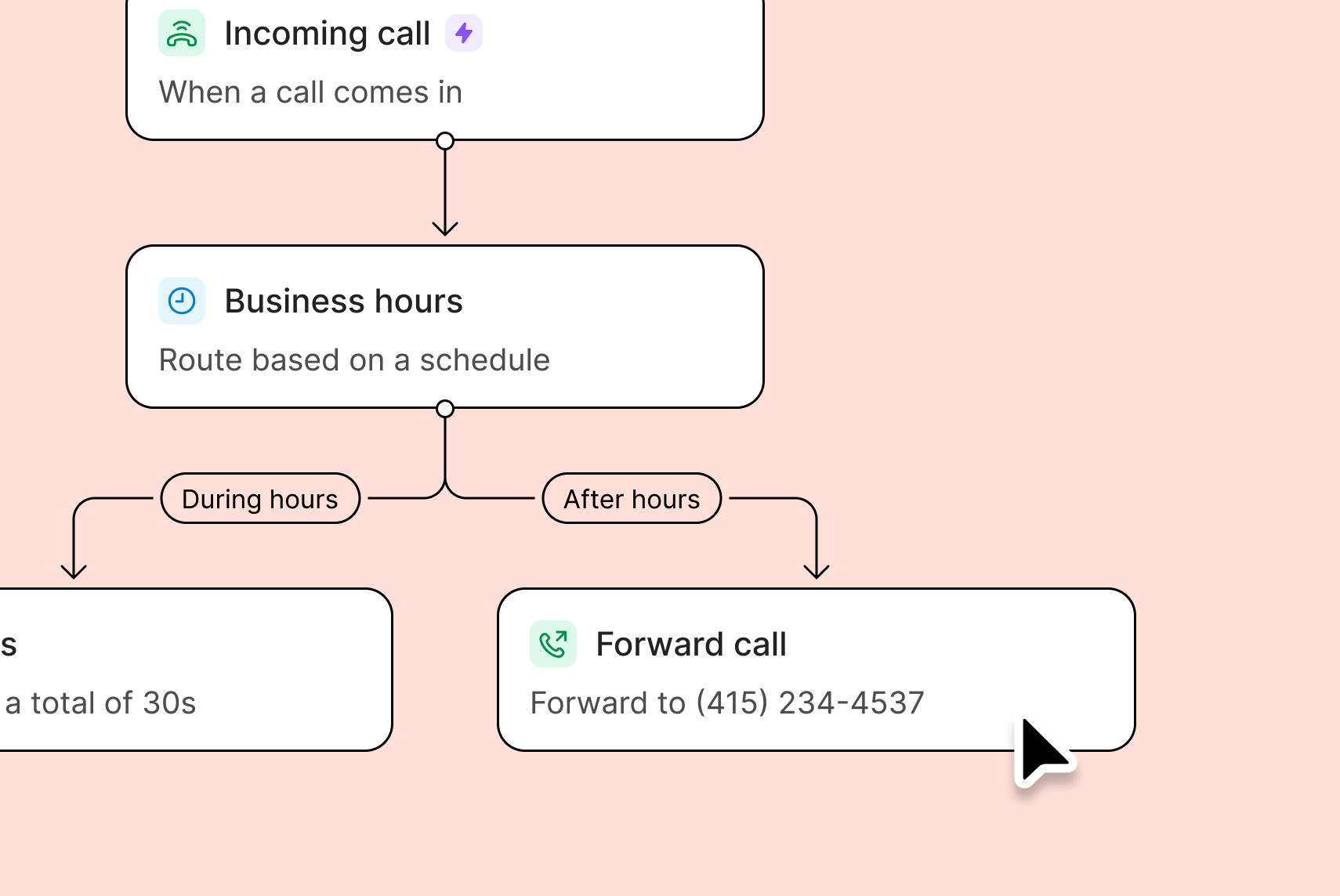
With phone menus, you can provide self-service routing options that help your clients reach the right team member faster. If your law firm has multiple specialties, you can provide guided menu options so they can reach the right members of your team without multiple call transfers or long wait times. For example, ‘Press one for intellectual property law’ and ‘Press two for bankruptcy cases’ To set up a phone menu in Quo:- In the call flow builder, drag in the Phone menu step from the side panel.
- Configure your phone menu greeting.
- Assign numbers 0–9 to destinations.
- Add voice keywords for each option.
- Configure up to 10 different paths.
Best practices for setting up your phone menu
Design a phone menu that’s easy for your callers to navigate. Here’s how: 1. Keep it simple: Stick to 3-4 menu options so callers aren’t spending time waiting for their option. Put the popular options first. And be sure to avoid using industry-specific or technical terms for the sake of clarity. 2. Have a clear menu greeting: Create a short menu greeting no longer than 20 seconds, and let customers know who they’ve called by mentioning your company’s name. Make sure to offer a way out of the menu in the greeting. For example, “If you know your party’s extension, you may dial it at any time.” 3. Route calls instead of repeating the menu: Send callers to your default ring group, even if they don’t choose a specific menu option. You can reduce your missed calls and automatically connect callers with your team.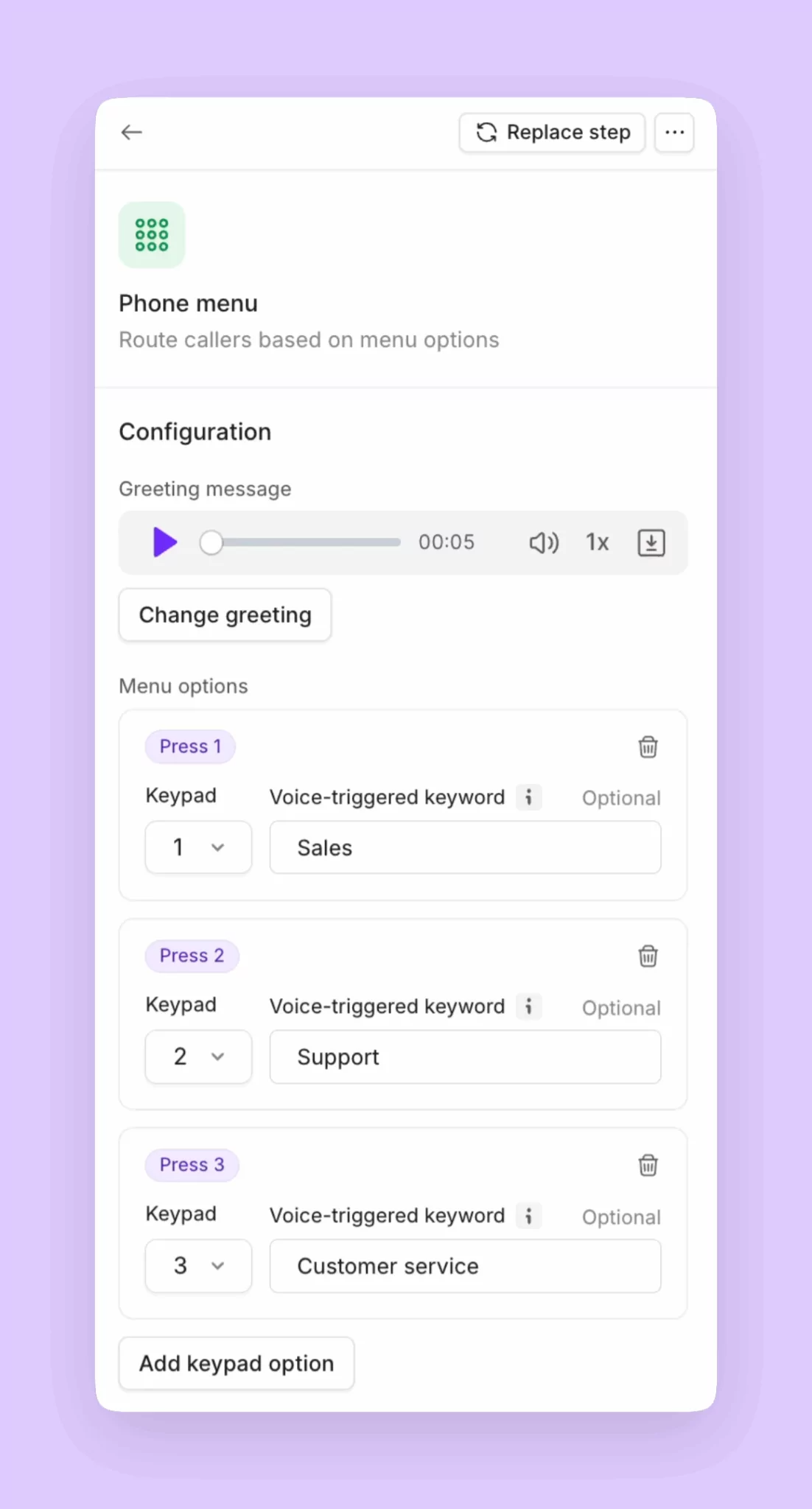
Reduce your missed calls with ring groups
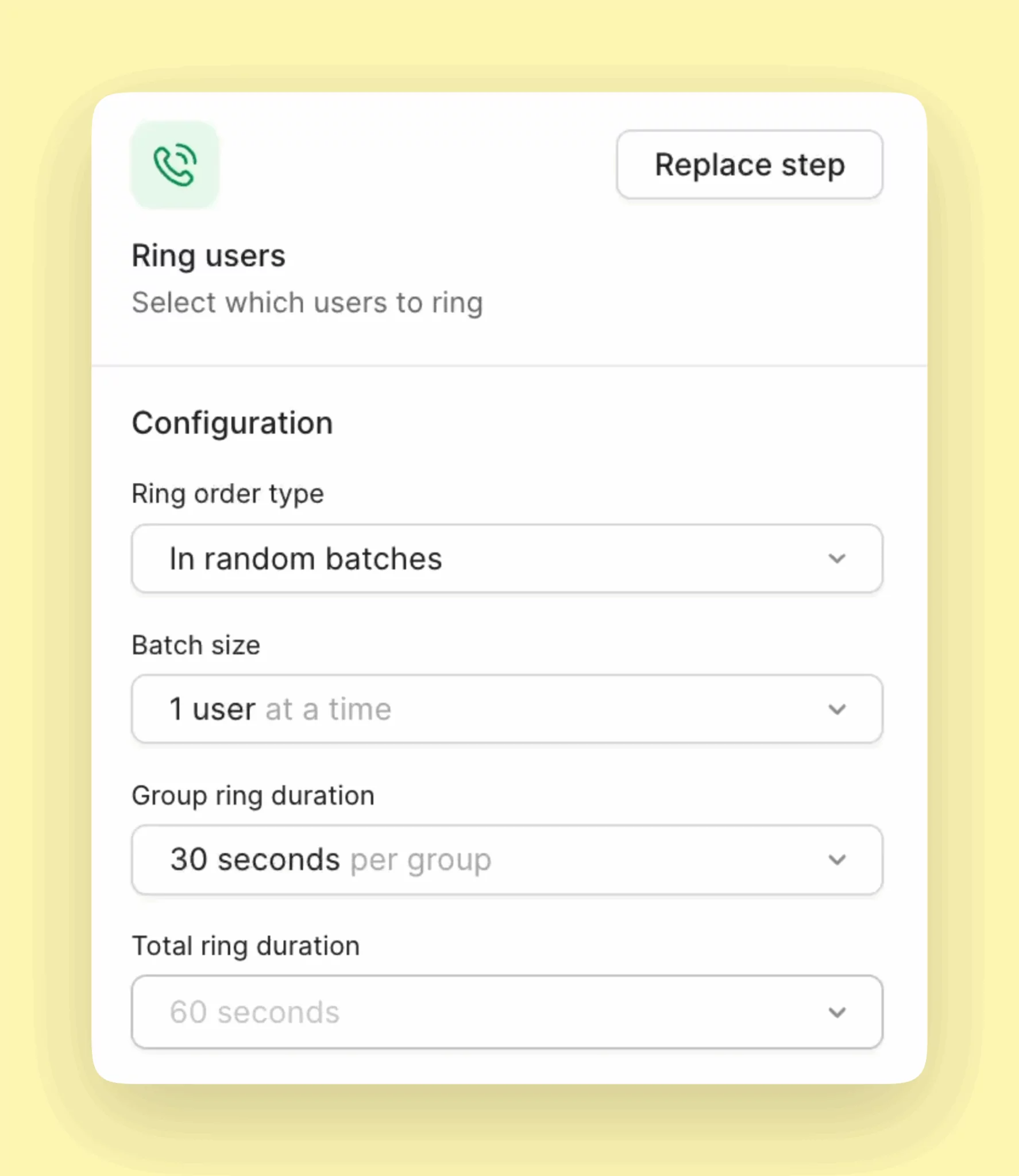
Custom ring groups help your team share responsibility for incoming calls. After a client navigates through your phone menu and selects the team they’re interested in, their call can ring everyone on that team sequentially. You can create a custom ring group where:- First batch: Your team’s receptionist is dialed first.
- Second batch: If your receptionist is on another call, the call can go to your junior attorneys.
- Third batch: If both batches are tied up, all members of your team can be dialed at once.
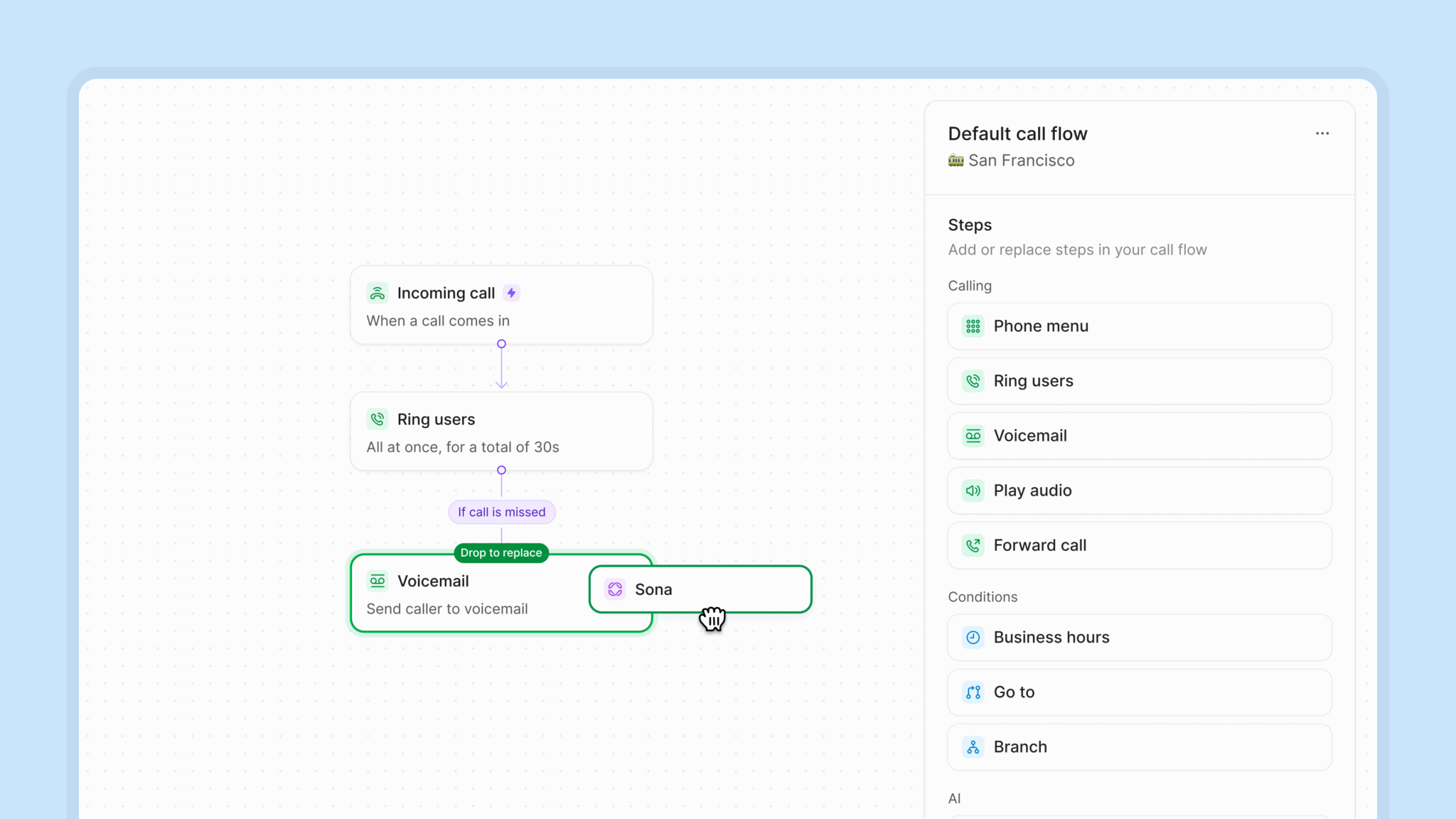
- Backup: If everyone is busy, the call can go to a backup number or to Sona, our 24/7 AI voice agent. Sona can handle new client intake or take a message and pass it on to your team.
- Add business hours if you haven’t already under your specific phone number’s settings.
- Open the call flow builder.
- Drag the Ring users step into canvas under During hours. Place it after the Phone menu step.
- Configure your ring strategy and timing.
Automate new client intake 24/7 with Sona
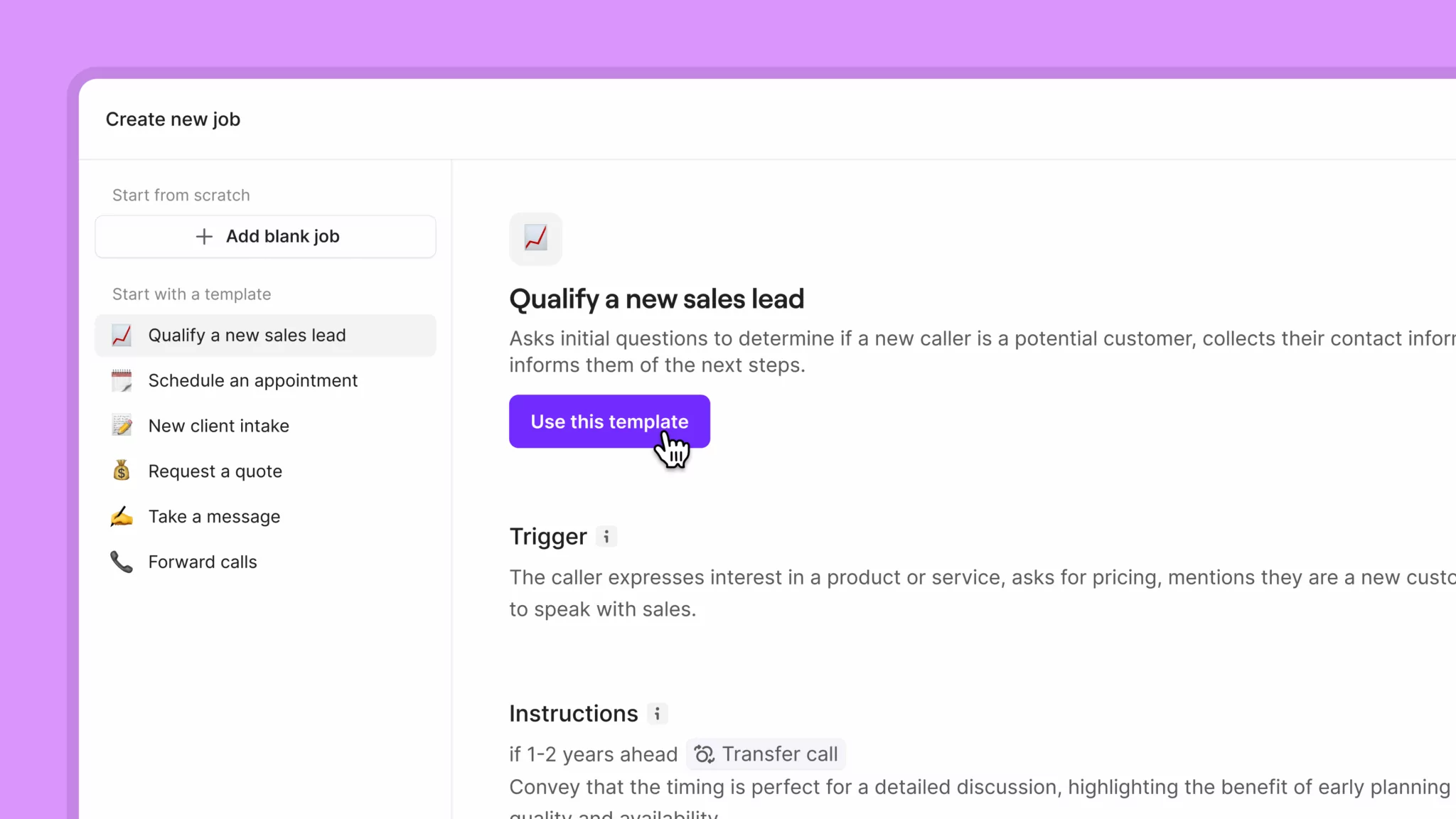
Sona is our 24/7 AI assistant that answers calls when your team is busy or unavailable. It acts as a virtual receptionist for your team. It can answer questions, take messages, and transfer calls to your team when needed. With Sona, you can capture new leads at the right moment instead of losing them if you miss their call. For example, you can set up a dedicated phone number linked to your Google Ads. Then add Sona to the call flow for that number. That way, Sona can qualify leads that call in by asking for details about their case. Your team can review Sona’s calls before deciding whether to follow up with an initial consultation call. To set up Sona to handle new client intake, you can create a custom Sona job:- Drag and drop Sona into your call flow and select it to start configuring.
- Click Add job in the Sona settings window.
- Select Create new job.
- Provide details about how you’d like Sona to handle new client intake — the keywords and phrases it should look out for and the information it should collect.
- Select Create job.
Example new client intake job
Example new client intake job
Job title: Legal client intakeJob description: Conduct initial screening of potential legal clients to gather essential case information and determine if the firm can assist with their legal matter.Instructions:The caller is seeking consultation, an appointment, legal assistance, or representation — such as mentioning they need a lawyer, have a legal problem, want to discuss a case, need legal advice, or are looking for help with a specific legal matter (divorce, injury, criminal charge, etc.).Respond with the following script:I’d be happy to help schedule that consultation for you. First, I’ll need to collect some basic information, and then we’ll discuss your specific legal matter to ensure we connect you with the right attorney.1. BUILDING RAPPORT & GATHERING CONTACT INFORMATIONBefore we dive into the details, I’d like to get to know you a bit. May I have your full name, please? [After they provide name]To make sure I have that correctly, would you mind spelling your first and last name for me?[After spelling] Thank you for spelling that out. I’ll need your email address so our attorneys can send you important information and documents. Could you share your email address with me and spell it out so I can be sure to get it exactly right? [After email]Thank you. And what is your current street address, including your city, state, and zip code? [If caller hesitates or seems reluctant]I understand your concern about sharing your complete address. At a minimum, could you share your city and zip code for our records? [After address]By the way, I’m curious — how did you hear about [Company Name]? [If they mention a referral] That’s wonderful to hear! We really appreciate referrals. We’d love to thank [Referrer Name] if you’d be comfortable sharing their name.2. UNDERSTANDING YOUR LEGAL NEEDSNow that I have your contact information, I’d like to understand what brings you to us today. Could you briefly describe the legal matter you’re dealing with? [Listen carefully and identify practice area, watching for urgency indicators]FAMILY LAWThank you for sharing that with me. Family matters can be quite personal, and I appreciate your openness. To help our family law attorneys prepare for your consultation, I have a few questions:What’s your current relationship situation with the other party? Are you married or separated, or was this a non-marital relationship? [Based on response, ask relevant follow-up]Has either of you taken any legal steps yet, like filing documents with the court?Do you have children together? If you’re comfortable sharing, could you tell me their ages? [If children mentioned]Thank you. Are there any special circumstances regarding the children that would be helpful for our attorneys to know about? And what are the current living arrangements?To give our attorneys a general picture, could you briefly mention any significant assets or financial considerations involved? For example, shared homes, businesses, or retirement accounts?What would you say is the main reason you’re seeking legal help right now?Have there been any discussions with the other party about these issues? How do you think they might respond to legal proceedings?Is there anything time-sensitive our attorneys should know about, such as upcoming court dates or safety concerns?CRIMINAL DEFENSEI understand this is a sensitive situation. To connect you with the right defense attorney, I need to ask a few specific questions, but please share only what you’re comfortable with:Is this regarding charges against you or someone you’re calling on behalf of?Without going into extensive detail, what charges or allegations are involved?When did this situation begin, and has there been an arrest or court appearance yet?Are there any immediate court dates or deadlines we should be aware of?Has there been any previous legal representation in this matter?Is there anything urgent our attorneys should know about, such as potential consequences to employment or immediate legal deadlines?CIVIL LITIGATION/DISPUTESThanks for explaining that. To help our litigation team understand your situation better:Could you describe the nature of this dispute? Is it between individuals or businesses, or is it related to an injury or property damage?What’s your connection to the other party involved?Where are things currently in the process? Has any formal legal action been taken yet?What kind of resolution are you hoping to achieve through legal help?Do you have any documentation or evidence related to this matter that might be helpful for our attorneys to review?REAL ESTATEReal estate matters can be complex. To help our attorneys prepare:Could you tell me about the property involved? Is this your home, an investment property, or commercial real estate?What’s your role in this situation? Are you buying, selling, renting, or dealing with a property dispute?What stage is this matter in currently? Is there a transaction in progress or a dispute that’s developed?Are there any deadlines or closing dates we should be aware of?Are there other parties involved, like agents, lenders, or contractors, that are relevant to the situation?ESTATE PLANNING/PROBATEThank you for sharing that. Estate matters require careful attention:[For estate planning]Are you starting with estate planning, or do you have existing documents you’d like to update?Are there specific goals you have in mind, such as providing for children, minimizing taxes, or protecting certain assets?Are there any unique circumstances we should know about, such as business interests or blended family considerations?[For probate]I’m sorry for your loss. To help our probate attorneys assist you, could you share when your loved one passed away and in which county they resided?Do you know if they left a will or any estate planning documents?Are there any immediate concerns about the estate that need attention, such as pending bills or property maintenance?3. ADDRESSING SPECIAL CIRCUMSTANCES[For urgent matters]I hear that this is time-sensitive. Let me make sure we prioritize your situation. What deadline are you facing? I want to make sure our team understands the urgency.Would you be able to email relevant documents to help our attorneys prepare? I can provide our secure email address.[For emotional callers]I can hear this is difficult, and I appreciate you sharing this with me. Would you like to take a moment before we continue, or would you prefer I arrange for an attorney to call you back directly?Everything you’re sharing helps us understand how to best support you through this.[For hesitant callers]I completely understand being cautious about sharing personal details. You’re welcome to share only what you’re comfortable with right now. Our attorneys respect client confidentiality above all else, and you can provide more information directly to them during your consultation.4. MOVING FORWARD[If matter is within firm’s practice areas]Based on what you’ve shared, this is definitely something our attorneys at [Company Name] specialize in. The next step would be setting up your initial consultation. We offer phone, video, or in-person meetings. Do you have a preference?What days or times generally work best for you? Mornings, afternoons, or evenings?Would you like me to text or email you a link to our scheduling system? That way, you can select the time that works best for your schedule.[If matter is outside firm’s practice areas]Thank you for sharing your situation with me. While our firm specializes in [practice areas], your matter seems to involve [other area]. We have excellent relationships with attorneys who focus on these issues. Would you like me to connect you with a trusted referral?5. WARM CONCLUSION[Name], I’ve recorded all the information you’ve shared, and the next step is [specific next action]. Our team will be in touch [timeframe]. Is there anything else I can assist with before we wrap up?Thank you for reaching out to [Company Name]. We understand legal matters can be stressful, and we’re committed to providing the guidance you need. We appreciate your call today and look forward to helping you navigate this situation.
Best practices for setting up Sona
Setting up Sona can take practice to get right. Here are a few tips to help you train Sona and write clear and effective instructions for jobs:1. Format your knowledge pages to train Sona effectively
Sona is a language-based AI agent that uses your business information to have detailed conversations with your clients. How you format your knowledge pages matters for Sona to perform effectively. Here are a few formatting tips:- Write FAQs in a Q&A format. Create a dedicated knowledge page for FAQs to make information easier for Sona to reference.
- Add website URLs for each page you want Sona to ingest. Sona can’t visit page links. You’ll need to paste every website URL you think it should know.
- Avoid writing conversation scripts in Sona knowledge pages. Use scripts in jobs instead.
2. Use jobs like mini instruction manuals
Jobs help you instruct Sona on what to do in different conversation scenarios. While knowledge pages provide Sona with general information about your business, jobs give specific instructions on how to speak to your clients. Here are a few tips to successfully set up your jobs:- Use clear, specific triggers with concrete examples. For instance, for a lead qualification job, let Sona know to look out for potential new clients who ask about your specialties, consultation fees, or typical case timeline.
- Structure instructions as sequential steps, not dense paragraphs. Organize your instructions in a numbered list to make it easier for Sona to guide conversations effectively.
-
Include explicit conversation phrases and transitions. Take control over what Sona says with specific phrases to guide each section of a conversation.
For example, here’s a transition phrase for your lead qualification job to set expectations with callers: Thank you for calling. I’d be happy to help schedule that consultation for you. First, I’ll need to collect some basic information, and then we’ll discuss your specific legal matter to ensure we connect you with the right attorney.
3. Use call recordings to train Sona
If you don’t already have a website or knowledge base to upload to Sona, you can build one using real customer conversations with our webhooks. Here’s how:- Create a Google Sheet to capture incoming call and text message data. Use this template and copy it for your own use by selecting File and Make copy.
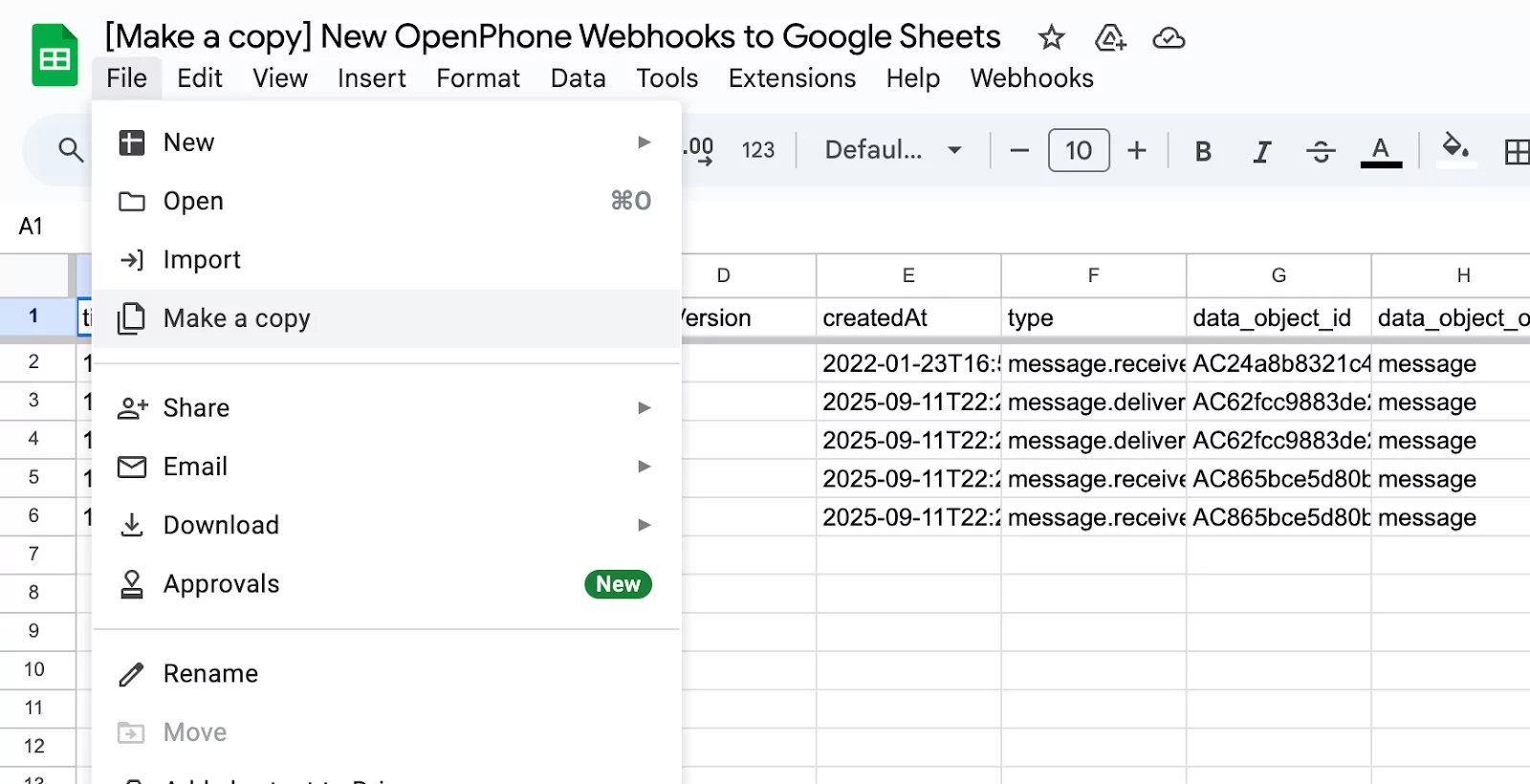
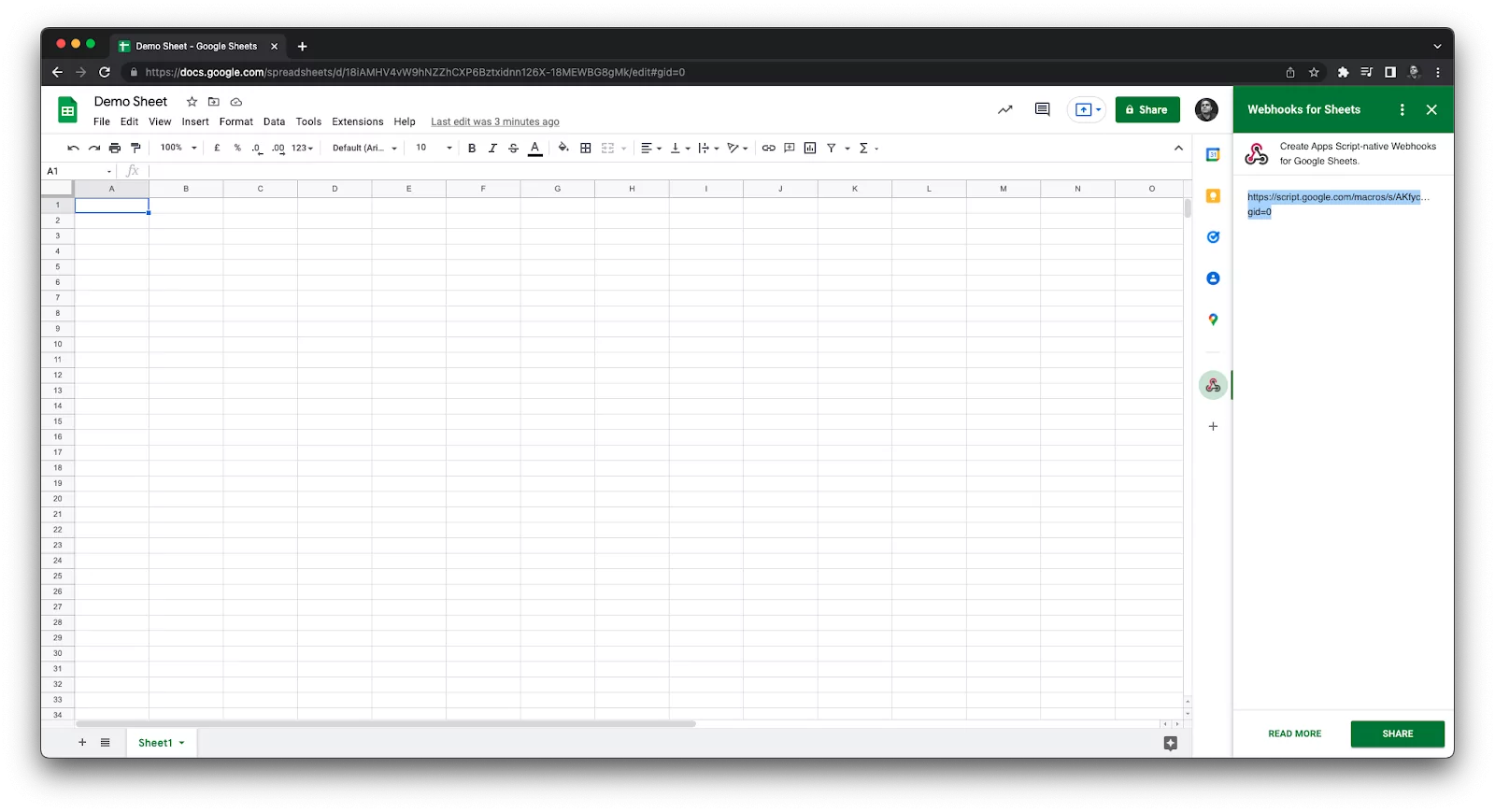
- Install the free Webhooks → Google Sheets add-on and get a custom webhook URL.
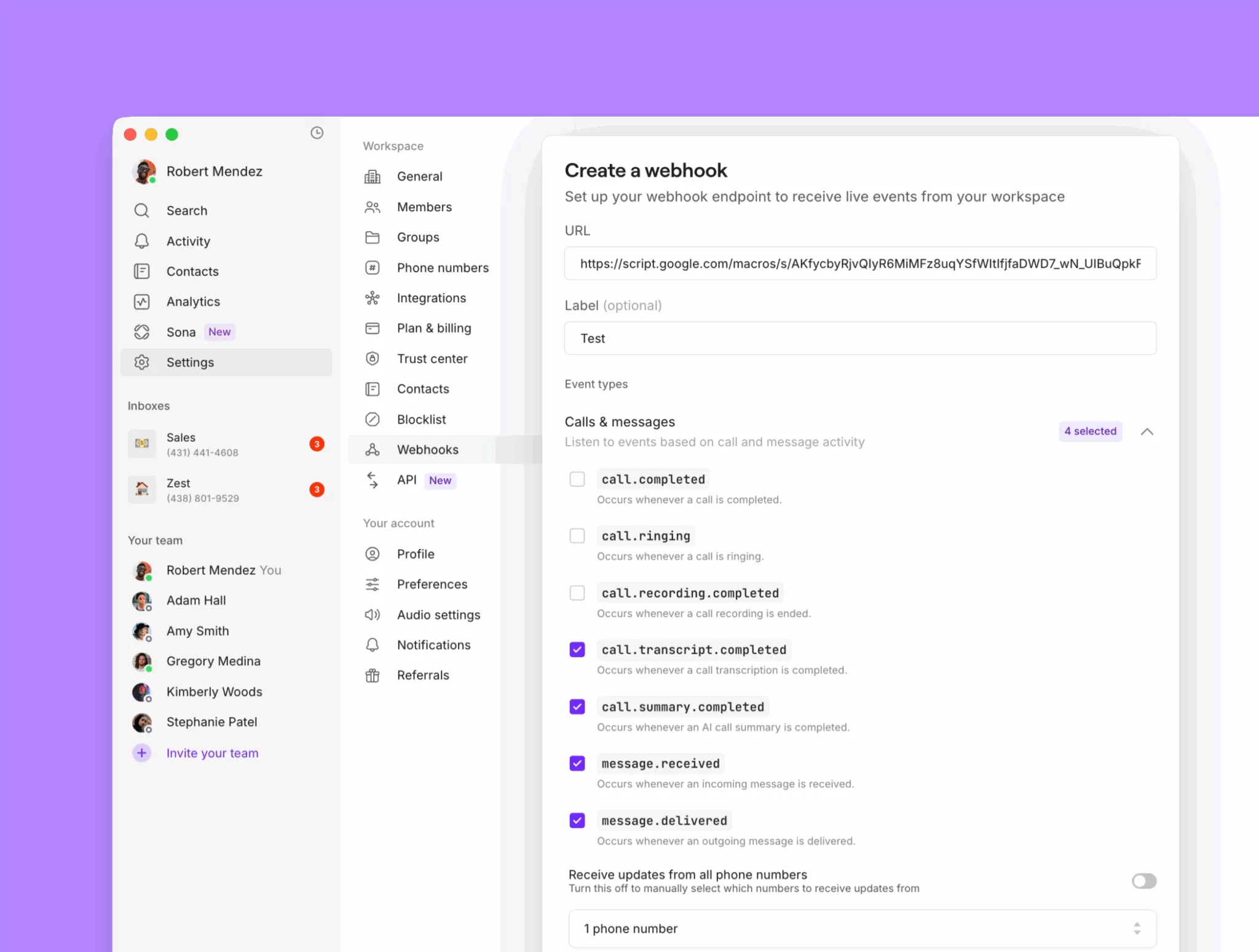
- Configure the webhook in Quo. Toggle on messages received, messages delivered, transcripts completed, and summaries completed.
- Let it run for 2–3 weeks to gather enough data.
- Export the sheet as a CSV and upload it to ChatGPT.
- Ask ChatGPT to generate knowledge pages based on the data in your sheet, including:
- List of FAQs
- List of common pain points and solutions
Sample ChatGPT prompt to create your knowledge pages
Sample ChatGPT prompt to create your knowledge pages
Here’s a prompt you can use once you upload your conversation data sheet to ChatGPT:You are analyzing customer conversations from a dataset that includes call transcripts and text messages.Your goal is to help identify the most common questions and problems customers are raising and to provide ready-to-use responses.⸻Instructions:1. Frequently Asked Questions (FAQs)• Identify the most common and repeated customer questions.• Write each as a clear question.• Provide a concise, customer-friendly answer for each.2. Biggest Issues/Pain Points• Identify recurring problems, blockers, or frustrations customers mention.• Summarize each issue clearly.• For each issue, provide a recommended response or solution framework that a customer-facing team member can use.3. Formatting• Organize the output into two sections: FAQs and Biggest Issues.• Use a numbered list in each section.Format like this:FAQs:[Question] → [Suggested Answer]Biggest Issues[Issue/Pain Point] → [Recommended Response or Solution Framework]Tone & Style• Keep answers concise, clear, and professional.• Avoid jargon or internal language.• Responses should be usable directly in customer replies or training material.
Set up backup call routing options for clients
With ring groups and Sona, your team can answer any incoming call that comes your way. But sometimes your clients may want a simpler option to leave a voicemail or book a follow-up appointment. Or you may have a specific phone number you don’t want an AI voice agent to handle calls for. You can set up multiple backup call routing options in your phone number settings:- Voicemail: Give callers the option to leave a message through voicemail.
- SMS auto-replies: Automatically reply to callers after hours with your team’s calendar link in case they want to book an appointment.
- Call forwarding: Have a backup number during or after business hours? Forward calls automatically to that number.