Reduce missed calls with ring groups
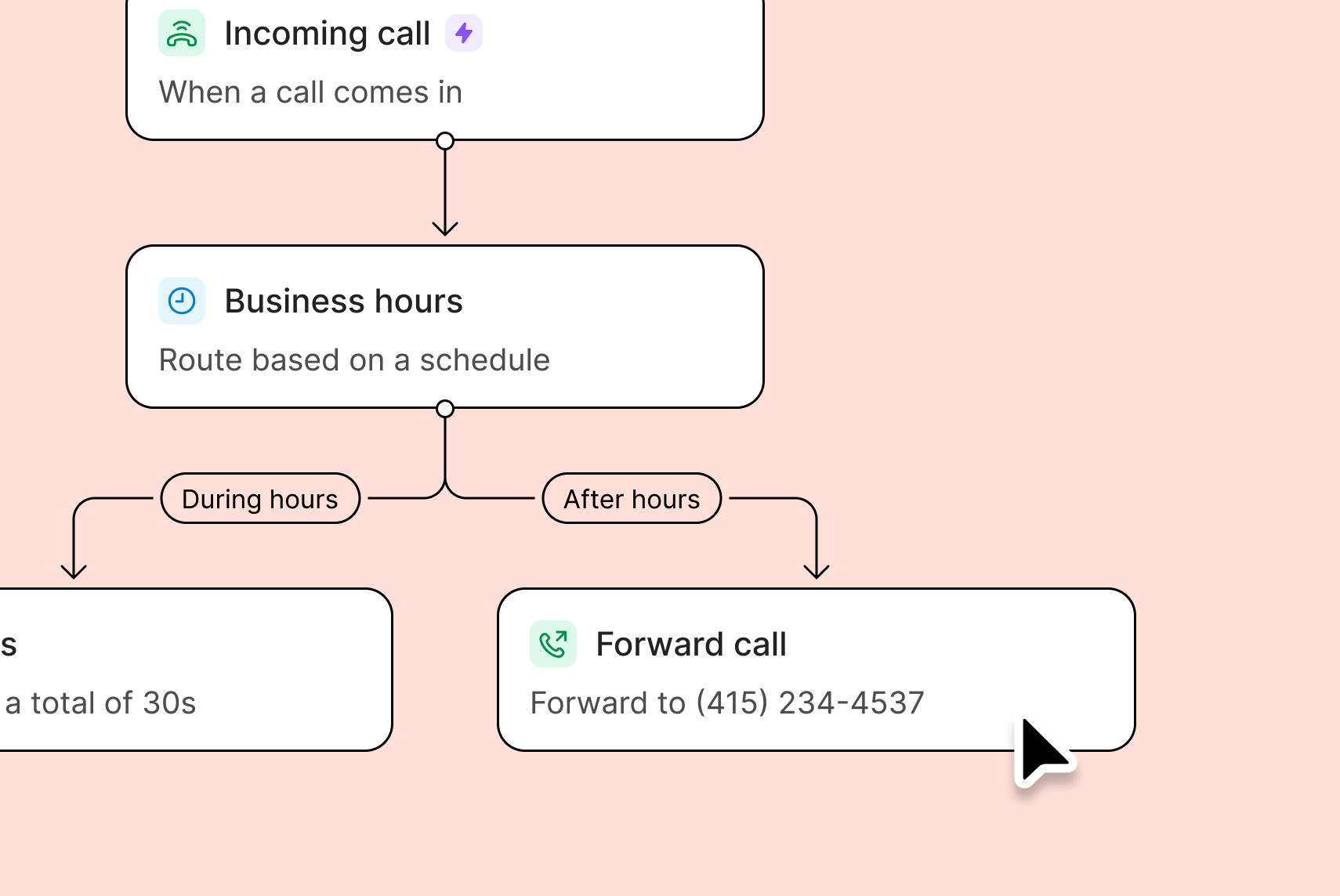
Ring groups help your team share responsibility for incoming calls. It’s a business phone feature that allows incoming calls to be directed to multiple people at the same time who have access to your shared number. Even if you’re busy at a job site, your colleagues in the office can take the call and book your next job. To set up a ring group on your Quo number:- Add business hours under your specific phone number’s settings.
- Open the call flow builder.
- Drag the Ring users step into the canvas under During hours.
- Select All at once from the dropdown.
- Set a minimum ring duration of 15 seconds if you plan to ring all your team members so the call has time to register.
- All users with number access are included automatically if they don’t have Do Not Disturb enabled or a specific number muted.
Use Do Not Disturb to automatically route calls to the next step
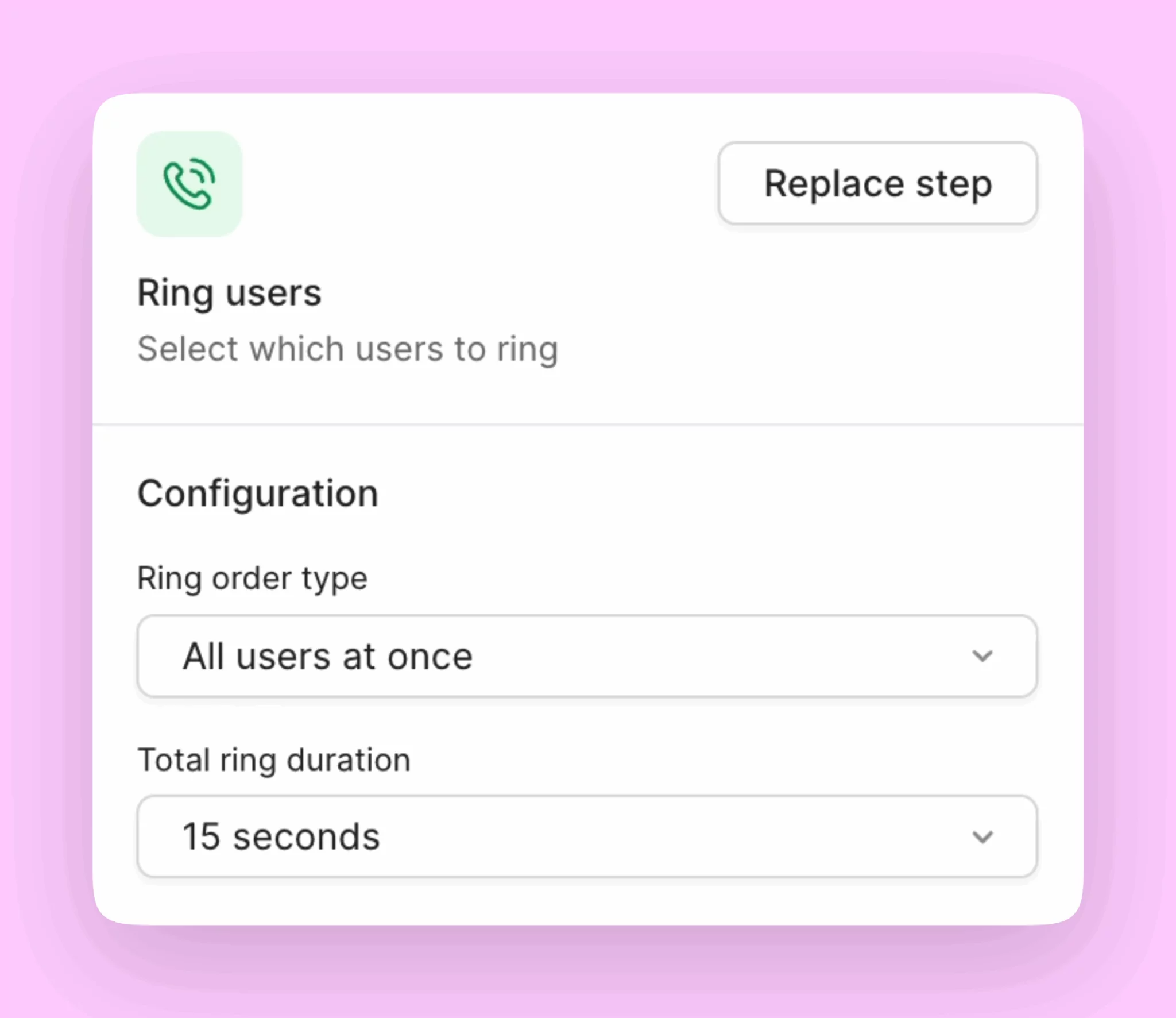
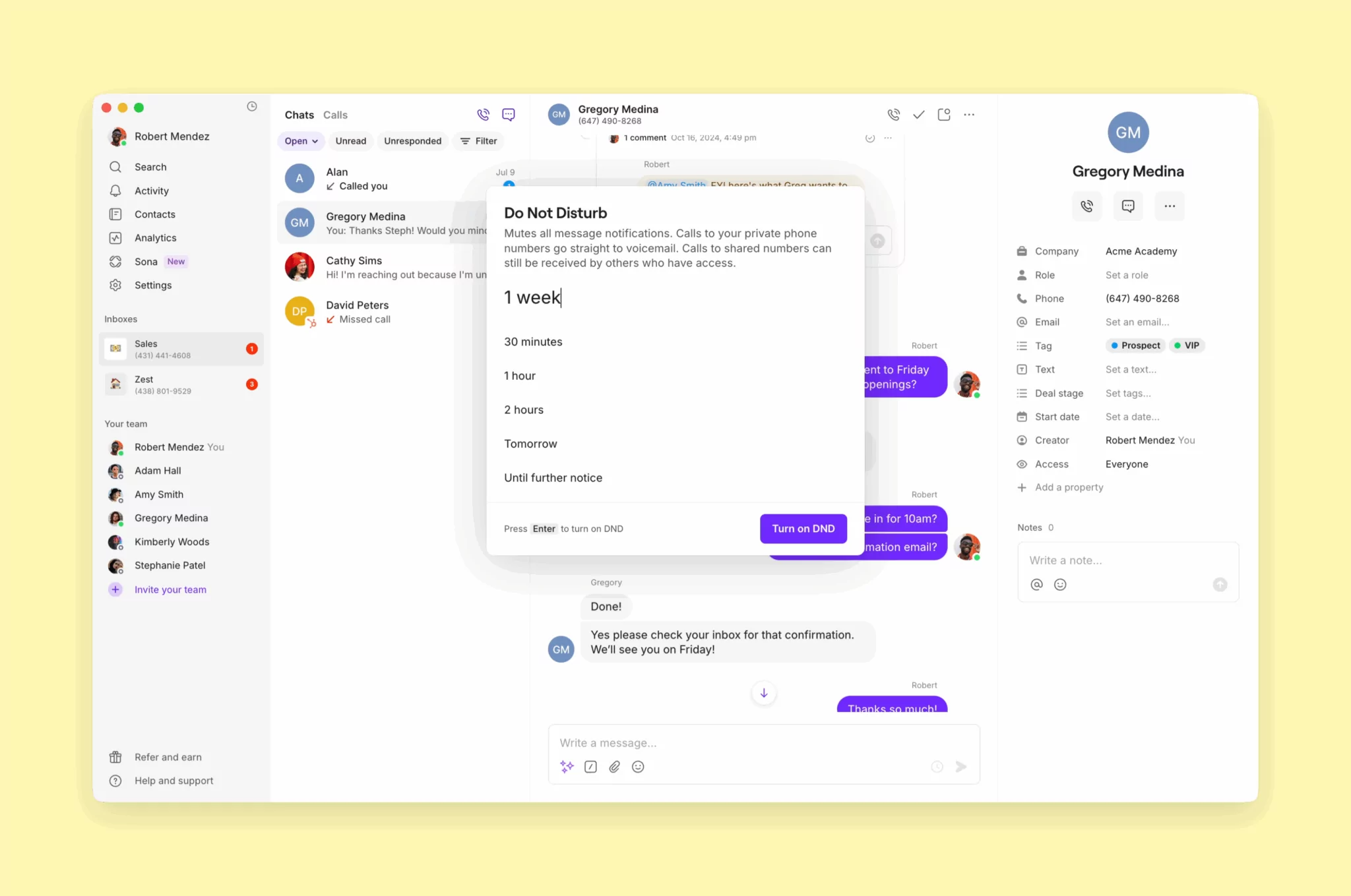
Concerned about constantly hearing incoming call notifications when you’re busy on a job? You can mute incoming call notifications with Do Not Disturb. Do Not Disturb, or DND, mutes your call and text notifications when you don’t want to be disturbed. Incoming calls will only ring other users on your shared number if you have DND activated. You don’t have to add and remove the Ring users call flow step every time you’re in the field; simply use DND. To turn on Do Not Disturb:- Click your profile icon in the top left corner.
- Select 🌙Do not disturb .
- Choose the duration:
- 30 minutes
- 1 hour
- 8 hours
- Tomorrow
- Until further notice
Capture new jobs 24/7 with Sona
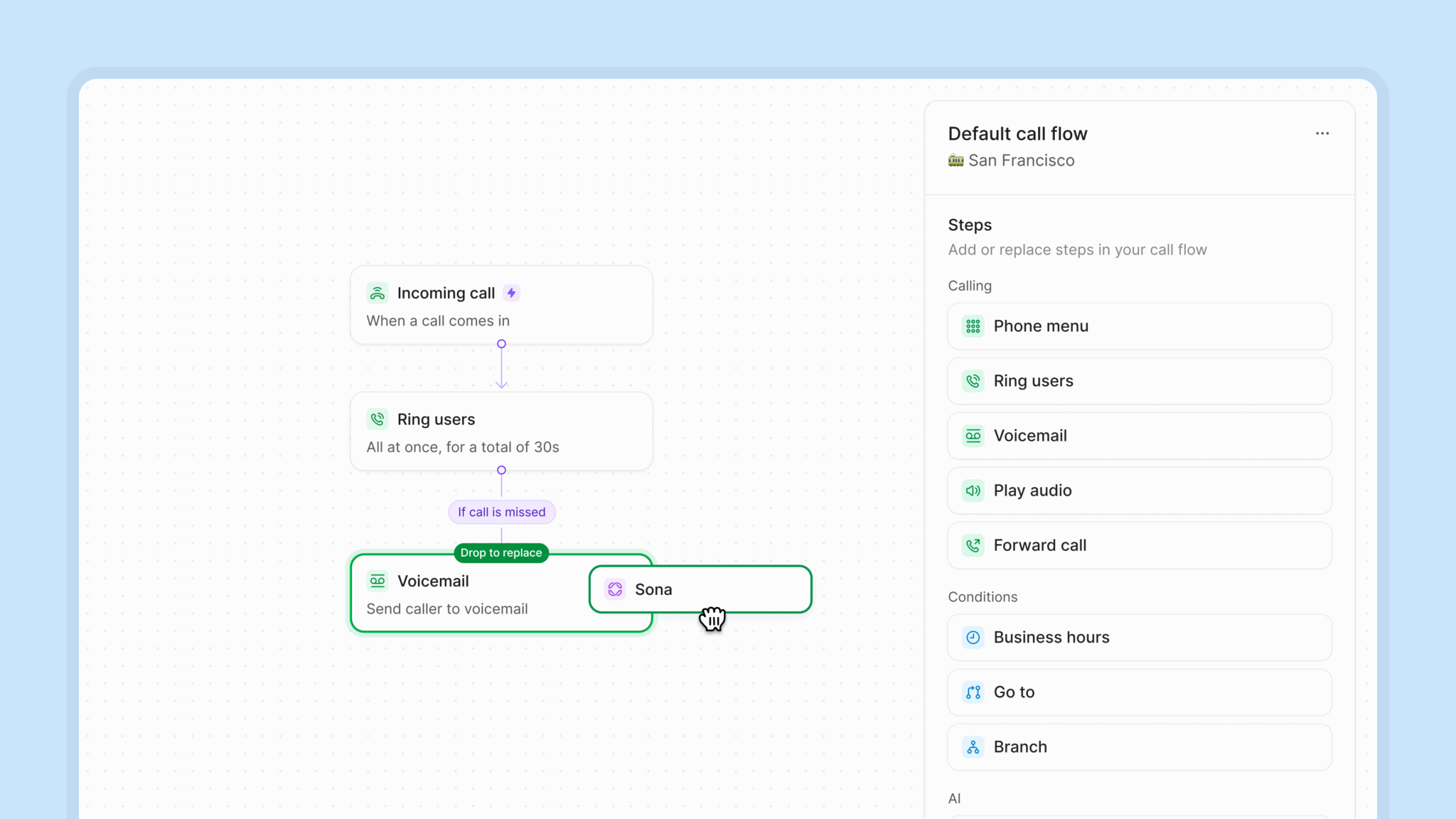
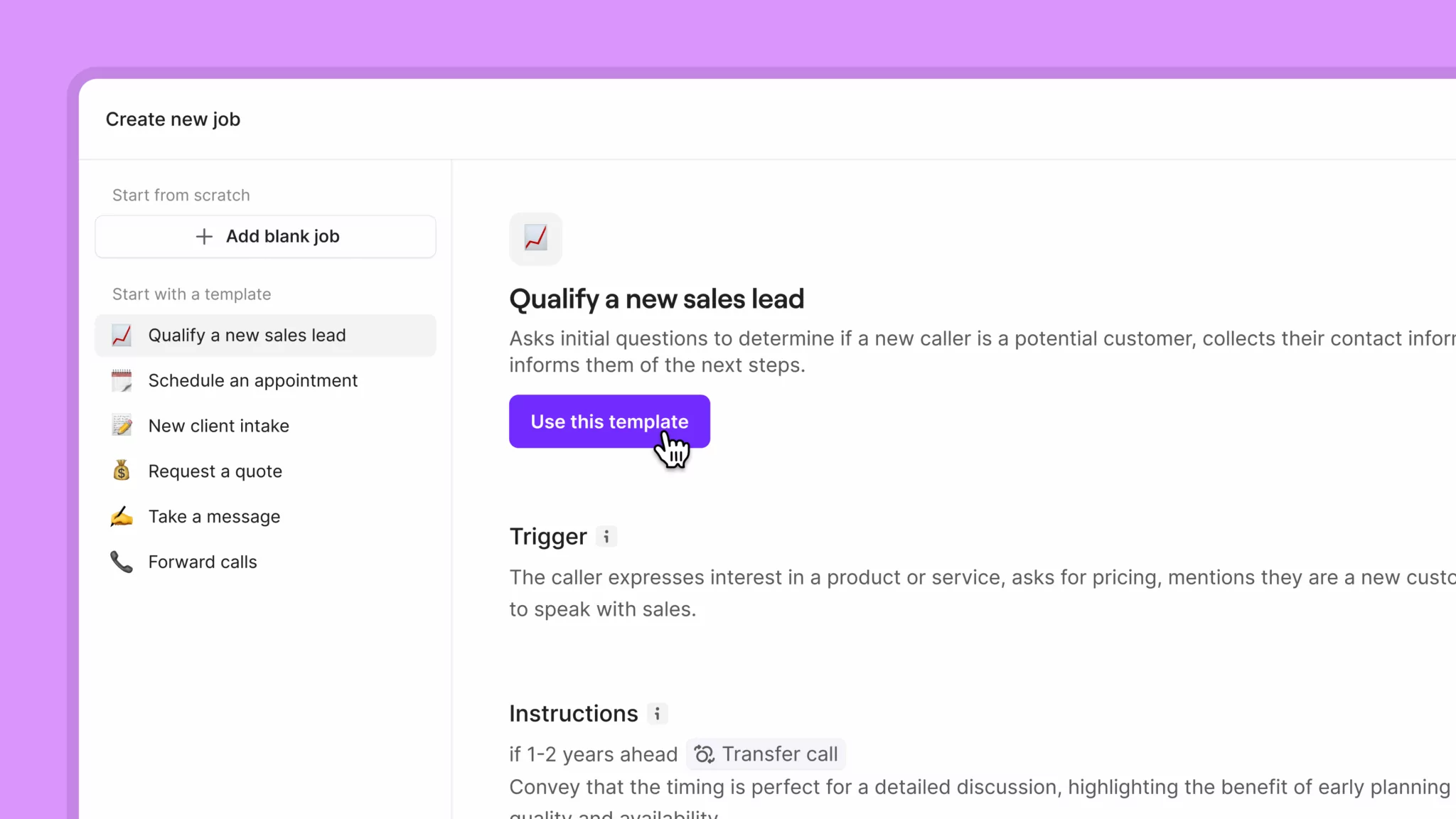
Sona is our 24/7 AI assistant that answers calls when your team is busy or unavailable. It acts as a virtual receptionist for your team. It can answer questions, take messages, and even transfer calls to your team when needed. Whether your team is busy during business hours or off for the day, Sona can greet new customers and learn what they need. That way, you can avoid missing potential customers and follow up faster. To set up Sona to gather information from potential customers, you can create a custom Sona job:- Drag and drop Sona into your call flow and select that Sona step.
- Click Add job in the Sona settings window.
- Select Create new job.
- Provide details about how you’d like Sona to handle new customer intake — what keywords and phrases it should look out for and what information it should collect. For example, the customer’s name, address, type of service, appointment preferences, details about the issue, etc.
- Select Create job.
Example templates to book new jobs with Sona
Booking new plumbing jobs template
Booking new plumbing jobs template
Job title: Plumbing service customer intakeJob description: Conduct initial screening of potential customers to gather essential plumbing service information, assess urgency and water damage risk, and arrange appropriate plumbing service appointments.Instructions: The caller is seeking plumbing services — such as mentioning they need a plumber, have water leaks, drainage problems, water heater issues, pipe problems, or are looking for assistance with any plumbing matter. Look out for “installation” and “install” requests as well. Respond with the following script:I’d be happy to help you with your plumbing needs. Let me gather some important information to ensure we send the right plumber with the proper equipment and expertise.1. BUILDING RAPPORT & GATHERING CONTACT INFORMATIONFirst, may I have your full name, please? [After they provide name]Thank you, [Name]. Could you please provide a phone number where we can reach you? This will be our primary contact for scheduling and any urgent updates. [After phone number]Perfect. Now I’ll need your complete service address, including the street address, city, state, and zip code. This helps us route the nearest available plumber to you. [After address]Great, I have that recorded. By the way, how did you hear about [Company Name]? [If they mention a referral] That’s wonderful! We really value referrals. If you’re comfortable sharing their name, we’d love to thank them.2. UNDERSTANDING PLUMBING SERVICE NEEDSNow, could you describe what plumbing issue or project you’re dealing with today? [Listen carefully to identify the type of plumbing work needed]Let me ask some specific questions to better understand your situation:URGENT WATER DAMAGE ASSESSMENT (Ask for ALL calls)First, I need to check on any immediate water damage risks — are you experiencing:
- Active water leaks or flooding?
- Water spraying or gushing from pipes?
- Sewage backup or overflow?
- Water coming through ceilings, walls, or floors?
- Standing water in your home?
- Can you use other bathrooms/fixtures as a workaround?
- Is this preventing normal use of your home?
- Are you able to shut off water to prevent further damage?
- Provide an appointment window
- Give you an estimate for our service call fee
- Answer additional questions
- Service address: [confirm address]
- Plumbing issue: [summarize the problem]
- Urgency level: [emergency/urgent/routine]
- Any water damage concerns: [note if applicable]
Booking new electrical jobs template
Booking new electrical jobs template
Job title: Electrical service customer intakeJob description: Conduct initial screening of potential customers to gather essential electrical service information, assess safety and urgency, and arrange appropriate electrical service appointments.Instructions:The caller is seeking electrical services — such as mentioning they need an electrician, have electrical problems or power issues, want electrical work done, need wiring help, or are looking for assistance with outlets, circuits, lighting, panels, or other electrical matters. Look out for “installation” and “install” requests as well. Respond with the following script:I’d be happy to help you with your electrical needs. Let me gather some important information to ensure we send the right electrician with the proper equipment and expertise.1. BUILDING RAPPORT & GATHERING CONTACT INFORMATIONFirst, may I have your full name, please? [After they provide name]Thank you, [Name]. Could you please provide a phone number where we can reach you? This will be our primary contact for scheduling and any urgent updates. [After phone number]Perfect. Now I’ll need your complete service address, including the street address, city, state, and zip code. This helps us route the nearest available electrician to you. [After address]Great, I have that recorded. By the way, how did you hear about [Company Name]? [If they mention a referral] That’s wonderful! We really value referrals. If you’re comfortable sharing their name, we’d love to thank them.2. UNDERSTANDING ELECTRICAL SERVICE NEEDSNow, could you describe the electrical issue or project you’re dealing with today? [Listen carefully to identify the type of electrical work needed]Let me ask some specific questions to better understand your situation:SAFETY ASSESSMENT (Ask for ALL calls)First, I need to check on safety — are you experiencing any of the following:
- Burning smells from outlets or electrical panels?
- Sparks or visible arcing?
- Outlets or switches that feel warm or hot to touch?
- Buzzing or crackling sounds from electrical components?
- Recent electrical shocks from appliances or switches?
- Is this preventing normal use of your home/business?
- Do you have temporary workarounds in place?
- Are there any safety concerns we haven’t discussed?
- Provide an exact appointment window
- Give you an estimate for our service call fee
- Answer any additional technical questions
- Service address: [confirm address]
- Electrical issue: [summarize the problem]
- Urgency level: [emergency/urgent/routine]
- Any safety concerns: [note if applicable]
Booking new HVAC jobs template
Booking new HVAC jobs template
Job title: HVAC service customer intakeJob description: Conduct initial screening of potential customers to gather essential HVAC service information, assess comfort and safety concerns, and arrange appropriate heating and cooling service appointments.Instructions:The caller is seeking HVAC services — such as mentioning they need heating or cooling help, have AC problems, furnace issues, no heat/cooling, temperature problems, or are looking for HVAC maintenance or installation. Look out for “installation” and “install” requests as well. Respond with the following script:I’d be happy to help you with your heating and cooling needs. Let me gather some important information to ensure we send the right HVAC technician with the proper equipment and expertise.1. BUILDING RAPPORT & GATHERING CONTACT INFORMATIONFirst, may I have your full name, please? [After they provide name]Thank you, [Name]. Could you please provide a phone number where we can reach you? This will be our primary contact for scheduling and any urgent updates. [After phone number]Perfect. Now I’ll need your complete service address, including the street address, city, state, and zip code. This helps us route the nearest available HVAC technician to you. [After address]Great, I have that recorded. By the way, how did you hear about [Company Name]? [If they mention a referral] That’s wonderful! We really value referrals. If you’re comfortable sharing their name, we’d love to thank them.2. UNDERSTANDING HVAC SERVICE NEEDSNow, could you describe what heating or cooling issue you’re experiencing today? [Listen carefully to identify the type of HVAC work needed]Let me ask some specific questions to better understand your situation:SAFETY ASSESSMENT (Ask for ALL calls)First, I need to check on safety — are you experiencing any of the following:
- Gas or chemical smells near your furnace or equipment?
- Visible smoke or soot?
- Carbon monoxide detector alarms going off?
- Electrical burning smells from HVAC equipment?
- Any family members experiencing headaches, nausea, or dizziness?
- Are there elderly persons, young children, or health-compromised individuals in the home?
- What’s the current temperature inside your home?
- Do you have any temporary heating/cooling solutions available?
- Provide an exact appointment window
- Give you an estimate for our diagnostic fee
- Answer any additional technical questions
- Service address: [confirm address]
- HVAC issue: [summarize the problem]
- Urgency level: [emergency/urgent/routine]
- Current home temperature: [if mentioned]
- Any safety concerns: [note if applicable]
Booking new landscaping jobs template
Booking new landscaping jobs template
Job title: Landscaping service customer intakeJob description: Conduct initial screening of potential customers to gather essential landscaping service information, understand the project scope, and arrange appropriate landscaping service appointments.Instructions:The caller is seeking landscaping services — such as mentioning they need lawn care, tree service, garden design, irrigation help, yard maintenance, or any outdoor/landscaping work.Respond with the following script:I’d be happy to help you with your landscaping needs. Let me gather some important information to ensure we send the right crew with the proper equipment and expertise.1. BUILDING RAPPORT & GATHERING CONTACT INFORMATIONFirst, may I have your full name, please? [After they provide name]Thank you, [Name]. Could you please provide a phone number where we can reach you? This will be our primary contact for scheduling and updates. [After phone number]Perfect. Now I’ll need your complete service address, including the street address, city, state, and zip code. This helps us route the appropriate crew to you. [After address]Great, I have that recorded. By the way, how did you hear about [Company Name]? [If they mention a referral] That’s wonderful! We really value referrals. If you’re comfortable sharing their name, we’d love to thank them.2. UNDERSTANDING LANDSCAPING SERVICE NEEDSNow, could you describe the type of landscaping service or project you’re looking for? [Listen carefully to identify the type of landscaping work needed]Let me ask some specific questions to better understand your needs:LAWN CARE & MAINTENANCEFor lawn care services:Are you looking for one-time service or regular maintenance?What specific services do you need? (Mowing, edging, trimming, leaf removal)What’s the approximate size of your property? (Square footage or “small/medium/large”)How often would you like service? (Weekly, bi-weekly, monthly)What’s the current condition of your lawn?Do you have any specific problem areas? (Bare spots, weeds, drainage issues)Are you interested in fertilization or weed control programs?Do you want grass clippings bagged or mulched?TREE & SHRUB SERVICESFor tree and shrub work:What type of service do you need? (Trimming, removal, planting, health assessment)How many trees or shrubs need attention?For trimming: What’s the approximate height? Are they near structures or power lines?For removal: What size trees? Any access limitations?Are there any safety concerns? (Dead branches, leaning trees, storm damage)Do you need stump grinding for trees that have been removed?For planting: Do you have specific species in mind?When was the last time they were serviced?GARDEN DESIGN & INSTALLATIONFor landscaping design/installation:Are you looking for a complete landscape design, or do you need help with specific areas?What’s your vision for your landscape? (Formal, natural, low-maintenance, native plants)Which areas need work? (Front yard, backyard, side yards, all)Are you interested in:
- Flower beds and plantings?
- Hardscaping (patios, walkways, retaining walls)?
- Water features?
- Outdoor lighting?
- Spring cleanup and mulching?
- Fall leaf removal and cleanup?
- Winter prep or snow removal?
- Seasonal planting?
- Provide an appointment window
- Give you an estimate for the services requested
- Answer any additional questions about our services
- Service address: [confirm address]
- Landscaping service needed: [summarize the services]
- Property size/scope: [as mentioned]
- Timeline preference: [if specified]
Booking new renovation jobs template
Booking new renovation jobs template
Job title: Renovation service customer intakeJob description: Conduct initial screening of potential customers to gather essential renovation project information, understand scope and requirements, and arrange appropriate consultation appointments.Instructions:The caller is seeking renovation services — such as mentioning they need remodeling, home improvement, kitchen/bathroom updates, additions, or any construction/renovation work.Respond with the following script:I’d be happy to help you with your renovation project. Let me gather some important information to ensure we send the right project specialist with the proper expertise for your needs.1. BUILDING RAPPORT & GATHERING CONTACT INFORMATIONFirst, may I have your full name, please? [After they provide name]Thank you, [Name]. Could you please provide a phone number where we can reach you? This will be our primary contact for scheduling and project updates. [After phone number]Perfect. Now I’ll need your complete property address, including the street address, city, state, and zip code. This helps us understand local building requirements and schedule appropriately. [After address]Great, I have that recorded. By the way, how did you hear about [Company Name]? [If they mention a referral] That’s wonderful! We really value referrals. If you’re comfortable sharing their name, we’d love to thank them.2. UNDERSTANDING RENOVATION PROJECT NEEDSNow, could you tell me about the renovation project you have in mind? [Listen carefully to identify the scope and type of renovation work]Let me ask some specific questions to better understand your project:KITCHEN RENOVATIONFor kitchen projects:Are you looking for a complete kitchen remodel, or do you need specific updates?What’s your main goal? (More space, updated look, better functionality, increased home value)What would you like to change?
- Cabinets (reface, replace, or paint)?
- Countertops (material preference)?
- Appliances (keeping existing or all new)?
- Flooring?
- Backsplash and walls?
- Lighting and electrical?
- Shower/tub (Convert tub to shower? Add a separate shower?)
- Vanity and storage?
- Toilet?
- Flooring?
- Lighting and ventilation?
- Bathroom addition?
- Kitchen/wet bar?
- Separate entrance?
- Additional bedrooms?
- Architectural plans?
- Interior design preferences?
- Specific materials in mind?
- Siding replacement?
- Window and door replacement?
- Roofing?
- Deck or patio addition?
- Garage conversion?
- A design professional or architect?
- Plans or drawings?
- Inspiration photos or ideas?
- Specific materials or finishes in mind?
- Review your project in detail
- Take measurements and photos
- Discuss design options and materials
- Provide a detailed estimate
- Explain our process and timeline
- Property address: [confirm address]
- Renovation project: [summarize the project scope]
- Key priorities: [mention their main goals]
- Timeline preference: [if mentioned]
- Budget: [if provided]
Best practices for training Sona
Setting up Sona can take practice to get right. Here are a few tips to help you train Sona and write clear and effective instructions for jobs:1. Format your knowledge pages to train Sona effectively
Sona is a language-based AI agent that uses your business information to have detailed conversations with your customers. How you format your knowledge pages matters for Sona to perform effectively. Here are a few formatting tips:- Write FAQs in a Q&A format. Create a dedicated knowledge page for FAQs to make information easier for Sona to reference.
- Add website URLs for each page you want Sona to ingest. Sona can’t visit page links. You’ll need to paste every website URL you think it should know.
- Avoid writing conversation scripts in Sona knowledge pages. Use scripts in jobs instead.
2. Use jobs like mini instruction manuals
Jobs help you instruct Sona on what to do in different conversation scenarios. While knowledge pages provide Sona with general information about your business, jobs give specific instructions on how to speak to your clients. Here are a few tips to successfully set up your jobs:- Use clear, specific triggers with concrete examples. For instance, for a customer intake job, let Sona know to look out for customers asking for service quotes, installations, or appliance repairs.
- Structure instructions as sequential steps, not dense paragraphs. Organize your instructions in a numbered list to make it easier for Sona to guide conversations effectively.
-
Include explicit conversation phrases and transitions. Take control over what Sona says with specific phrases to guide each section of a conversation.
For example, here’s a transition phrase for your customer intake job to set expectations with callers: I’d be happy to help you with your home service needs. Let me gather some information to ensure we send the right technician to help you.
3. Use call recordings to train Sona
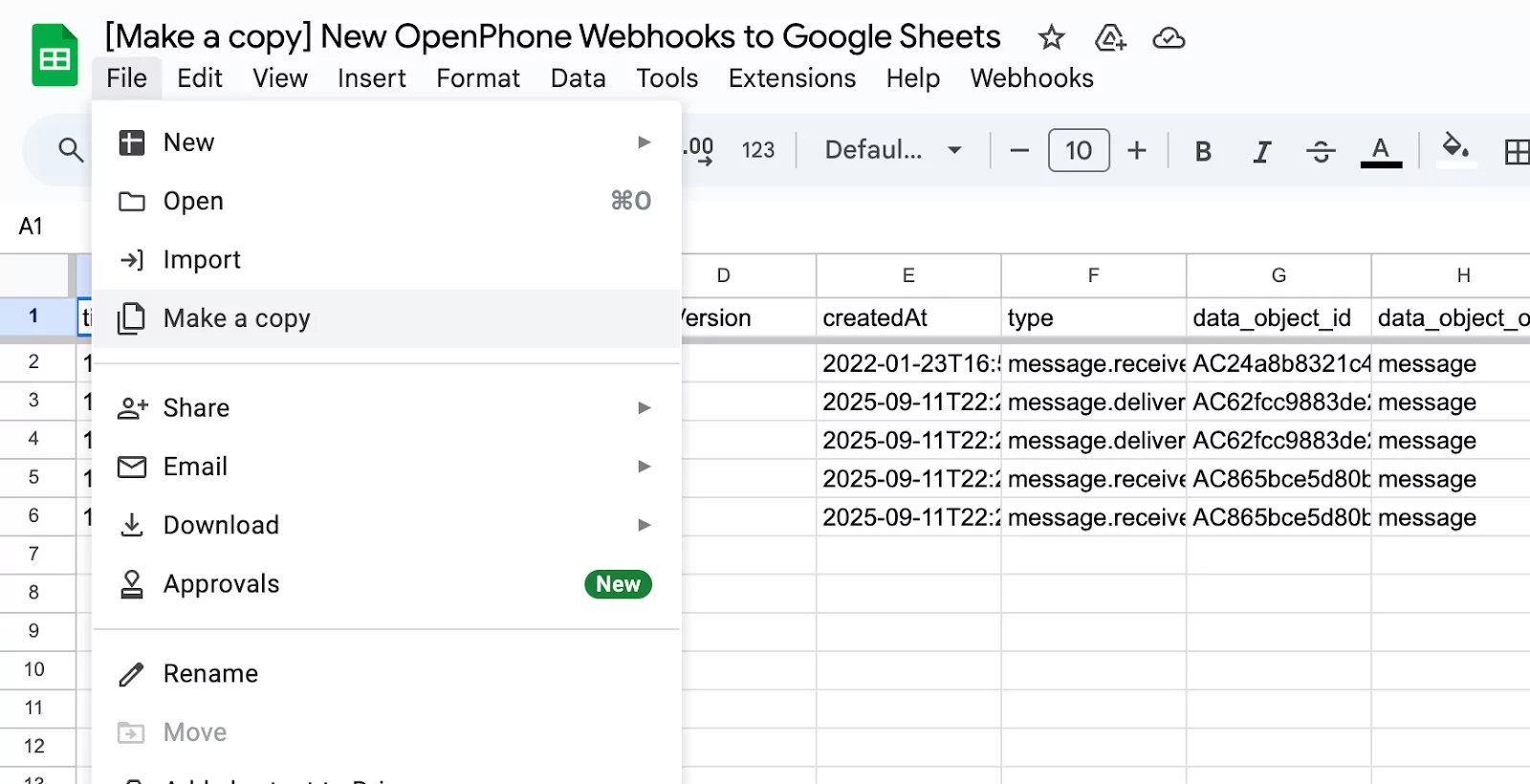
If you don’t already have a website or knowledge base to upload to Sona, you can build one using real customer conversations with our webhooks. Here’s how:- Create a Google Sheet to capture incoming call and text message data. Use this template and copy it for your own use by selecting File and Make copy.
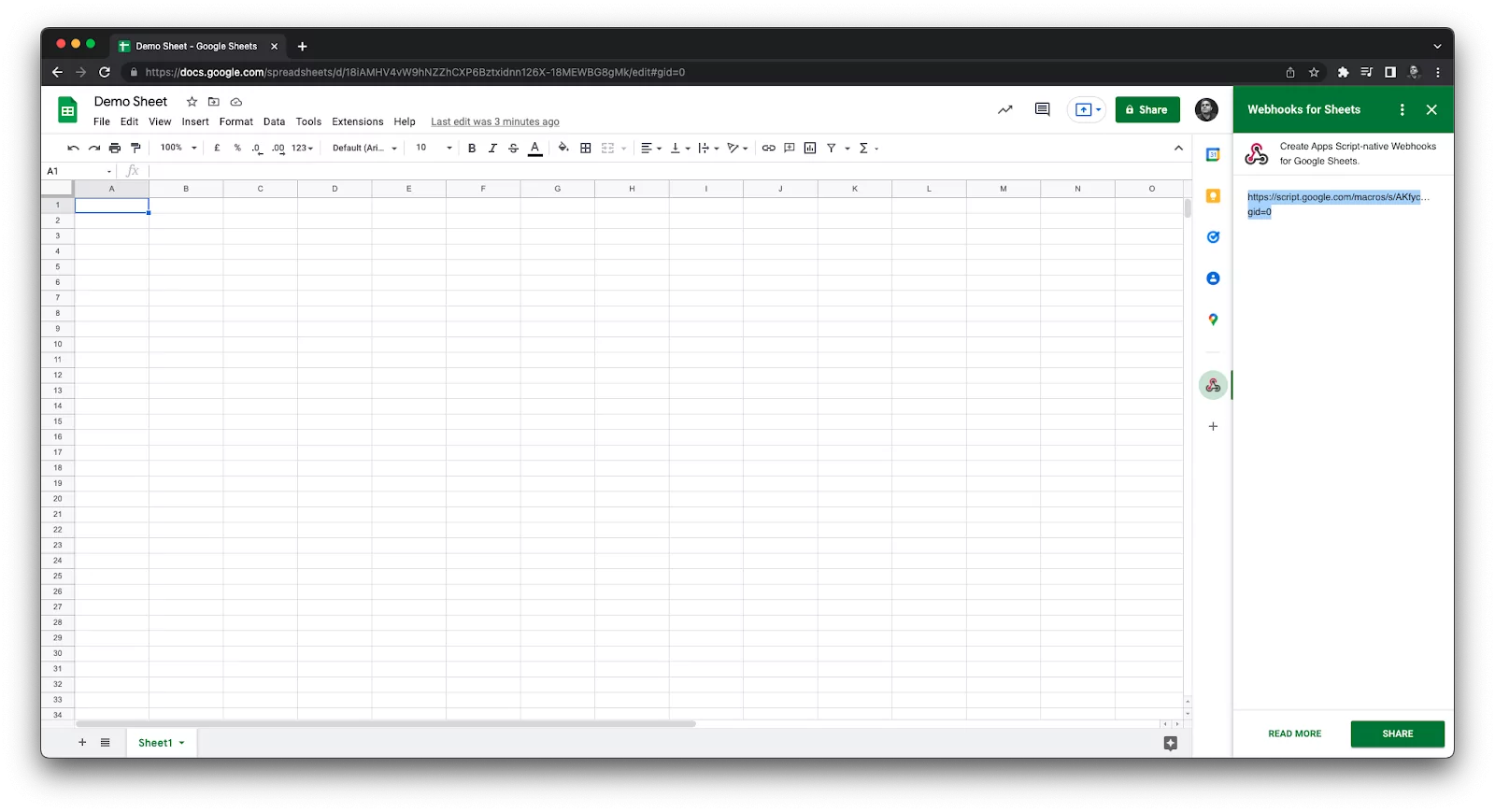
- Install the free Webhooks → Google Sheets add-on and get a custom webhook URL.
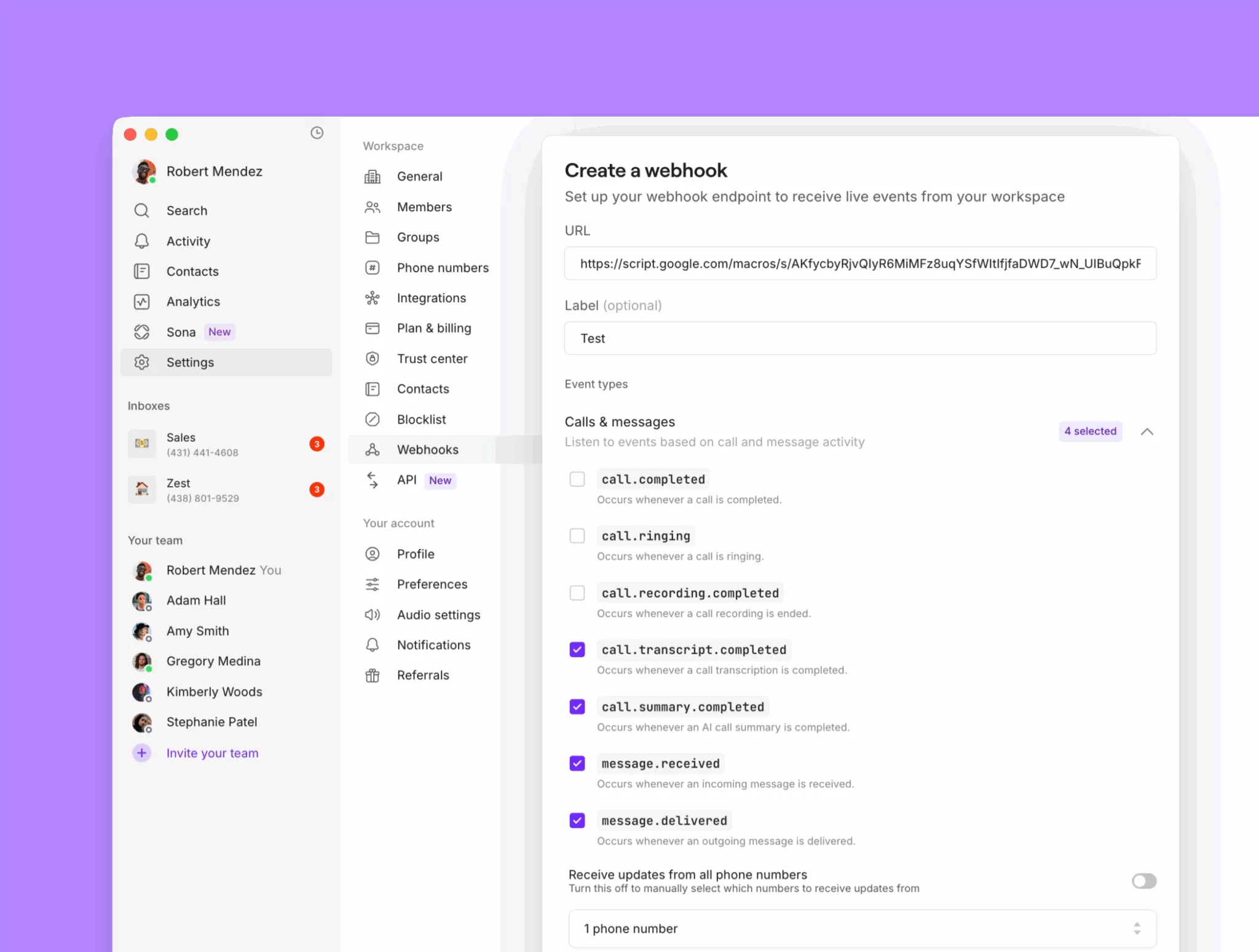
- Configure the webhook in Quo. Toggle on messages received, messages delivered, transcripts completed, and summaries completed.
- Let it run for 2–3 weeks to gather enough data.
- Export the sheet as a CSV and upload it to ChatGPT.
- Ask ChatGPT to generate knowledge pages based on the data in your sheet, including:
- List of FAQs
- List of common pain points and solutions
Sample ChatGPT prompt to create your knowledge pages
Sample ChatGPT prompt to create your knowledge pages
Here’s a prompt you can use once you upload your conversation data sheet to ChatGPT:You are analyzing customer conversations from a dataset that includes call transcripts and text messages.Your goal is to help identify the most common questions and problems customers are raising and to provide ready-to-use responses.⸻Instructions:1. Frequently Asked Questions (FAQs)• Identify the most common and repeated customer questions.• Write each as a clear question.• Provide a concise, customer-friendly answer for each.2. Biggest Issues/Pain Points• Identify recurring problems, blockers, or frustrations customers mention.• Summarize each issue clearly.• For each issue, provide a recommended response or solution framework a customer-facing team member can use.3. Formatting• Organize the output into two sections: FAQs and Biggest Issues.• Use a numbered list in each section.Format like this:FAQs:[Question] → [Suggested Answer]Biggest Issues:[Issue/Pain Point] → [Recommended Response or Solution Framework]Tone & Style:• Keep answers concise, clear, and professional.• Avoid jargon or internal language.• Responses should be usable directly in customer replies or training material.
Connect customers with the right service location with phone menus
If you manage multiple locations and service areas, a phone menu can help your customers reach the right team. They offer self-service call routing paths that help your customers reach the right team member faster. For example, ‘Press one for Austin’ and ‘Press two for Houston’ To set up a phone menu in Quo:- In the call flow builder, drag in the Phone menu step from the side panel.
- Configure your phone menu greeting.
- Assign numbers 0–9 to destinations.
- Add voice keywords for each option.
- Configure up to 10 different paths.
Best practices for setting up your phone menu
Design a phone menu that’s easy for your callers to navigate. Here’s how: 1. Keep it simple: Stick to 3-4 menu options so that callers aren’t spending time waiting for their option. Put the popular options first. And be sure to avoid using industry-specific or technical terms for the sake of clarity. 2. Have a clear menu greeting: Create a short menu greeting no longer than 20 seconds, and let customers know who they’ve called by mentioning your company’s name. Make sure to offer a way out of the menu in the greeting. For example, “If you know your party’s extension, you may dial it at any time.” 3. Route calls instead of repeating the menu: Send callers to your default ring group, even if they don’t choose a specific menu option. You can reduce your missed calls and automatically connect callers with your team.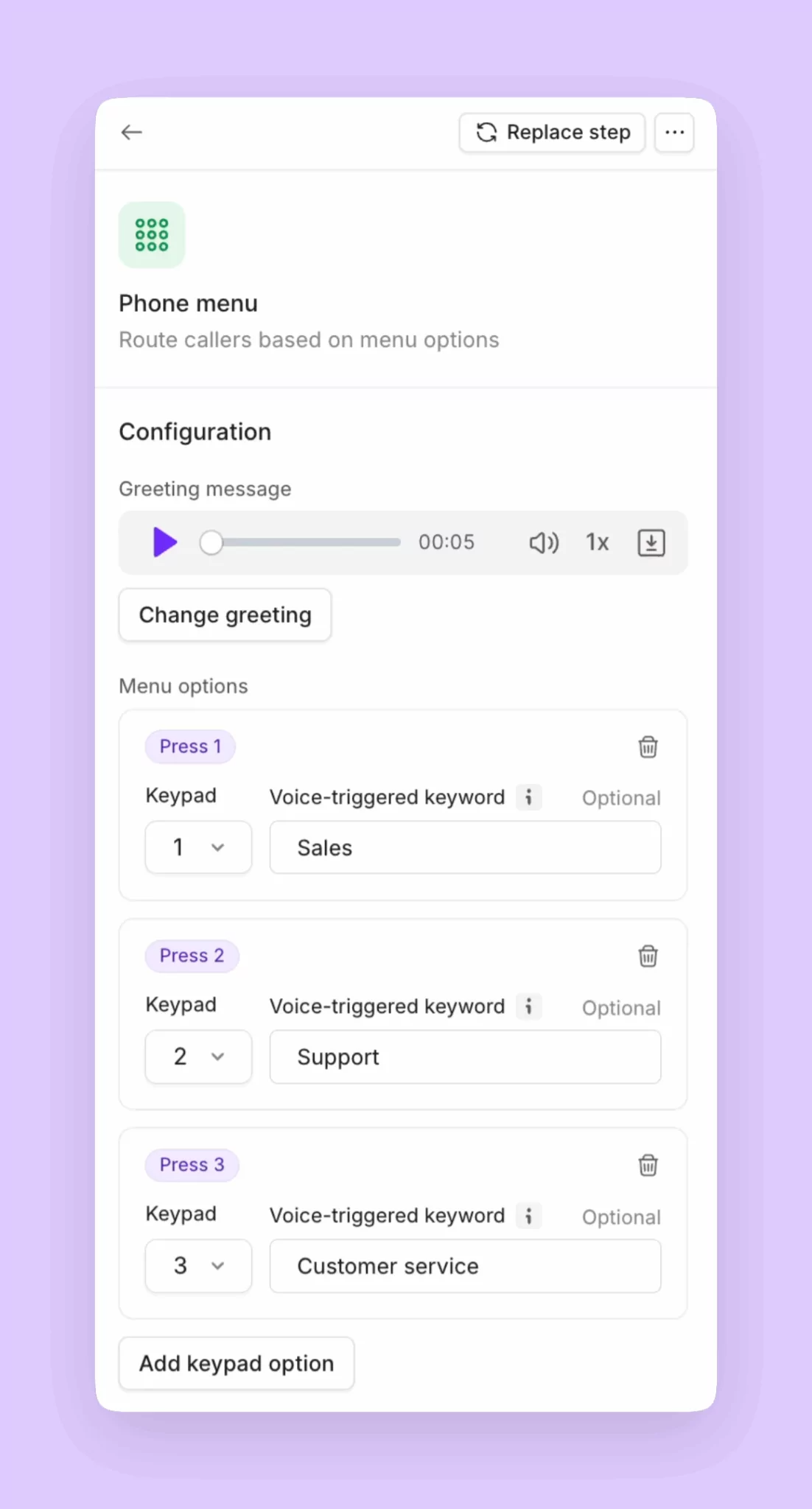
Set up backup call routing options for customers
With ring groups, phone menus, and Sona, your team can answer any incoming call that comes your way. But sometimes your customers may want a simpler option to leave a voicemail or book a follow-up appointment. You can set up backup automated call routing options in your phone number settings:- Voicemail: Give callers the option to leave a message through voicemail.
- SMS auto-replies: Automatically reply to callers after hours with your team’s calendar link in case they want to book a service appointment.
- Call forwarding: Have a backup number during or after business hours? Forward calls automatically to that number.