

Overview
Quo’s native monday CRM integration connects your customer records with the conversations your team has every day. Contacts from monday CRM sync into Quo, helping your team recognize callers and find their details without switching tools. When you edit supported details on those contacts in Quo, the changes sync back to monday CRM.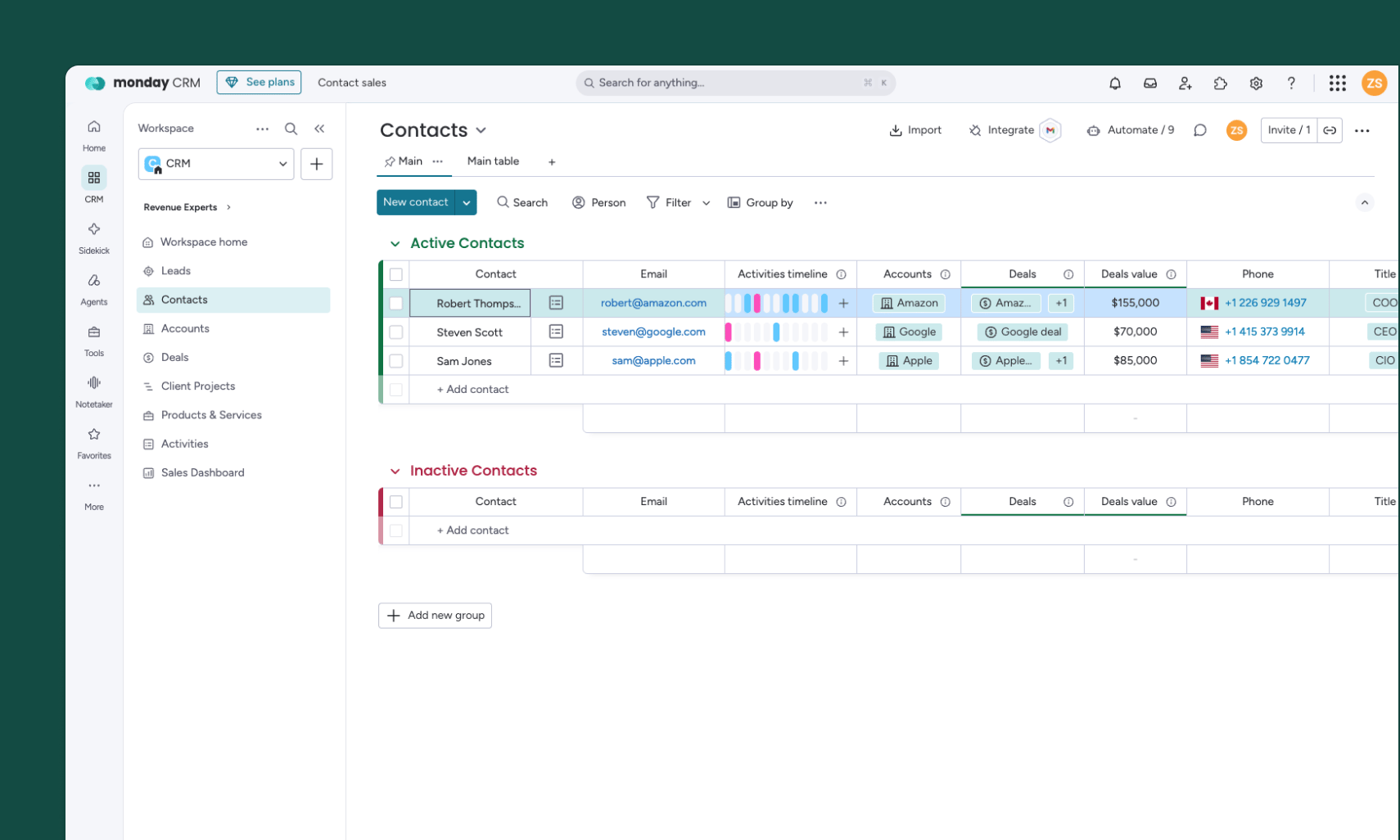
Available on Business and Scale. The monday CRM integration is available on Quo’s Business and Scale plans. Only a workspace Owner or Admin can connect it.
What the monday CRM integration does
Keeps contact details in sync
When you connect, Quo runs an initial sync from your selected monday CRM Contacts board. After that:- New and updated monday CRM contacts sync into Quo.
- Supported edits made in Quo to contacts that came from monday CRM sync back to monday.
- Contacts created in Quo don’t automatically sync to monday CRM.
Creating a new contact? Add it to your connected monday CRM Contacts board so it can sync into Quo. Bidirectional sync applies to supported edits on contacts that originated in monday CRM.
Logs calls and text messages
Supported Quo calls and texts log to the matched contact’s Emails & Activities feed. Call entries include call details, available summaries and recording links, and a link back to Quo. Text entries include the message content and a link back to the original activity. Entries are labeled Quo Call or Quo SMS, making it easy to identify conversations from Quo. Activity logging flows from Quo to monday CRM. It doesn’t import monday activities into Quo or let you send Quo texts from monday CRM.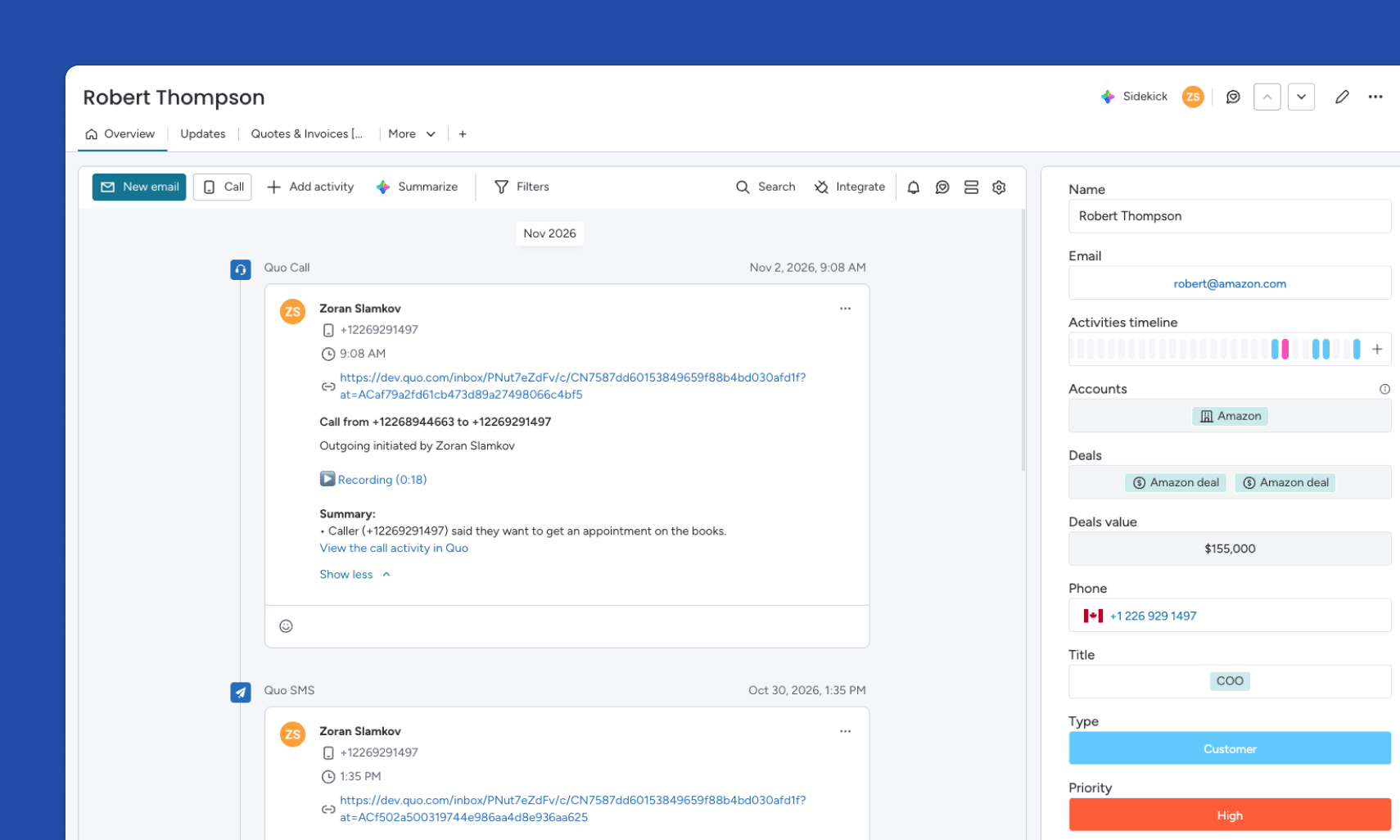
Before you connect
You’ll need:- A Quo Business or Scale plan
- Quo workspace Owner or Admin permissions
- Access to the monday.com account you want to connect
- Permission to authorize the integration and access the Contacts board you want to sync
Set up the monday CRM integration
- Open the Quo web or desktop app.
- Go to Settings → Integrations.
- Select monday CRM, then click Connect to monday CRM.
- Sign in to the monday.com account you want to connect.
- Review and authorize the requested access.
- If prompted, select the board you want to sync.
- Allow the initial contact sync to finish.
Find Quo activity in monday CRM
- Open your connected Contacts board in monday CRM.
- Open the contact associated with the call or text.
- In the contact’s Overview view, find the Emails & Activities feed.
- Look for a Quo Call or Quo SMS entry.
- Select the link in the entry to open the original activity in Quo.
Troubleshooting
A contact is missing or its details aren’t updating
Check that:- The integration shows as connected in Settings → Integrations → monday CRM.
- The correct monday.com account and Contacts board are connected.
- The contact exists on the connected board.
- The initial contact sync has finished.
- The change involves a supported contact property.
A call or text is missing in monday CRM
Check that:- The integration is connected.
- You’re viewing the contact on the connected Contacts board.
- The contact’s phone number matches the number used in the Quo conversation.
- You’re checking the Emails & Activities feed in Overview.
- Activity-feed filters aren’t hiding the entry.
FAQs
Which Quo plans support the monday CRM integration?
Which Quo plans support the monday CRM integration?
The integration is available on Quo’s Business and Scale plans. It isn’t available on Starter.
Who can connect the integration?
Who can connect the integration?
A Quo workspace Owner or Admin must set up the connection. The person connecting also needs permission to authorize access in monday.com and access the Contacts board being synced.
Do contacts sync in both directions?
Do contacts sync in both directions?
Contacts from monday CRM sync into Quo. Supported edits made in Quo to those contacts sync back to monday CRM. Contacts created in Quo don’t automatically sync to monday.
Where do calls and texts appear?
Where do calls and texts appear?
They appear as Quo Call and Quo SMS entries in the matched contact’s Emails & Activities feed, accessible from the contact’s Overview view.
Can I send Quo texts from monday CRM?
Can I send Quo texts from monday CRM?
No. Calls and texts happen in Quo, and supported activity logs to monday CRM.
Does activity from monday CRM sync into Quo?
Does activity from monday CRM sync into Quo?
No. Activity logging flows from Quo to monday CRM only.