

Overview
Webhooks provide real-time notifications when events occur in your Quo workspace, enabling powerful integrations and automated workflows. Configure webhooks to send event data to your applications instantly when calls complete, messages arrive, or contacts change.How webhooks work
Event-driven notifications: Webhooks deliver instant notifications when specific events occur in your Quo workspace. When an event triggers, Quo sends an HTTP POST request to your specified URL with detailed event data. Typical workflow:- Configure webhook URL and select event types
- Quo monitors for specified events
- When event occurs, Quo sends POST request with event payload
- Your application processes the event data and responds
- Quo logs the delivery status and retries if needed
Webhook configuration requires workspace Owner or Admin permissions. Settings are managed through web and desktop apps only.
Available webhook events
Messaging events
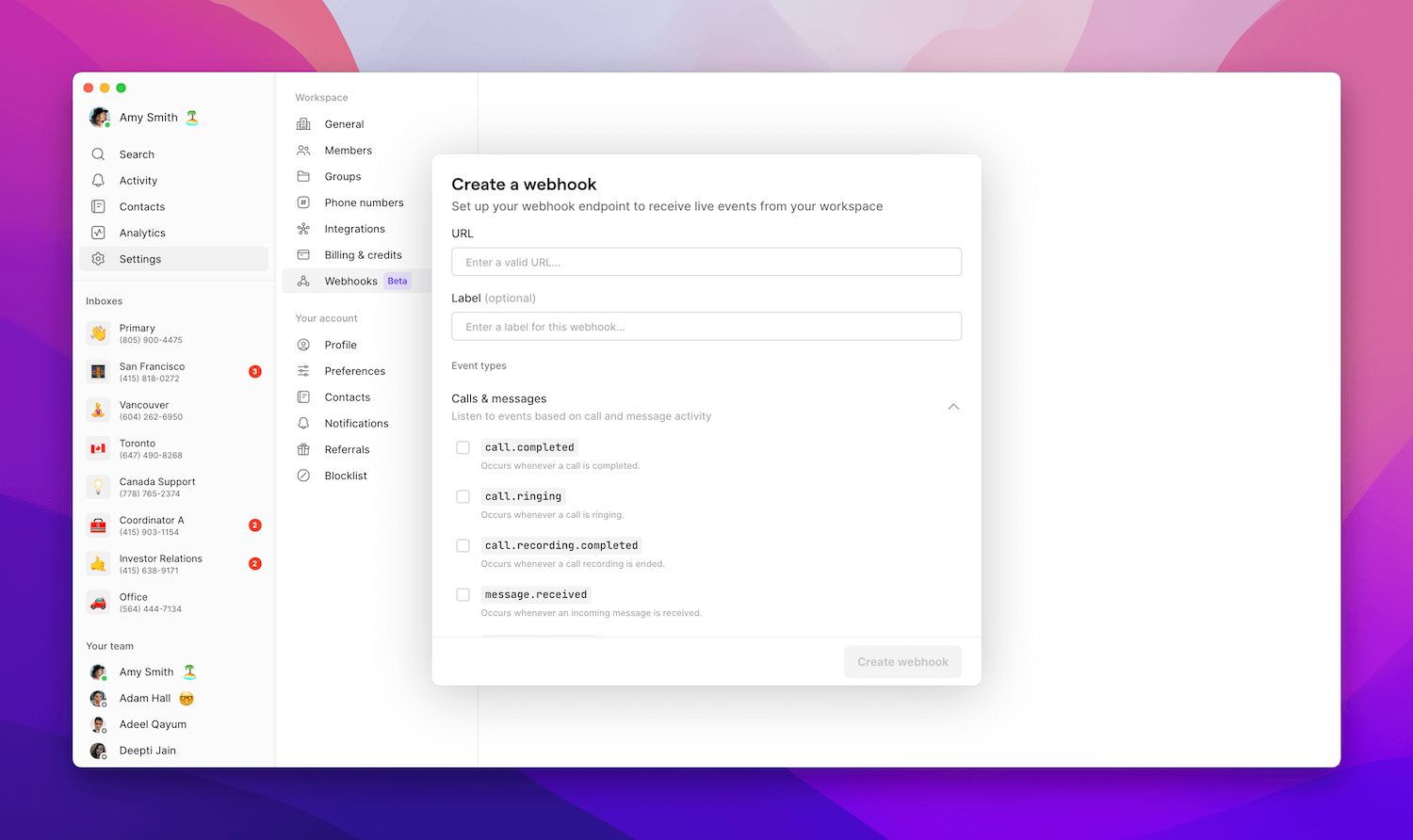
Text message notifications:message.received: Text message received by workspace phone number (includes media attachments)message.delivered: Text message sent from workspace and successfully delivered (includes media)
call.summary.completed: AI-generated call summary available in event payloadcall.transcript.completed: Complete call transcript available in event payload
Voice events
Call status notifications:call.ringing: Incoming call being received by workspace phone numbercall.completed: Call finished (answered or unanswered, may include voicemail)call.recording.completed: Call recording available at provided URL
Contact events
Contact management:contact.updated: Contact created or modified in workspacecontact.deleted: Contact removed from workspace
Task events
Task management:task.created: Task created in your workspacetask.updated: Task’s title, description, assignee, or due date changedtask.completed: Task marked completetask.reopened: Completed task reopenedtask.deleted: Task removed from your workspacetask.unassigned: Task’s assignee removedtask.due_date_changed: Task’s due date changedtask.due_date_removed: Task’s due date removedtask.overdue: Task passed its due datetask.linked: Task linked to a conversation, phone number, or conversation activitytask.unlinked: Task unlinked from a conversation
For more detail on building with webhooks and the API, visit the Quo API reference.
Setting up webhooks
Configuration requirements
Required parameters:
Optional parameters:
Setup process
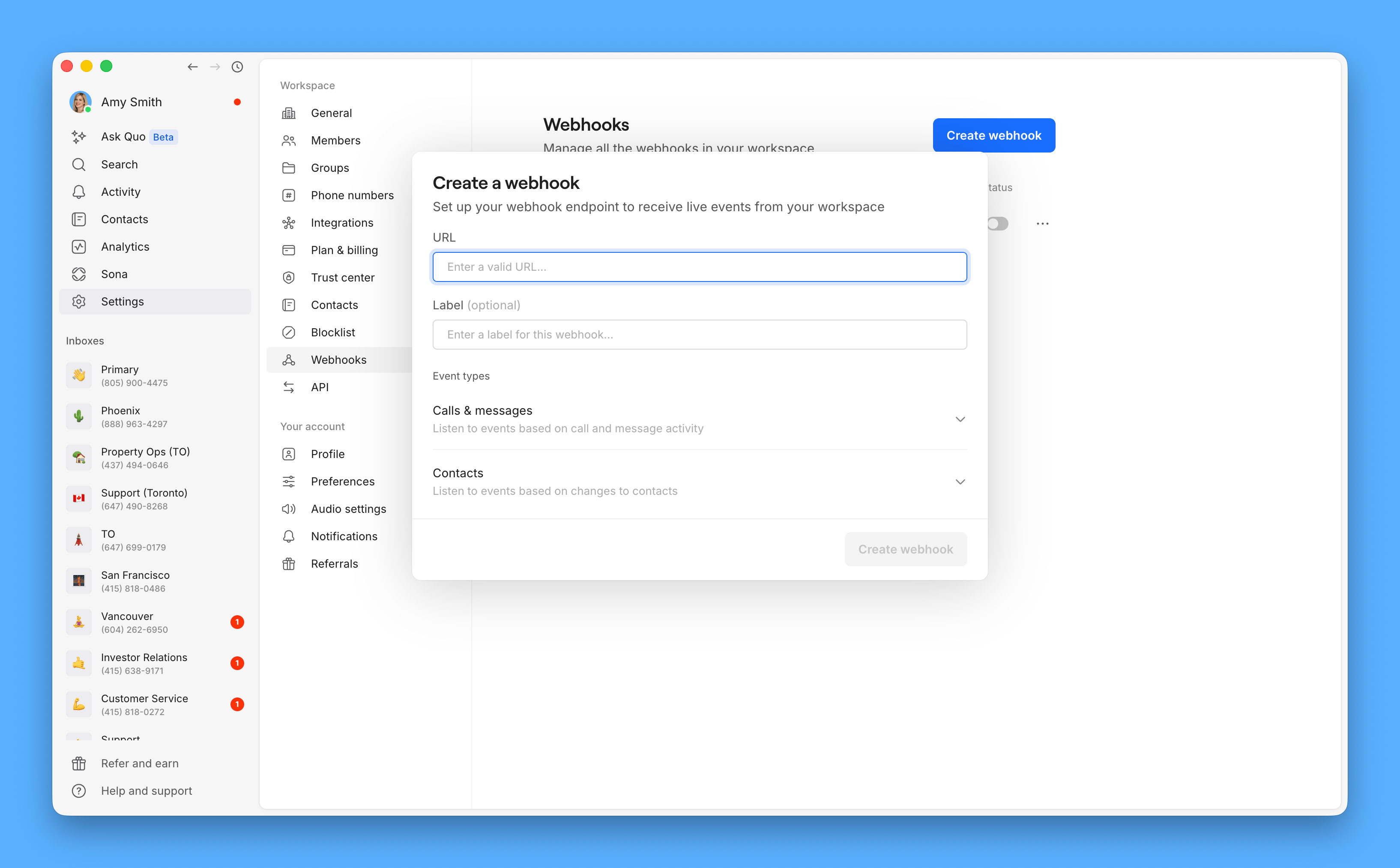
To create a webhook:- Navigate to Settings → Webhooks in Quo
- Click Create webhook
- Enter your webhook handler URL
- Select event types to monitor
- Choose phone numbers or contact resources
- Add optional label for identification
- Save and test configuration
Building webhook handlers
Handler requirements
Technical specifications:- Accept HTTP POST requests at your webhook URL
- Process JSON event payload in request body
- Respond with 2xx HTTP status code within 10 seconds
- Verify webhook signature for security
- Handle retries and failures gracefully
- Success: Return 2xx status code (no response body required)
- Failure: Non-2xx response triggers Quo retry sequence
- Timeout: No response within 10 seconds initiates retries
Security and authentication
Webhook signature verification: All webhook calls include cryptographic signatures to verify authenticity and prevent spoofing attacks. Signature header format:Signature verification process
Verification steps:- Extract components from
openphone-signatureheader - Prepare signed data by concatenating
timestamp + "." + payload - Decode signing key from base64 (available in webhook details)
- Compute HMAC-SHA256 using decoded key and signed data
- Compare result with signature from header
- Remove all whitespace and newlines from JSON payload before concatenation
- Use binary form of base64-decoded signing key for HMAC computation
- Ensure exact string matching for verification success
- Go to webhook details page in Quo
- Click ellipses (⋯) at top right
- Select “Reveal signing secret”
- Copy base64-encoded key for your application
Implementation examples
Node.js webhook handler:Future versions may include multiple signatures separated by commas. Split the header value on commas to handle multiple signatures if needed.
Security best practices
Replay attack protection: Implement timestamp validation to prevent replay attacks:- Compare signature timestamp with current time
- Reject requests with timestamps outside acceptable tolerance (e.g., 5 minutes)
- Each webhook call generates unique timestamp and signature
- Retries automatically include new timestamps
- Always use HTTPS URLs for production webhooks
- Store signing keys securely (environment variables, secret management)
- Implement proper error handling and logging
- Consider rate limiting for webhook endpoints
Error handling and retries
Automatic retry system
Retry behavior:- Trigger conditions: Non-2xx response codes or 10-second timeout
- Backoff strategy: Exponential backoff with increasing delays
- Retry duration: Up to 3 days of retry attempts
- Final failure: Email notification sent to webhook creator
- Initial retries happen quickly for minimal delay
- Delays increase exponentially with each attempt
- Prioritizes delivery close to original event time
- Automatic status tracking throughout process
Manual retry options
Webhook management:- View delivery status in Quo webhook details
- Manually retry failed webhook calls anytime
- Failed webhooks marked with ‘failure’ status
- Successful manual retries update status to ‘success’
Failure notifications
When retries exhaust:- Email alert sent to webhook creator
- Webhook call marked as permanently failed
- Event details preserved for manual review
- Option to retry manually when issues resolved
Testing and validation
Development testing
Local testing options:- HTTP clients: Use cURL, Postman, or Insomnia to send test POST requests
- Local URLs: Test against localhost during development
- Mock payloads: Create sample event JSON matching Quo format
- Signature testing: Verify HMAC validation logic with test keys
Quo test features
Built-in test request:- Navigate to webhook details page in Quo
- Click ellipses (⋯) at top right
- Select “Send Test Request”
- Quo sends sample event to your webhook URL
- Verify signature verification and response handling
Test requests require publicly accessible webhook URLs. Local development URLs won’t work with Quo’s test feature.
Live event testing
Real event triggers:- Configure webhook for specific event type (e.g.,
message.received) - Select your Quo number in webhook resources
- Trigger actual event (send text to your number)
- Monitor webhook delivery and processing
- Verify complete end-to-end functionality
- [ ] Webhook receives POST requests correctly
- [ ] Signature verification works
- [ ] Event payload parsing succeeds
- [ ] Application logic processes events properly
- [ ] Error responses trigger retries
- [ ] Success responses stop retry sequence
Troubleshooting
Common issues and solutions
Configuration problems:- Verify webhook URL is correct and accessible
- Check webhook status is enabled in settings
- Confirm event types are properly selected
- Validate resources (phone numbers/users/groups) are correct
- HTTP status codes: Ensure 2xx responses for successful processing
- Response timing: Return responses within 10-second timeout
- Error handling: Implement proper error responses for debugging
- Signature validation: Verify HMAC signature computation
- Key format: Ensure signing key is properly base64 decoded
- Timestamp handling: Check timestamp extraction and concatenation
Debugging tools
Event monitoring:- Events log: View delivery history in webhook details page
- Status tracking: Monitor success/failure rates
- Retry attempts: Review automatic retry sequences
- Manual testing: Use “Send Test Request” for immediate validation
- Response time: Keep processing under 10 seconds
- Error rates: Minimize failures to reduce retry overhead
- Logging: Implement comprehensive request/response logging
- Monitoring: Set up alerts for webhook delivery failures
Event payload examples
Message events
message.received payload:
message.delivered payload:
Call events
call.ringing payload:
call.completed (incoming with voicemail):
call.completed (outgoing answered call):
call.recording.completed payload:
Contact events
contact.updated and contact.deleted payload:
AI analysis events
call.summary.completed payload:
call.transcript.completed payload: