

Overview
Sona pricing is simple and flexible. You get a monthly pack of automation credits that Sona uses when it answers calls. Start free, then scale up as your usage grows. Think of credits like phone minutes. You choose a bundle that fits your business. If your business gets busier, you can move up instantly.How it works
You’re automatically on the free tier
- Every workspace starts with 1,000 credits (~10 calls) each month.
- No setup needed. Sona will use credits when it answers calls.
If you run out of credits, calls will automatically be sent to the fallback path in your call flow instead of being picked up by Sona. To keep Sona active, you’ll need to allow overages or choose a monthly credit tier.
- Sona uses 100 credits per call. Each plan includes 1,000 credits (~10 calls/month) at no extra cost.
- Calls under 15 seconds don’t count toward usage.
- By default, overages are disabled. When credits run out, Sona stops answering and routes calls through the fallback path in your call flow.
- If you enable overages, Sona keeps answering and bills extra calls at your tier’s overage rate. On the free tier, that’s $1.00 per call.
- To avoid unexpected charges, estimate your monthly call volume before activating. If you receive more than 10 calls a month that Sona would handle, consider upgrading to a paid tier.
Pick a monthly credit tier
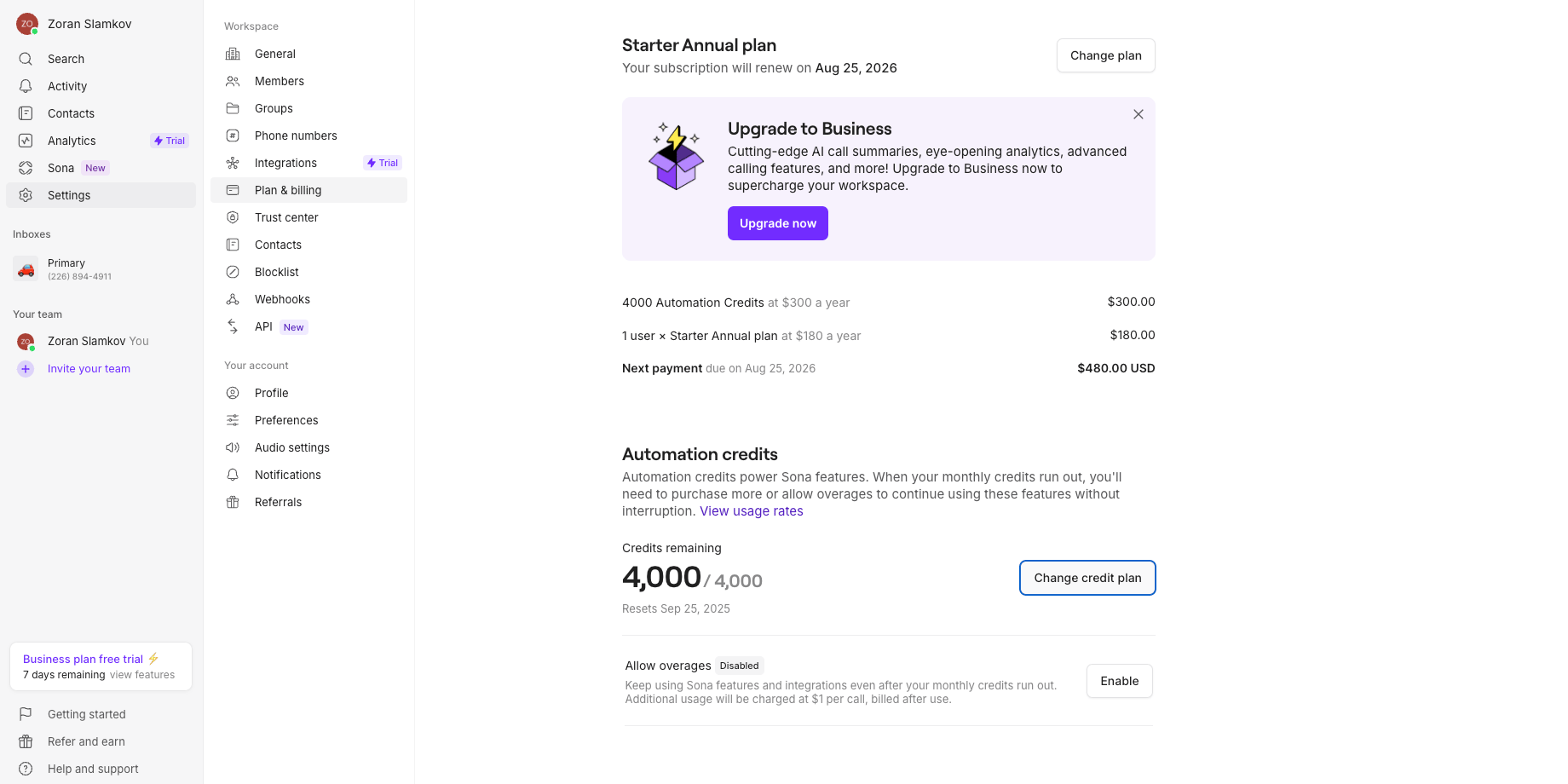
- Go to the Plan & billing page in Settings.
- Review the Automation credits tiers.
- Select the tier that matches your typical month.
- Tier 1 (Free): 1,000 credits → ~10 calls
- Tier 2 ($25/month): 4,000 credits → ~40 calls
- Tier 3 ($49/month): 10,000 credits → ~100 calls
- Tier 4 ($99/month): 25,000 credits → ~250 calls
- Tier 5 ($199/month): 60,000 credits → ~600 calls
Sona calls use 100 credits per call.
Control what happens after you run out
- Open Plan & billing.
- Find Allow overages.
- Choose your preference:
- Disabled (default): Sona pauses when credits hit zero.
- Enabled: Sona keeps working and bills extra usage at your tier’s rate.

Track usage and costs in one place
- Open the Sona tab or Plan & billing.
- Check credits used, credits remaining, and your reset date.
- Watch for email alerts at 80% and 100% of your monthly credits.
- At 80% usage: You’ll receive a warning email. If overages are enabled, the email will note that additional charges will apply once credits run out. If overages are disabled, it will note that Sona will stop handling calls and send them to voicemail when credits run out.
- At 100% usage: You’ll receive a second email confirming you’ve reached your limit. The messaging again depends on your overage setting: if on, Sona continues at the overage rate; if off, Sona routes calls to voicemail.
Upgrade anytime and save instantly
- Go to Plan & billing and pick a higher tier.
- Your upgrade applies right away.
- We re-rate the current month at your new tier.
- Any existing overages get the lower rate or may drop to $0.
Eligibility requirements
To purchase paid packages:- Must be on paid Quo plan (not free trial)
- Must use online payments (not Apple subscription)
- Must have workspace Admin or Owner permissions
- Available for Starter, Business, and Scale plans
If you currently have an Apple subscription, switch to online payments to add Sona.
Understand renewals and timing
- Credits refresh monthly on your billing renewal date.
- Annual plans still refresh credits monthly.
- Unused credits expire at the end of each billing period.
Key benefits at a glance
- Start free with enough calls to prove value.
- Scale smoothly by moving up tiers as you grow.
- Control costs with an overage toggle and clear rates.
- See everything with real-time usage and simple alerts.
Frequently asked questions
How do credits translate to calls?
How do credits translate to calls?
Sona uses 100 credits per call. For example, 1,000 credits equal about 10 calls; 10,000 credits equal about 100 calls.
What happens when I run out of credits?
What happens when I run out of credits?
If overages is disabled, Sona pauses when credits hit zero and will exit out the fallback path in the call flow builder. If it is on, Sona continues and bills extra usage at your tier’s overage rate.
Can I change tiers mid-cycle?
Can I change tiers mid-cycle?
Yes. Upgrades apply right away. We re-rate your current month at the new tier.
Do credits roll over to the next month?
Do credits roll over to the next month?
No. Credits expire at the end of your billing period. Fresh credits appear at the start of your next cycle.
How are annual plans and overages billed?
How are annual plans and overages billed?
Annual customers still receive a monthly refresh of credits aligned to their renewal schedule. Overage charges are always billed monthly. If overages are enabled, service continues without interruption.
Can I monitor usage in real time?
Can I monitor usage in real time?
Yes. Go to Sona or Plan & Billing to see credits used, credits remaining, and your reset date. You also get email alerts at 80% and 100%.
How do I estimate my costs before activating Sona?
How do I estimate my costs before activating Sona?
Count roughly how many inbound calls per month you’d want Sona to handle.Each plan includes 10 free calls. If you expect more, either upgrade to a paid tier or keep overages disabled so Sona routes to voicemail or your fallback path once credits run out.On the free tier with overages enabled, each extra call costs $1.00.
How do I stop Sona from charging me for calls beyond the free tier?
How do I stop Sona from charging me for calls beyond the free tier?
Overages are disabled by default. To confirm, go to Settings → Plan & billing → Allow overages and confirm that it’s disabled.With overages disabled, Sona stops answering when your credits run out and routes calls through your call flow’s fallback path — no extra charges.