> ## Documentation Index
> Fetch the complete documentation index at: https://support.quo.com/llms.txt
> Use this file to discover all available pages before exploring further.
# Messaging issues
> Resolve text message delivery problems, verification issues, and SMS troubleshooting
## Overview
Text messaging issues can disrupt business communications and customer interactions. This guide addresses common SMS problems including delivery failures, verification code issues, and message blocking to ensure reliable messaging functionality.
Quo, formerly OpenPhone, supports standard SMS and MMS messaging with files up to 5MB. Some limitations apply for verification services and short codes.
## Common messaging problems
**Symptoms:**
* Expected messages never arrive
* Missing verification codes
* No delivery of promotional texts
* Inconsistent message reception
**Common causes:**
* Virtual number restrictions for verification services
* Short code limitations (5-6 digit numbers)
* Carrier filtering or blocking
* Recent number porting issues
**Quick fixes:**
1. Verify sender can send to other numbers
2. Check if you've replied "STOP" to opt out
3. Confirm short code vs regular number
4. For recent ports, wait 24-48 hours
5. Test with known contacts
**Symptoms:**
* Messages marked as "undelivered"
* Recipients claiming non-receipt despite "delivered" status
* Specific error messages in message details
* Consistent delivery problems to certain numbers
**Primary causes:**
* Destination number issues
* Content filtering by carriers
* Recipient opt-out status
* Carrier-level blocking
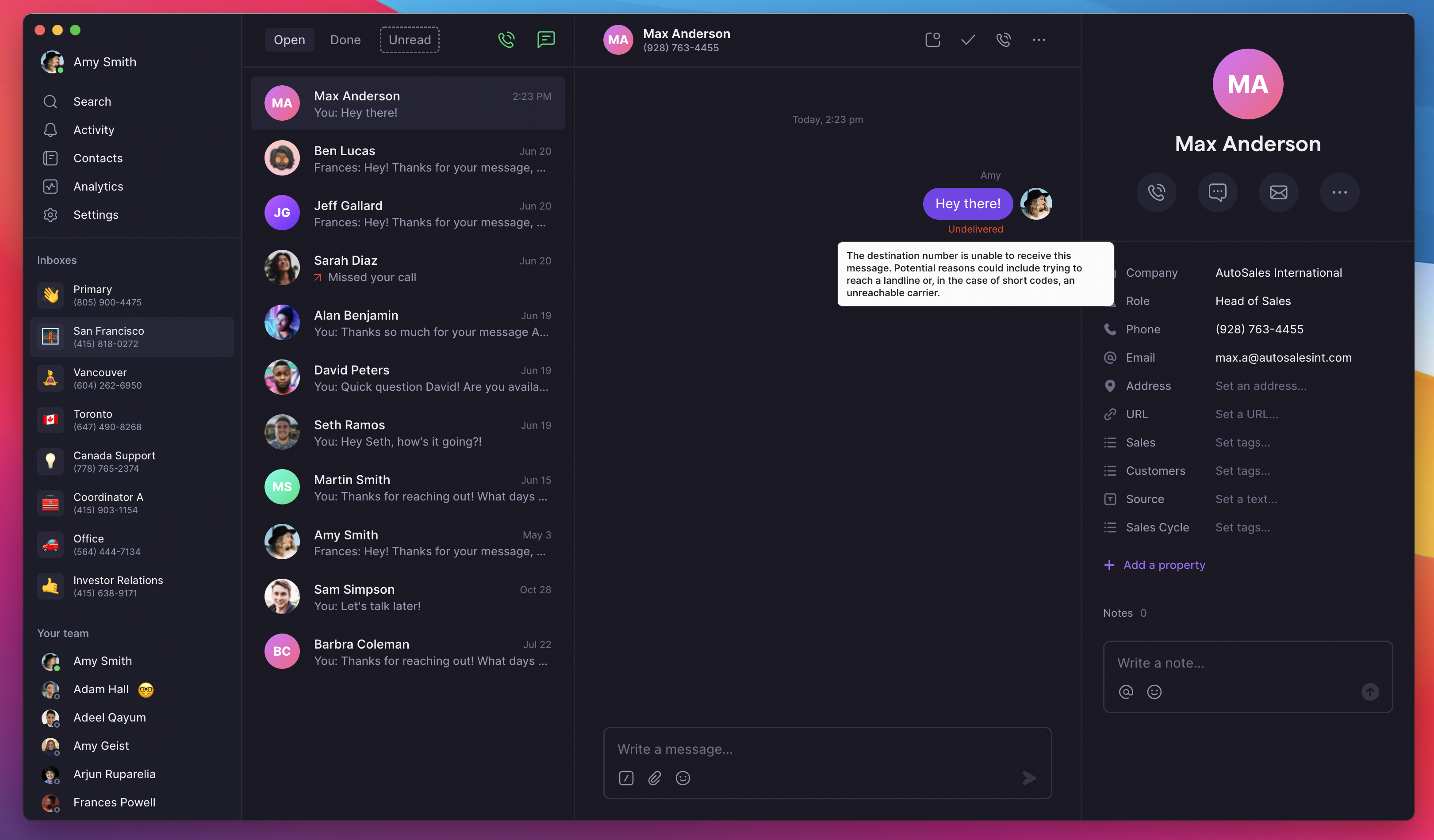
**Quick diagnosis:** On web/desktop, hover over "undelivered" status to see specific error messages and troubleshooting guidance.
 **Symptoms:**
* 2FA codes not arriving
* Account verification failures
* Registration process blocking
* Service rejection of Quo numbers
**Services that commonly block virtual numbers:**
* Banking and financial institutions
* Social media platforms (Facebook, Instagram)
* Ride-sharing services (Uber, Lyft)
* Payment services (PayPal, Venmo)
* Google services and WhatsApp
* Government services and utilities
**Why virtual numbers are restricted:**
* Enhanced security requirements
* Fraud prevention measures
* Easier acquisition compared to carrier numbers
* Multi-device accessibility concerns
**Alternative solutions:**
* Use personal mobile number for initial verification
* Contact service customer support for alternatives
* Look for email-based verification options
* Consider landline verification where available
Most 2FA and verification codes are sent from short codes (5–6 digit numbers). Quo numbers can't receive short code SMS. **This is a VoIP limitation that applies across providers, not just Quo.**
## Understanding delivery errors
**Understanding delivery indicators:**
* **Delivered**: Message successfully reached recipient's device
* **Undelivered**: Carrier reported delivery failure with error details
* **Sent**: Message left Quo but status pending from carrier
* **Failed**: Message could not be processed or sent
**Viewing error details:** On web/desktop, hover over "undelivered" status to see specific error messages and troubleshooting guidance.
**What this means:** The phone number you're trying to reach is not recognized by the carrier network.
**Resolution steps:**
* Verify number is active and in service
* Check for typos in phone number
* Confirm number hasn't been disconnected
* Try alternative contact methods if available
**Common causes:**
* Number has been disconnected
* Typo in the phone number
* Number was ported and not fully transferred
**What this means:** The recipient's device cannot receive the message at this time.
**Possible causes:**
* Recipient device may be turned off
* Outside cellular coverage area
* Carrier-level filtering (less common)
* Temporary network issues
**Resolution:** Wait and retry later, or use alternative contact method if urgent.
**What this means:** The recipient or their carrier is blocking messages from your number.
**Common reasons:**
* Recipient doesn't accept SMS from unknown senders
* Mobile plan limitations on SMS reception
* Carrier spam filtering
* Number blocked by recipient
**Resolution steps:**
1. Verify recipient hasn't blocked your number
2. Check if this is a business messaging compliance issue
3. Try calling instead of texting
4. Have recipient whitelist your number
**What this means:** You're attempting to send a text to a number that cannot receive SMS.
**Common scenarios:**
* Attempting to text landline number
* Carrier routing issues
* Service compatibility problems
* Geographic restrictions
**Resolution:**
* Verify the number is mobile-enabled
* Try calling instead of texting
* Check if international texting is supported
**What this means:** Your message content has been blocked by carrier spam filters.
**Common triggers:**
* Message content triggered spam filters
* Violation of carrier messaging policies
* High-volume messaging patterns
* Compliance issues with business messaging
**Resolution steps:**
1. Review message content for spam triggers
2. Ensure A2P 10DLC compliance for business messaging
3. Include clear business identification
4. Add opt-out instructions
5. Avoid URL shorteners and spam-like content
## Troubleshooting specific scenarios
**Short code limitations:**
* Quo cannot receive messages from short codes (5-6 digit numbers)
* Includes promotional campaigns and some verification services
* Alternative: Request standard 10-digit number communication
* Contact businesses directly for alternative contact methods
**Diagnostic steps for missing messages:**
1. **Verify sender can send**: Ask sender to try different numbers
2. **Check for opt-out status**: Confirm you haven't replied "STOP"
3. **Review business messaging**: Ensure A2P 10DLC compliance
4. **Test with known contacts**: Send test messages between known numbers
If you've previously replied "STOP" to a sender, you must reply "START" or "UNSTOP" to resume receiving messages.
**Post-porting message issues:**
* SMS functionality may take 24-48 hours after port completion
* Carrier routing updates can cause temporary delays
* Previous carrier may still route some messages
* Testing required to confirm full functionality
**Resolution timeline:**
* **0-24 hours**: Normal adjustment period
* **24-48 hours**: Extended but acceptable delay
* **48+ hours**: Verify carrier registration status in [Settings → Trust](https://my.quo.com/settings/trust), before contacting support
Unregistered numbers cannot text US numbers regardless of how long ago the port completed. \
\
**If you haven't registered for A2P 10DLC yet**, [start your registration here →](https://support.quo.com/getting-started/carrier-registration/carrier-registration)
* Document specific message failures for troubleshooting
**What to do:**
1. Wait 24-48 hours for full SMS activation
2. Test with multiple contacts
3. Document any failures with timestamps
4. Contact support if issues persist beyond 48 hours
**Signs this is an RCS issue:**
* Contacts with Android devices report sending messages that you didn't receive in Quo
* Messages you send aren't being received by some Android contacts
* Only affects some contacts, not all
* Group messages created before your transferred your number to Quo aren't arriving
* Problem persists beyond the normal 24–48 hour post-porting window
**What's happening:**
* Your ported number may still have an active RCS registration in the carrier's cache
* Contacts with RCS-enabled devices send messages via RCS instead of SMS, and those don't reach your Quo number
* Messages you send are undelivered until the carrier cache clears and traffic falls back to SMS
**What to do:**
1. **If you haven't ported yet**: Disable RCS on your device before you transfer your number. See [Special considerations for Android users](https://support.quo.com/getting-started/porting/overview#special-considerations-for-android-users).
2. **For affected group threads**: Ask contacts to delete the old thread and start a new one to force messages to fall back to SMS/MMS.
3. **For 1-on-1 messages**: Delete and restart the conversation or choose "Send as SMS" within the conversation.
If you've recently ported a number that was previously active on an iPhone or used with an iPhone-based carrier account, iMessage may still be intercepting texts sent to your number.
**What to do:**
1. **Remove from iMessage**
* Go to iPhone **Settings**
* Tap **Messages**
* Tap **Send & Receive**
* Uncheck your ported number in **You can be reached by iMessage at**
2. **Remove from FaceTime**
* Go to iPhone **Settings**
* Tap **FaceTime**
* Uncheck your ported number in **You can be reached by FaceTime at**
If messages still aren’t routing correctly, you may need to [**deregister iMessage**](https://selfsolve.apple.com/deregister-imessage/) completely.
## Advanced troubleshooting
**Understanding soft-blocks:** Messages appear delivered but recipients don't receive them due to:
* Carrier-level spam filtering
* Content-based blocking algorithms
* Volume-based filtering
* Reputation-based restrictions
**Identifying soft-blocking:**
* Recipients consistently claim non-receipt
* Messages show "delivered" status
* Issues with multiple recipients
* Patterns across different carriers
**Resolution approaches:**
1. Review message content for spam indicators
2. Verify proper business messaging registration
3. Implement A2P 10DLC compliance
4. Contact support with specific examples
Soft-blocking often affects business messaging. Ensure you're registered for A2P 10DLC to improve delivery rates.
**Message content optimization:**
* Avoid spam-trigger words and phrases
* Include clear business identification
* Provide opt-out instructions
* Maintain professional messaging tone
**Business messaging compliance:**
* Register for A2P 10DLC campaigns
* Maintain proper opt-in documentation
* Honor opt-out requests immediately
* Follow carrier messaging guidelines
**Volume and frequency management:**
* Avoid sudden messaging volume spikes
* Implement gradual volume increases
* Respect recipient preferences
* Monitor delivery rates and adjust accordingly
**Best practices for content:**
* Start with business name
* State purpose clearly
* Include "Reply STOP to unsubscribe"
* Avoid ALL CAPS and excessive punctuation
* Don't use URL shorteners
## File and media troubleshooting
**File size limitations:**
* Quo accepts up to 5MB files
* Sender carrier may have lower limits
* Compression may occur during transmission
* Multiple files may be combined or split
**Supported file types:**
* Images: JPEG, PNG, GIF
* Video: MP4, MOV, 3GP
* Audio: MP3, AAC, AMR
* Documents: PDF (with size restrictions)
**Resolution steps:**
1. **Reduce file size**: Compress images/videos before sending
2. **Alternative sharing**: Use cloud storage links for large files
3. **Format conversion**: Try different file formats
4. **Split large content**: Send multiple smaller messages
If recipients can't receive MMS, their carrier or plan may not support multimedia messages.
## Prevention and best practices
**Content best practices:**
* **Clear identification**: Include business name and purpose
* **Professional tone**: Use business-appropriate language
* **Value delivery**: Provide useful information to recipients
* **Compliance**: Follow all relevant messaging regulations
**Message template example:**
```text theme={null}
Hi [Name], this is [Your Name] from [Business].
[Clear purpose of message]
Reply STOP to unsubscribe.
```
**Avoid these red flags:**
* ALL CAPS MESSAGES
* Excessive punctuation!!!
* URL shorteners (bit.ly, tinyurl)
* Words like "free," "winner," "claim now"
* Missing business identification
* No opt-out instructions
**Documentation checklist:**
* ✓ Save examples of delivery failures
* ✓ Note patterns in timing and recipients
* ✓ Track when issues start or stop
* ✓ Screenshot error messages
* ✓ Document carrier-specific issues
**Monitoring routine:**
* **Daily**: Check delivery rates
* **Weekly**: Test messages to different carriers
* **Monthly**: Review delivery metrics
* **Quarterly**: Audit messaging practices
**Key metrics to track:**
* Delivery rate by carrier
* Time of day performance
* Message length impact
* Content type success rates
* Geographic delivery patterns
## Support escalation
**Contact support for:**
* Multiple delivery failures with same error
* Verification services unexpectedly blocking number
* Soft-blocking affecting business operations
* Post-porting issues lasting over 48 hours
* Compliance questions about business messaging
**Before contacting support:**
1. Document at least 3 specific examples
2. Try basic troubleshooting steps
3. Check if issue is carrier-specific
4. Review message content for spam triggers
5. Verify A2P 10DLC registration status
**Essential details checklist:**
* ✓ Three or more failed message examples
* ✓ Exact error messages (screenshots help)
* ✓ Dates and times of failures
* ✓ Recipient carriers if known
* ✓ Your messaging use case
**Message content details:**
* Sample messages that failed
* Volume sent per day/week
* How you obtained consent
* Previous successful messaging history
**For business messaging:**
* Business type and industry
* Customer opt-in process
* A2P 10DLC registration status
* Typical message content types
* Volume and frequency patterns
**Submit at:** [support.quo.com](https://support.quo.com/help/submit-a-request)
## Additional resources
**Need assistance?** Submit a support request at [support.quo.com](https://support.quo.com/help/submit-a-request) with specific message delivery details for personalized troubleshooting assistance.
**Symptoms:**
* 2FA codes not arriving
* Account verification failures
* Registration process blocking
* Service rejection of Quo numbers
**Services that commonly block virtual numbers:**
* Banking and financial institutions
* Social media platforms (Facebook, Instagram)
* Ride-sharing services (Uber, Lyft)
* Payment services (PayPal, Venmo)
* Google services and WhatsApp
* Government services and utilities
**Why virtual numbers are restricted:**
* Enhanced security requirements
* Fraud prevention measures
* Easier acquisition compared to carrier numbers
* Multi-device accessibility concerns
**Alternative solutions:**
* Use personal mobile number for initial verification
* Contact service customer support for alternatives
* Look for email-based verification options
* Consider landline verification where available
Most 2FA and verification codes are sent from short codes (5–6 digit numbers). Quo numbers can't receive short code SMS. **This is a VoIP limitation that applies across providers, not just Quo.**
## Understanding delivery errors
**Understanding delivery indicators:**
* **Delivered**: Message successfully reached recipient's device
* **Undelivered**: Carrier reported delivery failure with error details
* **Sent**: Message left Quo but status pending from carrier
* **Failed**: Message could not be processed or sent
**Viewing error details:** On web/desktop, hover over "undelivered" status to see specific error messages and troubleshooting guidance.
**What this means:** The phone number you're trying to reach is not recognized by the carrier network.
**Resolution steps:**
* Verify number is active and in service
* Check for typos in phone number
* Confirm number hasn't been disconnected
* Try alternative contact methods if available
**Common causes:**
* Number has been disconnected
* Typo in the phone number
* Number was ported and not fully transferred
**What this means:** The recipient's device cannot receive the message at this time.
**Possible causes:**
* Recipient device may be turned off
* Outside cellular coverage area
* Carrier-level filtering (less common)
* Temporary network issues
**Resolution:** Wait and retry later, or use alternative contact method if urgent.
**What this means:** The recipient or their carrier is blocking messages from your number.
**Common reasons:**
* Recipient doesn't accept SMS from unknown senders
* Mobile plan limitations on SMS reception
* Carrier spam filtering
* Number blocked by recipient
**Resolution steps:**
1. Verify recipient hasn't blocked your number
2. Check if this is a business messaging compliance issue
3. Try calling instead of texting
4. Have recipient whitelist your number
**What this means:** You're attempting to send a text to a number that cannot receive SMS.
**Common scenarios:**
* Attempting to text landline number
* Carrier routing issues
* Service compatibility problems
* Geographic restrictions
**Resolution:**
* Verify the number is mobile-enabled
* Try calling instead of texting
* Check if international texting is supported
**What this means:** Your message content has been blocked by carrier spam filters.
**Common triggers:**
* Message content triggered spam filters
* Violation of carrier messaging policies
* High-volume messaging patterns
* Compliance issues with business messaging
**Resolution steps:**
1. Review message content for spam triggers
2. Ensure A2P 10DLC compliance for business messaging
3. Include clear business identification
4. Add opt-out instructions
5. Avoid URL shorteners and spam-like content
## Troubleshooting specific scenarios
**Short code limitations:**
* Quo cannot receive messages from short codes (5-6 digit numbers)
* Includes promotional campaigns and some verification services
* Alternative: Request standard 10-digit number communication
* Contact businesses directly for alternative contact methods
**Diagnostic steps for missing messages:**
1. **Verify sender can send**: Ask sender to try different numbers
2. **Check for opt-out status**: Confirm you haven't replied "STOP"
3. **Review business messaging**: Ensure A2P 10DLC compliance
4. **Test with known contacts**: Send test messages between known numbers
If you've previously replied "STOP" to a sender, you must reply "START" or "UNSTOP" to resume receiving messages.
**Post-porting message issues:**
* SMS functionality may take 24-48 hours after port completion
* Carrier routing updates can cause temporary delays
* Previous carrier may still route some messages
* Testing required to confirm full functionality
**Resolution timeline:**
* **0-24 hours**: Normal adjustment period
* **24-48 hours**: Extended but acceptable delay
* **48+ hours**: Verify carrier registration status in [Settings → Trust](https://my.quo.com/settings/trust), before contacting support
Unregistered numbers cannot text US numbers regardless of how long ago the port completed. \
\
**If you haven't registered for A2P 10DLC yet**, [start your registration here →](https://support.quo.com/getting-started/carrier-registration/carrier-registration)
* Document specific message failures for troubleshooting
**What to do:**
1. Wait 24-48 hours for full SMS activation
2. Test with multiple contacts
3. Document any failures with timestamps
4. Contact support if issues persist beyond 48 hours
**Signs this is an RCS issue:**
* Contacts with Android devices report sending messages that you didn't receive in Quo
* Messages you send aren't being received by some Android contacts
* Only affects some contacts, not all
* Group messages created before your transferred your number to Quo aren't arriving
* Problem persists beyond the normal 24–48 hour post-porting window
**What's happening:**
* Your ported number may still have an active RCS registration in the carrier's cache
* Contacts with RCS-enabled devices send messages via RCS instead of SMS, and those don't reach your Quo number
* Messages you send are undelivered until the carrier cache clears and traffic falls back to SMS
**What to do:**
1. **If you haven't ported yet**: Disable RCS on your device before you transfer your number. See [Special considerations for Android users](https://support.quo.com/getting-started/porting/overview#special-considerations-for-android-users).
2. **For affected group threads**: Ask contacts to delete the old thread and start a new one to force messages to fall back to SMS/MMS.
3. **For 1-on-1 messages**: Delete and restart the conversation or choose "Send as SMS" within the conversation.
If you've recently ported a number that was previously active on an iPhone or used with an iPhone-based carrier account, iMessage may still be intercepting texts sent to your number.
**What to do:**
1. **Remove from iMessage**
* Go to iPhone **Settings**
* Tap **Messages**
* Tap **Send & Receive**
* Uncheck your ported number in **You can be reached by iMessage at**
2. **Remove from FaceTime**
* Go to iPhone **Settings**
* Tap **FaceTime**
* Uncheck your ported number in **You can be reached by FaceTime at**
If messages still aren’t routing correctly, you may need to [**deregister iMessage**](https://selfsolve.apple.com/deregister-imessage/) completely.
## Advanced troubleshooting
**Understanding soft-blocks:** Messages appear delivered but recipients don't receive them due to:
* Carrier-level spam filtering
* Content-based blocking algorithms
* Volume-based filtering
* Reputation-based restrictions
**Identifying soft-blocking:**
* Recipients consistently claim non-receipt
* Messages show "delivered" status
* Issues with multiple recipients
* Patterns across different carriers
**Resolution approaches:**
1. Review message content for spam indicators
2. Verify proper business messaging registration
3. Implement A2P 10DLC compliance
4. Contact support with specific examples
Soft-blocking often affects business messaging. Ensure you're registered for A2P 10DLC to improve delivery rates.
**Message content optimization:**
* Avoid spam-trigger words and phrases
* Include clear business identification
* Provide opt-out instructions
* Maintain professional messaging tone
**Business messaging compliance:**
* Register for A2P 10DLC campaigns
* Maintain proper opt-in documentation
* Honor opt-out requests immediately
* Follow carrier messaging guidelines
**Volume and frequency management:**
* Avoid sudden messaging volume spikes
* Implement gradual volume increases
* Respect recipient preferences
* Monitor delivery rates and adjust accordingly
**Best practices for content:**
* Start with business name
* State purpose clearly
* Include "Reply STOP to unsubscribe"
* Avoid ALL CAPS and excessive punctuation
* Don't use URL shorteners
## File and media troubleshooting
**File size limitations:**
* Quo accepts up to 5MB files
* Sender carrier may have lower limits
* Compression may occur during transmission
* Multiple files may be combined or split
**Supported file types:**
* Images: JPEG, PNG, GIF
* Video: MP4, MOV, 3GP
* Audio: MP3, AAC, AMR
* Documents: PDF (with size restrictions)
**Resolution steps:**
1. **Reduce file size**: Compress images/videos before sending
2. **Alternative sharing**: Use cloud storage links for large files
3. **Format conversion**: Try different file formats
4. **Split large content**: Send multiple smaller messages
If recipients can't receive MMS, their carrier or plan may not support multimedia messages.
## Prevention and best practices
**Content best practices:**
* **Clear identification**: Include business name and purpose
* **Professional tone**: Use business-appropriate language
* **Value delivery**: Provide useful information to recipients
* **Compliance**: Follow all relevant messaging regulations
**Message template example:**
```text theme={null}
Hi [Name], this is [Your Name] from [Business].
[Clear purpose of message]
Reply STOP to unsubscribe.
```
**Avoid these red flags:**
* ALL CAPS MESSAGES
* Excessive punctuation!!!
* URL shorteners (bit.ly, tinyurl)
* Words like "free," "winner," "claim now"
* Missing business identification
* No opt-out instructions
**Documentation checklist:**
* ✓ Save examples of delivery failures
* ✓ Note patterns in timing and recipients
* ✓ Track when issues start or stop
* ✓ Screenshot error messages
* ✓ Document carrier-specific issues
**Monitoring routine:**
* **Daily**: Check delivery rates
* **Weekly**: Test messages to different carriers
* **Monthly**: Review delivery metrics
* **Quarterly**: Audit messaging practices
**Key metrics to track:**
* Delivery rate by carrier
* Time of day performance
* Message length impact
* Content type success rates
* Geographic delivery patterns
## Support escalation
**Contact support for:**
* Multiple delivery failures with same error
* Verification services unexpectedly blocking number
* Soft-blocking affecting business operations
* Post-porting issues lasting over 48 hours
* Compliance questions about business messaging
**Before contacting support:**
1. Document at least 3 specific examples
2. Try basic troubleshooting steps
3. Check if issue is carrier-specific
4. Review message content for spam triggers
5. Verify A2P 10DLC registration status
**Essential details checklist:**
* ✓ Three or more failed message examples
* ✓ Exact error messages (screenshots help)
* ✓ Dates and times of failures
* ✓ Recipient carriers if known
* ✓ Your messaging use case
**Message content details:**
* Sample messages that failed
* Volume sent per day/week
* How you obtained consent
* Previous successful messaging history
**For business messaging:**
* Business type and industry
* Customer opt-in process
* A2P 10DLC registration status
* Typical message content types
* Volume and frequency patterns
**Submit at:** [support.quo.com](https://support.quo.com/help/submit-a-request)
## Additional resources
**Need assistance?** Submit a support request at [support.quo.com](https://support.quo.com/help/submit-a-request) with specific message delivery details for personalized troubleshooting assistance.