> ## Documentation Index
> Fetch the complete documentation index at: https://support.quo.com/llms.txt
> Use this file to discover all available pages before exploring further.
# Housecall Pro
Connect Quo to Housecall Pro to refresh customer details in Quo every hour and log calls and texts to matching customer records.
## Overview
Quo’s native Housecall Pro integration brings customer context into Quo and keeps communication activity connected to the work in Housecall Pro.
.png?fit=max&auto=format&n=38BQtvC1lyWmtwlO&q=85&s=55ee949eeebee3851853257164baa91e) When you connect the integration, Quo imports your Housecall Pro customers as contacts. It then refreshes those contacts automatically every hour. Contact sync is one-way from Housecall Pro to Quo, so Housecall Pro remains the source of truth.
When Quo can reliably match a contact to a Housecall Pro customer, calls and text messages are logged to that customer’s record in Housecall Pro.
The integration is available on the **Quo Business and Scale plans**. It requires a Housecall Pro **MAX or XL plan** with API access. Only a Quo workspace Owner or Admin can connect it, and only a Housecall Pro Admin can generate the API key.
***
## What the Housecall Pro integration does
### Syncs Housecall Pro customers into Quo
Quo runs an initial customer import when the integration is connected. After that, it checks Housecall Pro hourly for new and updated customer information.
Supported data includes:
* Customer name
* Phone numbers
* Email addresses
* Other supported contact details, such as company or role, when available
Contact sync is one-way, from Housecall Pro to Quo. Contacts imported from Housecall Pro are read-only in Quo, so make any changes to customer details directly in Housecall Pro. Updates will appear in Quo after the next hourly sync.
### Logs Quo activity to Housecall Pro customer records
When Quo can reliably match a contact to a Housecall Pro customer, it logs supported activity to that customer’s record:
* Incoming and outgoing calls
* Incoming and outgoing text messages
If Quo cannot safely match the contact to a customer, the activity remains available in Quo and nothing is created in Housecall Pro. The integration does not create placeholder customers.
Only new activity is logged after the integration is connected. Historical Quo activity is not backfilled.
***
## Before you connect
You’ll need:
* A Quo Business or Scale plan
* A Housecall Pro MAX or XL plan with API access
* Quo workspace Owner or Admin permissions
* Housecall Pro Admin permissions
* A Housecall Pro API key with **Full access**
A read-only API key can import customer data but cannot support the full integration, including logging Quo activity back to Housecall Pro.
***
## Create a Housecall Pro API key
1. Sign in to Housecall Pro as an Admin.
2. Go to **My Apps → All Apps**.
3. Find and open **API Key Management**.
4. Click **Generate API Key**.
5. Give the key a recognizable name, such as **Quo**.
6. Under Permissions, select **Full access**.
7. Click **Generate key**, then copy the API key.
Treat the API key like a password. Store it securely and do not share it outside the tools and people who need it.
***
## Connect Housecall Pro to Quo
1. Open the Quo web or desktop app.
2. Go to **Settings → Integrations**.
3. Select **Housecall Pro**, then click **Connect**.
When you connect the integration, Quo imports your Housecall Pro customers as contacts. It then refreshes those contacts automatically every hour. Contact sync is one-way from Housecall Pro to Quo, so Housecall Pro remains the source of truth.
When Quo can reliably match a contact to a Housecall Pro customer, calls and text messages are logged to that customer’s record in Housecall Pro.
The integration is available on the **Quo Business and Scale plans**. It requires a Housecall Pro **MAX or XL plan** with API access. Only a Quo workspace Owner or Admin can connect it, and only a Housecall Pro Admin can generate the API key.
***
## What the Housecall Pro integration does
### Syncs Housecall Pro customers into Quo
Quo runs an initial customer import when the integration is connected. After that, it checks Housecall Pro hourly for new and updated customer information.
Supported data includes:
* Customer name
* Phone numbers
* Email addresses
* Other supported contact details, such as company or role, when available
Contact sync is one-way, from Housecall Pro to Quo. Contacts imported from Housecall Pro are read-only in Quo, so make any changes to customer details directly in Housecall Pro. Updates will appear in Quo after the next hourly sync.
### Logs Quo activity to Housecall Pro customer records
When Quo can reliably match a contact to a Housecall Pro customer, it logs supported activity to that customer’s record:
* Incoming and outgoing calls
* Incoming and outgoing text messages
If Quo cannot safely match the contact to a customer, the activity remains available in Quo and nothing is created in Housecall Pro. The integration does not create placeholder customers.
Only new activity is logged after the integration is connected. Historical Quo activity is not backfilled.
***
## Before you connect
You’ll need:
* A Quo Business or Scale plan
* A Housecall Pro MAX or XL plan with API access
* Quo workspace Owner or Admin permissions
* Housecall Pro Admin permissions
* A Housecall Pro API key with **Full access**
A read-only API key can import customer data but cannot support the full integration, including logging Quo activity back to Housecall Pro.
***
## Create a Housecall Pro API key
1. Sign in to Housecall Pro as an Admin.
2. Go to **My Apps → All Apps**.
3. Find and open **API Key Management**.
4. Click **Generate API Key**.
5. Give the key a recognizable name, such as **Quo**.
6. Under Permissions, select **Full access**.
7. Click **Generate key**, then copy the API key.
Treat the API key like a password. Store it securely and do not share it outside the tools and people who need it.
***
## Connect Housecall Pro to Quo
1. Open the Quo web or desktop app.
2. Go to **Settings → Integrations**.
3. Select **Housecall Pro**, then click **Connect**.
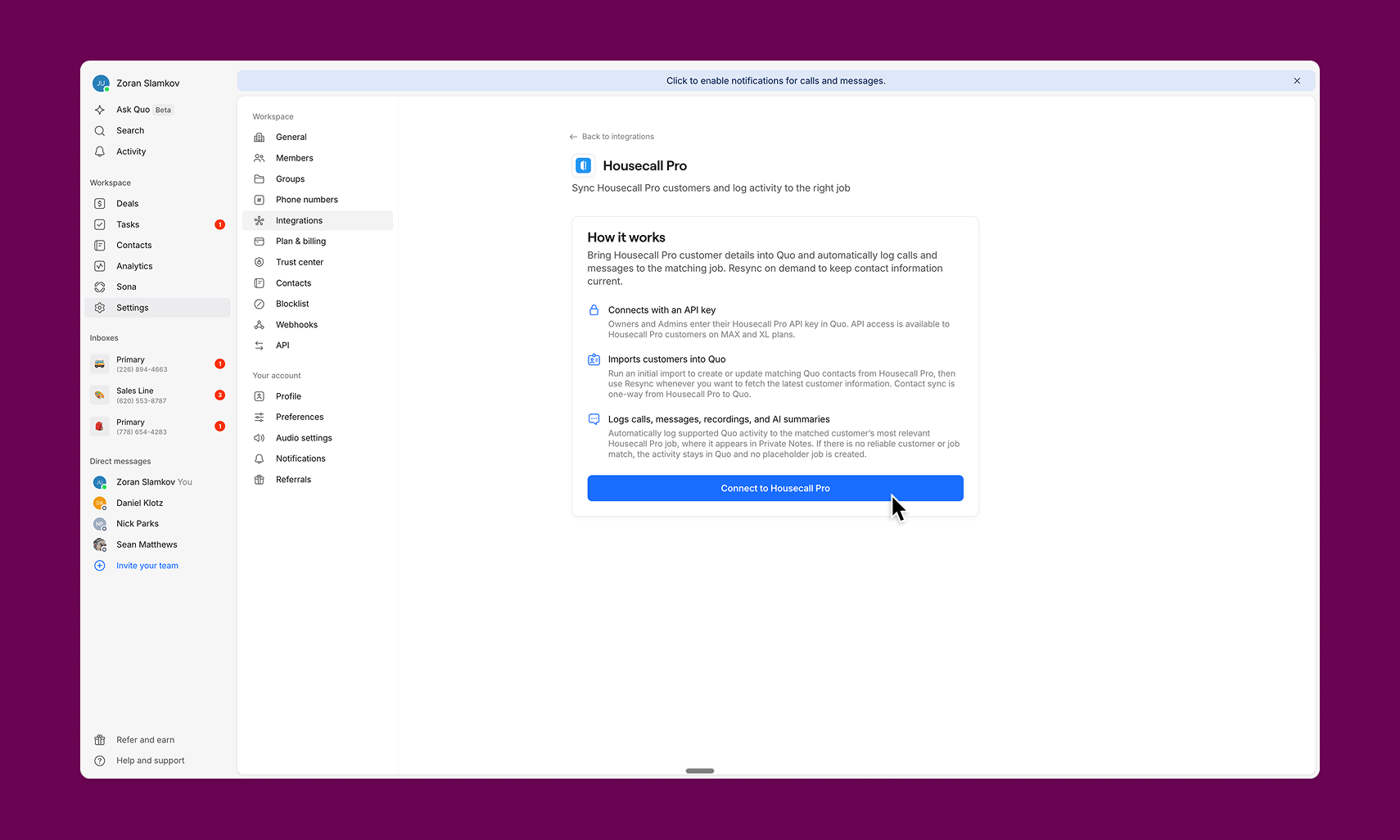 4. Paste the Housecall Pro API key and complete the connection.
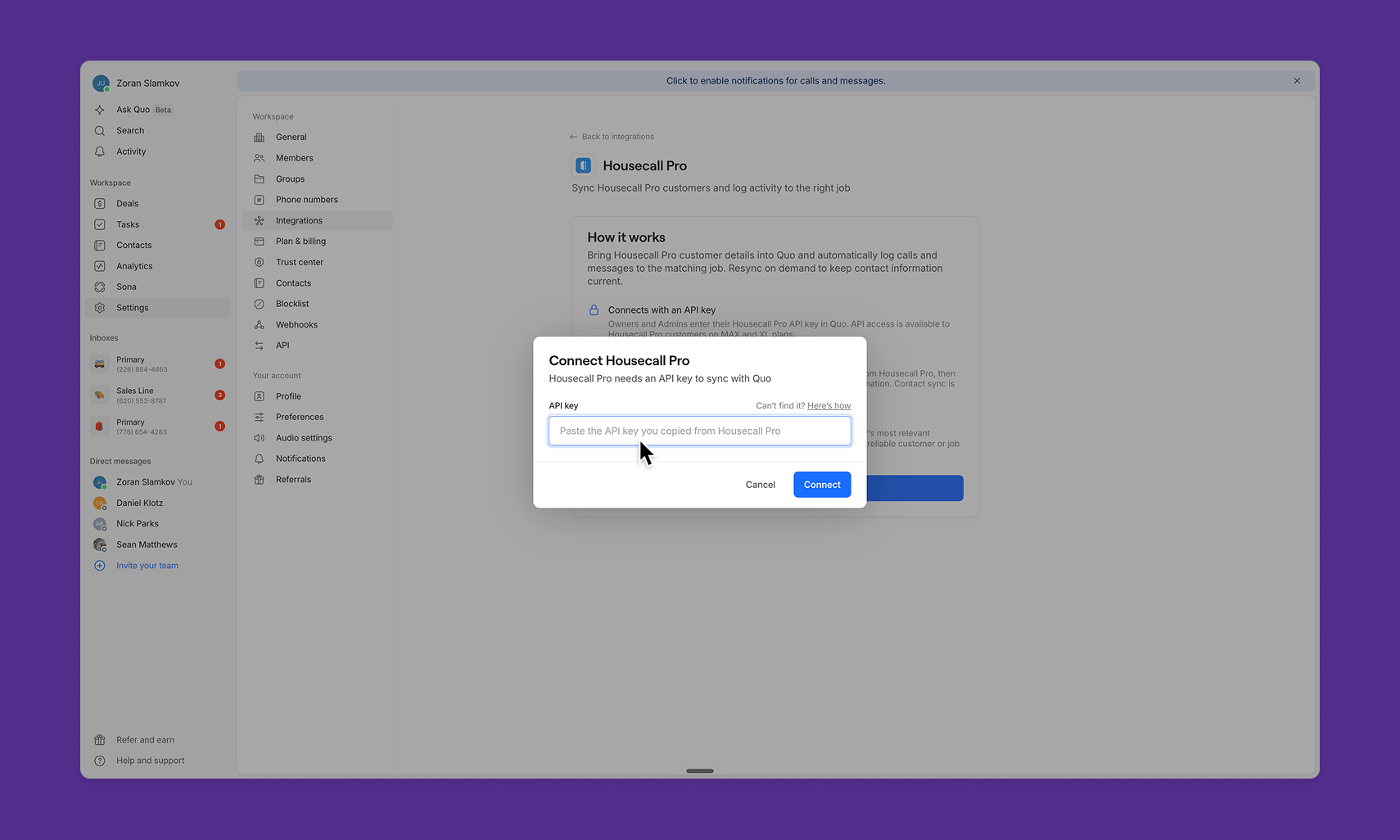 5. Quo validates the key and begins the initial customer import.
6. After the initial import, Quo refreshes Housecall Pro customer information automatically every hour.
***
## How contact matching works
Quo uses phone numbers to match contacts with Housecall Pro customers.
For the most reliable matching:
* Make sure each Housecall Pro customer has a current phone number.
* Avoid assigning the same phone number to unrelated customer records.
* Store phone numbers in a valid format, including the country code when applicable.
Customers without a usable phone number may not import or match. If several unrelated customers share the same number, Quo may be unable to choose a safe match and will not log duplicate activity.
***
## Find Quo activity in Housecall Pro
1. Open the matched customer in Housecall Pro.
2. Go to the customer's **Notes** section
3. Find the Quo call or text entry, including a deeplink back to the activity in Quo.
5. Quo validates the key and begins the initial customer import.
6. After the initial import, Quo refreshes Housecall Pro customer information automatically every hour.
***
## How contact matching works
Quo uses phone numbers to match contacts with Housecall Pro customers.
For the most reliable matching:
* Make sure each Housecall Pro customer has a current phone number.
* Avoid assigning the same phone number to unrelated customer records.
* Store phone numbers in a valid format, including the country code when applicable.
Customers without a usable phone number may not import or match. If several unrelated customers share the same number, Quo may be unable to choose a safe match and will not log duplicate activity.
***
## Find Quo activity in Housecall Pro
1. Open the matched customer in Housecall Pro.
2. Go to the customer's **Notes** section
3. Find the Quo call or text entry, including a deeplink back to the activity in Quo.
.png?fit=max&auto=format&n=38BQtvC1lyWmtwlO&q=85&s=9a0429ea9b4edb7d26e6665f1804012d) ***
## Disconnect the integration
1. In Quo, go to **Settings → Integrations → Housecall Pro**.
2. Click **Disconnect**.
Disconnecting stops future contact refreshes and activity logging. Calls and messages created during the disconnected period are not logged retroactively after reconnection.
If you delete or revoke the API key in Housecall Pro, the integration will also stop working. Generate a new Full access key and reconnect the integration in Quo.
***
## FAQs
### How often does Quo refresh Housecall Pro contacts?
Quo runs an initial import when you connect, then refreshes contact information automatically every hour. A Housecall Pro change may take up to one hour to appear in Quo.
### Do contact updates sync from Quo back to Housecall Pro?
No. Contact sync is one-way from Housecall Pro to Quo. Make customer-information changes in Housecall Pro.
### Which Housecall Pro plan do I need?
You need a Housecall Pro MAX or XL plan with API access. You also need a Quo Business or Scale plan.
### Which API-key permission should I choose?
Choose **Full access** so Quo can import customer information and log communication activity back to Housecall Pro.
### Why is a contact missing in Quo?
Confirm that:
* The customer has a usable phone number in Housecall Pro.
* The initial or most recent hourly sync completed.
* The API key is still active.
* Your Housecall Pro plan includes API access.
* The same phone number is not shared by multiple unrelated customers.
### Why didn’t a call or text appear in Housecall Pro?
Quo needs a reliable match between the contact and a Housecall Pro customer, based on phone number. If there is no match, the activity remains in Quo and no placeholder customer is created.
### Does the integration create jobs, estimates, or leads?
No. The current integration syncs customer details into Quo and logs supported activity to existing customer records. It does not create Housecall Pro jobs, estimates, or leads.
### Does Quo import historical calls and messages?
No. Activity logging begins after the integration is connected.
***
## Need help?
[Submit a support request](https://support.quo.com/contact-support/submit-a-request) and we’ll help you get connected.
***
***
## Disconnect the integration
1. In Quo, go to **Settings → Integrations → Housecall Pro**.
2. Click **Disconnect**.
Disconnecting stops future contact refreshes and activity logging. Calls and messages created during the disconnected period are not logged retroactively after reconnection.
If you delete or revoke the API key in Housecall Pro, the integration will also stop working. Generate a new Full access key and reconnect the integration in Quo.
***
## FAQs
### How often does Quo refresh Housecall Pro contacts?
Quo runs an initial import when you connect, then refreshes contact information automatically every hour. A Housecall Pro change may take up to one hour to appear in Quo.
### Do contact updates sync from Quo back to Housecall Pro?
No. Contact sync is one-way from Housecall Pro to Quo. Make customer-information changes in Housecall Pro.
### Which Housecall Pro plan do I need?
You need a Housecall Pro MAX or XL plan with API access. You also need a Quo Business or Scale plan.
### Which API-key permission should I choose?
Choose **Full access** so Quo can import customer information and log communication activity back to Housecall Pro.
### Why is a contact missing in Quo?
Confirm that:
* The customer has a usable phone number in Housecall Pro.
* The initial or most recent hourly sync completed.
* The API key is still active.
* Your Housecall Pro plan includes API access.
* The same phone number is not shared by multiple unrelated customers.
### Why didn’t a call or text appear in Housecall Pro?
Quo needs a reliable match between the contact and a Housecall Pro customer, based on phone number. If there is no match, the activity remains in Quo and no placeholder customer is created.
### Does the integration create jobs, estimates, or leads?
No. The current integration syncs customer details into Quo and logs supported activity to existing customer records. It does not create Housecall Pro jobs, estimates, or leads.
### Does Quo import historical calls and messages?
No. Activity logging begins after the integration is connected.
***
## Need help?
[Submit a support request](https://support.quo.com/contact-support/submit-a-request) and we’ll help you get connected.
***