> ## Documentation Index
> Fetch the complete documentation index at: https://support.quo.com/llms.txt
> Use this file to discover all available pages before exploring further.
# How to port out from Google Voice
> Step-by-step guide to transfer your phone number from Google Voice to Quo, formerly OpenPhone
## Overview
Transferring your Google Voice number to Quo requires unlocking the number first through Google's portal, then completing the standard porting process. The entire process typically takes 1-2 weeks.
## Before you begin
### Requirements
* Active Google Voice account with the number you want to port
* \$3 fee for Google Voice to unlock the number
* Google account credentials
* Access to the email associated with your Google Voice account
### What to know
* Your old Google Voice messages remain in your Google account after porting
* The number must be unlocked before you can port it
* Google Workspace (shown in our documentation as Google Voice Paid) numbers follow a different process than this one
## Unlocking your Google Voice number
### Step 1: Access the unlock page
Visit [google.com/voice/unlock](http://www.google.com/voice/unlock) and sign in to your Google account.
### Step 2: Select and unlock your number
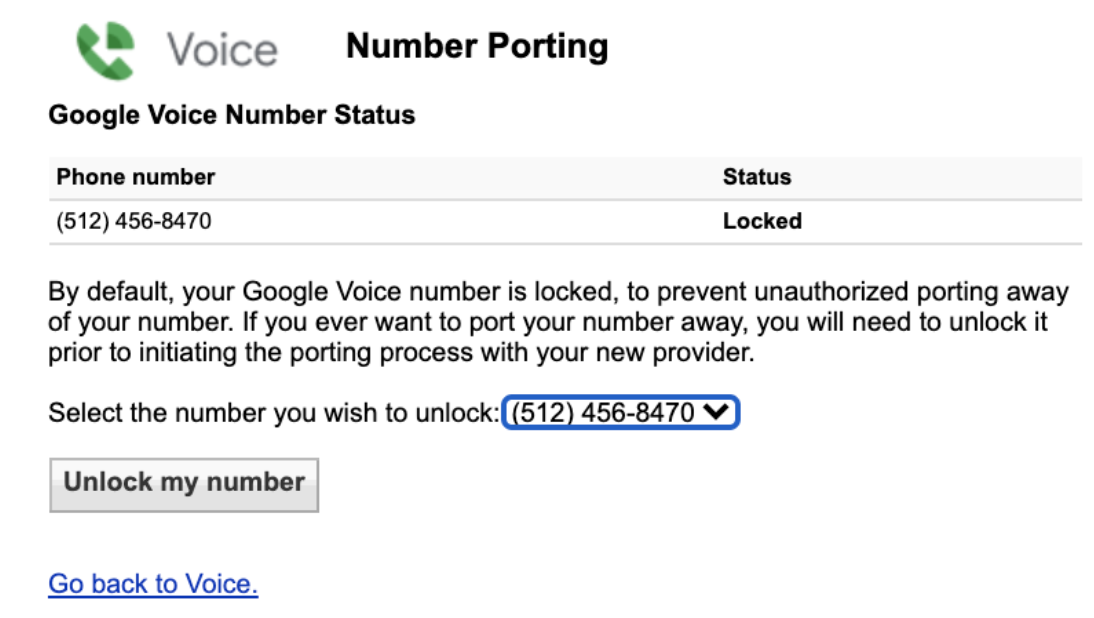
Click **Unlock my number** below the Google Voice number you want to port. If you have multiple numbers, select the correct one from the dropdown menu first.
 ### Step 3: Pay the unlock fee
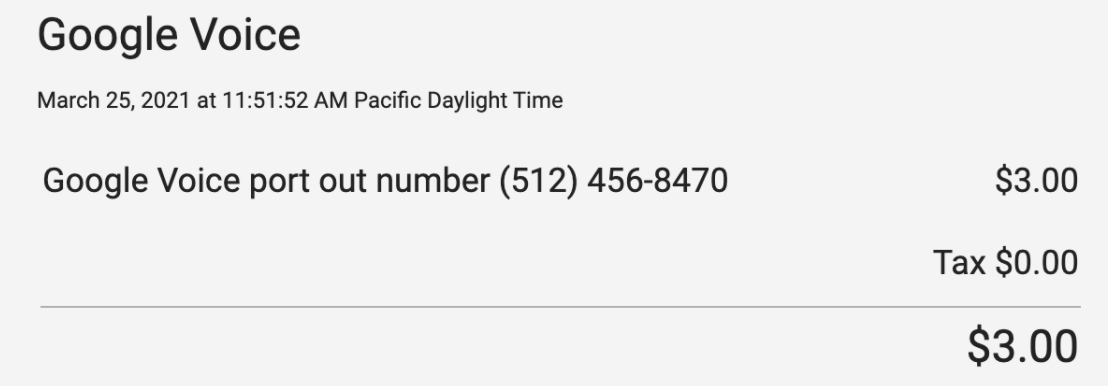
Google charges a \$3 fee to unlock your number for porting. The payment screen confirms that your messages will remain in your Google Voice account.
### Step 4: Complete payment
Pay the fee through Google Pay. You'll receive a receipt at your registered email address.
### Step 3: Pay the unlock fee
Google charges a \$3 fee to unlock your number for porting. The payment screen confirms that your messages will remain in your Google Voice account.
### Step 4: Complete payment
Pay the fee through Google Pay. You'll receive a receipt at your registered email address.
 ### Step 5: Verify unlock status
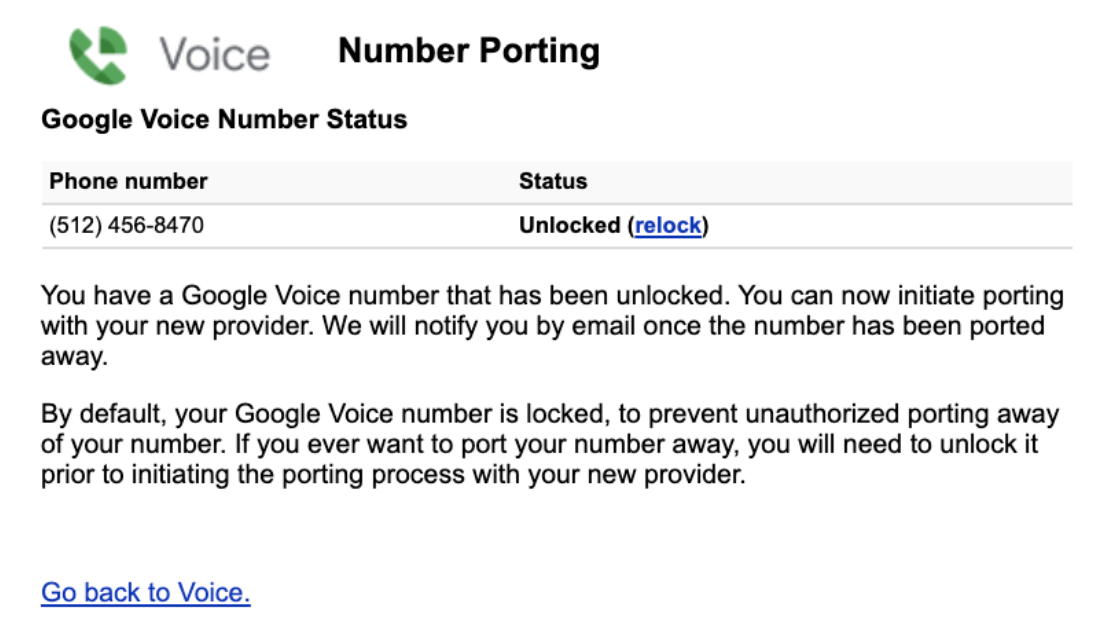
After payment, the Number Porting status will show "Unlocked".
### Step 5: Verify unlock status
After payment, the Number Porting status will show "Unlocked".
 ## Porting to Quo
Once your number is unlocked, you can initiate the port to Quo.
### Required information
When porting from Google Voice, you'll need:
* **Letter of Authorization**: Completed during the porting process
* **Billing proof**: Screenshot of the "number unlocked" page
* **PIN**: Your Google Voice voicemail PIN (or 0000 if you don't have one)
* **Account number**: Your Google Voice phone number
### Next steps
Follow the [standard porting process](https://support.quo.com/getting-started/porting/overview) to complete your transfer to Quo.
For Google Workspace (business) numbers, refer to the [Workspace Admin guide](https://support.google.com/a/answer/9530249?hl=en) for specific instructions.
Need assistance? [Submit a request](https://support.quo.com/help/submit-a-request) to our support team or [chat with us](https://support.quo.com/help/chat-with-us).
## FAQs
After unlocking your number, the porting process typically takes 1-2 weeks. The unlock itself is immediate after payment.
No, all your messages remain in your Google Voice account even after the number is ported away.
Yes, but the process is different. Workspace admins should follow Google's specific guide for business numbers.
If you don't have a voicemail PIN set up, use 0000 as your PIN when submitting the port request.
## Try before you port
Not ready to port yet? [Sign up](https://my.quo.com/signup) for a free 7-day trial with a temporary number to explore Quo's features before transferring your Google Voice number.
Need help? [Contact our support team](https://support.quo.com/help/submit-a-request) for assistance.
## Porting to Quo
Once your number is unlocked, you can initiate the port to Quo.
### Required information
When porting from Google Voice, you'll need:
* **Letter of Authorization**: Completed during the porting process
* **Billing proof**: Screenshot of the "number unlocked" page
* **PIN**: Your Google Voice voicemail PIN (or 0000 if you don't have one)
* **Account number**: Your Google Voice phone number
### Next steps
Follow the [standard porting process](https://support.quo.com/getting-started/porting/overview) to complete your transfer to Quo.
For Google Workspace (business) numbers, refer to the [Workspace Admin guide](https://support.google.com/a/answer/9530249?hl=en) for specific instructions.
Need assistance? [Submit a request](https://support.quo.com/help/submit-a-request) to our support team or [chat with us](https://support.quo.com/help/chat-with-us).
## FAQs
After unlocking your number, the porting process typically takes 1-2 weeks. The unlock itself is immediate after payment.
No, all your messages remain in your Google Voice account even after the number is ported away.
Yes, but the process is different. Workspace admins should follow Google's specific guide for business numbers.
If you don't have a voicemail PIN set up, use 0000 as your PIN when submitting the port request.
## Try before you port
Not ready to port yet? [Sign up](https://my.quo.com/signup) for a free 7-day trial with a temporary number to explore Quo's features before transferring your Google Voice number.
Need help? [Contact our support team](https://support.quo.com/help/submit-a-request) for assistance.