> ## Documentation Index
> Fetch the complete documentation index at: https://support.quo.com/llms.txt
> Use this file to discover all available pages before exploring further.
# Business carrier registration
> How to register your business for carrier compliance (A2P 10DLC) with Quo, formerly OpenPhone.
## Overview
Registering your business for carrier compliance (A2P 10DLC) ensures your messages are delivered reliably and in compliance with carrier regulations.
## Who should register as a business?
* Incorporated businesses (LLC, Corp, etc.)
* Organizations with an EIN (Employer Identification Number)
* Businesses sending messages on behalf of a brand or company
***
## How to complete your registration
### Try it step-by-step
### Steps to register
1. **Gather your business information:**
* Legal business name (including info like whether you're an LLC, an S-Corp, etc)
* EIN (Employer Identification Number)
* Official business address
* Your industry/vertical
* Your business website URL
Your website must be live, publicly accessible and not a "Coming soon" page. The business name in your website's Privacy Policy, Terms of Service, and footer should match the name you submit for your A2P Registration.
2. **Submit your registration:**
* Go to **Settings**, then click [**Trust center**](https://my.quo.com/settings/trust)
* Choose **"Register now"**
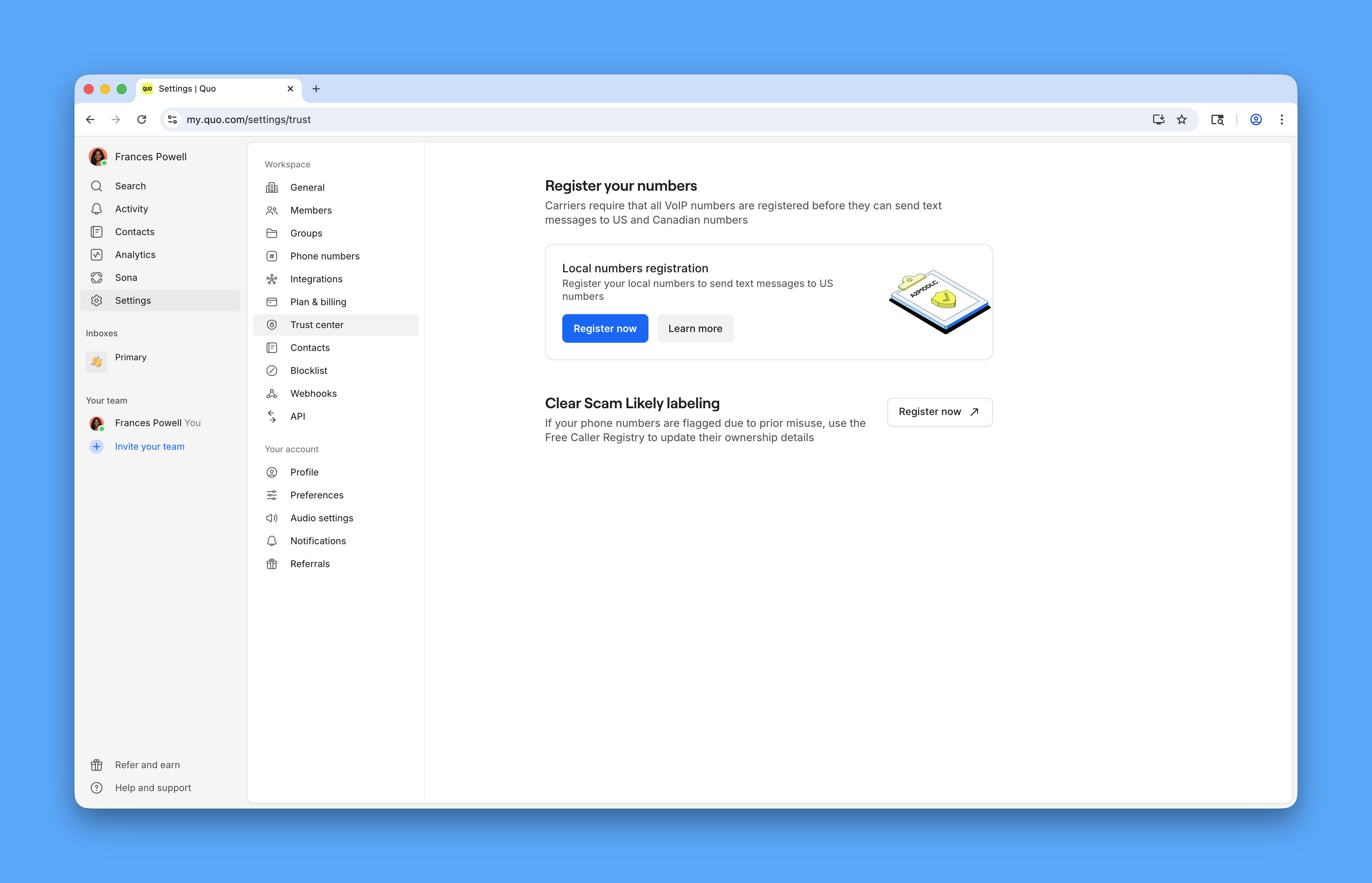 * Select **For business** as your registration type
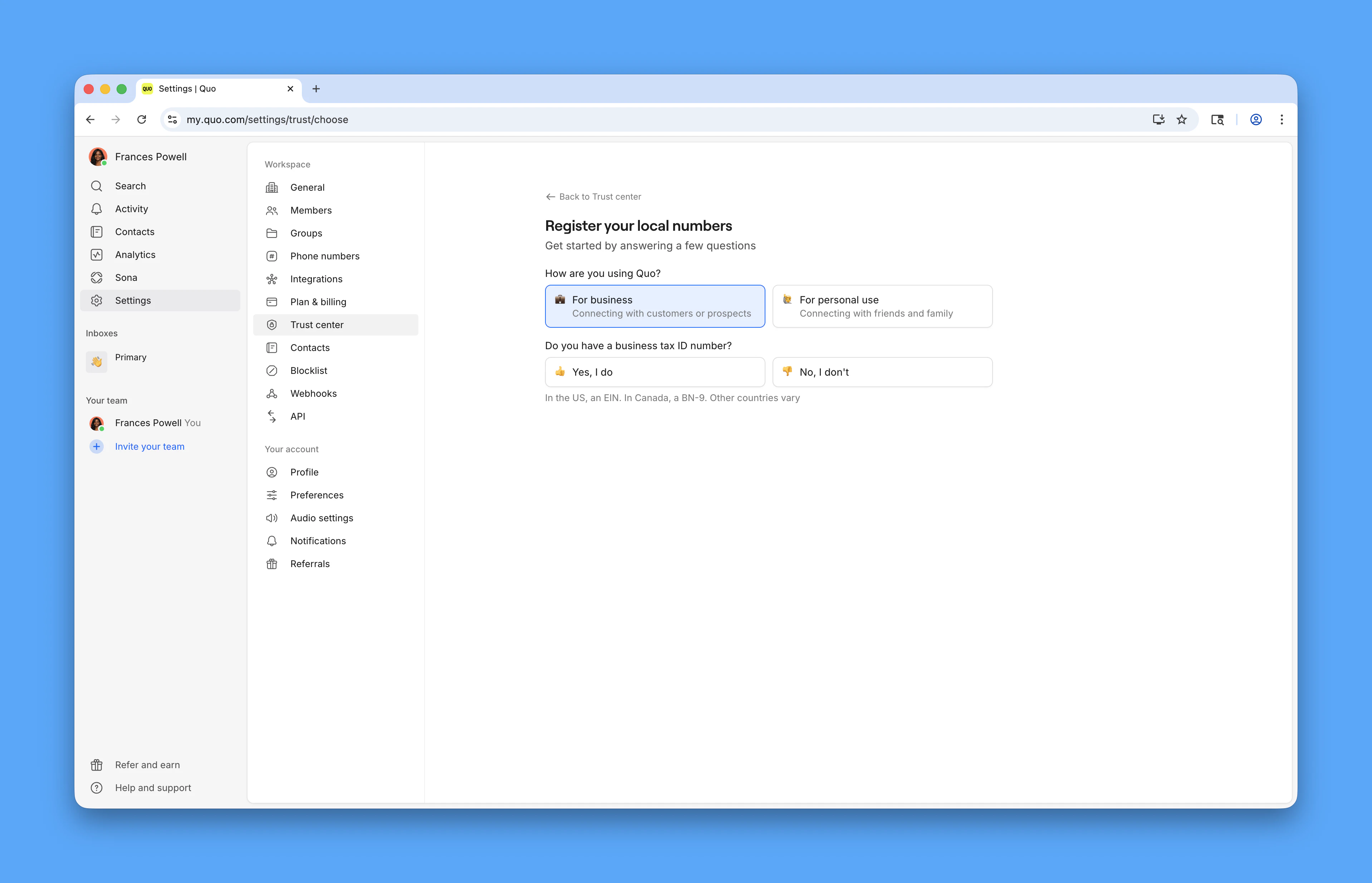 * Fill out the required fields and submit
3. **Wait for approval:**
* Carrier review can take 1-3 business days
* You’ll be notified by email when your registration is approved or if more information is needed
***
## Tips
* Double-check your EIN and business name for accuracy
* Confirm the business name on your website matches your registration
* Check that your website phone number and address match what you're submitting
* Ensure your website shows a clear product or service
* Identify your official business address (cannot be a PO Box or dev URL)
* If you have multiple brands, register each separately
* If registration is rejected despite a compliant website, [contact support](https://support.quo.com/help/submit-a-request) for Twilio clarification on the rejection reason
Having a consistent online presence (Google Business Profile, social media, business listings) helps strengthen your registration application.
***
## Caller ID names and business names
**The name you use for Caller ID must match the business name on your carrier registration.**
If you operate under a secondary or DBA business name that differs from your registration, the Caller ID submission will be rejected.
To use a secondary name, you'll need to provide documentation linking the two names (e.g. a DBA filing or name change certificate). [Quo](https://support.quo.com/help/submit-a-request) can submit a manual request behalf, but cannot guarantee approval.
***
## FAQs
Not directly. To switch, you’ll need to delete your current registration and re-register as a business.
A couple things to know:
* Messaging may be briefly paused during the switch
* The carrier review fee applies again
Sole proprietor and business registrations are treated as completely separate by carriers, so there’s no way to convert or transfer an existing registration
If you're using a secondary or DBA name, you'll need documentation linking it to your registered name (e.g. a DBA filing or name change certificate). [Contact support](https://support.quo.com/help/submit-a-request) and we'll submit a manual request to Twilio on your behalf. Approval is not guaranteed.
***
## Need support?
[Submit a request](https://support.quo.com/help/submit-a-request) to our support team or [chat with us](https://support.quo.com/help/chat-with-us).
* Fill out the required fields and submit
3. **Wait for approval:**
* Carrier review can take 1-3 business days
* You’ll be notified by email when your registration is approved or if more information is needed
***
## Tips
* Double-check your EIN and business name for accuracy
* Confirm the business name on your website matches your registration
* Check that your website phone number and address match what you're submitting
* Ensure your website shows a clear product or service
* Identify your official business address (cannot be a PO Box or dev URL)
* If you have multiple brands, register each separately
* If registration is rejected despite a compliant website, [contact support](https://support.quo.com/help/submit-a-request) for Twilio clarification on the rejection reason
Having a consistent online presence (Google Business Profile, social media, business listings) helps strengthen your registration application.
***
## Caller ID names and business names
**The name you use for Caller ID must match the business name on your carrier registration.**
If you operate under a secondary or DBA business name that differs from your registration, the Caller ID submission will be rejected.
To use a secondary name, you'll need to provide documentation linking the two names (e.g. a DBA filing or name change certificate). [Quo](https://support.quo.com/help/submit-a-request) can submit a manual request behalf, but cannot guarantee approval.
***
## FAQs
Not directly. To switch, you’ll need to delete your current registration and re-register as a business.
A couple things to know:
* Messaging may be briefly paused during the switch
* The carrier review fee applies again
Sole proprietor and business registrations are treated as completely separate by carriers, so there’s no way to convert or transfer an existing registration
If you're using a secondary or DBA name, you'll need documentation linking it to your registered name (e.g. a DBA filing or name change certificate). [Contact support](https://support.quo.com/help/submit-a-request) and we'll submit a manual request to Twilio on your behalf. Approval is not guaranteed.
***
## Need support?
[Submit a request](https://support.quo.com/help/submit-a-request) to our support team or [chat with us](https://support.quo.com/help/chat-with-us).