> ## Documentation Index
> Fetch the complete documentation index at: https://support.quo.com/llms.txt
> Use this file to discover all available pages before exploring further.
# Message opt-out
> Understand how contacts can opt out of text messages and manage subscription preferences
## Overview
Quo, formerly OpenPhone, provides automatic opt-out functionality to comply with anti-spam legislation and industry standards. Recipients can easily unsubscribe from text messages using standard keywords, and the system automatically prevents future messages while allowing opt-back-in options.
## How opt-out works
### Standard opt-out keywords
Recipients can stop receiving messages by replying with any of these single-word responses:
* **STOP**
* **STOPALL**
* **UNSUBSCRIBE**
* **CANCEL**
* **END**
* **QUIT**
Only single-word messages trigger the opt-out. Messages like "STOP PLEASE" or "PLEASE CANCEL" will not activate the unsubscribe process.
### Automatic confirmation
When someone uses an opt-out keyword, Quo automatically sends this confirmation message:
> "You have successfully been unsubscribed. You will not receive any more messages from this number. Reply START to resubscribe."
### Account-wide blocking
**Important:** The opt-out applies to all Quo numbers associated with your account, not just the specific number they replied to.
## What happens after opt-out
### Message delivery prevention
Once someone opts out:
* All future message attempts to that contact will fail
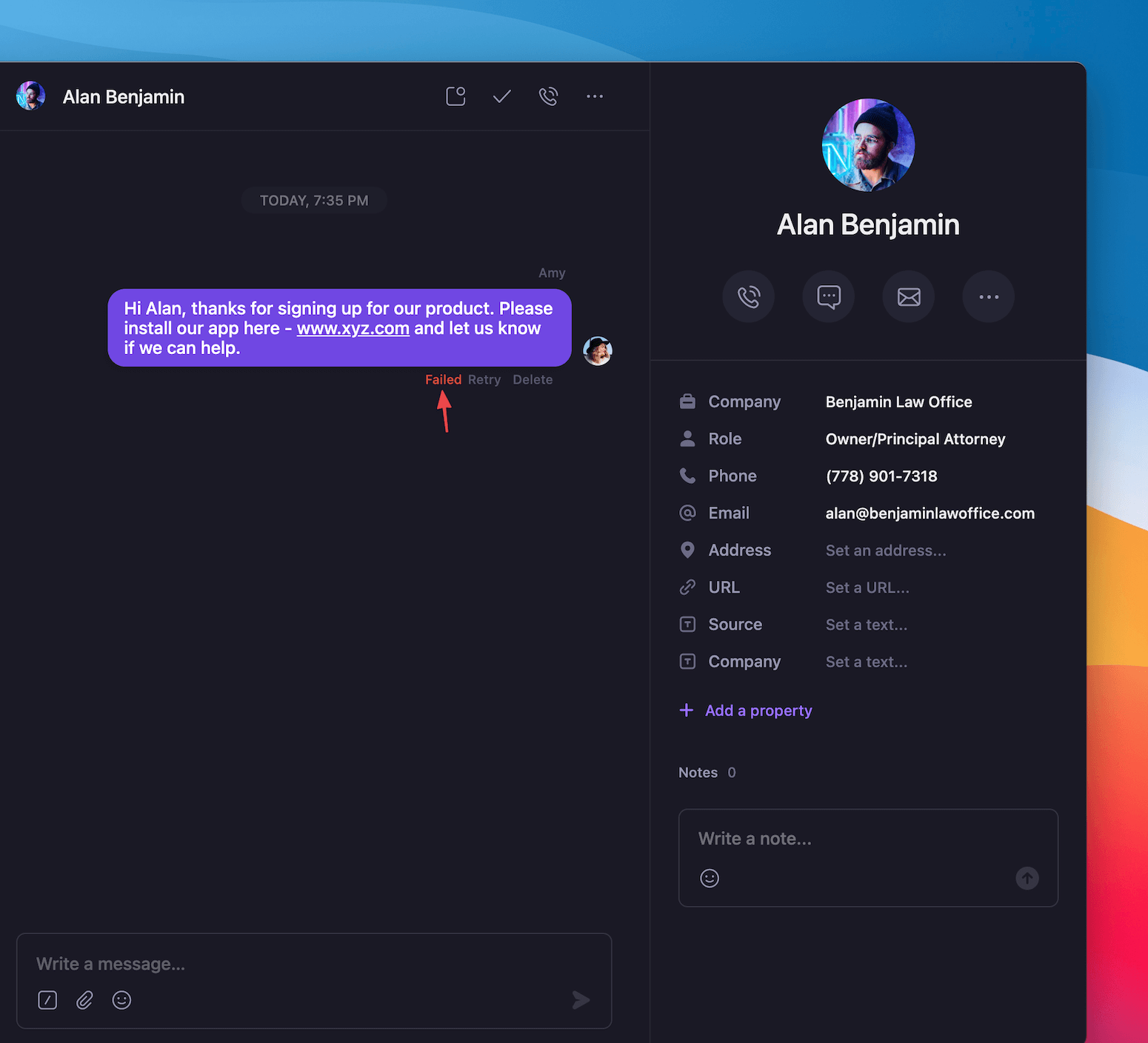
* You'll see a "Failed" status in Quo for attempted messages
* The block remains in effect until they manually opt back in
 ### Identifying opted-out contacts
**Signs a contact has opted out:**
* Messages consistently show "Failed" delivery status
* No response to recent messages
* Previous successful message history suddenly stops
## Opt-back-in process
### How contacts can resubscribe
Recipients can opt back into messages by texting either keyword:
* **START**
* **UNSTOP**
### Resubscription confirmation
When someone opts back in, they automatically receive this message:
> "You have successfully been re-subscribed to messages from this number. Reply HELP for help. Reply STOP to unsubscribe. Msg\&Data Rates May Apply."
### Restored messaging access
**After opt-back-in:**
* All Quo numbers in your account can message the contact again
* Normal message delivery resumes immediately
* Previous conversation history remains intact
## Compliance considerations
### Legal requirements
While Quo handles automatic opt-out processing, you should consult legal counsel to ensure your text messaging practices comply with all applicable laws and regulations.
### Best practices for compliance
**Include opt-out instructions:**
* Add "Reply STOP to unsubscribe" in initial messages
* Clearly communicate how recipients can opt out
* Honor opt-out requests immediately
**Record keeping:**
* Document when contacts opt out
* Maintain records of consent and opt-out history
* Track resubscription events
### Industry standards
**CTIA compliance:**
* Automatic keyword processing meets industry standards
* Single-word trigger requirements follow best practices
* Confirmation messages include required elements
## FAQs
Check if they accidentally sent a single-word message matching opt-out keywords (STOP, END, etc.). They can text START to resubscribe.
Quo's system should automatically send confirmations. If this fails, contact support to investigate the issue with automatic message processing.
Allow a few minutes for system processing. If messages continue failing after opt-back-in, there may be other delivery issues to investigate.
Quo doesn't provide a master opt-out list. Monitor individual conversation threads for failed message status to identify opted-out contacts.
No, contacts must opt back in themselves using START or UNSTOP keywords. This ensures compliance with anti-spam regulations.
If multiple contacts share a phone number (business lines), the opt-out applies to that number for your entire account. This is normal system behavior.
<>
### Identifying opted-out contacts
**Signs a contact has opted out:**
* Messages consistently show "Failed" delivery status
* No response to recent messages
* Previous successful message history suddenly stops
## Opt-back-in process
### How contacts can resubscribe
Recipients can opt back into messages by texting either keyword:
* **START**
* **UNSTOP**
### Resubscription confirmation
When someone opts back in, they automatically receive this message:
> "You have successfully been re-subscribed to messages from this number. Reply HELP for help. Reply STOP to unsubscribe. Msg\&Data Rates May Apply."
### Restored messaging access
**After opt-back-in:**
* All Quo numbers in your account can message the contact again
* Normal message delivery resumes immediately
* Previous conversation history remains intact
## Compliance considerations
### Legal requirements
While Quo handles automatic opt-out processing, you should consult legal counsel to ensure your text messaging practices comply with all applicable laws and regulations.
### Best practices for compliance
**Include opt-out instructions:**
* Add "Reply STOP to unsubscribe" in initial messages
* Clearly communicate how recipients can opt out
* Honor opt-out requests immediately
**Record keeping:**
* Document when contacts opt out
* Maintain records of consent and opt-out history
* Track resubscription events
### Industry standards
**CTIA compliance:**
* Automatic keyword processing meets industry standards
* Single-word trigger requirements follow best practices
* Confirmation messages include required elements
## FAQs
Check if they accidentally sent a single-word message matching opt-out keywords (STOP, END, etc.). They can text START to resubscribe.
Quo's system should automatically send confirmations. If this fails, contact support to investigate the issue with automatic message processing.
Allow a few minutes for system processing. If messages continue failing after opt-back-in, there may be other delivery issues to investigate.
Quo doesn't provide a master opt-out list. Monitor individual conversation threads for failed message status to identify opted-out contacts.
No, contacts must opt back in themselves using START or UNSTOP keywords. This ensures compliance with anti-spam regulations.
If multiple contacts share a phone number (business lines), the opt-out applies to that number for your entire account. This is normal system behavior.
<>