> ## Documentation Index
> Fetch the complete documentation index at: https://support.quo.com/llms.txt
> Use this file to discover all available pages before exploring further.
# Zapier
> Connect Quo, formerly OpenPhone, with 8,000+ applications through automated workflows and intelligent triggers
To use integrations, you must have the [Quo Desktop app installed](https://support.quo.com/getting-started/install-apps).
## Overview
Quo's Zapier integration connects your business phone system with 8,000+ applications, enabling powerful automation workflows that save time and reduce manual work. Create sophisticated triggers and actions to streamline your communication processes.
Zapier integration is included with all Quo plans. Message sending via Zapier uses pay-per-use API pricing starting February 2025.
## Understanding Zapier automation
**What is Zapier?** [Zapier](https://zapier.com/apps/openphone/integrations) is a no-code automation platform that connects applications and automates workflows between them. Instead of manually transferring data between tools, Zapier handles these tasks automatically.
**How Zaps work:** Every Zapier workflow (called a "Zap") consists of two main components:
* **Trigger**: An event that starts the automation (e.g., new Quo call)
* **Action**: What happens when triggered (e.g., create CRM record)
**Integration possibilities:** With 8,000+ connected applications, you can create unlimited automation combinations to streamline your business processes and eliminate repetitive tasks.
## Setting up Zapier integration
### Prerequisites
**Requirements:**
* Active Zapier account ([create account](https://zapier.com/sign-up/))
* Quo workspace Owner or Admin permissions
* Active Quo account with chosen plan
### Connection process
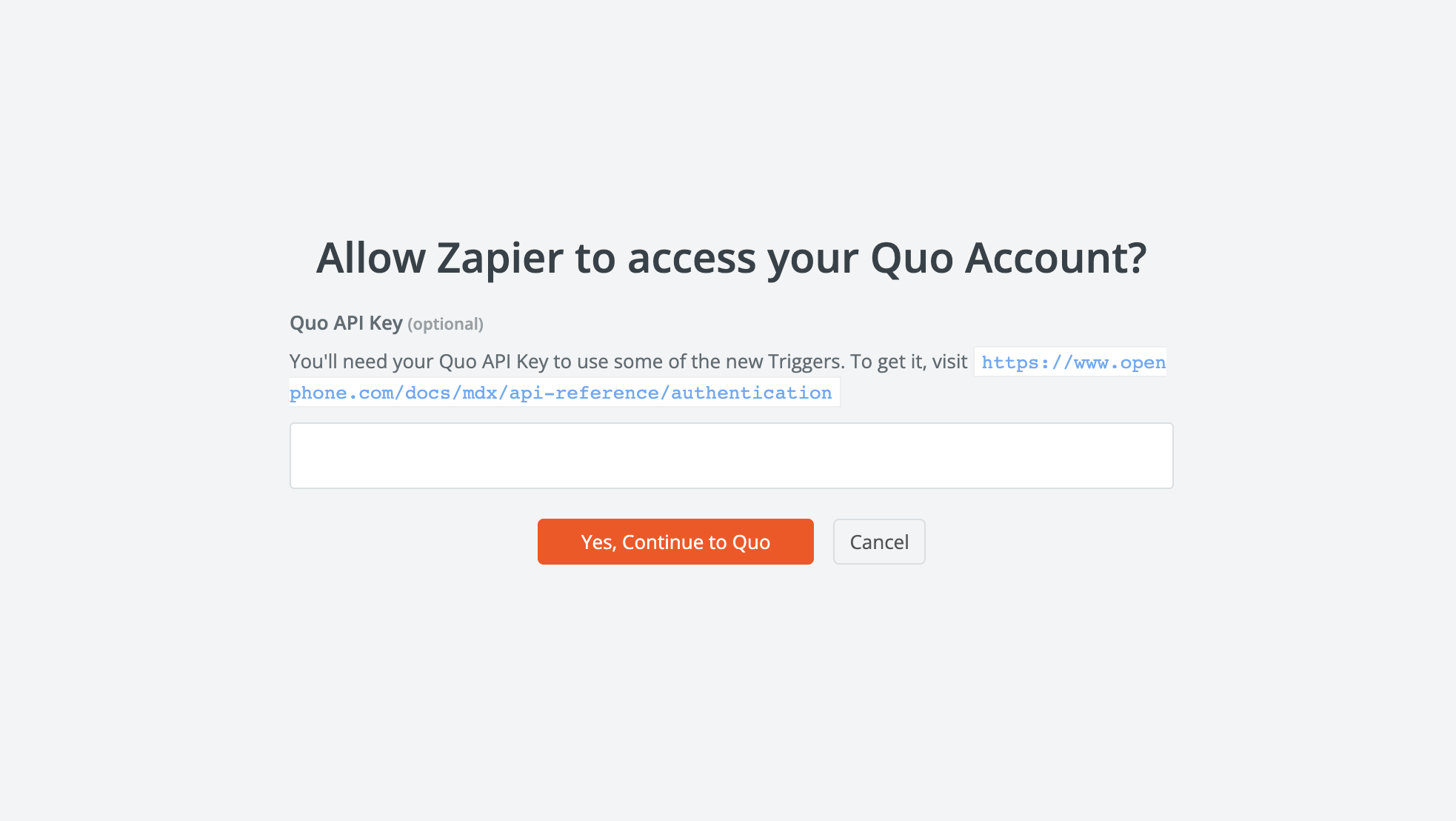
Zapier uses the [Quo API](https://www.quo.com/docs/mdx/api-reference/authentication) for certain triggers and actions, which is why an API key may be required during setup.
You'll need your [Quo API key](https://www.quo.com/docs/mdx/api-reference/authentication) in order to use some of the new triggers. To add it to an existing Zap, simply click "Reconnect" next to Quo in the Zapier interface.
**To connect Quo to Zapier:**
1. **Access Zapier**: Log in to [Zapier dashboard](https://zapier.com/app/login)
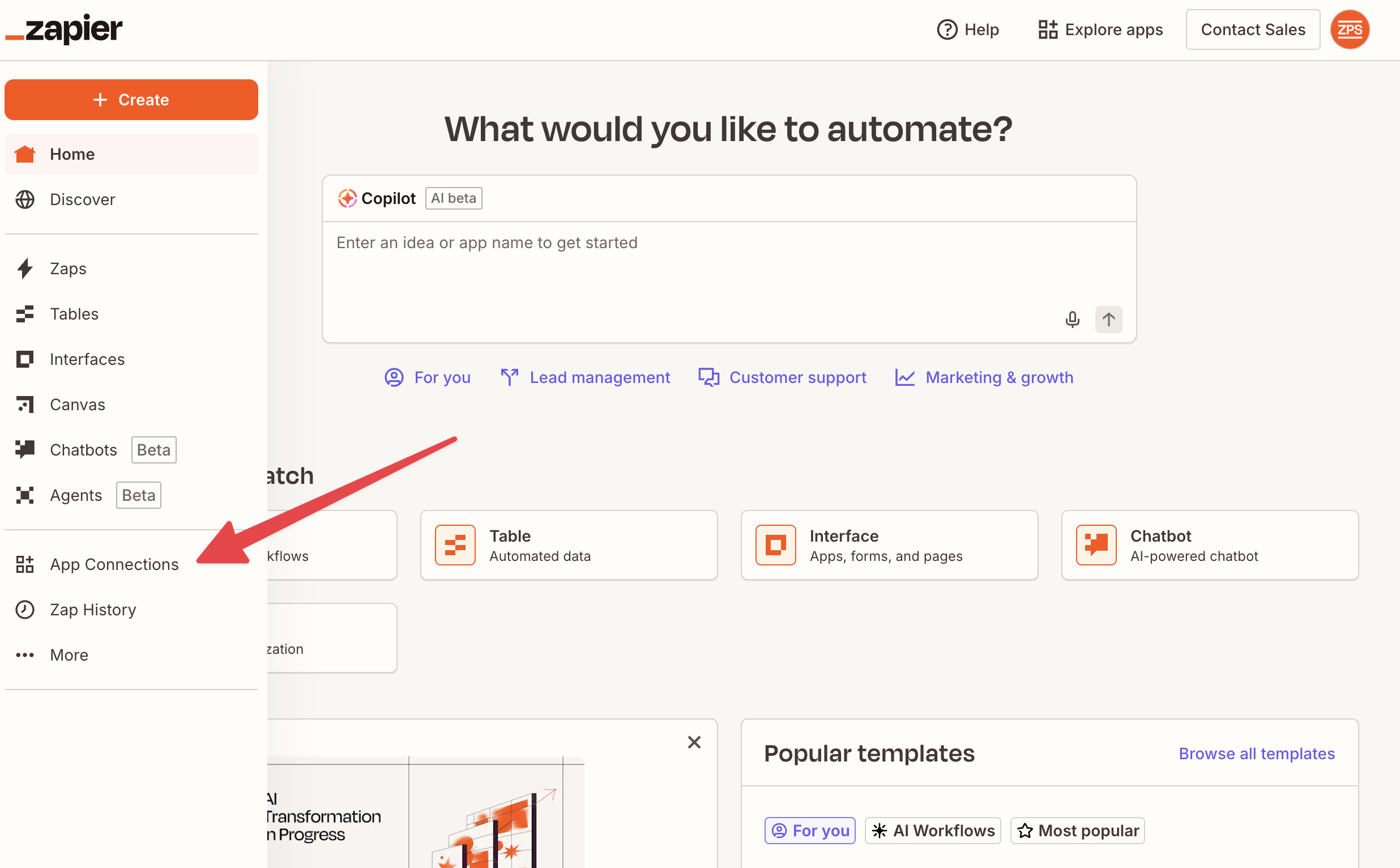
2. **Add connection**: Click "App Connections" and "Add connection"
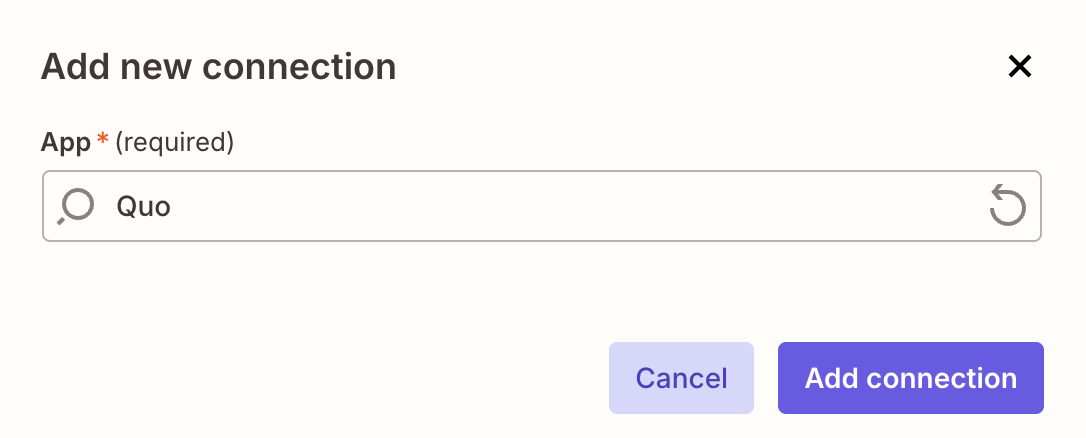
 4. **Search Quo**: Find "Quo" in app directory
 5. **Add Quo API key**: Generate your Quo API key [here](https://my.quo.com/settings/api) and paste it before continuing to authenticate
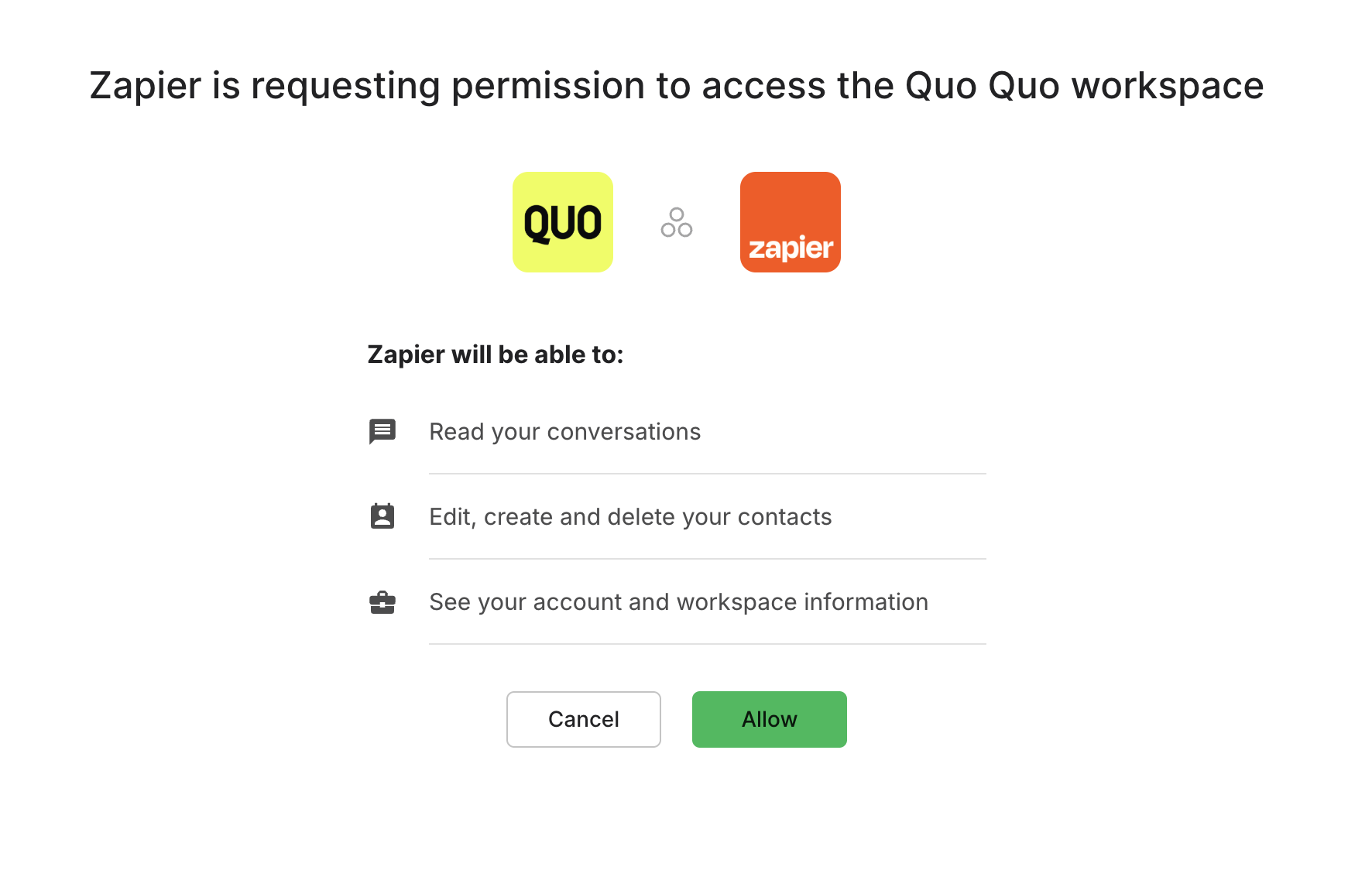
 5. **Authenticate**: Enter Quo credentials to authorize connection
 6. **Start automating**: Quo now available as trigger and action in Zaps
 ## Available triggers and actions
You'll need to add your [Quo API key](https://www.quo.com/docs/mdx/api-reference/authentication) to the Quo app connection in Zapier in order to use the triggers and actions marked with an asterix.
### Trigger events
* **Incoming message received**: Activates when Quo receives a text message
* **Outgoing message delivered**: Activates when sent message is successfully delivered
* **Incoming call completed**: Activates when incoming call ends (includes voicemail data if applicable)
* **Outgoing call completed**: Activates when outgoing call ends
* **Call recording completed**: Activates when call recording is generated and available
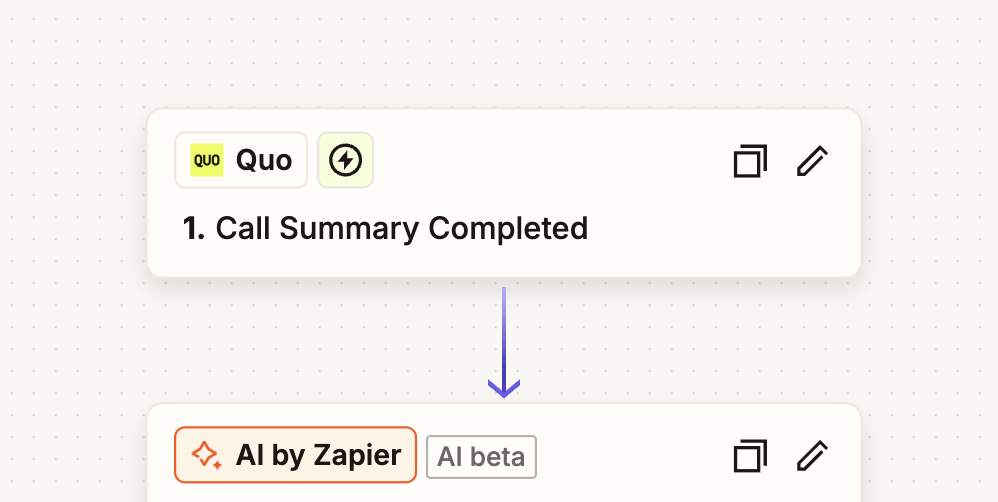
* **Call summary completed**: Activates when AI call summary is generated
* **Call transcript completed**: Activates when call transcription is processed
* **List phone numbers**: Retrieve phone numbers and users associated with your workspace
### Action capabilities
* **Create or update contact**: Add new contacts or modify existing contact information
* **Send a message**: Send SMS messages through Quo to any contact
* \*\* List calls\*\*: Retrieve call history with filtering options
* **Get recordings for a call**: Access call recording files
* **Get a summary for a call**: Retrieve AI-generated call summaries
* **Get a transcription for a call**: Access call transcription text
* **List conversations**: Browse conversation threads
* **List messages**: Retrieve message history
* **Get a message by ID**: Fetch specific message details
* **List phone numbers**: Access account phone number inventory
### Data handling
**Available data fields:**
* Call duration and timestamps
* Voicemail recordings and transcriptions
* Message content and media attachments
* Contact information and phone numbers
* Call status and completion details
## Common automation workflows
### Lead generation and follow-up
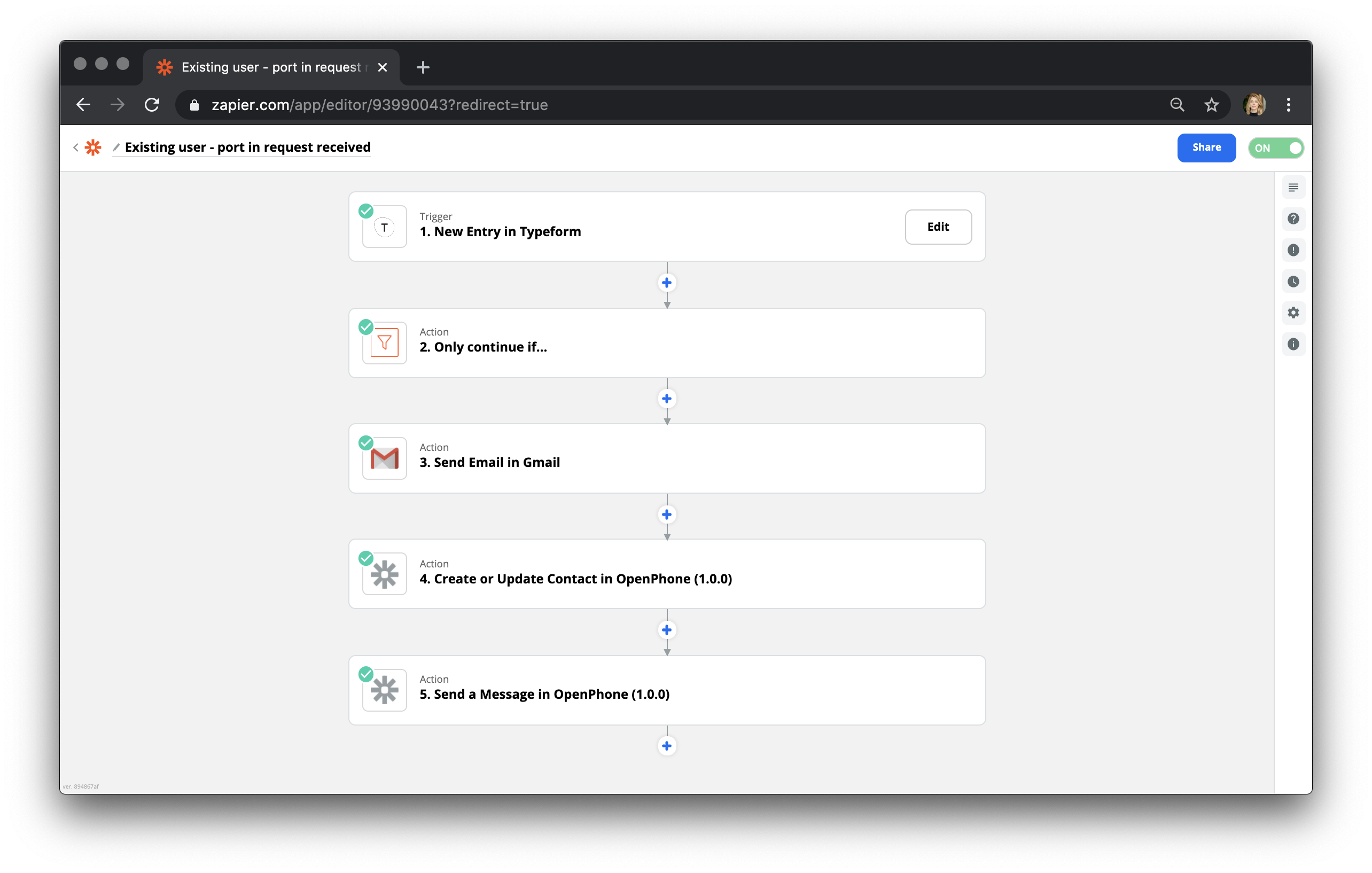
**Typeform to Quo automation:** When someone completes a survey, automatically add them to Quo contacts and send confirmation message:
## Available triggers and actions
You'll need to add your [Quo API key](https://www.quo.com/docs/mdx/api-reference/authentication) to the Quo app connection in Zapier in order to use the triggers and actions marked with an asterix.
### Trigger events
* **Incoming message received**: Activates when Quo receives a text message
* **Outgoing message delivered**: Activates when sent message is successfully delivered
* **Incoming call completed**: Activates when incoming call ends (includes voicemail data if applicable)
* **Outgoing call completed**: Activates when outgoing call ends
* **Call recording completed**: Activates when call recording is generated and available
* **Call summary completed**: Activates when AI call summary is generated
* **Call transcript completed**: Activates when call transcription is processed
* **List phone numbers**: Retrieve phone numbers and users associated with your workspace
### Action capabilities
* **Create or update contact**: Add new contacts or modify existing contact information
* **Send a message**: Send SMS messages through Quo to any contact
* \*\* List calls\*\*: Retrieve call history with filtering options
* **Get recordings for a call**: Access call recording files
* **Get a summary for a call**: Retrieve AI-generated call summaries
* **Get a transcription for a call**: Access call transcription text
* **List conversations**: Browse conversation threads
* **List messages**: Retrieve message history
* **Get a message by ID**: Fetch specific message details
* **List phone numbers**: Access account phone number inventory
### Data handling
**Available data fields:**
* Call duration and timestamps
* Voicemail recordings and transcriptions
* Message content and media attachments
* Contact information and phone numbers
* Call status and completion details
## Common automation workflows
### Lead generation and follow-up
**Typeform to Quo automation:** When someone completes a survey, automatically add them to Quo contacts and send confirmation message:
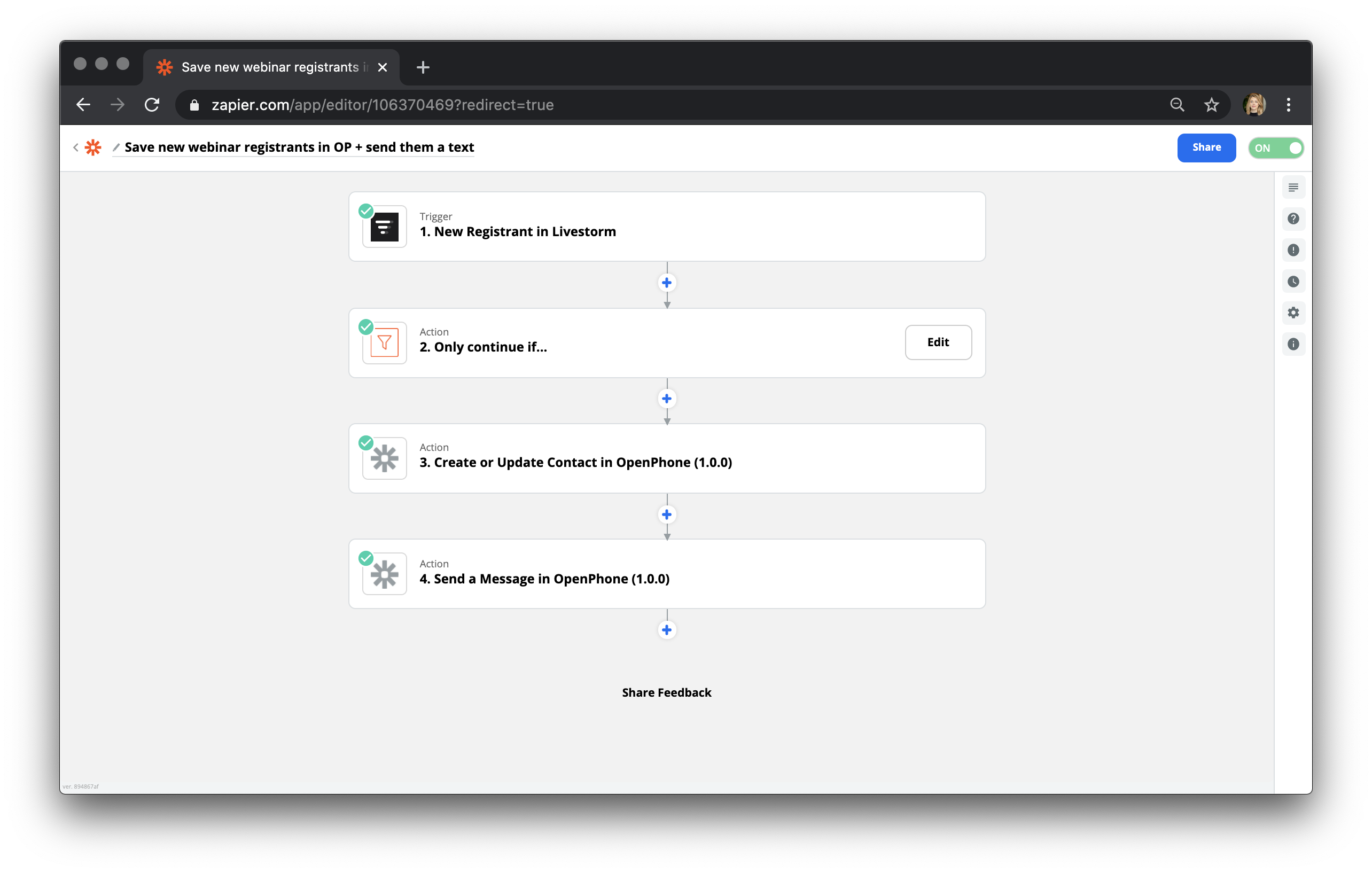
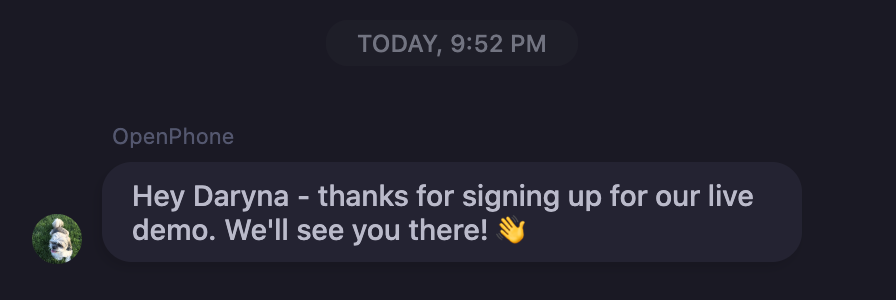
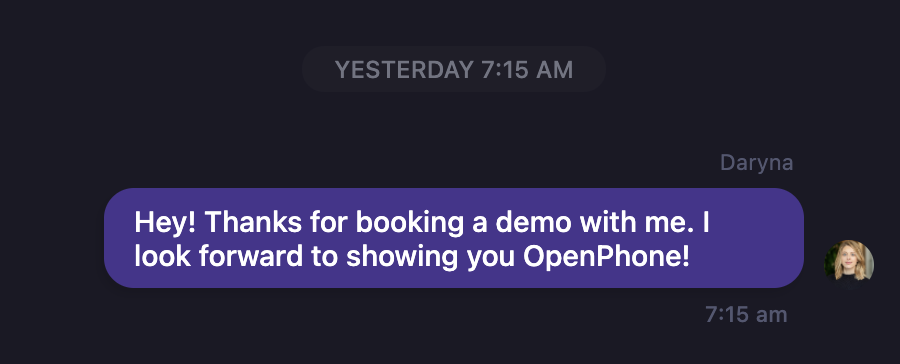
 **Demo registration workflow:** Automatic messaging for demo registrations:
 **Calendly booking confirmations:** Send automatic confirmation messages when appointments are scheduled:
 ### Additional workflow ideas
**Customer service:**
* Create support tickets from missed calls
* Log call summaries to help desk systems
* Send follow-up surveys after support calls
**Sales automation:**
* Add new leads to CRM from incoming calls
* Update deal stages based on call outcomes
* Schedule follow-up tasks from call recordings
**Marketing integration:**
* Add contacts to email marketing lists
* Track campaign responses through messages
* Segment contacts based on call interactions
## Pricing and billing
### Message pricing (Effective February 1, 2025)
**Pay-per-use model:** Quo charges for outgoing messages sent through Zapier using a segment-based pricing structure.
**Message segmentation:** Messages are divided into segments based on character count:
* **Standard messages**: Up to 160 characters per segment
* **Special characters**: Reduce capacity to 70 characters per segment
* **Multiple segments**: Longer messages automatically split
**Segment calculation tool:** Use this [Segment Calculator](https://twiliodeved.github.io/message-segment-calculator/) to estimate costs before sending messages.
### Cost optimization strategies
**Character count management:**
* **Monitor length**: Keep messages under 160 characters when possible
* **Avoid special characters**: Characters like é, ñ, ß reduce segment capacity
* **Limit emojis**: Most emojis count as two characters
* **Remove line breaks**: Each line break uses one character
**Content optimization:**
* **Use URL shorteners**: Long URLs consume multiple segments
* **Common abbreviations**: Use widely understood shortcuts
* **Concise messaging**: Communicate efficiently without losing clarity
### Current messaging rates
**Domestic messaging:**
* **US and Canada SMS**: \$0.01 per segment
**International messaging:**
* **Base rate**: \$0.01 per segment
* **Destination charges**: Additional rates vary by country
* **Rate lookup**: Check [International Pricing Guide](https://www.quo.com/rates) for specific countries
### Credit-based billing system
**How it works:**
1. **Add credits**: Purchase credits under "Plans & Billing" in Quo
2. **Automatic deduction**: Credits used when Zapier sends messages
3. **Insufficient funds**: Messages fail if credit balance is too low
4. **Auto-recharge**: Enable automatic credit top-ups to prevent interruptions
Partial credits cannot be used. Messages require sufficient credit balance for full segment cost or they will fail to send.
**Credit management:**
* Monitor usage in Quo billing dashboard
* Set up auto-recharge to maintain service continuity
* Review segment usage to optimize costs
* Track international vs domestic message ratios
## Best practices
### Workflow design
**Effective automation:**
* Start with simple trigger-action pairs
* Test thoroughly before activating Zaps
* Use filters to prevent unnecessary triggers
* Monitor Zap performance and error rates
### Message optimization
**Cost-effective messaging:**
* Design templates under 160 characters
* Use dynamic content strategically
* Implement message scheduling for optimal delivery
* Track delivery rates and optimize content
### Error handling
**Robust automation:**
* Set up error notifications for failed Zaps
* Include fallback actions for critical workflows
* Monitor credit balance regularly
* Test international messaging before deployment
## Getting started
**Ready to automate?** [Explore Quo Zapier integrations](https://zapier.com/apps/openphone/integrations) and start building your first automation workflow.
**Need assistance?** Submit a support request at [support.quo.com](https://support.quo.com/help/submit-a-request) for help with Zapier integration setup.
### Additional workflow ideas
**Customer service:**
* Create support tickets from missed calls
* Log call summaries to help desk systems
* Send follow-up surveys after support calls
**Sales automation:**
* Add new leads to CRM from incoming calls
* Update deal stages based on call outcomes
* Schedule follow-up tasks from call recordings
**Marketing integration:**
* Add contacts to email marketing lists
* Track campaign responses through messages
* Segment contacts based on call interactions
## Pricing and billing
### Message pricing (Effective February 1, 2025)
**Pay-per-use model:** Quo charges for outgoing messages sent through Zapier using a segment-based pricing structure.
**Message segmentation:** Messages are divided into segments based on character count:
* **Standard messages**: Up to 160 characters per segment
* **Special characters**: Reduce capacity to 70 characters per segment
* **Multiple segments**: Longer messages automatically split
**Segment calculation tool:** Use this [Segment Calculator](https://twiliodeved.github.io/message-segment-calculator/) to estimate costs before sending messages.
### Cost optimization strategies
**Character count management:**
* **Monitor length**: Keep messages under 160 characters when possible
* **Avoid special characters**: Characters like é, ñ, ß reduce segment capacity
* **Limit emojis**: Most emojis count as two characters
* **Remove line breaks**: Each line break uses one character
**Content optimization:**
* **Use URL shorteners**: Long URLs consume multiple segments
* **Common abbreviations**: Use widely understood shortcuts
* **Concise messaging**: Communicate efficiently without losing clarity
### Current messaging rates
**Domestic messaging:**
* **US and Canada SMS**: \$0.01 per segment
**International messaging:**
* **Base rate**: \$0.01 per segment
* **Destination charges**: Additional rates vary by country
* **Rate lookup**: Check [International Pricing Guide](https://www.quo.com/rates) for specific countries
### Credit-based billing system
**How it works:**
1. **Add credits**: Purchase credits under "Plans & Billing" in Quo
2. **Automatic deduction**: Credits used when Zapier sends messages
3. **Insufficient funds**: Messages fail if credit balance is too low
4. **Auto-recharge**: Enable automatic credit top-ups to prevent interruptions
Partial credits cannot be used. Messages require sufficient credit balance for full segment cost or they will fail to send.
**Credit management:**
* Monitor usage in Quo billing dashboard
* Set up auto-recharge to maintain service continuity
* Review segment usage to optimize costs
* Track international vs domestic message ratios
## Best practices
### Workflow design
**Effective automation:**
* Start with simple trigger-action pairs
* Test thoroughly before activating Zaps
* Use filters to prevent unnecessary triggers
* Monitor Zap performance and error rates
### Message optimization
**Cost-effective messaging:**
* Design templates under 160 characters
* Use dynamic content strategically
* Implement message scheduling for optimal delivery
* Track delivery rates and optimize content
### Error handling
**Robust automation:**
* Set up error notifications for failed Zaps
* Include fallback actions for critical workflows
* Monitor credit balance regularly
* Test international messaging before deployment
## Getting started
**Ready to automate?** [Explore Quo Zapier integrations](https://zapier.com/apps/openphone/integrations) and start building your first automation workflow.
**Need assistance?** Submit a support request at [support.quo.com](https://support.quo.com/help/submit-a-request) for help with Zapier integration setup.