> ## Documentation Index
> Fetch the complete documentation index at: https://support.quo.com/llms.txt
> Use this file to discover all available pages before exploring further.
# Pipedrive
> Quo’s Pipedrive integration allows you to connect your phone with your CRM. We’ll show you how it works, how to set up the integration and what’s possible.
## Overview
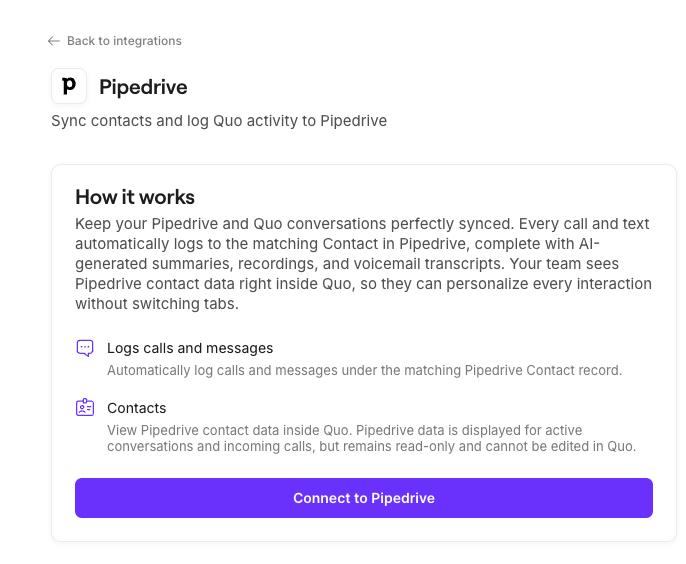
The Pipedrive integration brings your CRM and phone system together so your team always has the most up-to-date customer context. Once connected, Quo will automatically sync your Pipedrive contacts into Quo and log all calls, texts, voicemails, recordings, and AI-powered call summaries back to the correct Pipedrive contacts.
This allows sales, success, and support teams to work directly from Pipedrive with complete communication history without manual updates, or switching tools.
To enable the Pipedrive integration you'll need to be a workspace **Owner or Admin**, and be on a **Quo Business or Scale plan**
***
## How the integration works
### Contact syncing
Quo automatically imports and displays contact information from Pipedrive when a call or text matches an existing Pipedrive Person’s phone number. The integration focuses on displaying Pipedrive contact information **during active conversations** rather than syncing entire contact databases.
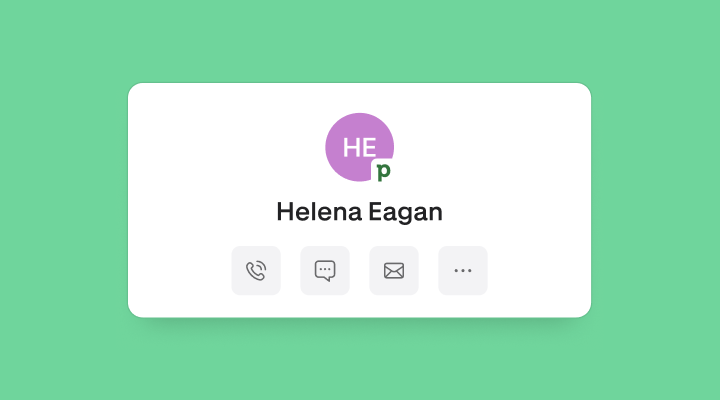 **For Quo to sync and display Pipedrive contact information**, the person you're communicating with **must already exist as a Person in Pipedrive** with their phone number on file.
If a call or text comes in from a number that doesn't match any existing Pipedrive contact, the integration won't be able to pull or display that contact's information.
**Imported fields:**
* First name
* Last name
* Phone
* Email address
**If available:**
* Organization
### Limitations of contact syncing with Pipedrive
* **One-way sync only:** Contact details flow from Pipedrive to Quo, not bidirectionally at this time.
* **Contact matching is phone-number based:** Quo displays Pipedrive contact details only when the incoming/outgoing phone number matches a *Person*’s number in Pipedrive.
* **Editing in Quo does not update Pipedrive:** If you need to update names, numbers, or emails for a *Person*, make those changes directly in Pipedrive.
* **Contacts created or edited in Quo do not sync back to Pipedrive.**
***
## Quo activity syncing
Quo can automatically log communication activity to the correct Pipedrive contact giving your team a unified timeline of every customer interaction. These include all of the following:
* Incoming calls (incl. those handled by Sona)
* Outgoing calls
* Call recordings
* Call summaries and next steps
* Voicemail
* SMS messages
**For Quo to sync and display Pipedrive contact information**, the person you're communicating with **must already exist as a Person in Pipedrive** with their phone number on file.
If a call or text comes in from a number that doesn't match any existing Pipedrive contact, the integration won't be able to pull or display that contact's information.
**Imported fields:**
* First name
* Last name
* Phone
* Email address
**If available:**
* Organization
### Limitations of contact syncing with Pipedrive
* **One-way sync only:** Contact details flow from Pipedrive to Quo, not bidirectionally at this time.
* **Contact matching is phone-number based:** Quo displays Pipedrive contact details only when the incoming/outgoing phone number matches a *Person*’s number in Pipedrive.
* **Editing in Quo does not update Pipedrive:** If you need to update names, numbers, or emails for a *Person*, make those changes directly in Pipedrive.
* **Contacts created or edited in Quo do not sync back to Pipedrive.**
***
## Quo activity syncing
Quo can automatically log communication activity to the correct Pipedrive contact giving your team a unified timeline of every customer interaction. These include all of the following:
* Incoming calls (incl. those handled by Sona)
* Outgoing calls
* Call recordings
* Call summaries and next steps
* Voicemail
* SMS messages
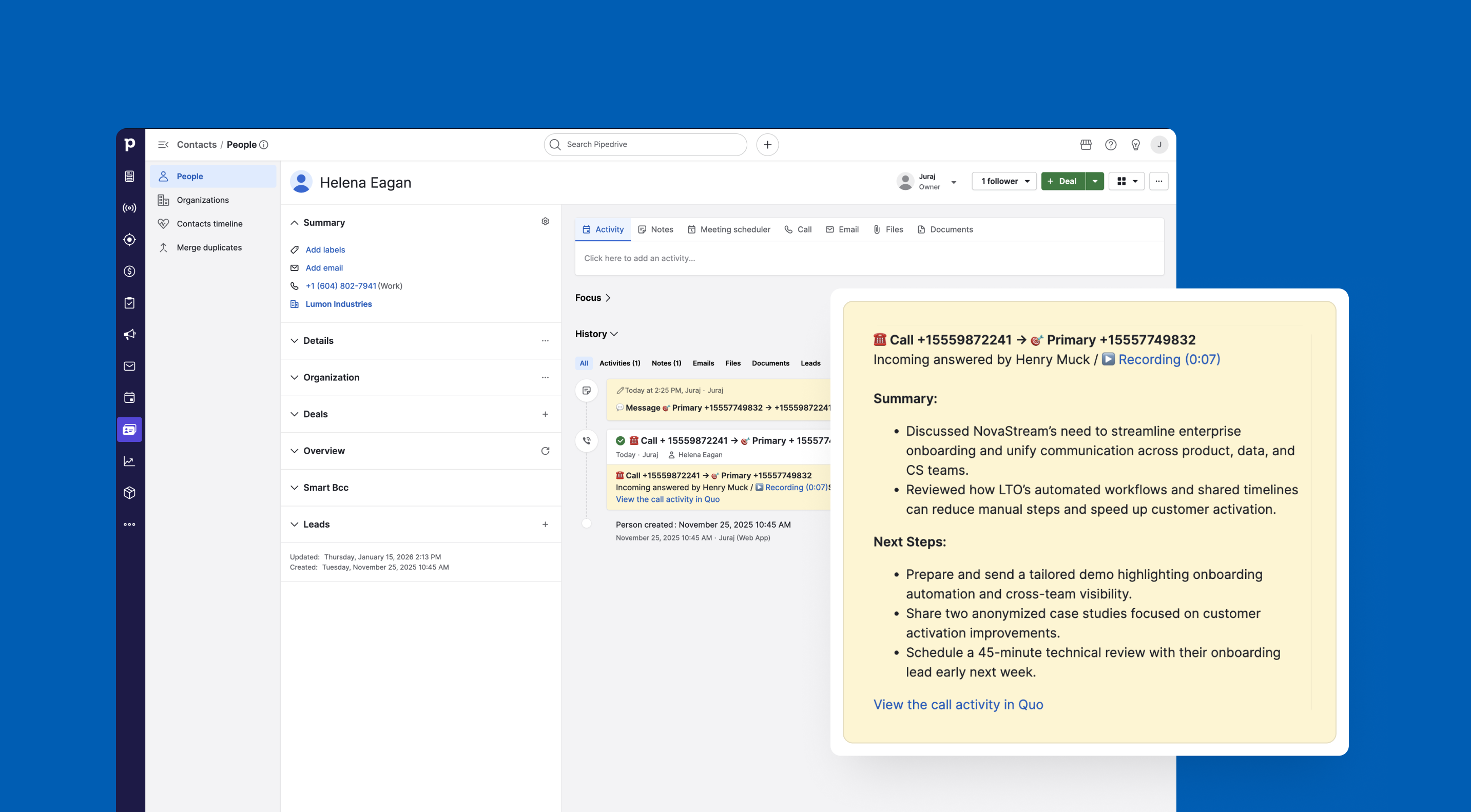 You're right, the formatting didn't carry over properly. Here's how it should look, matching HubSpot's style:
### **Lead and deal associations**
When Quo logs activity to Pipedrive, it automatically associates the activity with any Leads or Deals linked to the contact. This means:
* If a contact has an associated Lead or Deal in Pipedrive, logged calls and messages appear on that record's timeline as well.
* Lead and deal associations are read-only — they are pulled from Pipedrive based on existing contact relationships. You cannot create or modify Lead or Deal associations from Quo.
* All relevant Lead and Deal timelines are updated when activity is logged against a contact.
Lead and deal associations rely on the relationships configured in Pipedrive. If a Lead or Deal is associated with a contact in Pipedrive, Quo respects that association when logging activity. Make sure your Leads and Deals are properly associated with the relevant contacts in Pipedrive.
### Number-level control
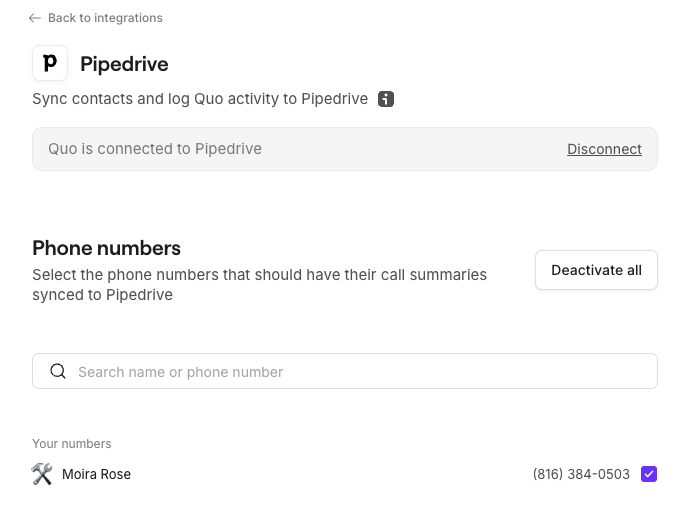
You can choose which Quo phone numbers sync activity to Pipedrive, giving teams flexibility in managing what data flows to the CRM.
## Who can access and set up the integration?
All customers on the [**Quo Scale and Business plans**](https://support.quo.com/core-concepts/administration/billing/pricing#plan-comparison) have access to the integration. Only an Quo workspace Owner or Admin can set up the integration.
From Pipedrive, you can access this integration with any Pipedrive plan.
***
## How to set up the Pipedrive integration
**Quo Workspace Owners/Admins:**
1. Navigate to the Quo [**web**](https://my.quo.com/signup) or **desktop** app
2. Go to **Workspace Settings** → [**Integrations**](https://get.quo.com/integrations-pipedrive)
3. Select **Pipedrive** and authenticate
You're right, the formatting didn't carry over properly. Here's how it should look, matching HubSpot's style:
### **Lead and deal associations**
When Quo logs activity to Pipedrive, it automatically associates the activity with any Leads or Deals linked to the contact. This means:
* If a contact has an associated Lead or Deal in Pipedrive, logged calls and messages appear on that record's timeline as well.
* Lead and deal associations are read-only — they are pulled from Pipedrive based on existing contact relationships. You cannot create or modify Lead or Deal associations from Quo.
* All relevant Lead and Deal timelines are updated when activity is logged against a contact.
Lead and deal associations rely on the relationships configured in Pipedrive. If a Lead or Deal is associated with a contact in Pipedrive, Quo respects that association when logging activity. Make sure your Leads and Deals are properly associated with the relevant contacts in Pipedrive.
### Number-level control
You can choose which Quo phone numbers sync activity to Pipedrive, giving teams flexibility in managing what data flows to the CRM.
## Who can access and set up the integration?
All customers on the [**Quo Scale and Business plans**](https://support.quo.com/core-concepts/administration/billing/pricing#plan-comparison) have access to the integration. Only an Quo workspace Owner or Admin can set up the integration.
From Pipedrive, you can access this integration with any Pipedrive plan.
***
## How to set up the Pipedrive integration
**Quo Workspace Owners/Admins:**
1. Navigate to the Quo [**web**](https://my.quo.com/signup) or **desktop** app
2. Go to **Workspace Settings** → [**Integrations**](https://get.quo.com/integrations-pipedrive)
3. Select **Pipedrive** and authenticate
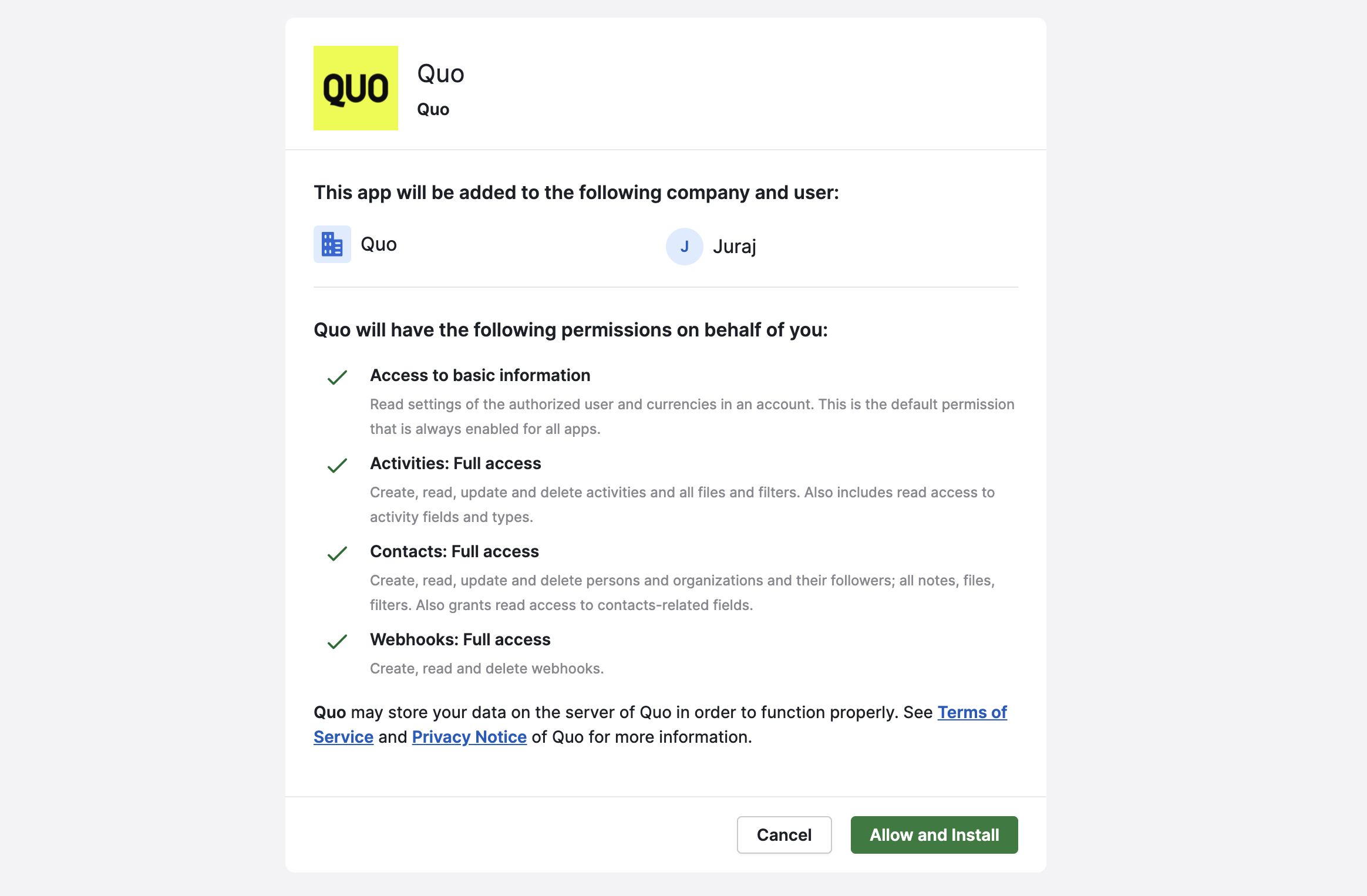 4. **Choose the phone numbers** you want to sync to Pipedrive
 5. **Save** configuration
 ## How to disconnect the Pipedrive integration
If you wish to uninstall your Pipedrive integration, there are two ways to do so:
### From Quo
* In your Quo workspace, navigate to **Settings >** **Integration >** **Pipedrive**
* Click **Disconnect**
### From Pipedrive
* In Pipedrive, navigate to your **Settings** **>** **Tools and apps** **> Marketplace apps**
* Find the Quo, then click the **three-dot menu (...) icon**
* Select **Uninstall**
While the integration is disconnected, Quo will not send any activity to Pipedrive. Activities generated during downtime cannot be synced retroactively, though they remain visible in Quo.
***
## FAQs
This integration sends and receives data differently, depending on the information that's being shared.
* **Pipedrive → Quo:** Contact information is read from Pipedrive and displayed in Quo during active conversations
* **Quo → Pipedrive:** Communication activity (calls, texts, voicemails, recordings, and AI summaries) is sent into Pipedrive
Changes made in Quo won’t update contact records in Pipedrive, and contacts created in Quo aren’t pushed back to Pipedrive.
Quo does **not** sync your entire Pipedrive contact database.
Contact information is displayed **only during active conversations**, when:
* A call or text is sent or received
* The phone number matches an existing *Person* in Pipedrive
This keeps Quo focused on live conversations instead of filling your workspace with unused contacts.
Quo logs activity using Pipedrive’s native objects:
* **Phone calls** are logged as **Activities**
* **SMS messages** are logged as **Notes**
Calls are logged as Activities so they can be used in Pipedrive automations and workflows. SMS messages are logged as Notes, following Pipedrive’s best practices.
Calls handled by **Sona** are logged in Pipedrive the same way as regular Quo calls.
Sona-handled call activities include:
* An indicator that the call was handled by Sona
* The call summary and next steps
* A recording link (if available)
Because these calls are logged as **Activities**, they can also be used in Pipedrive workflows, automations, and reporting.
Yes. To use **click-to-call** from Pipedrive, the **Quo desktop app must be installed and running**.
When you click a phone number in Pipedrive:
* The Quo desktop app opens
* The number is pre-filled
* The call is placed from your Quo number
Pipedrive **does not** currently include a built-in dialer for Quo.
Once a call is synced to Pipedrive:
* **Recording links do not expire** and usually download the MP3 directly
* **All relevant contacts** involved in the call are linked to the activity
You can also manually edit the activity in Pipedrive to:
* Add or remove associated contacts
* Attach the call to a deal
* Adjust ownership or context as needed
Any activities that synced **before** disconnection remain in Pipedrive.
Keep in mind:
* New calls or messages won’t sync while disconnected
* Missed activity **can’t be synced retroactively**
* Reconnecting the integration resumes syncing from that point forward
***
## Need Support?
Submit a support request at [**support.quo.com**](http://support.quo.com/) for help with the Pipedrive integration setup.
## How to disconnect the Pipedrive integration
If you wish to uninstall your Pipedrive integration, there are two ways to do so:
### From Quo
* In your Quo workspace, navigate to **Settings >** **Integration >** **Pipedrive**
* Click **Disconnect**
### From Pipedrive
* In Pipedrive, navigate to your **Settings** **>** **Tools and apps** **> Marketplace apps**
* Find the Quo, then click the **three-dot menu (...) icon**
* Select **Uninstall**
While the integration is disconnected, Quo will not send any activity to Pipedrive. Activities generated during downtime cannot be synced retroactively, though they remain visible in Quo.
***
## FAQs
This integration sends and receives data differently, depending on the information that's being shared.
* **Pipedrive → Quo:** Contact information is read from Pipedrive and displayed in Quo during active conversations
* **Quo → Pipedrive:** Communication activity (calls, texts, voicemails, recordings, and AI summaries) is sent into Pipedrive
Changes made in Quo won’t update contact records in Pipedrive, and contacts created in Quo aren’t pushed back to Pipedrive.
Quo does **not** sync your entire Pipedrive contact database.
Contact information is displayed **only during active conversations**, when:
* A call or text is sent or received
* The phone number matches an existing *Person* in Pipedrive
This keeps Quo focused on live conversations instead of filling your workspace with unused contacts.
Quo logs activity using Pipedrive’s native objects:
* **Phone calls** are logged as **Activities**
* **SMS messages** are logged as **Notes**
Calls are logged as Activities so they can be used in Pipedrive automations and workflows. SMS messages are logged as Notes, following Pipedrive’s best practices.
Calls handled by **Sona** are logged in Pipedrive the same way as regular Quo calls.
Sona-handled call activities include:
* An indicator that the call was handled by Sona
* The call summary and next steps
* A recording link (if available)
Because these calls are logged as **Activities**, they can also be used in Pipedrive workflows, automations, and reporting.
Yes. To use **click-to-call** from Pipedrive, the **Quo desktop app must be installed and running**.
When you click a phone number in Pipedrive:
* The Quo desktop app opens
* The number is pre-filled
* The call is placed from your Quo number
Pipedrive **does not** currently include a built-in dialer for Quo.
Once a call is synced to Pipedrive:
* **Recording links do not expire** and usually download the MP3 directly
* **All relevant contacts** involved in the call are linked to the activity
You can also manually edit the activity in Pipedrive to:
* Add or remove associated contacts
* Attach the call to a deal
* Adjust ownership or context as needed
Any activities that synced **before** disconnection remain in Pipedrive.
Keep in mind:
* New calls or messages won’t sync while disconnected
* Missed activity **can’t be synced retroactively**
* Reconnecting the integration resumes syncing from that point forward
***
## Need Support?
Submit a support request at [**support.quo.com**](http://support.quo.com/) for help with the Pipedrive integration setup.