> ## Documentation Index
> Fetch the complete documentation index at: https://support.quo.com/llms.txt
> Use this file to discover all available pages before exploring further.
# Make
> Create visual automation workflows between Quo, formerly OpenPhone, and thousands of apps using Make's no-code platform
To use integrations, you must have the [Quo Desktop app installed](https://support.quo.com/getting-started/install-apps).
## Overview
Make is a visual automation platform that connects Quo with thousands of apps through intuitive, no-code workflows. Design and automate everything from simple tasks to complex multi-step processes in minutes.
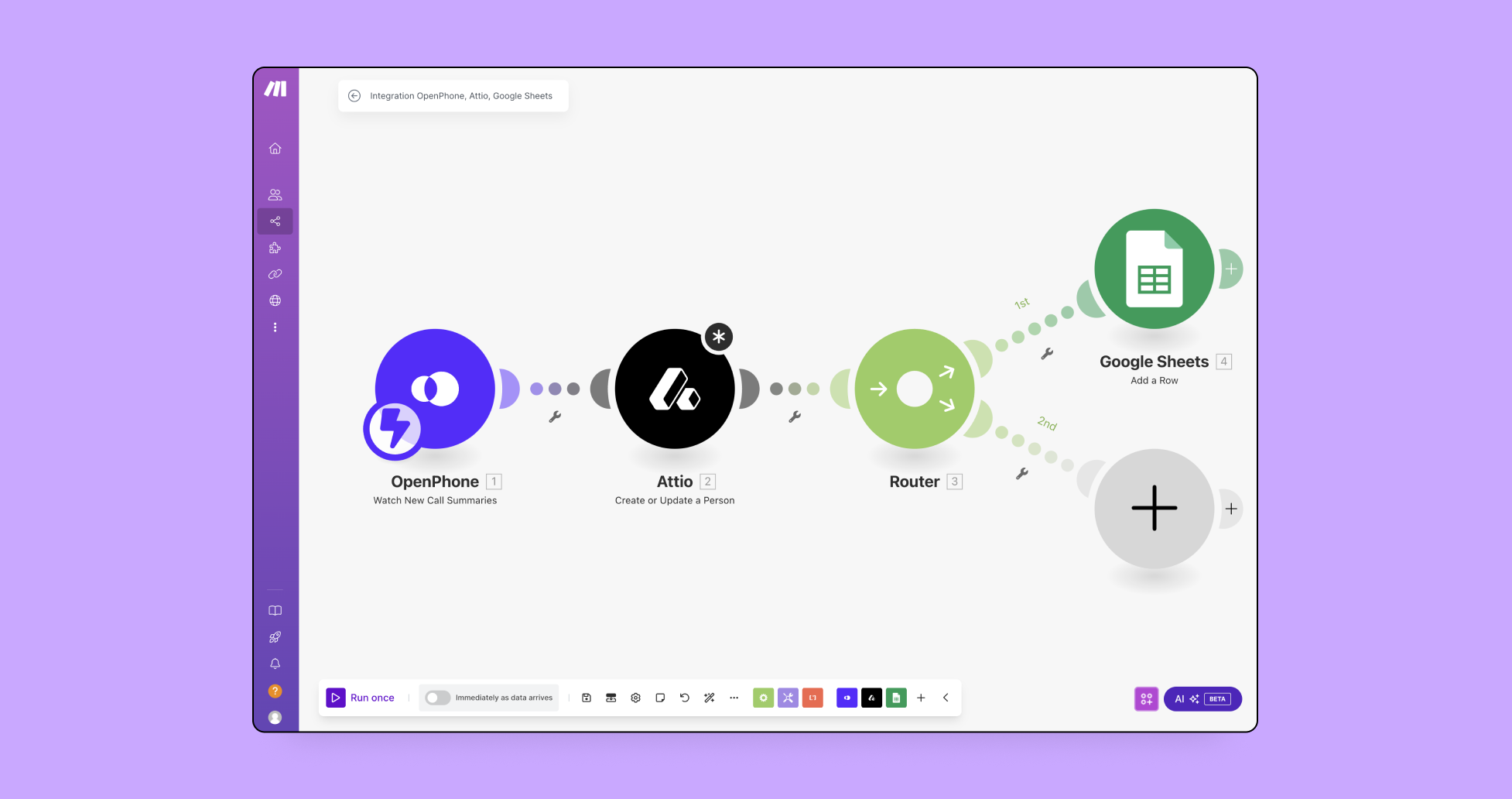 Make integration is included with all Quo plans. SMS messages sent through Make use Quo API pricing.
## What is Make?
**Visual automation platform:** [Make](https://www.make.com/register?promo=open-phone-app-partner-program) lets you design, build, and automate workflows between apps without coding. Create scenarios that trigger actions across your tech stack when specific events occur in Quo.
**Key capabilities:**
* Visual, drag-and-drop workflow builder
* Connects to thousands of apps and services
* Real-time data synchronization
* Custom scheduling and execution controls
* HTTP app for connecting any API
## Setting up Make integration
### Getting started
**Prerequisites:**
* Make account ([create account](https://www.make.com/register?promo=open-phone-app-partner-program) - 2 months free)
* Quo workspace Owner or Admin permissions
* API key generated from Quo
### Creating your first scenario
**Step-by-step setup:**
1. **Log into Make** and navigate to **Scenarios**
2. **Click "Create a new scenario"**
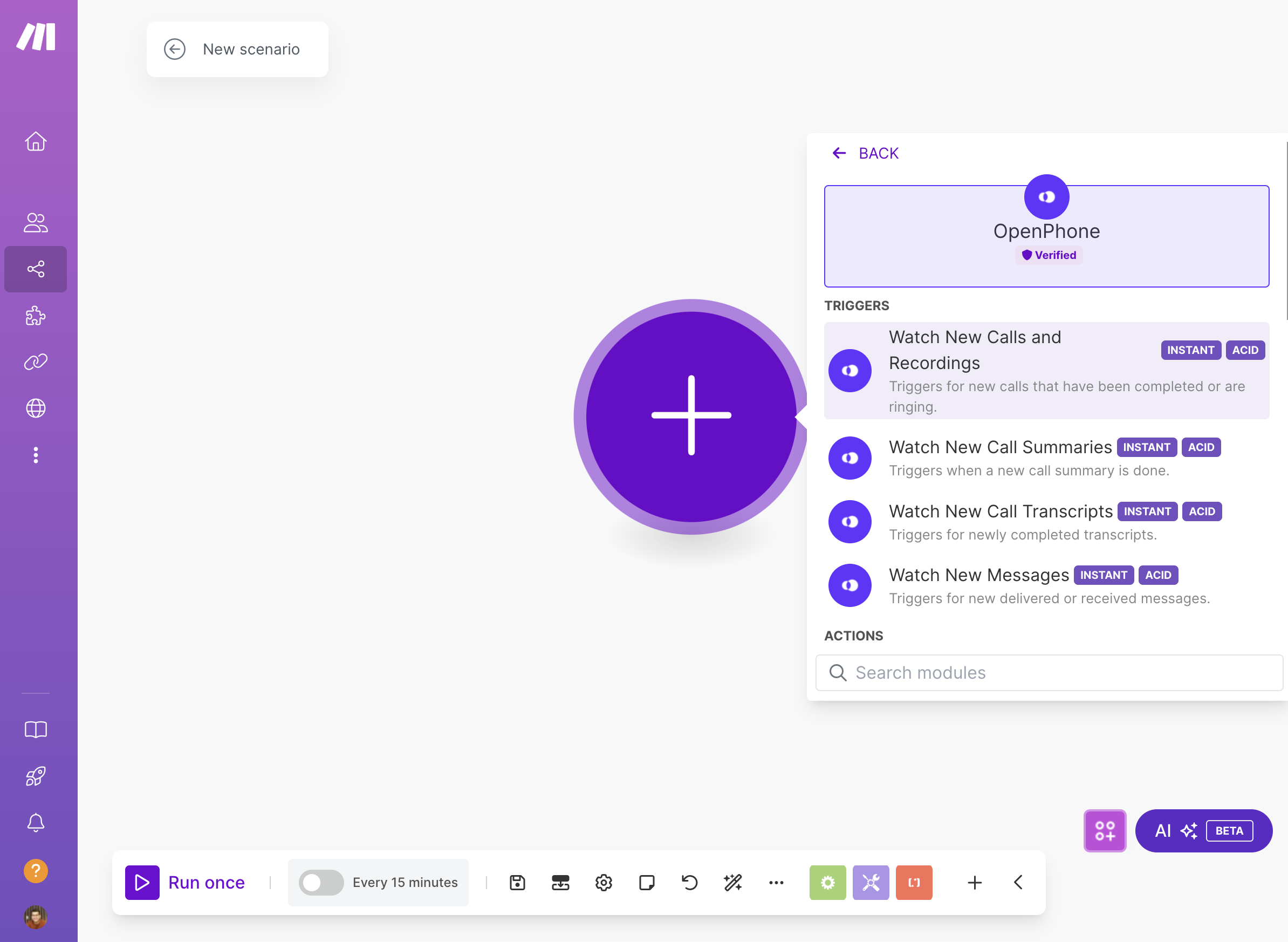
3. **Search for Quo** and select your trigger
4. **Generate API key** in Quo Settings → API
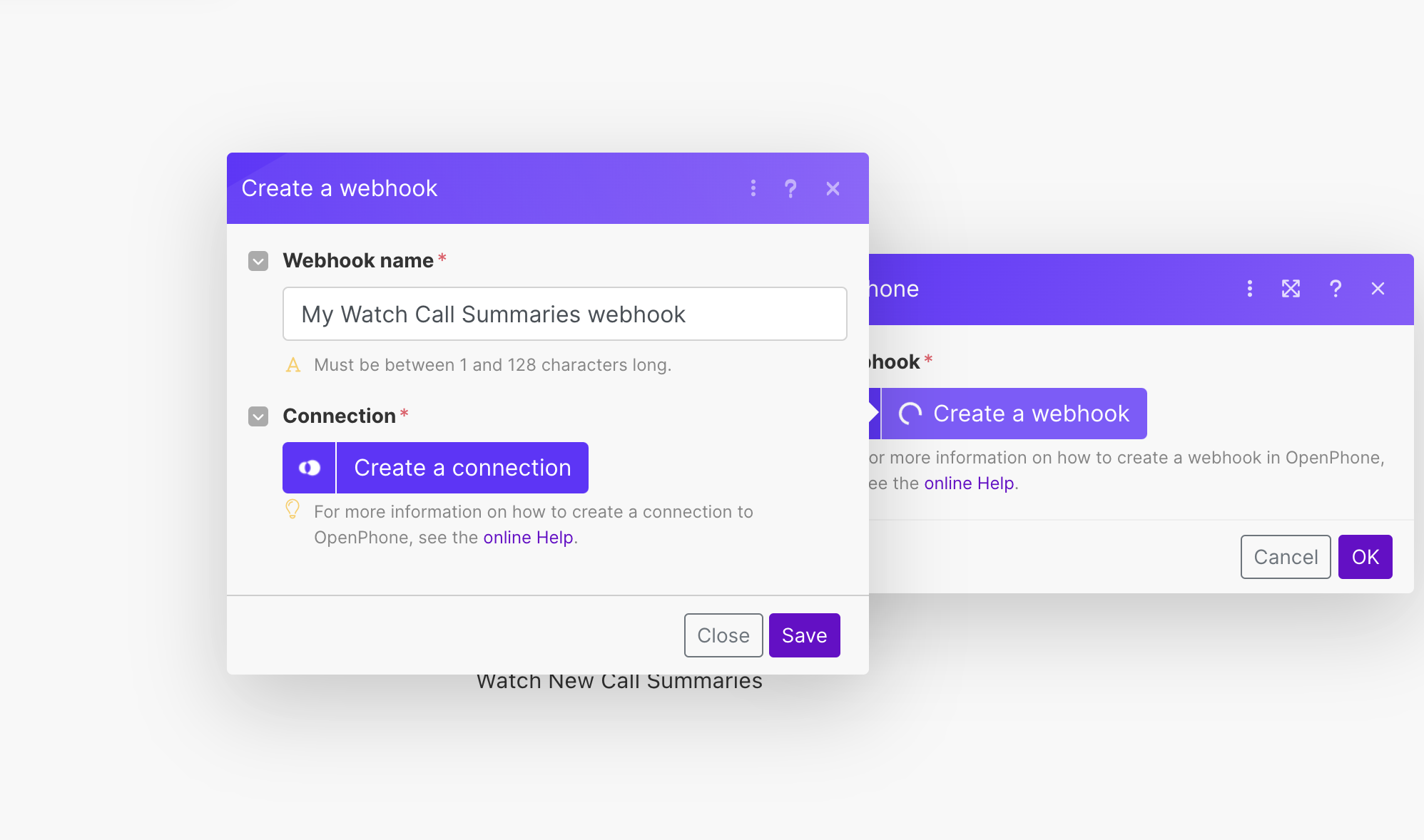
5. **Connect to Quo** using your API key
6. **Add action modules** for other apps or services
7. **Test and activate** your scenario
Make integration is included with all Quo plans. SMS messages sent through Make use Quo API pricing.
## What is Make?
**Visual automation platform:** [Make](https://www.make.com/register?promo=open-phone-app-partner-program) lets you design, build, and automate workflows between apps without coding. Create scenarios that trigger actions across your tech stack when specific events occur in Quo.
**Key capabilities:**
* Visual, drag-and-drop workflow builder
* Connects to thousands of apps and services
* Real-time data synchronization
* Custom scheduling and execution controls
* HTTP app for connecting any API
## Setting up Make integration
### Getting started
**Prerequisites:**
* Make account ([create account](https://www.make.com/register?promo=open-phone-app-partner-program) - 2 months free)
* Quo workspace Owner or Admin permissions
* API key generated from Quo
### Creating your first scenario
**Step-by-step setup:**
1. **Log into Make** and navigate to **Scenarios**
2. **Click "Create a new scenario"**
3. **Search for Quo** and select your trigger
4. **Generate API key** in Quo Settings → API
5. **Connect to Quo** using your API key
6. **Add action modules** for other apps or services
7. **Test and activate** your scenario
 ### API key generation
**Creating Quo API connection:**
1. Navigate to **Settings** → **API** in Quo
2. Click **Generate API key**
3. Label your key (e.g., "Make Integration")
4. Copy key for use in Make connection
### API key generation
**Creating Quo API connection:**
1. Navigate to **Settings** → **API** in Quo
2. Click **Generate API key**
3. Label your key (e.g., "Make Integration")
4. Copy key for use in Make connection
 ## Available Make modules
### Triggers
**Workflow initiators:**
* **Watch new calls and recordings**: Triggers on completed or ringing calls
* **Watch new messages**: Triggers on delivered or received messages
* **Watch new call summaries**: Triggers when call summaries are generated
* **Watch new call transcripts**: Triggers on completed transcripts
### Actions
**Quo operations:**
* **Create a Contact**: Add new contacts to Quo
* **Get a Contact**: Retrieve contact information
* **Update a Contact**: Modify existing contact details
* **Delete a Contact**: Remove contacts from workspace
* **Send a Text Message (SMS)**: Send automated messages
* **Get a Text Message**: Retrieve message information
* **Get a Call Summary**: Access AI-generated summaries
* **Get a Call Transcript**: Retrieve call transcriptions
* **Make an API call**: Perform custom API operations
### Search functions
**Data retrieval:**
* **Search Calls**: Find calls matching specific criteria
* **Search Text Messages**: Locate messages by parameters
* **List Call Recordings**: Get recordings for specific calls
* **List Phone Numbers**: Retrieve workspace phone numbers
* **List Custom Fields**: Access custom field definitions
## Common automation examples
### Customer service workflows
**Support ticket creation:**
* Trigger: New voicemail in Quo
* Action: Create ticket in help desk system
* Include: Caller information and voicemail transcript
**Follow-up messaging:**
* Trigger: Missed call in Quo
* Action: Send automated SMS follow-up
* Include: Callback scheduling link
### Sales automation
**Lead generation:**
* Trigger: New contact created in Quo
* Action: Add to CRM and marketing automation
* Include: Call summary and contact details
**Opportunity tracking:**
* Trigger: Call summary contains specific keywords
* Action: Update deal stage in CRM
* Include: Conversation insights and next steps
### Team notifications
**Urgent call alerts:**
* Trigger: Call tagged as "urgent" in Quo
* Action: Send instant notifications to team
* Include: Caller details and urgency reason
## Best practices
### Scenario design
**Effective automation:**
* Start with simple, single-action scenarios
* Test thoroughly before activation
* Use descriptive naming for scenarios and modules
* Document complex workflows for team reference
### Performance optimization
**Execution management:**
* Set appropriate run schedules (minimum 15-minute intervals)
* Monitor message limits to avoid spam flagging
* Use filters to prevent unnecessary triggers
* Regular review of scenario performance
### Error handling
**Robust workflows:**
* Include error handling for failed actions
* Set up notifications for scenario failures
* Test with various data types and edge cases
* Maintain backup processes for critical workflows
## Troubleshooting
### Common issues
**Phone number formatting:**
* **Error**: 400 invalid input when sending SMS
* **Solution**: Use E.164 format (+1234567890)
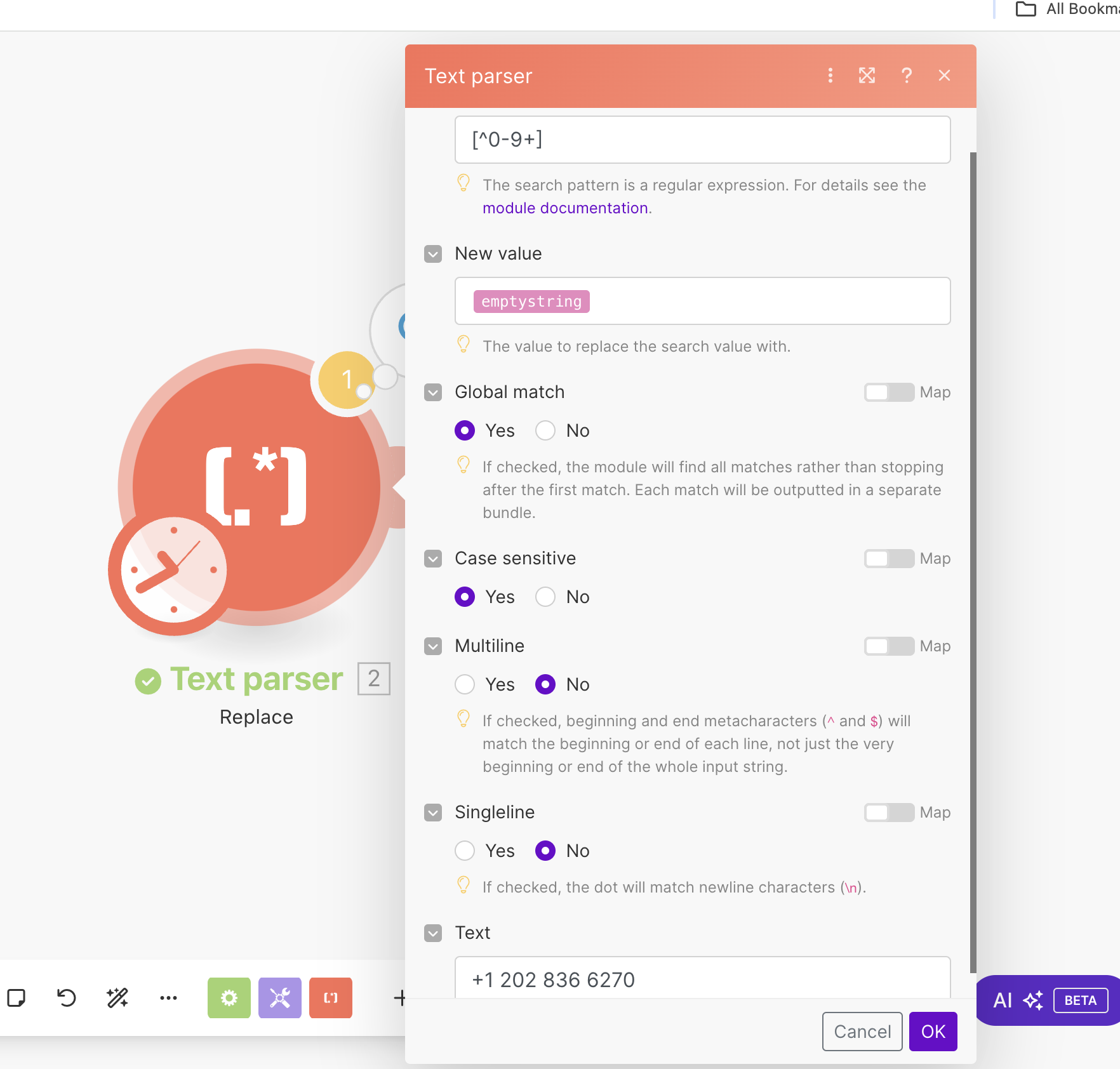
* **Fix**: Add Text Parser module with pattern \[^0-9+]
## Available Make modules
### Triggers
**Workflow initiators:**
* **Watch new calls and recordings**: Triggers on completed or ringing calls
* **Watch new messages**: Triggers on delivered or received messages
* **Watch new call summaries**: Triggers when call summaries are generated
* **Watch new call transcripts**: Triggers on completed transcripts
### Actions
**Quo operations:**
* **Create a Contact**: Add new contacts to Quo
* **Get a Contact**: Retrieve contact information
* **Update a Contact**: Modify existing contact details
* **Delete a Contact**: Remove contacts from workspace
* **Send a Text Message (SMS)**: Send automated messages
* **Get a Text Message**: Retrieve message information
* **Get a Call Summary**: Access AI-generated summaries
* **Get a Call Transcript**: Retrieve call transcriptions
* **Make an API call**: Perform custom API operations
### Search functions
**Data retrieval:**
* **Search Calls**: Find calls matching specific criteria
* **Search Text Messages**: Locate messages by parameters
* **List Call Recordings**: Get recordings for specific calls
* **List Phone Numbers**: Retrieve workspace phone numbers
* **List Custom Fields**: Access custom field definitions
## Common automation examples
### Customer service workflows
**Support ticket creation:**
* Trigger: New voicemail in Quo
* Action: Create ticket in help desk system
* Include: Caller information and voicemail transcript
**Follow-up messaging:**
* Trigger: Missed call in Quo
* Action: Send automated SMS follow-up
* Include: Callback scheduling link
### Sales automation
**Lead generation:**
* Trigger: New contact created in Quo
* Action: Add to CRM and marketing automation
* Include: Call summary and contact details
**Opportunity tracking:**
* Trigger: Call summary contains specific keywords
* Action: Update deal stage in CRM
* Include: Conversation insights and next steps
### Team notifications
**Urgent call alerts:**
* Trigger: Call tagged as "urgent" in Quo
* Action: Send instant notifications to team
* Include: Caller details and urgency reason
## Best practices
### Scenario design
**Effective automation:**
* Start with simple, single-action scenarios
* Test thoroughly before activation
* Use descriptive naming for scenarios and modules
* Document complex workflows for team reference
### Performance optimization
**Execution management:**
* Set appropriate run schedules (minimum 15-minute intervals)
* Monitor message limits to avoid spam flagging
* Use filters to prevent unnecessary triggers
* Regular review of scenario performance
### Error handling
**Robust workflows:**
* Include error handling for failed actions
* Set up notifications for scenario failures
* Test with various data types and edge cases
* Maintain backup processes for critical workflows
## Troubleshooting
### Common issues
**Phone number formatting:**
* **Error**: 400 invalid input when sending SMS
* **Solution**: Use E.164 format (+1234567890)
* **Fix**: Add Text Parser module with pattern \[^0-9+]
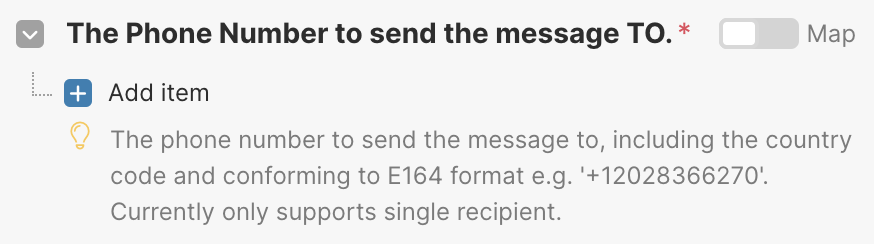 **Text parsing for phone numbers:** Use Text Parser module before Quo module:
 ### API connection issues
**Connection troubleshooting:**
* Verify API key is correctly copied
* Check Quo workspace permissions
* Ensure API key hasn't expired
* Test connection with simple scenario
## Pricing considerations
### Make platform costs
**Make pricing structure:**
* Free tier available with limited operations
* Paid plans based on operations per month
* Get 2 months free with Quo partnership
### Quo API charges
**SMS messaging costs:**
* Messages sent via Make use API pricing
* \$0.01 per message segment for US/Canada
* International rates vary by destination
* Requires prepaid credits in Quo account
Monitor message volume and frequency to maintain carrier compliance and avoid spam classification.
### API connection issues
**Connection troubleshooting:**
* Verify API key is correctly copied
* Check Quo workspace permissions
* Ensure API key hasn't expired
* Test connection with simple scenario
## Pricing considerations
### Make platform costs
**Make pricing structure:**
* Free tier available with limited operations
* Paid plans based on operations per month
* Get 2 months free with Quo partnership
### Quo API charges
**SMS messaging costs:**
* Messages sent via Make use API pricing
* \$0.01 per message segment for US/Canada
* International rates vary by destination
* Requires prepaid credits in Quo account
Monitor message volume and frequency to maintain carrier compliance and avoid spam classification.