> ## Documentation Index
> Fetch the complete documentation index at: https://support.quo.com/llms.txt
> Use this file to discover all available pages before exploring further.
# Jobber
> Sync AI call summaries and transcripts from Quo, formerly OpenPhone, to Jobber and call clients with one click, for even more streamlined field service management
To use integrations, you must have the [Quo Desktop app installed](https://support.quo.com/getting-started/install-apps).
## Overview
Jobber is a leading field service management platform that helps businesses handle scheduling, quotes, invoices, and client communications. Quo's Jobber integration automatically syncs AI-powered call summaries and transcripts, eliminating manual data entry and providing instant context for every client interaction.
Jobber integration is available for Business and Scale plan customers. Requires an active Jobber account to use this feature.
## How the integration works
### Automatic client and request creation
**Smart client matching:**
* Quo checks Jobber for existing clients by phone number on incoming calls
* Creates placeholder client records for new callers automatically
* Generates new Request objects for unmatched calls
* Ensures no lead or client information is lost
### AI call summary sync
**Automated data transfer:**
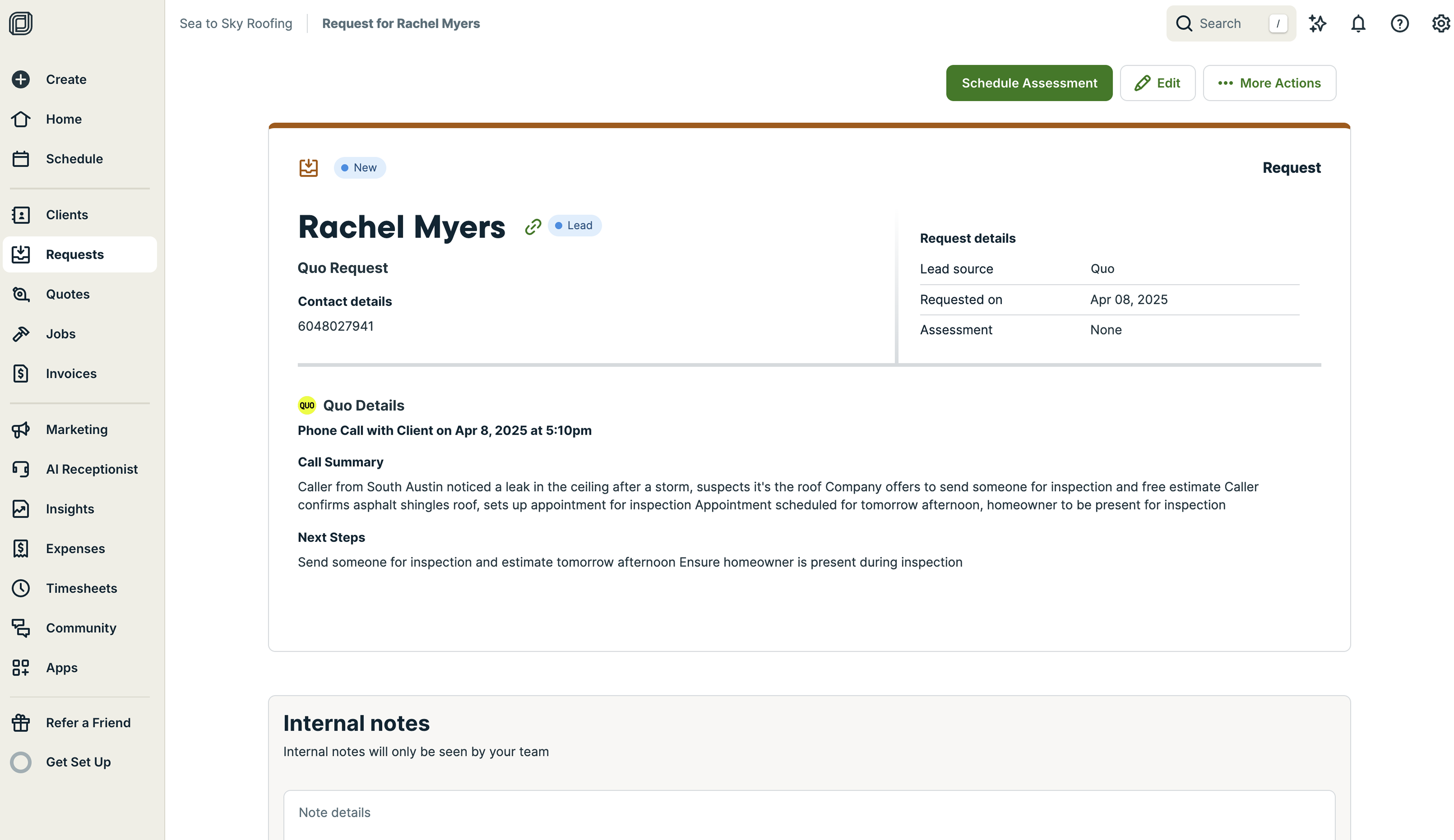
* Quo AI generates concise call summaries after each incoming phone call
* Complete call transcripts sync directly to Jobber
* Time-stamped transcripts for easy reference
* Eliminates manual note-taking and data entry
 ### Create requests from live calls with Sona
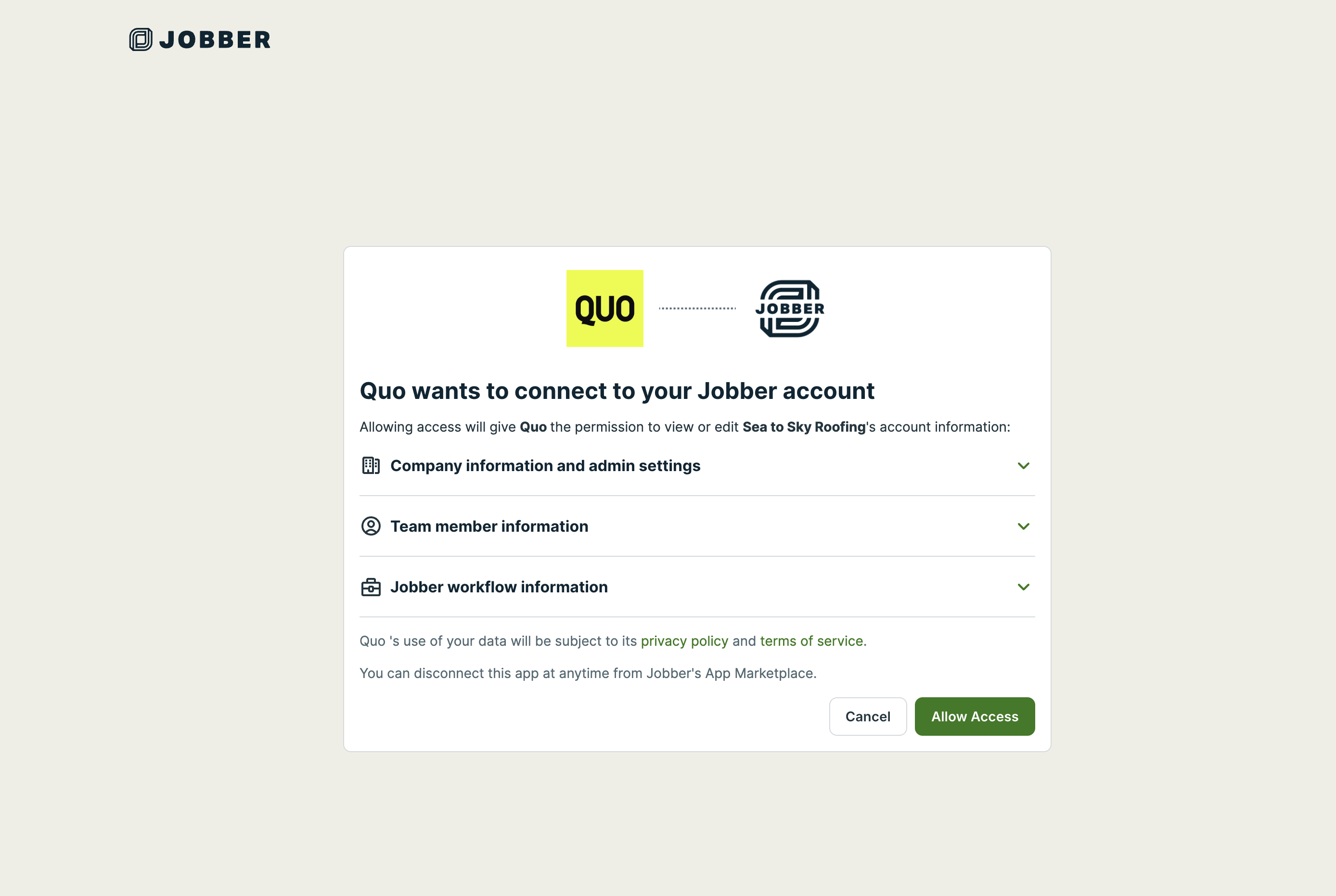
Sona, our AI voice agent, can create Jobber requests during a live call when a caller asks about a new job. The request appears in Jobber immediately with a title, service details, and next steps generated from the conversation.
When you set up a custom Sona job, you can tell Sona exactly when to create a service request from a phone call it handles, based on the conversation and your instructions. This gives you more control over request creation and helps make sure requests reflect real service needs.
**How it works:**
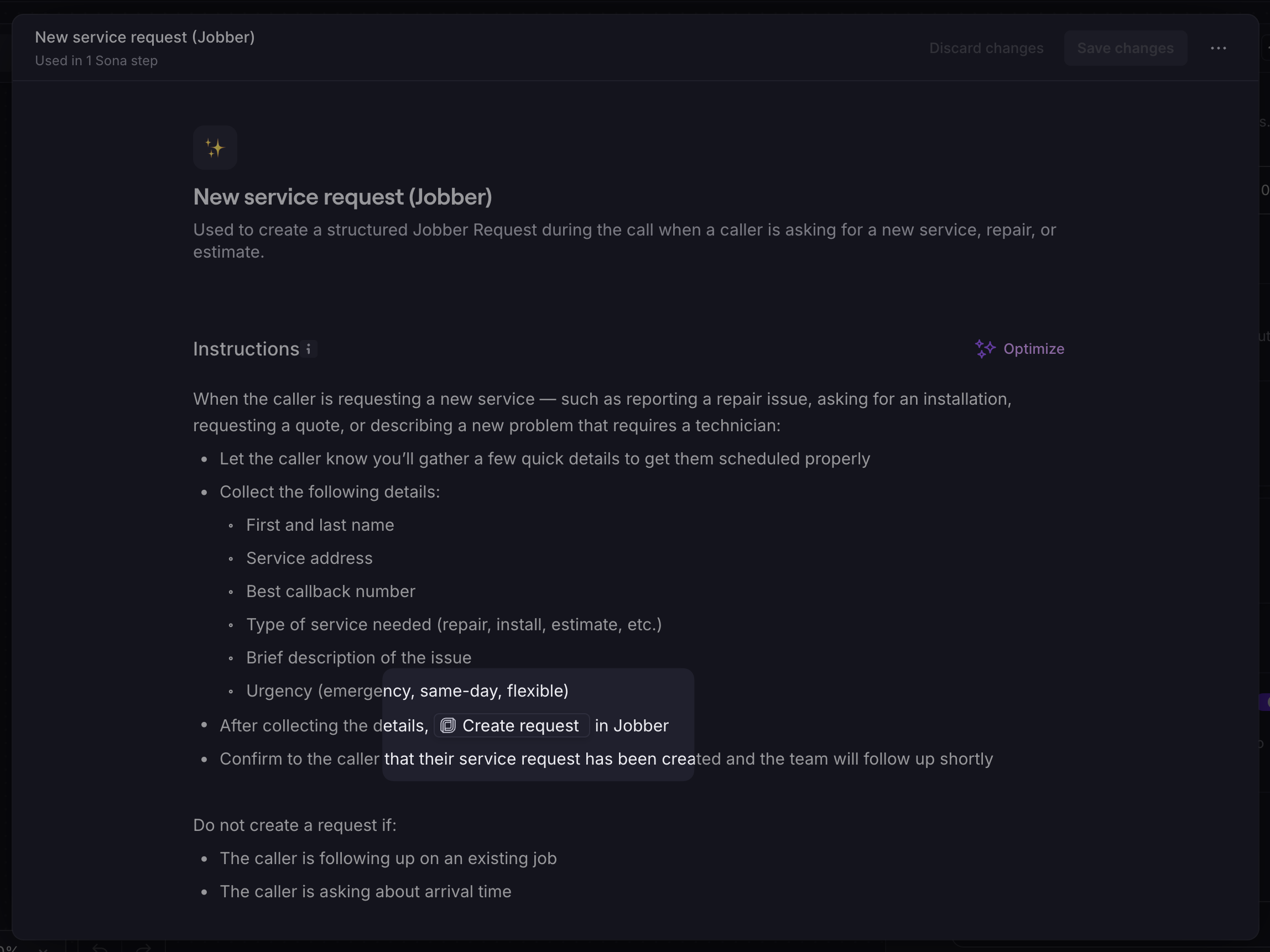
* Add the **/Create request** action to a Sona job
* Sona creates the request when the caller expresses service intent
* Title, details, and next steps are inferred from the conversation automatically
### Create requests from live calls with Sona
Sona, our AI voice agent, can create Jobber requests during a live call when a caller asks about a new job. The request appears in Jobber immediately with a title, service details, and next steps generated from the conversation.
When you set up a custom Sona job, you can tell Sona exactly when to create a service request from a phone call it handles, based on the conversation and your instructions. This gives you more control over request creation and helps make sure requests reflect real service needs.
**How it works:**
* Add the **/Create request** action to a Sona job
* Sona creates the request when the caller expresses service intent
* Title, details, and next steps are inferred from the conversation automatically
 **Getting started:**
* Create or edit a Sona job and insert the action where Sona should submit the request
* See [Using actions](https://support.quo.com/core-concepts/ai-automations/sona/actions) for setup instructions and an example job configuration
### **Click-to-call from Jobber**
**Call clients in one tap:**
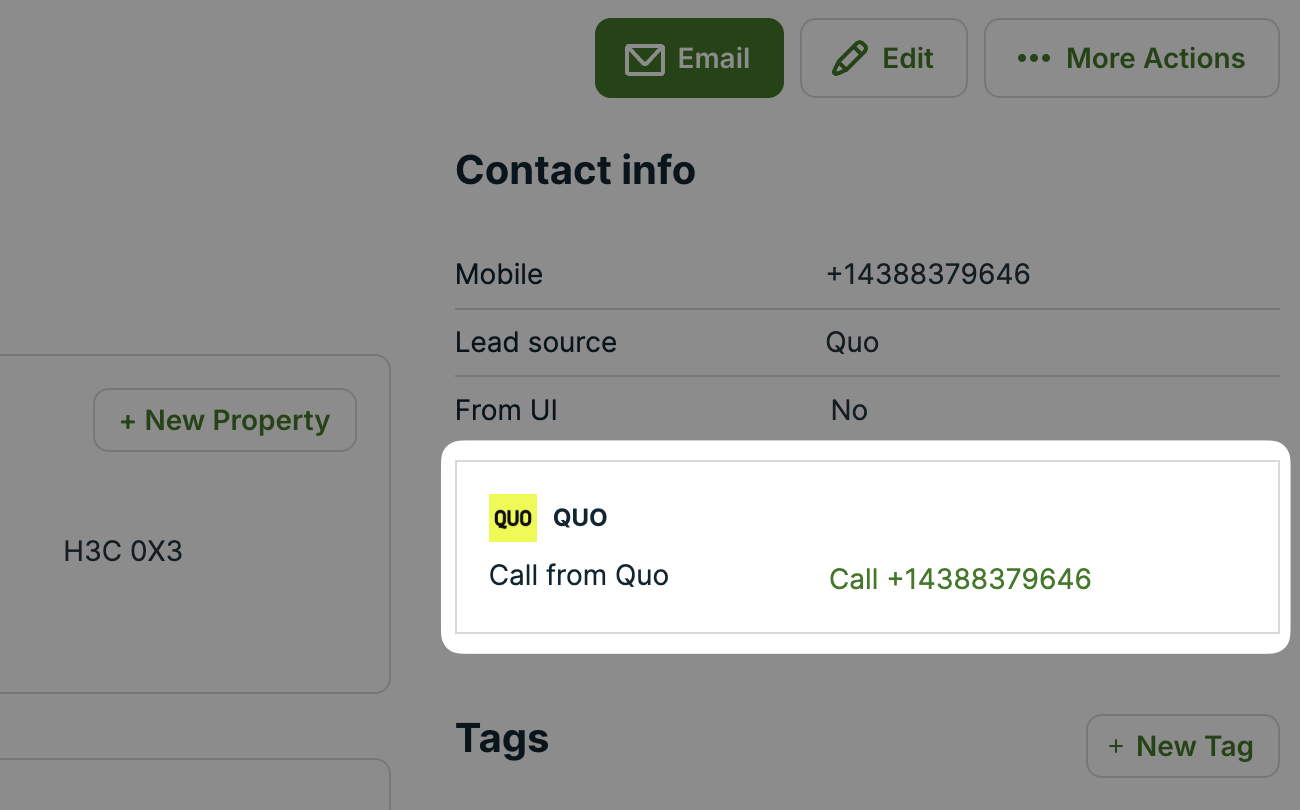
* Click a client’s name on any synced Jobber request
* After clicking on the phone number marked as ‘Call from Quo’, you'll be taken to the Quo desktop app where you can click "Call" to dial that number
* Save time and avoid switching apps or copy-pasting numbers
*Note: Requires a Connect plan or higher in Jobber to support custom fields for this feature.*
**Getting started:**
* Create or edit a Sona job and insert the action where Sona should submit the request
* See [Using actions](https://support.quo.com/core-concepts/ai-automations/sona/actions) for setup instructions and an example job configuration
### **Click-to-call from Jobber**
**Call clients in one tap:**
* Click a client’s name on any synced Jobber request
* After clicking on the phone number marked as ‘Call from Quo’, you'll be taken to the Quo desktop app where you can click "Call" to dial that number
* Save time and avoid switching apps or copy-pasting numbers
*Note: Requires a Connect plan or higher in Jobber to support custom fields for this feature.*
 ### **Per-number sync settings**
**Control what syncs to Jobber:**
* Choose which Quo numbers sync with Jobber
* Turn syncing on or off for each number independently
* Keep Jobber organized by only syncing the numbers you want
## Benefits for field service teams
### Enhanced client management
**Streamlined workflow:**
* **Create Clients and Requests** automatically from new caller interactions
* **Quick context access** from past conversations in Jobber
* **Complete conversation history** with detailed transcripts
* **Reduced data entry** with automatic synchronization
### Improved service delivery
**Better customer insights:**
* Full conversation context before service visits
* Historical communication patterns and preferences
* Detailed service request information from calls
* Enhanced follow-up capabilities
## Setting up Jobber integration
### Prerequisites
**Requirements:**
* Quo Business or Scale plan
* Active Jobber account ([sign up here](https://www.getjobber.com/plp/openphone))
* Call transcription and summarization enabled
* Workspace Owner or Admin permissions
### Installation process
**To connect Quo to Jobber:**
1. Navigate to **Settings** → **Integrations** → **Jobber**
2. Follow prompts to grant permissions
3. Connect your Jobber account
4. Verify call summary settings are enabled
### **Per-number sync settings**
**Control what syncs to Jobber:**
* Choose which Quo numbers sync with Jobber
* Turn syncing on or off for each number independently
* Keep Jobber organized by only syncing the numbers you want
## Benefits for field service teams
### Enhanced client management
**Streamlined workflow:**
* **Create Clients and Requests** automatically from new caller interactions
* **Quick context access** from past conversations in Jobber
* **Complete conversation history** with detailed transcripts
* **Reduced data entry** with automatic synchronization
### Improved service delivery
**Better customer insights:**
* Full conversation context before service visits
* Historical communication patterns and preferences
* Detailed service request information from calls
* Enhanced follow-up capabilities
## Setting up Jobber integration
### Prerequisites
**Requirements:**
* Quo Business or Scale plan
* Active Jobber account ([sign up here](https://www.getjobber.com/plp/openphone))
* Call transcription and summarization enabled
* Workspace Owner or Admin permissions
### Installation process
**To connect Quo to Jobber:**
1. Navigate to **Settings** → **Integrations** → **Jobber**
2. Follow prompts to grant permissions
3. Connect your Jobber account
4. Verify call summary settings are enabled
 ### Configuration requirements
**Essential settings:**
* Enable **Transcribe and summarize calls** for phone numbers
* Ensure AI call summaries are activated
* Verify Jobber account permissions
* Test with sample calls
## Using the integration
### Automatic synchronization
**What syncs to Jobber:**
* AI-generated call summaries
* Complete conversation transcripts
* Call metadata (duration, timestamp, participants)
* Client identification and contact information
### Data organization in Jobber
**Structured information:**
* New clients created automatically
* Service requests generated from calls
* Call summaries attached to appropriate records
* Transcripts available for detailed review
### Workflow integration
**Daily operations:**
* Review call summaries before service visits
* Use transcripts for service request clarification
* Access complete conversation history
* Plan follow-up activities based on call content
## Synchronization limitations
**Data flow restrictions:**
* Client information updated in Jobber doesn't sync back to Quo
* No two-way contact synchronization
* Changes in Jobber require manual updates in Quo
* Future versions may include bidirectional sync
## Best practices
### Setup optimization
**Effective configuration:**
* Enable call summaries for client-facing phone numbers
* Test integration with sample calls
* Train team on accessing synced data in Jobber
* Regular review of client creation and request generation
### Workflow integration
**Maximizing value:**
* Review call summaries before field visits
* Use transcripts for accurate service documentation
* Reference conversation history for follow-up planning
* Coordinate with Jobber scheduling and quoting features
### Data management
**Maintaining quality:**
* Monitor automatic client creation for accuracy
* Regular cleanup of placeholder client records
* Ensure call summary quality through proper conversations
* Review transcript accuracy and completeness
## Getting started with Jobber
**New to Jobber?**
* [Sign up for Jobber](https://www.getjobber.com/plp/openphone) to get started and get 20% off for your first 6 months
* Explore field service management features
* Set up scheduling and invoicing workflows
* Configure client management processes
### Configuration requirements
**Essential settings:**
* Enable **Transcribe and summarize calls** for phone numbers
* Ensure AI call summaries are activated
* Verify Jobber account permissions
* Test with sample calls
## Using the integration
### Automatic synchronization
**What syncs to Jobber:**
* AI-generated call summaries
* Complete conversation transcripts
* Call metadata (duration, timestamp, participants)
* Client identification and contact information
### Data organization in Jobber
**Structured information:**
* New clients created automatically
* Service requests generated from calls
* Call summaries attached to appropriate records
* Transcripts available for detailed review
### Workflow integration
**Daily operations:**
* Review call summaries before service visits
* Use transcripts for service request clarification
* Access complete conversation history
* Plan follow-up activities based on call content
## Synchronization limitations
**Data flow restrictions:**
* Client information updated in Jobber doesn't sync back to Quo
* No two-way contact synchronization
* Changes in Jobber require manual updates in Quo
* Future versions may include bidirectional sync
## Best practices
### Setup optimization
**Effective configuration:**
* Enable call summaries for client-facing phone numbers
* Test integration with sample calls
* Train team on accessing synced data in Jobber
* Regular review of client creation and request generation
### Workflow integration
**Maximizing value:**
* Review call summaries before field visits
* Use transcripts for accurate service documentation
* Reference conversation history for follow-up planning
* Coordinate with Jobber scheduling and quoting features
### Data management
**Maintaining quality:**
* Monitor automatic client creation for accuracy
* Regular cleanup of placeholder client records
* Ensure call summary quality through proper conversations
* Review transcript accuracy and completeness
## Getting started with Jobber
**New to Jobber?**
* [Sign up for Jobber](https://www.getjobber.com/plp/openphone) to get started and get 20% off for your first 6 months
* Explore field service management features
* Set up scheduling and invoicing workflows
* Configure client management processes