> ## Documentation Index
> Fetch the complete documentation index at: https://support.quo.com/llms.txt
> Use this file to discover all available pages before exploring further.
# HighLevel
> Connect Quo to HighLevel to sync contacts and log every call, text, and AI summary to the native conversation thread.
## Overview
Quo's native integration with HighLevel keeps your contacts and conversations in sync so your team never has to leave HighLevel to see the full picture. Once connected, HighLevel contacts sync into Quo automatically, and every call, text, voicemail, recording, and AI-powered call summary logs back to the matching contact's conversation thread in HighLevel.
The HighLevel integration is available for the [Quo Business and Scale plans](https://support.quo.com/core-concepts/administration/billing/pricing). It installs per HighLevel Sub-Account (Location), so multi-location and multi-client rollouts stay simple.
***
## What the HighLevel integration does
Contacts created, updated, or deleted in HighLevel sync into Quo automatically in real time. Synced contacts are read-only in Quo.
Every call, inbound and outbound, logs to the matching contact's native Conversation thread in HighLevel as a Call message, with recordings attached.
Inbound and outbound SMS messages log to the matching contact's native Conversation thread in HighLevel as an SMS message, preserving the existing conversation history.
Quo's AI call summaries and next steps post to the contact's Notes in HighLevel, so the full context is available without leaving HighLevel.
***
## Set up the HighLevel integration
Find **HighLevel** in the list of available integrations.
You'll be redirected to HighLevel's OAuth flow to authorize the connection.
.png?fit=max&auto=format&n=fHn888zO7ULQmhBh&q=85&s=f126be6e738e63da1e23bcdf917529c1) If your agency runs HighLevel in SaaS Mode, each Sub-Account (Location) needs its own Quo workspace and its own connection to HighLevel.
Only calls and messages on the numbers you select will log to HighLevel.
This runs in the background. Once it finishes, new contact changes in HighLevel sync in real time.
***
## How contact sync works
Contact sync is one-way, from HighLevel to Quo. HighLevel stays the source of truth. Contacts created, updated, or deleted in HighLevel sync into Quo automatically in real time. When you first connect, Quo also runs a one-time bulk import of your existing HighLevel contacts.
If your agency runs HighLevel in SaaS Mode, each Sub-Account (Location) needs its own Quo workspace and its own connection to HighLevel.
Only calls and messages on the numbers you select will log to HighLevel.
This runs in the background. Once it finishes, new contact changes in HighLevel sync in real time.
***
## How contact sync works
Contact sync is one-way, from HighLevel to Quo. HighLevel stays the source of truth. Contacts created, updated, or deleted in HighLevel sync into Quo automatically in real time. When you first connect, Quo also runs a one-time bulk import of your existing HighLevel contacts.
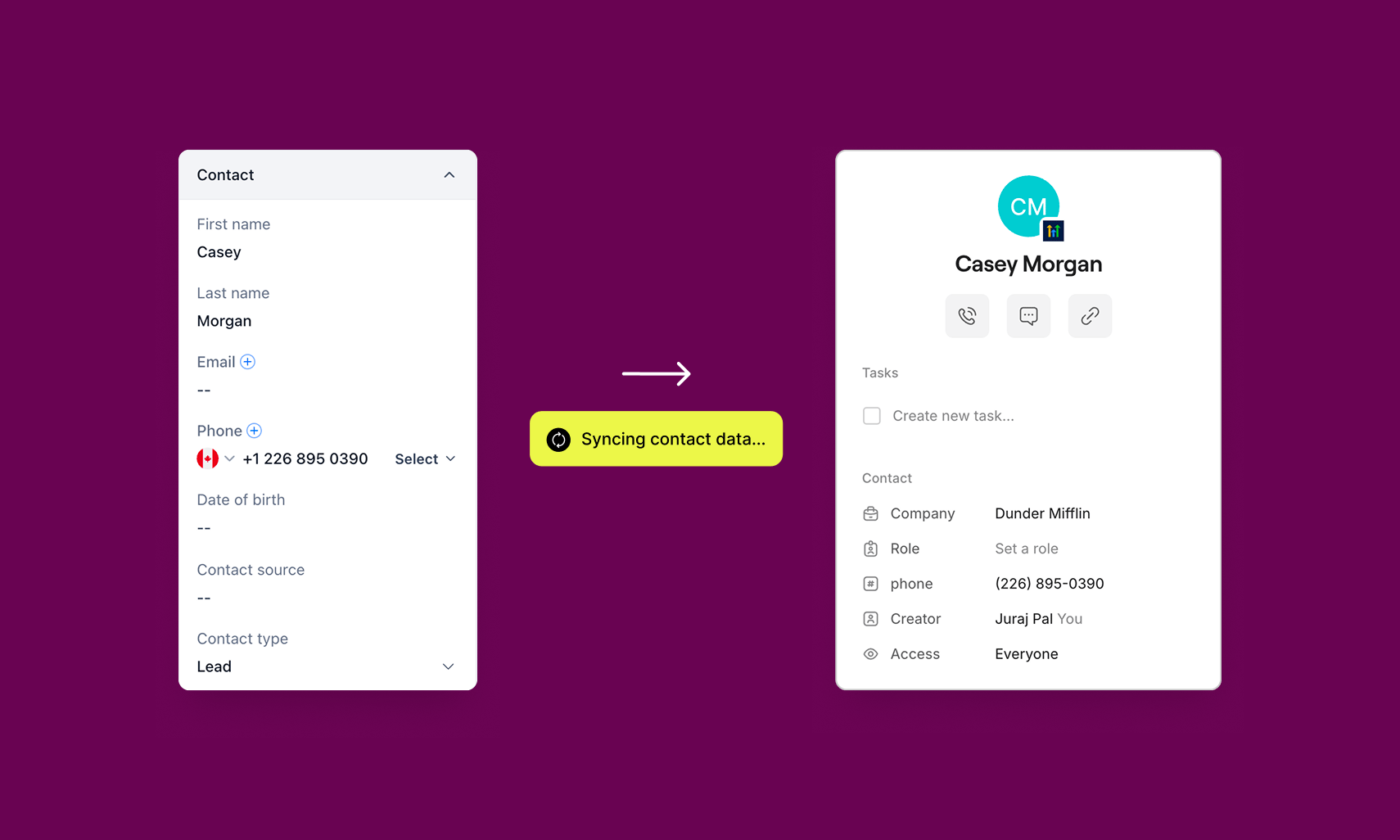 **Imported fields:**
* First and last name
* Phone number
* Email address
* Company
**Limitations of contact sync:**
* **One-way sync only.** Contact details flow from HighLevel into Quo, not the other way around.
* **Editing in Quo doesn't update HighLevel.** Make contact changes in HighLevel and they'll sync over automatically.
* **Contacts created in Quo don't sync to HighLevel.**
***
## How call logging works
Every call, inbound and outbound, logs to the matching contact's native Conversation thread in HighLevel:
**Imported fields:**
* First and last name
* Phone number
* Email address
* Company
**Limitations of contact sync:**
* **One-way sync only.** Contact details flow from HighLevel into Quo, not the other way around.
* **Editing in Quo doesn't update HighLevel.** Make contact changes in HighLevel and they'll sync over automatically.
* **Contacts created in Quo don't sync to HighLevel.**
***
## How call logging works
Every call, inbound and outbound, logs to the matching contact's native Conversation thread in HighLevel:
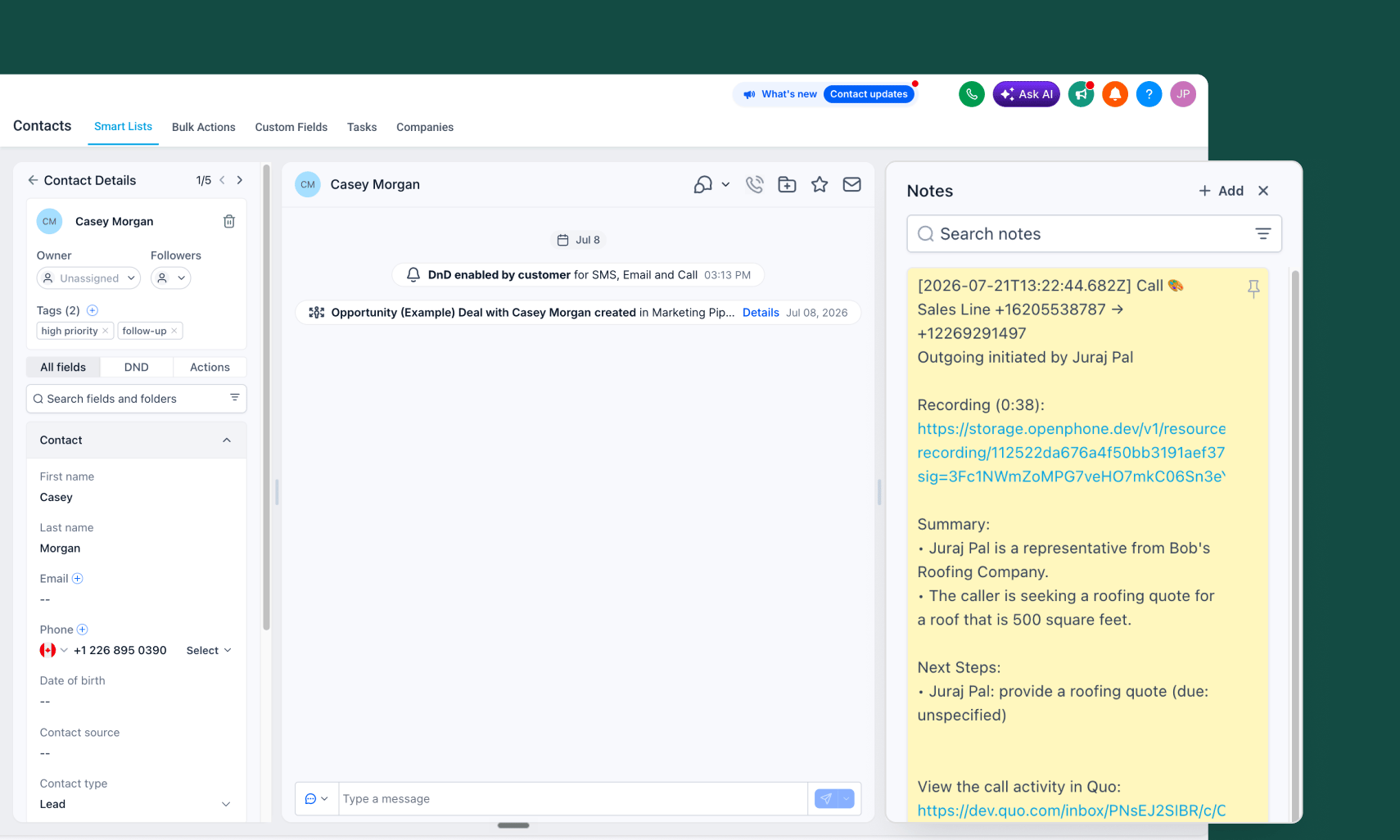 * Logged as a Call message
* Recordings are attached to the call message
* Once ready, Quo posts a Note on the contact with the AI call summary and next steps
* Every logged call includes a **View in Quo** deep link back to the full conversation
***
## How message logging works
Inbound and outbound SMS messages log to the matching contact's native Conversation thread in HighLevel:
* Logged as an SMS message
* Existing conversation history in HighLevel's inbox stays intact
If the integration disconnects, activity stops syncing immediately. There's no retroactive sync for calls or messages sent during the downtime, though they remain visible in Quo.
***
## Who can access and set up the HighLevel integration
The HighLevel integration is available on the [Quo Business and Scale plans](https://support.quo.com/core-concepts/administration/billing/pricing). Only a Quo workspace Owner or Admin can set it up.
On the HighLevel side, the integration installs at the Sub-Account (Location) level and works with any HighLevel plan, including Starter, Unlimited, and SaaS Pro. You'll need permission to install Marketplace apps for the Sub-Account you're connecting.
***
## Disconnect the integration
### From Quo
1. Go to **Settings → Integrations → HighLevel**
2. Click **Disconnect**
### From HighLevel
1. In HighLevel, go to your Sub-Account's Marketplace app settings
2. Find Quo and uninstall it
While the integration is disconnected, Quo won't send any activity to HighLevel. Activity generated during downtime can't be synced retroactively, though it remains visible in Quo.
***
## FAQs
Yes. The integration installs at the Sub-Account (Location) level and works with HighLevel's Starter, Unlimited, and SaaS Pro plans.
Yes. Each Sub-Account (Location) needs its own Quo workspace and its own connection to HighLevel.
Not yet. Contact sync is one-way, from HighLevel to Quo.
No. HighLevel treats Company as a text field.
Activity stops syncing immediately. There's no retroactive sync of calls or messages from the time the integration was disconnected, though they remain visible in Quo.
You'll end up with two separate contact records. Quo doesn't currently match or merge contacts by phone number when you connect the integration. Since HighLevel is the source of truth for synced contacts, you can delete the duplicate Quo contact if you don't need it anymore.
Quo starts a new conversation thread for that contact. The number change doesn't carry over the existing conversation history, so the new thread starts empty.
No. Calls, texts, and AI summaries log to the contact record only, not to any opportunities tied to that contact.
Disconnect and reconnect the integration. This resolves most sync issues and follows the same troubleshooting steps as Quo's other CRM integrations.
***
Need help? [Submit a support request](https://support.quo.com/help/submit-a-request) and we'll jump in.
* Logged as a Call message
* Recordings are attached to the call message
* Once ready, Quo posts a Note on the contact with the AI call summary and next steps
* Every logged call includes a **View in Quo** deep link back to the full conversation
***
## How message logging works
Inbound and outbound SMS messages log to the matching contact's native Conversation thread in HighLevel:
* Logged as an SMS message
* Existing conversation history in HighLevel's inbox stays intact
If the integration disconnects, activity stops syncing immediately. There's no retroactive sync for calls or messages sent during the downtime, though they remain visible in Quo.
***
## Who can access and set up the HighLevel integration
The HighLevel integration is available on the [Quo Business and Scale plans](https://support.quo.com/core-concepts/administration/billing/pricing). Only a Quo workspace Owner or Admin can set it up.
On the HighLevel side, the integration installs at the Sub-Account (Location) level and works with any HighLevel plan, including Starter, Unlimited, and SaaS Pro. You'll need permission to install Marketplace apps for the Sub-Account you're connecting.
***
## Disconnect the integration
### From Quo
1. Go to **Settings → Integrations → HighLevel**
2. Click **Disconnect**
### From HighLevel
1. In HighLevel, go to your Sub-Account's Marketplace app settings
2. Find Quo and uninstall it
While the integration is disconnected, Quo won't send any activity to HighLevel. Activity generated during downtime can't be synced retroactively, though it remains visible in Quo.
***
## FAQs
Yes. The integration installs at the Sub-Account (Location) level and works with HighLevel's Starter, Unlimited, and SaaS Pro plans.
Yes. Each Sub-Account (Location) needs its own Quo workspace and its own connection to HighLevel.
Not yet. Contact sync is one-way, from HighLevel to Quo.
No. HighLevel treats Company as a text field.
Activity stops syncing immediately. There's no retroactive sync of calls or messages from the time the integration was disconnected, though they remain visible in Quo.
You'll end up with two separate contact records. Quo doesn't currently match or merge contacts by phone number when you connect the integration. Since HighLevel is the source of truth for synced contacts, you can delete the duplicate Quo contact if you don't need it anymore.
Quo starts a new conversation thread for that contact. The number change doesn't carry over the existing conversation history, so the new thread starts empty.
No. Calls, texts, and AI summaries log to the contact record only, not to any opportunities tied to that contact.
Disconnect and reconnect the integration. This resolves most sync issues and follows the same troubleshooting steps as Quo's other CRM integrations.
***
Need help? [Submit a support request](https://support.quo.com/help/submit-a-request) and we'll jump in.