> ## Documentation Index
> Fetch the complete documentation index at: https://support.quo.com/llms.txt
> Use this file to discover all available pages before exploring further.
# Managing contacts
> Add, edit, organize, and manage your business contacts with custom properties, bulk operations, and team collaboration features
## Overview
Quo, formerly OpenPhone, makes it easy to organize, edit, and manage your company contacts across your team. Customize fields, sync data, and collaborate on your contact database, all in one place.
## Adding contacts
### Manual contact creation
Create new contacts one at a time:
1. Go to **Contacts**
2. Select **Add contact**
3. Enter the name, phone number, and any business details
4. Click **Save**
### Import existing contacts
For larger lists or switching systems, import contacts via:
* CSV uploads (with templates)
* Google Contacts sync
* Phone contact sync
* **AI-powered contact suggestions**\
Quo can automatically surface potential new contacts from voicemails and call transcripts — no manual entry needed.
See our [import guide](import) for full instructions.
## Editing and managing contacts
### Mobile app
1. Open the Quo app
2. Tap **Contacts** (bottom right)
3. Tap the **+** icon
4. Enter contact info
5. Tap **Save**
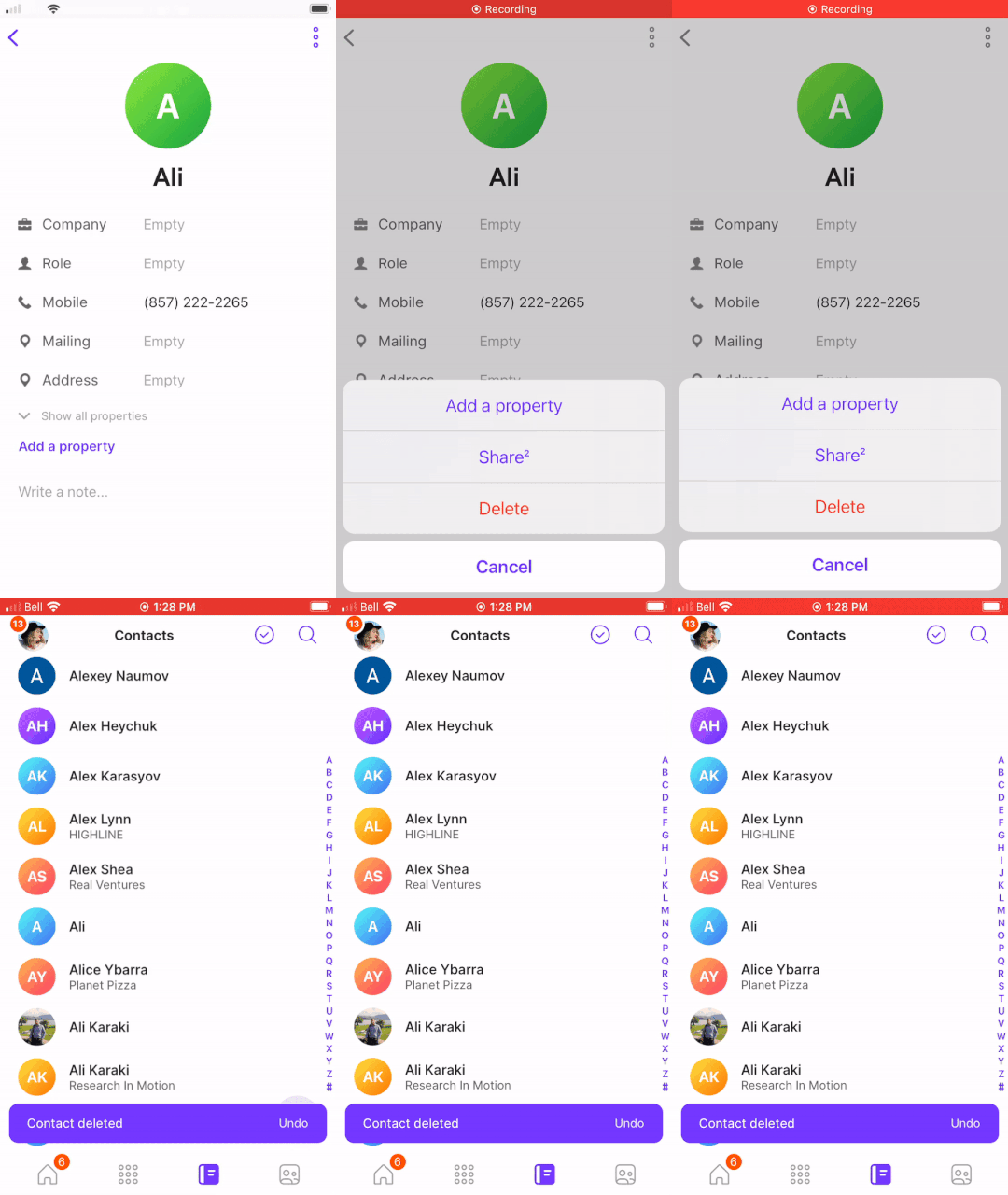
1. Open **Contacts**
2. Select a contact
3. Edit the details or tap the menu icon → **Delete**
 ### Web/desktop app
1. Launch the [web](https://my.quo.com/signup) or desktop app
2. Click **Contacts**
3. Select **+** above the search bar
4. Add contact info and any custom properties
5. Click **Save**
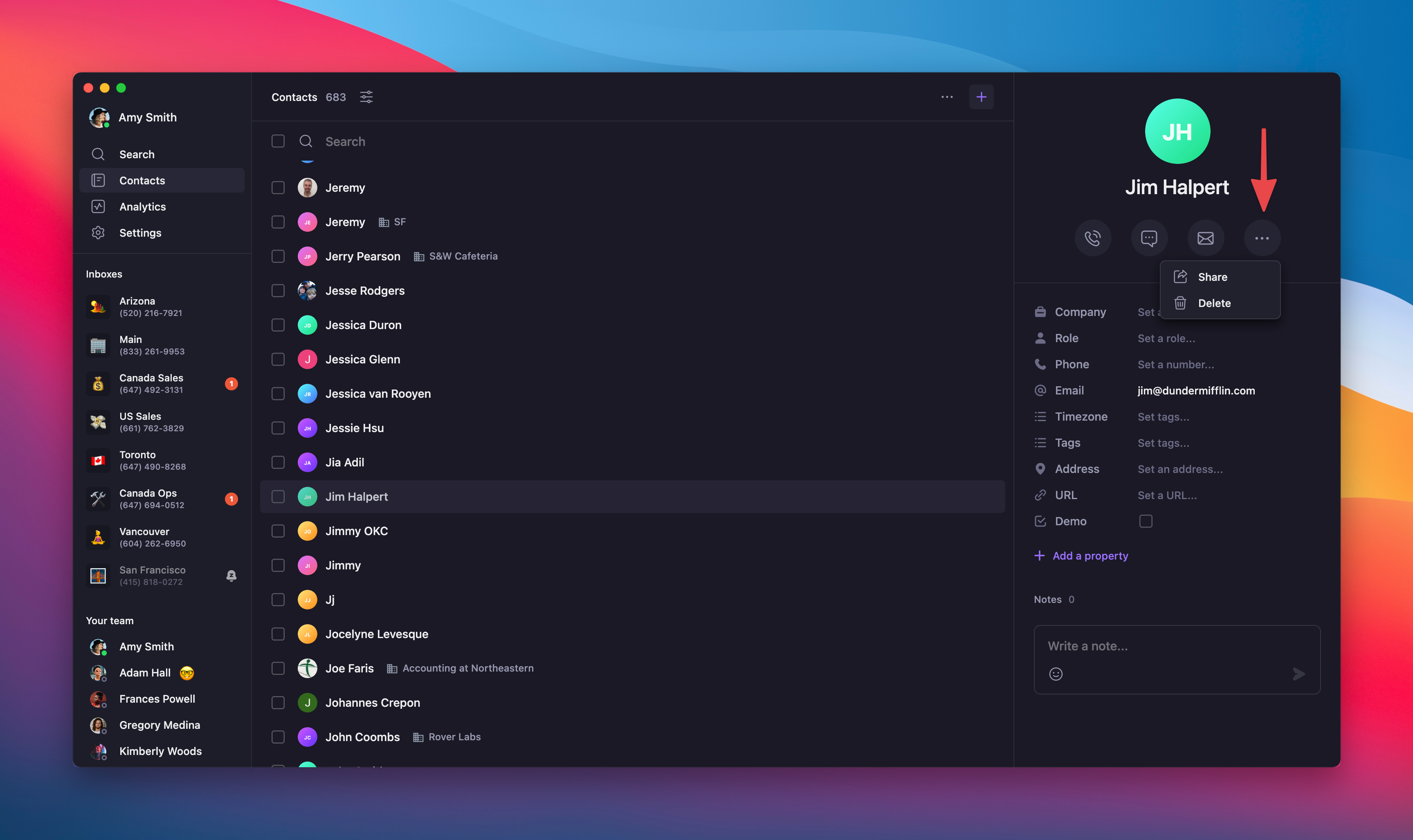
1. Go to **Contacts**
2. Find the contact via search or scroll
3. Click the contact to edit
4. Or click **...** → **Delete**
### Web/desktop app
1. Launch the [web](https://my.quo.com/signup) or desktop app
2. Click **Contacts**
3. Select **+** above the search bar
4. Add contact info and any custom properties
5. Click **Save**
1. Go to **Contacts**
2. Find the contact via search or scroll
3. Click the contact to edit
4. Or click **...** → **Delete**
 ## Advanced contact operations
### Merging duplicate contacts
If a team member creates a duplicate contact, Quo makes it easy to clean it up.
Merging contacts is only available on web or desktop.
#### From a conversation
1. Open the conversation with the duplicate contact
2. Click the **Other matching contacts found** dropdown
3. Select **Merge contacts**
## Advanced contact operations
### Merging duplicate contacts
If a team member creates a duplicate contact, Quo makes it easy to clean it up.
Merging contacts is only available on web or desktop.
#### From a conversation
1. Open the conversation with the duplicate contact
2. Click the **Other matching contacts found** dropdown
3. Select **Merge contacts**
 #### If no conversation exists
1. Open both contacts
2. Copy relevant fields from one to the other
3. Delete the duplicate contact
#### If no conversation exists
1. Open both contacts
2. Copy relevant fields from one to the other
3. Delete the duplicate contact
 ### Bulk contact deletion
Clean up large lists in a few clicks.
Only available on web or desktop apps.
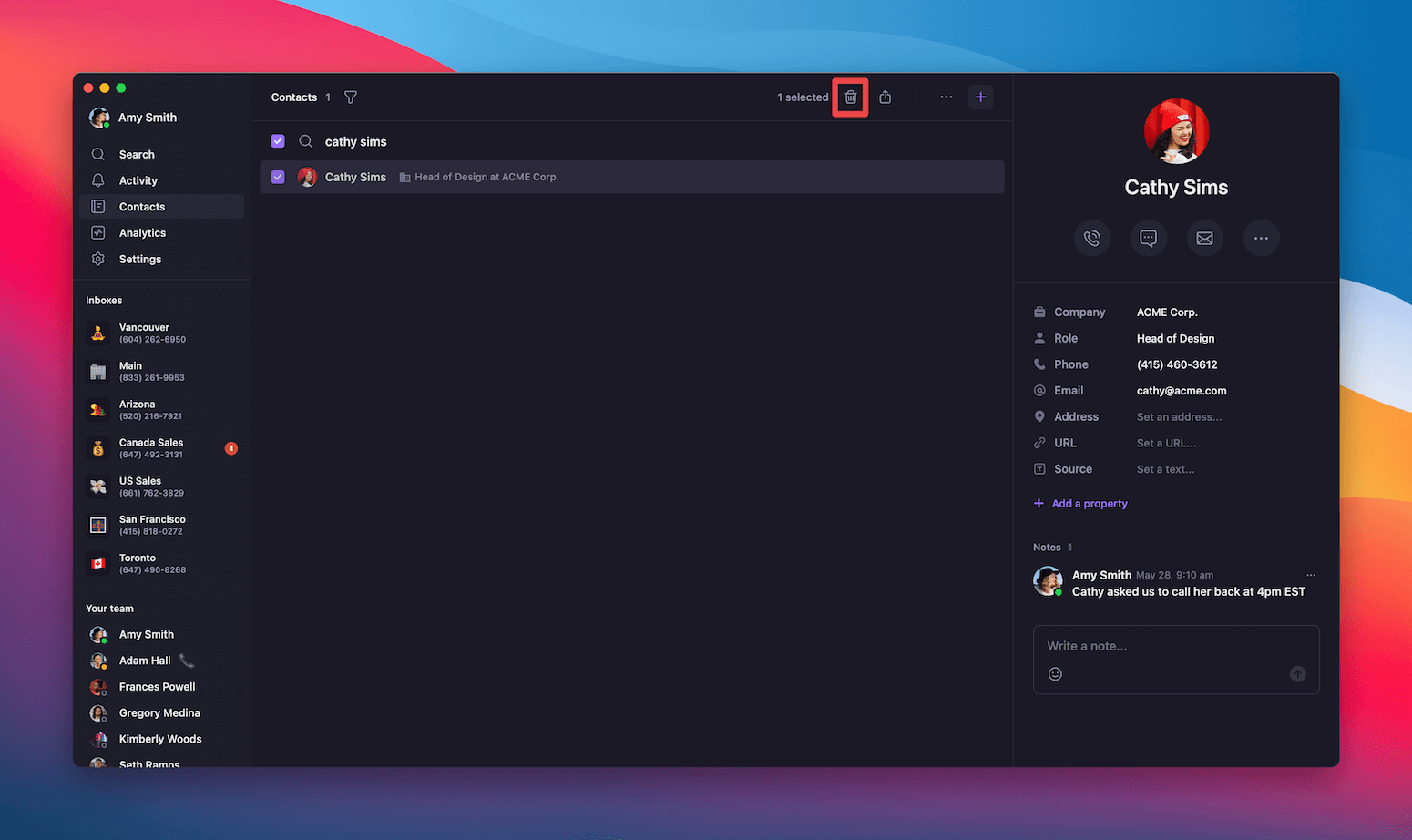
1. Log in to [web](https://my.quo.com/signup) or desktop app
2. Go to **Contacts**
3. Select multiple contacts (use filters to narrow)
4. Click the trash bin icon
5. Confirm deletion
### Bulk contact deletion
Clean up large lists in a few clicks.
Only available on web or desktop apps.
1. Log in to [web](https://my.quo.com/signup) or desktop app
2. Go to **Contacts**
3. Select multiple contacts (use filters to narrow)
4. Click the trash bin icon
5. Confirm deletion
 Contact deletion is permanent. Confirm carefully before deleting.
## Contact enhancement features
### Custom properties
Capture the info that matters most with custom fields. Use tags, dates, dropdowns, and more. See our [custom properties guide](custom-properties) to get started.
### Contact notes
Add private notes to contacts so your whole team stays aligned. Learn how in our [contact notes guide](contact-notes).
### Contact sharing
Choose who on your team can view or edit each contact. See our [contact sharing guide](contact-sharing) to learn more.
## FAQs
No. Deleted contacts can't be recovered. You’ll need to re-add them manually, via CSV import, or through sync.
The merge option only appears if both contacts have the same phone number. If not, copy the details manually, then delete the duplicate.
Yes. From the web app, go to **Contacts**, open the settings menu, and select **Export as CSV**.
Mobile is great for quick changes like names or numbers. Web/desktop supports full editing, bulk actions, and custom fields.
Merge and delete permissions depend on a user’s **workspace role** and **contact ownership**. **Owners and Admins** can merge or delete any contact in the workspace, including contacts created by integrations. **Members** can only merge or delete contacts they've personally created.
Only workspace \*\*Owners, Admins, \*\*and the **original creator of the contact (when applicable)** can merge or delete contacts, including those created via Zapier.
Need help? [Submit a support request](https://support.quo.com/help/submit-a-request) and we'll jump in.
Contact deletion is permanent. Confirm carefully before deleting.
## Contact enhancement features
### Custom properties
Capture the info that matters most with custom fields. Use tags, dates, dropdowns, and more. See our [custom properties guide](custom-properties) to get started.
### Contact notes
Add private notes to contacts so your whole team stays aligned. Learn how in our [contact notes guide](contact-notes).
### Contact sharing
Choose who on your team can view or edit each contact. See our [contact sharing guide](contact-sharing) to learn more.
## FAQs
No. Deleted contacts can't be recovered. You’ll need to re-add them manually, via CSV import, or through sync.
The merge option only appears if both contacts have the same phone number. If not, copy the details manually, then delete the duplicate.
Yes. From the web app, go to **Contacts**, open the settings menu, and select **Export as CSV**.
Mobile is great for quick changes like names or numbers. Web/desktop supports full editing, bulk actions, and custom fields.
Merge and delete permissions depend on a user’s **workspace role** and **contact ownership**. **Owners and Admins** can merge or delete any contact in the workspace, including contacts created by integrations. **Members** can only merge or delete contacts they've personally created.
Only workspace \*\*Owners, Admins, \*\*and the **original creator of the contact (when applicable)** can merge or delete contacts, including those created via Zapier.
Need help? [Submit a support request](https://support.quo.com/help/submit-a-request) and we'll jump in.