> ## Documentation Index
> Fetch the complete documentation index at: https://support.quo.com/llms.txt
> Use this file to discover all available pages before exploring further.
# Blocking contacts
> Block unwanted callers and manage your blocklist to protect your time from spam and unwanted communications
## Overview
Blocking unwanted contacts helps protect your time and maintain a professional communication environment. Quo, formerly OpenPhone's blocking features allow you to prevent spam calls and messages while maintaining full control over your blocklist for easy management.
## Understanding blocking
When you block a contact in Quo:
* **Calls are silenced**: Blocked numbers cannot reach you by phone
* **Messages are filtered**: Text messages from blocked contacts are hidden from your inbox
* **Team protection**: Blocked contacts are prevented from reaching your entire team
* **Easy reversal**: You can unblock contacts at any time through your blocklist
Blocked conversations are moved out of your main inbox but remain accessible through your blocklist for reference.
## Blocking contacts
### Block from mobile app
1. Launch the Quo app
2. Go to your inbox by tapping the **Home** icon
3. Press and hold the message or call from the unwanted contact
4. From the menu, select **Block sender**
<>
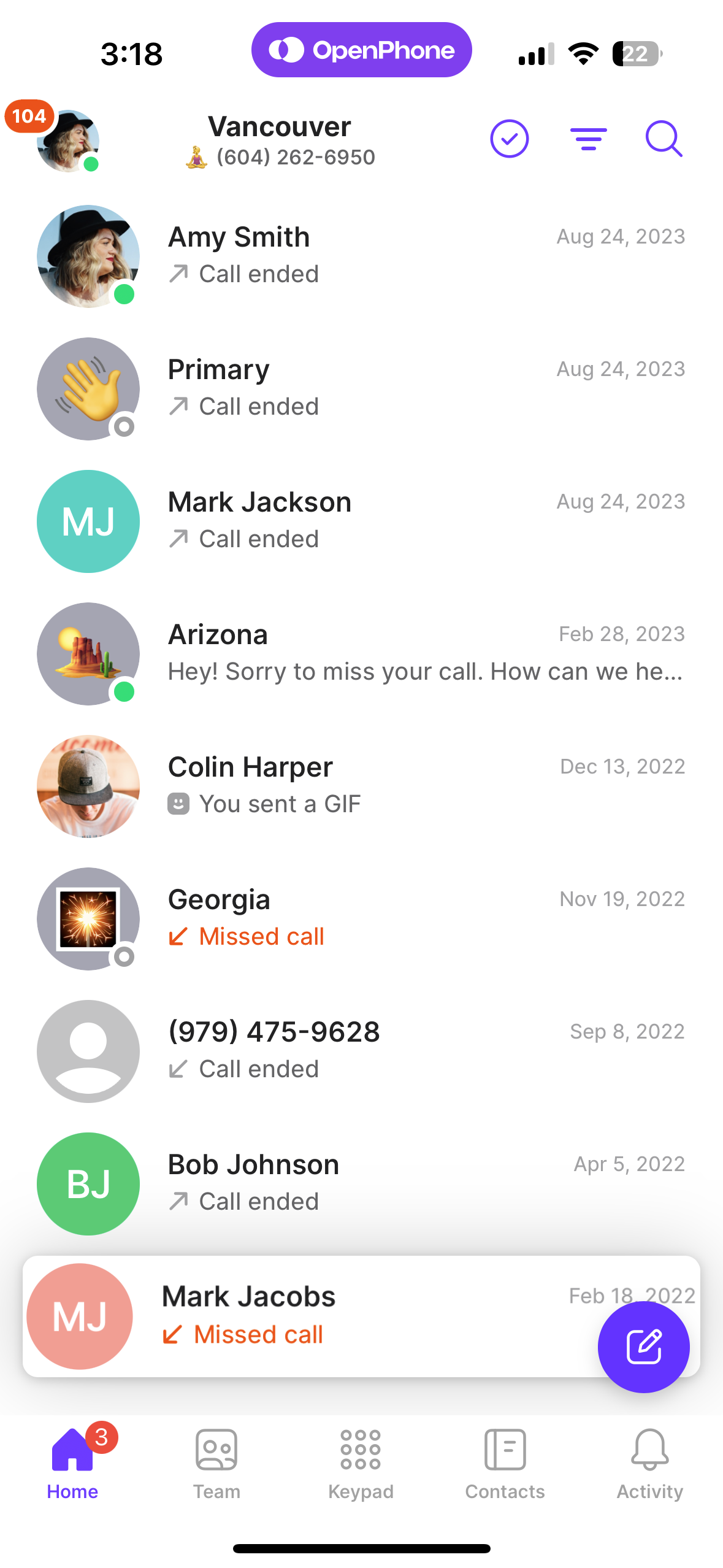
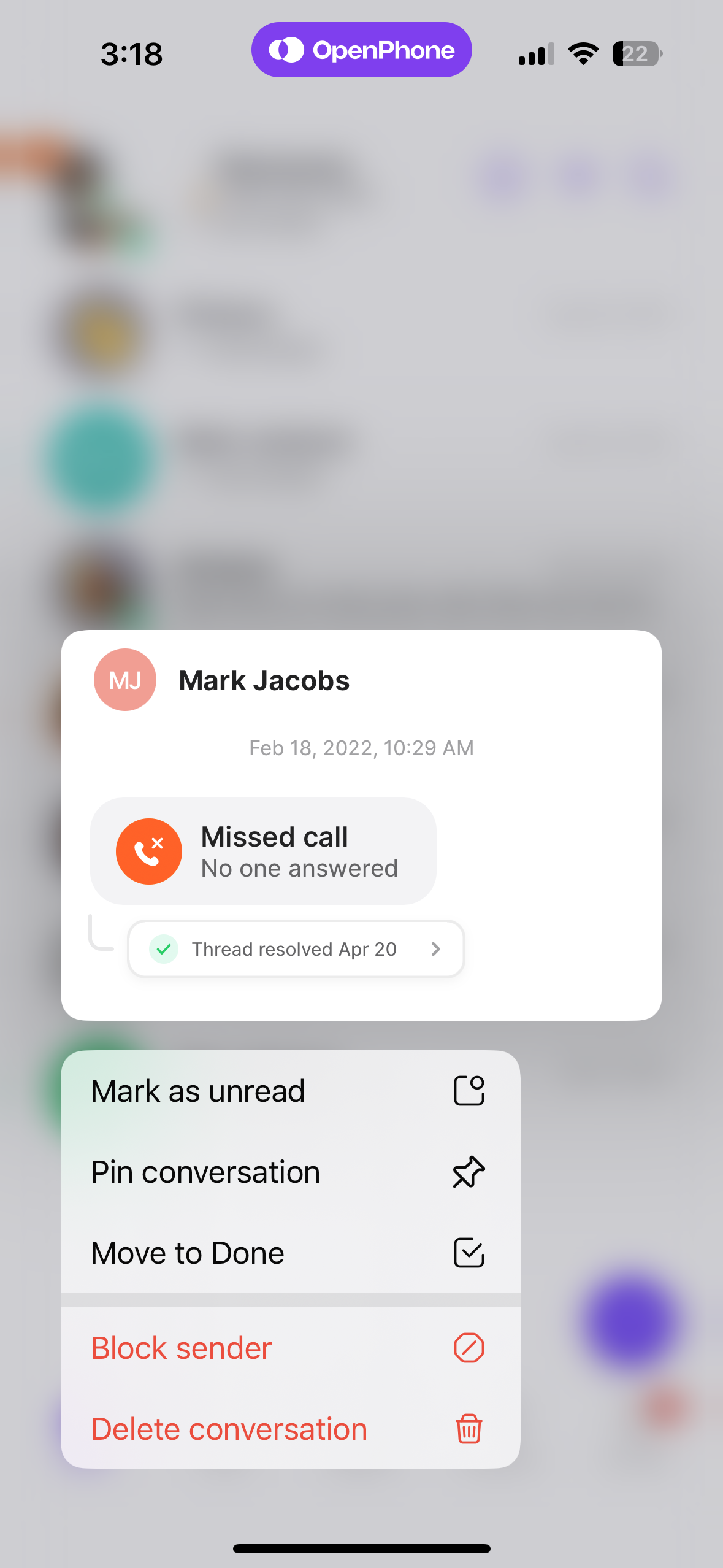 The conversation will immediately disappear from your inbox and move to your blocklist.
### Block from web or desktop
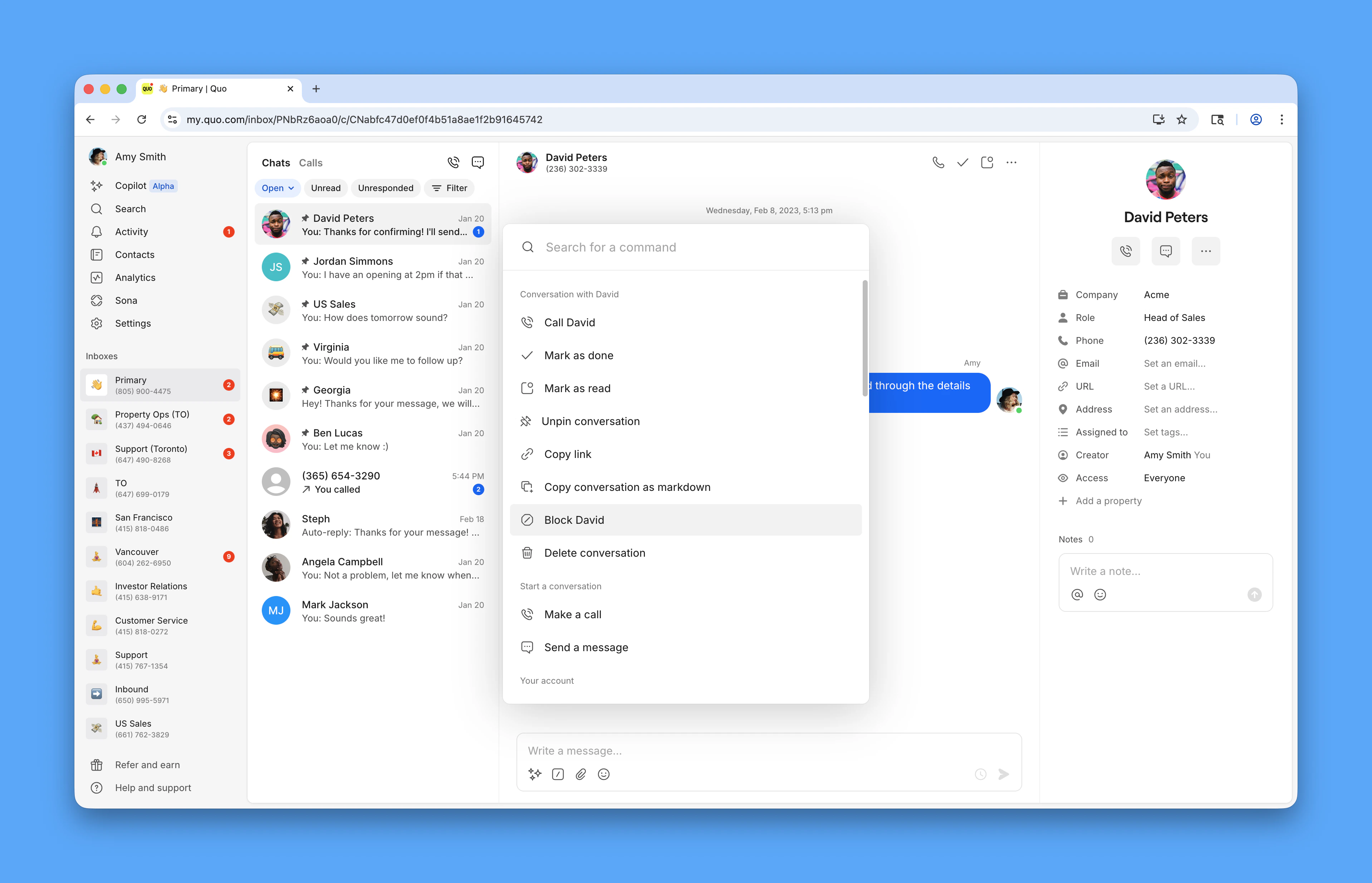
1. Select the conversation or call history in your inbox
2. Click the three dots (...) icon in the top right corner
3. Select **Block** from the dropdown menu
<>
The conversation will immediately disappear from your inbox and move to your blocklist.
### Block from web or desktop
1. Select the conversation or call history in your inbox
2. Click the three dots (...) icon in the top right corner
3. Select **Block** from the dropdown menu
<>
 ## Managing your blocklist
### Accessing your blocklist
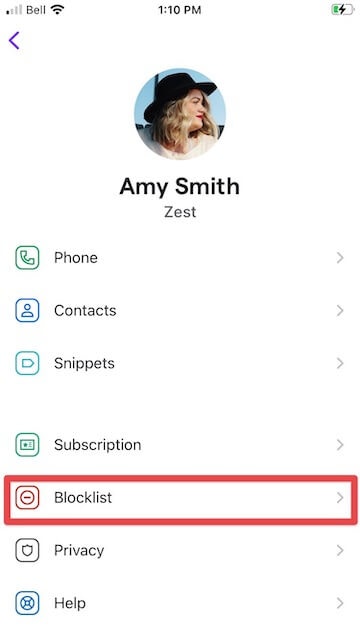
**From mobile app:**
1. Tap your profile icon in the upper left
2. Select **Settings**
3. Navigate to **Blocklist**
**From web or desktop:**
1. Click **Settings** in the left menu
2. Under Workspace, select **Blocklist**
## Managing your blocklist
### Accessing your blocklist
**From mobile app:**
1. Tap your profile icon in the upper left
2. Select **Settings**
3. Navigate to **Blocklist**
**From web or desktop:**
1. Click **Settings** in the left menu
2. Under Workspace, select **Blocklist**
 ### Adding numbers directly to blocklist
You can proactively block numbers without waiting for them to contact you:
1. Access your blocklist through Settings
2. Click **Add number** or the plus (+) icon
3. Enter the phone number you want to block
4. Confirm the blocking action
### Unblocking contacts
When you need to restore communication with a previously blocked contact:
1. Navigate to **Settings** → **Blocklist**
2. Search for the number you want to unblock
3. Click the three dots (...) next to the number
4. Select **Unblock number**
The contact will immediately be able to reach you again, and any future conversations will appear in your main inbox.
## Team blocklist management
For workspaces with multiple team members:
* **Shared protection**: Numbers blocked by any team member protect the entire workspace
* **Admin controls**: Workspace admins can manage the blocklist for all team members
* **Consistent experience**: Blocked contacts cannot reach any team member through any workspace number
## FAQs
When you block a contact, their calls will be silenced and their messages will be filtered out of your inbox. The conversation moves to your blocklist but isn't deleted, so you can still reference it if needed. Blocked contacts cannot reach you or any other team members in your workspace.
No, blocked contacts cannot leave voicemails. Their calls are completely prevented from reaching your Quo numbers, including voicemail systems.
Blocked contacts won't receive any indication that they've been blocked. From their perspective, calls may go to voicemail or seem to ring without answer, depending on your settings.
Messages from blocked contacts are filtered out of your main inbox but remain accessible through your blocklist. You can view these messages by accessing Settings → Blocklist and selecting the blocked contact.
You can proactively add numbers to your blocklist through Settings → Blocklist → Add number. This is useful for blocking known spam numbers or unwanted contacts before they attempt to reach you.
There's no limit to the number of contacts you can block. Your blocklist can accommodate as many numbers as needed to maintain your preferred communication environment.
When you unblock a contact, they can immediately reach you again. Previous conversations remain in your conversation history, and new messages will appear in your main inbox as normal.
<>
### Adding numbers directly to blocklist
You can proactively block numbers without waiting for them to contact you:
1. Access your blocklist through Settings
2. Click **Add number** or the plus (+) icon
3. Enter the phone number you want to block
4. Confirm the blocking action
### Unblocking contacts
When you need to restore communication with a previously blocked contact:
1. Navigate to **Settings** → **Blocklist**
2. Search for the number you want to unblock
3. Click the three dots (...) next to the number
4. Select **Unblock number**
The contact will immediately be able to reach you again, and any future conversations will appear in your main inbox.
## Team blocklist management
For workspaces with multiple team members:
* **Shared protection**: Numbers blocked by any team member protect the entire workspace
* **Admin controls**: Workspace admins can manage the blocklist for all team members
* **Consistent experience**: Blocked contacts cannot reach any team member through any workspace number
## FAQs
When you block a contact, their calls will be silenced and their messages will be filtered out of your inbox. The conversation moves to your blocklist but isn't deleted, so you can still reference it if needed. Blocked contacts cannot reach you or any other team members in your workspace.
No, blocked contacts cannot leave voicemails. Their calls are completely prevented from reaching your Quo numbers, including voicemail systems.
Blocked contacts won't receive any indication that they've been blocked. From their perspective, calls may go to voicemail or seem to ring without answer, depending on your settings.
Messages from blocked contacts are filtered out of your main inbox but remain accessible through your blocklist. You can view these messages by accessing Settings → Blocklist and selecting the blocked contact.
You can proactively add numbers to your blocklist through Settings → Blocklist → Add number. This is useful for blocking known spam numbers or unwanted contacts before they attempt to reach you.
There's no limit to the number of contacts you can block. Your blocklist can accommodate as many numbers as needed to maintain your preferred communication environment.
When you unblock a contact, they can immediately reach you again. Previous conversations remain in your conversation history, and new messages will appear in your main inbox as normal.
<>