> ## Documentation Index
> Fetch the complete documentation index at: https://support.quo.com/llms.txt
> Use this file to discover all available pages before exploring further.
# Call transcripts and summaries
> Automatically generate AI-powered transcripts, summaries, and action items from recorded calls to save time and improve follow-up
## Overview
Quo automatically generates AI-powered transcripts and summaries for all recorded calls, helping you save time and improve follow-up. Get speaker-separated transcripts, conversation summaries, and potential action items within seconds of ending a call.
Call transcripts and summaries are available on Business and Scale plans and require call recording to be enabled.
## Enabling transcripts and summaries
Call transcripts and summaries are enabled by default for Business and Scale plans. To disable or re-enable:
1. Go to **Settings** → **Phone numbers**
2. Select the specific phone number
3. Find **Transcribe and summarize calls** setting
4. Toggle on/off as needed
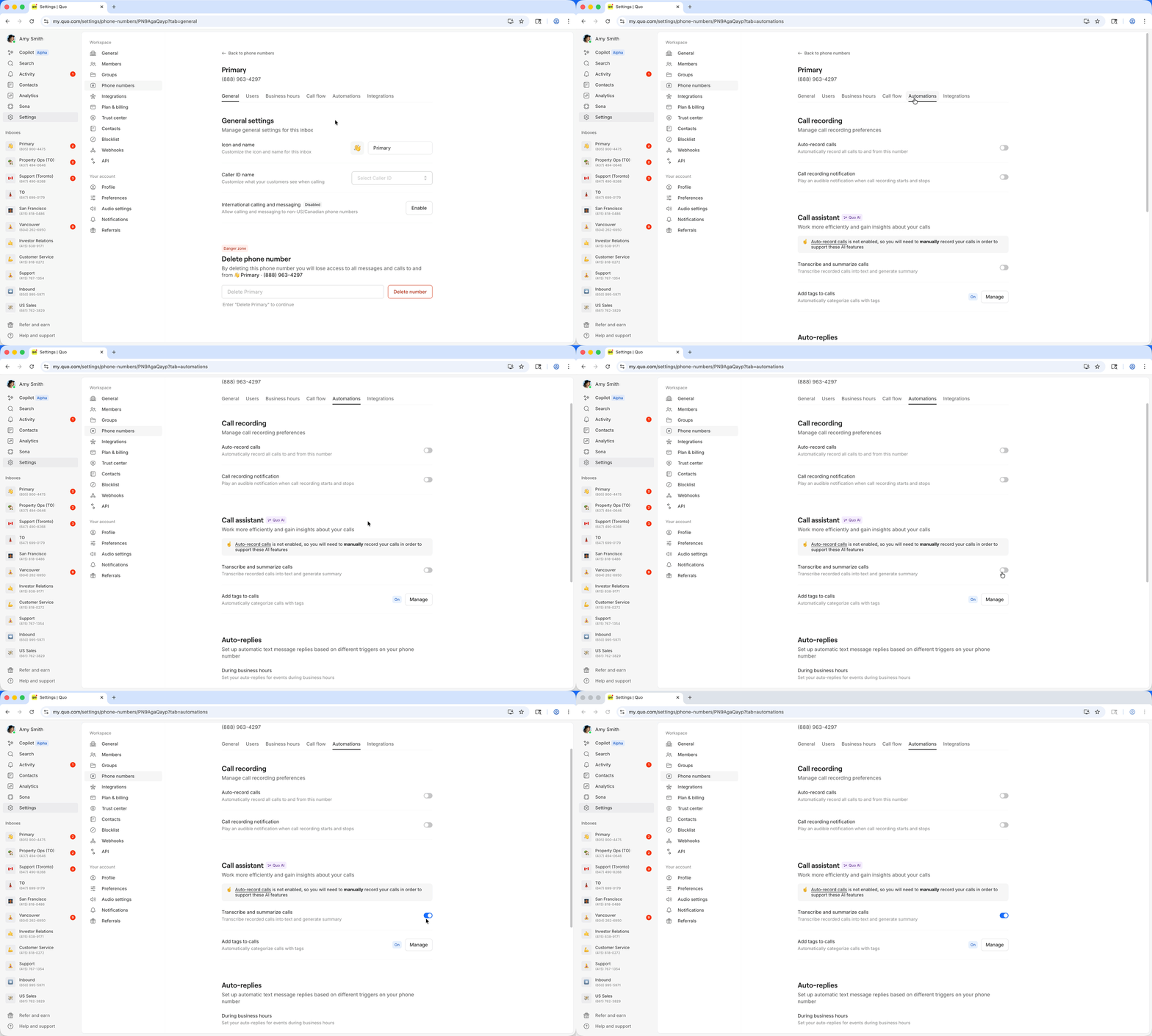 Transcription settings are configured per phone number, not account-wide.
## How it works
### Automatic generation
When you record a call, Quo automatically:
1. **Transcribes the conversation** with speaker identification
2. **Generates an AI summary** highlighting key points
3. **Identifies action items** for follow-up
4. **Delivers results** within seconds of call completion
### Accessing transcripts and summaries
After a recorded call ends:
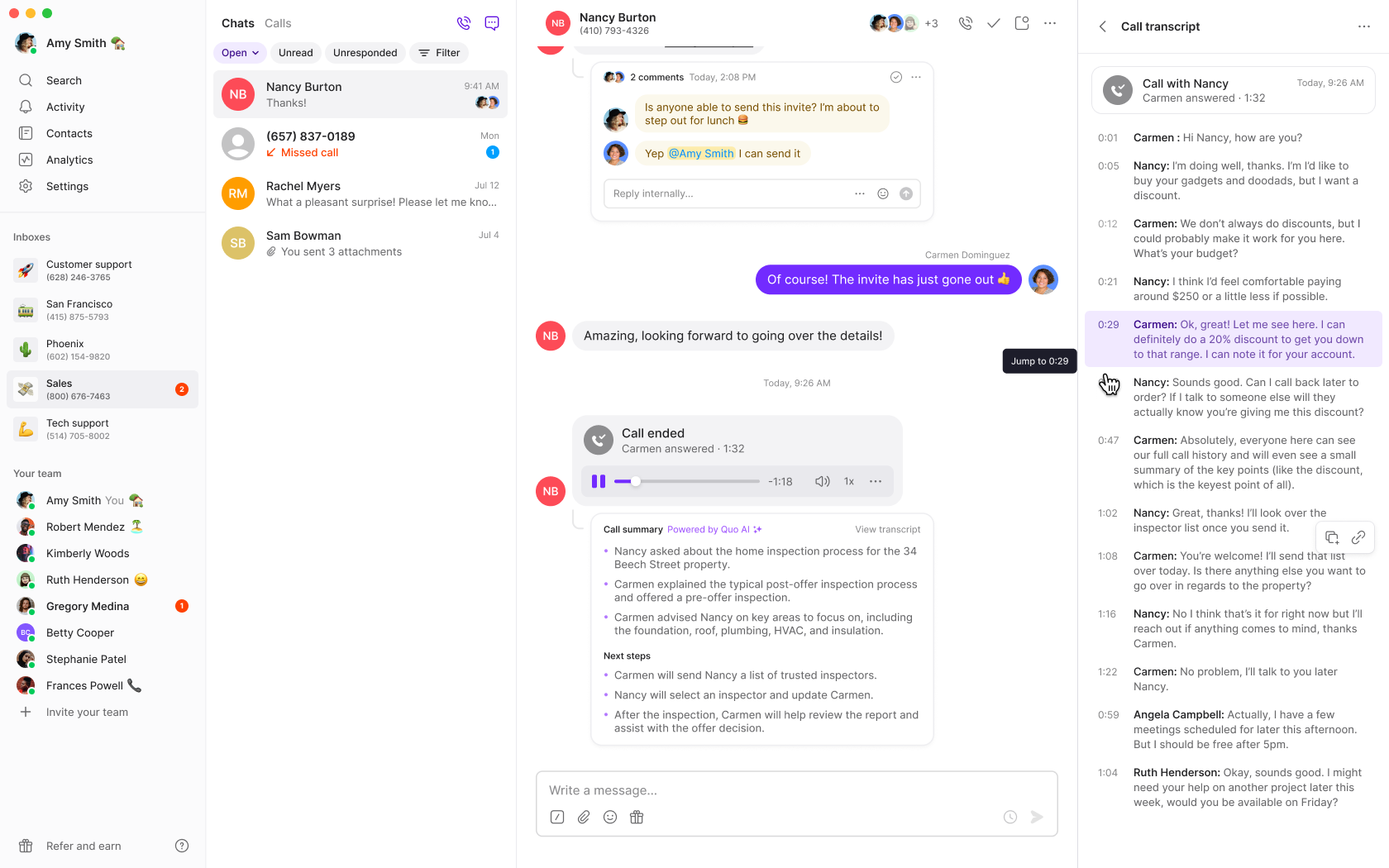
1. **View the summary** in the conversation thread
2. **Click the call summary** to expand details
3. **Review action items** for follow-up tasks
4. **Open the transcript** to see the full conversation
Transcription settings are configured per phone number, not account-wide.
## How it works
### Automatic generation
When you record a call, Quo automatically:
1. **Transcribes the conversation** with speaker identification
2. **Generates an AI summary** highlighting key points
3. **Identifies action items** for follow-up
4. **Delivers results** within seconds of call completion
### Accessing transcripts and summaries
After a recorded call ends:
1. **View the summary** in the conversation thread
2. **Click the call summary** to expand details
3. **Review action items** for follow-up tasks
4. **Open the transcript** to see the full conversation
 ## Searching within transcripts
You can search within a call transcript to quickly find specific words or phrases without scrolling through the entire conversation. This is especially useful for locating key moments, action items, or topics discussed during longer calls.
### How to search within a transcript
1. Open a recorded call in the conversation thread
2. Click the call summary to expand details, then open the full transcript
3. Use the **search bar** at the top of the transcript panel to type a keyword or phrase
4. Matching results are highlighted in the transcript, and you can navigate between matches to jump directly to the relevant section
Use specific keywords related to the topic you're looking for — such as a product name, action item, or person's name — to quickly narrow down results.
### Use cases
* **Sales teams**: Search for pricing discussions, competitor mentions, or objection handling in prospect calls
* **Support teams**: Find specific troubleshooting steps or issue descriptions from customer calls
* **Managers**: Locate coaching moments or compliance-related language during call reviews
Searching within transcripts requires a Business or Scale plan with call recording and transcription enabled.
### Play audio from any transcript line
You can jump to any moment in a recording directly from the transcript, without scrubbing.
1. Hover over any transcript line to reveal a play button next to the timestamp.
2. Click it to hear the recording starting at to that line
Clicking play doesn't clear your search. You can navigate matches and listen to the audio at the same time.
***
## Language support
Quo supports call transcripts and summaries in 40+ languages:
### European Languages
* **Bulgarian**, **Catalan**, **Czech**, **Danish**, **Dutch**
* **English**, **Estonian**, **Finnish**, **Flemish**, **French**
* **German** (including Switzerland), **Greek**, **Hungarian**
* **Italian**, **Latvian**, **Lithuanian**, **Norwegian**
* **Polish**, **Portuguese**, **Romanian**, **Russian**
* **Slovak**, **Spanish**, **Swedish**, **Turkish**, **Ukrainian**
### Asian Languages
* **Chinese** (Mandarin Simplified/Traditional, Cantonese Traditional)
* **Hindi**, **Indonesian**, **Japanese**, **Korean**
* **Malay**, **Thai**, **Vietnamese**
Transcription accuracy may vary based on audio quality, speaker clarity, and language complexity.
# FAQs
Ensure you have a Business or Scale plan and that call recording is enabled for your phone number. Transcripts only generate for recorded calls.
Check call audio quality and minimize background noise. Speak clearly and avoid overlapping conversations for better AI transcription accuracy.
Only workspace Owners and Admins can modify transcription settings. Check your role permissions in the workspace.
Action items are only available on Scale plans. Business plan users get transcripts and summaries but not AI-generated action items.
Check the supported languages list above. If your language isn't supported, transcription may not work accurately or at all.
Transcripts are only generated for calls made after upgrading to Business or Scale plans. Previous calls cannot be retroactively transcribed.
Yes, you can retrieve a single call summary with the public API using the **call ID**: `GET /v1/call-summaries/:callId`. [For more information about Quo's API, visit our docs](https://www.quo.com/docs/mdx/api-reference/introduction).
Not yet. The public API currently supports retrieving one summary at a time by call ID. Bulk export is planned for a future release. If you need a bulk export now, [contact support](https://support.quo.com/help/submit-a-request) to request an internal data export.
**Check the following:**
* **Transcript search is available on web or desktop only.**
* You're on a\*\* \*\*Business or Scale plan.
* AI call transcription is enabled.
* Ensure that the call you're viewing has a transcript available.
* If the audio quality was poor, or the call was too short, a transcript may not have been generated.
The play button appears **on hover** over the timestamp area. If it doesn't appear, confirm the call has a playable recording. Deleted or expired recordings won't show the play control.
Transcript search matches **exact text** in the transcript. If the transcription engine misheard a word (especially an industry term or name), it won't appear as expected in the transcript and search won't find it. Try searching for a partial word or an alternative spelling.
Yes. Search works on any existing transcript and play-from-line works on any call that has both a transcript and a playable recording.
Yes, as long as a voicemail has been transcribed, you can search within it the same way. The play-from-line feature applies to call recordings only.
***
**Need help?** [Submit a support request](https://support.quo.com/help/submit-a-request) and we'll jump in.
## Searching within transcripts
You can search within a call transcript to quickly find specific words or phrases without scrolling through the entire conversation. This is especially useful for locating key moments, action items, or topics discussed during longer calls.
### How to search within a transcript
1. Open a recorded call in the conversation thread
2. Click the call summary to expand details, then open the full transcript
3. Use the **search bar** at the top of the transcript panel to type a keyword or phrase
4. Matching results are highlighted in the transcript, and you can navigate between matches to jump directly to the relevant section
Use specific keywords related to the topic you're looking for — such as a product name, action item, or person's name — to quickly narrow down results.
### Use cases
* **Sales teams**: Search for pricing discussions, competitor mentions, or objection handling in prospect calls
* **Support teams**: Find specific troubleshooting steps or issue descriptions from customer calls
* **Managers**: Locate coaching moments or compliance-related language during call reviews
Searching within transcripts requires a Business or Scale plan with call recording and transcription enabled.
### Play audio from any transcript line
You can jump to any moment in a recording directly from the transcript, without scrubbing.
1. Hover over any transcript line to reveal a play button next to the timestamp.
2. Click it to hear the recording starting at to that line
Clicking play doesn't clear your search. You can navigate matches and listen to the audio at the same time.
***
## Language support
Quo supports call transcripts and summaries in 40+ languages:
### European Languages
* **Bulgarian**, **Catalan**, **Czech**, **Danish**, **Dutch**
* **English**, **Estonian**, **Finnish**, **Flemish**, **French**
* **German** (including Switzerland), **Greek**, **Hungarian**
* **Italian**, **Latvian**, **Lithuanian**, **Norwegian**
* **Polish**, **Portuguese**, **Romanian**, **Russian**
* **Slovak**, **Spanish**, **Swedish**, **Turkish**, **Ukrainian**
### Asian Languages
* **Chinese** (Mandarin Simplified/Traditional, Cantonese Traditional)
* **Hindi**, **Indonesian**, **Japanese**, **Korean**
* **Malay**, **Thai**, **Vietnamese**
Transcription accuracy may vary based on audio quality, speaker clarity, and language complexity.
# FAQs
Ensure you have a Business or Scale plan and that call recording is enabled for your phone number. Transcripts only generate for recorded calls.
Check call audio quality and minimize background noise. Speak clearly and avoid overlapping conversations for better AI transcription accuracy.
Only workspace Owners and Admins can modify transcription settings. Check your role permissions in the workspace.
Action items are only available on Scale plans. Business plan users get transcripts and summaries but not AI-generated action items.
Check the supported languages list above. If your language isn't supported, transcription may not work accurately or at all.
Transcripts are only generated for calls made after upgrading to Business or Scale plans. Previous calls cannot be retroactively transcribed.
Yes, you can retrieve a single call summary with the public API using the **call ID**: `GET /v1/call-summaries/:callId`. [For more information about Quo's API, visit our docs](https://www.quo.com/docs/mdx/api-reference/introduction).
Not yet. The public API currently supports retrieving one summary at a time by call ID. Bulk export is planned for a future release. If you need a bulk export now, [contact support](https://support.quo.com/help/submit-a-request) to request an internal data export.
**Check the following:**
* **Transcript search is available on web or desktop only.**
* You're on a\*\* \*\*Business or Scale plan.
* AI call transcription is enabled.
* Ensure that the call you're viewing has a transcript available.
* If the audio quality was poor, or the call was too short, a transcript may not have been generated.
The play button appears **on hover** over the timestamp area. If it doesn't appear, confirm the call has a playable recording. Deleted or expired recordings won't show the play control.
Transcript search matches **exact text** in the transcript. If the transcription engine misheard a word (especially an industry term or name), it won't appear as expected in the transcript and search won't find it. Try searching for a partial word or an alternative spelling.
Yes. Search works on any existing transcript and play-from-line works on any call that has both a transcript and a playable recording.
Yes, as long as a voicemail has been transcribed, you can search within it the same way. The play-from-line feature applies to call recordings only.
***
**Need help?** [Submit a support request](https://support.quo.com/help/submit-a-request) and we'll jump in.