> ## Documentation Index
> Fetch the complete documentation index at: https://support.quo.com/llms.txt
> Use this file to discover all available pages before exploring further.
# AI contact suggestions
> Automatically build your contact list with AI-powered suggestions from voicemails and call summaries
## Overview
Quo, formerly OpenPhone, AI contact suggestions automatically analyze voicemails and call recordings to identify missing contact information, helping you build a comprehensive contact list without manual data entry. This feature saves time and ensures you know who's calling, even before creating formal contact records.
AI contact suggestions are available on Business plans and require call recording and transcription to be enabled.
## How AI contact suggestions work
### Automatic contact detection
**AI analysis process:**
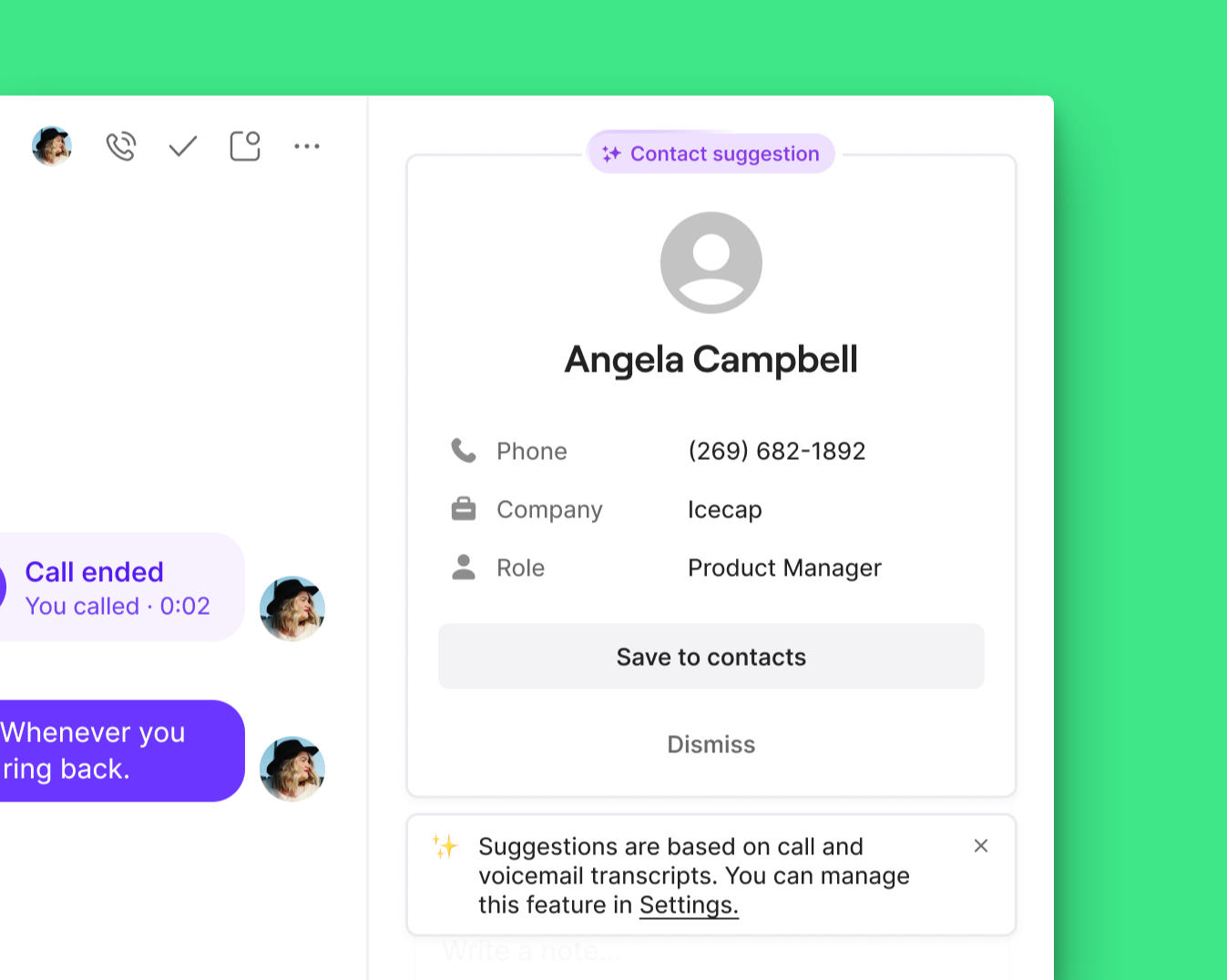
When voicemails or call recordings are transcribed, Quo AI automatically searches for:
* **First name**: Personal identification from conversation
* **Last name**: Complete name information
* **Company**: Business or organization affiliation
* **Contact role**: Job title or position mentioned
**Smart recognition:**
* AI identifies contact details mentioned naturally in conversations
* Works with various speech patterns and conversation styles
* Processes both formal introductions and casual mentions
* Analyzes context to ensure accurate suggestions
### Suggestion presentation
**Where suggestions appear:**
* **Contact panel**: Integrated with existing contact interface
* **Inbox chat list**: Shows suggested names for unknown numbers
* **Incoming call alerts**: Displays potential contact information during calls
* **Notifications**: Alerts you to new contact suggestions
 ## Managing contact suggestions
### Suggestion options
**Available actions:**
* **Accept**: Create contact with suggested information
* **Edit**: Modify details before creating contact
* **Dismiss**: Reject suggestion and prevent future suggestions for this number
**Contact creation process:**
* Accepted suggestions create contacts using workspace default sharing settings
* Contact information follows your organization's contact management policies
* New contacts are immediately available across your workspace
### Suggestion accuracy
**Quality considerations:**
* Suggestions are AI-generated and may require verification
* Edit contact details to ensure accuracy before accepting
* Dismiss incorrect suggestions to improve future AI performance
* Review suggested information for completeness
## Configuration and settings
### Enabling/disabling suggestions
**Default status:**
AI contact suggestions are enabled by default for all Business plan customers.
**Administrative control:**
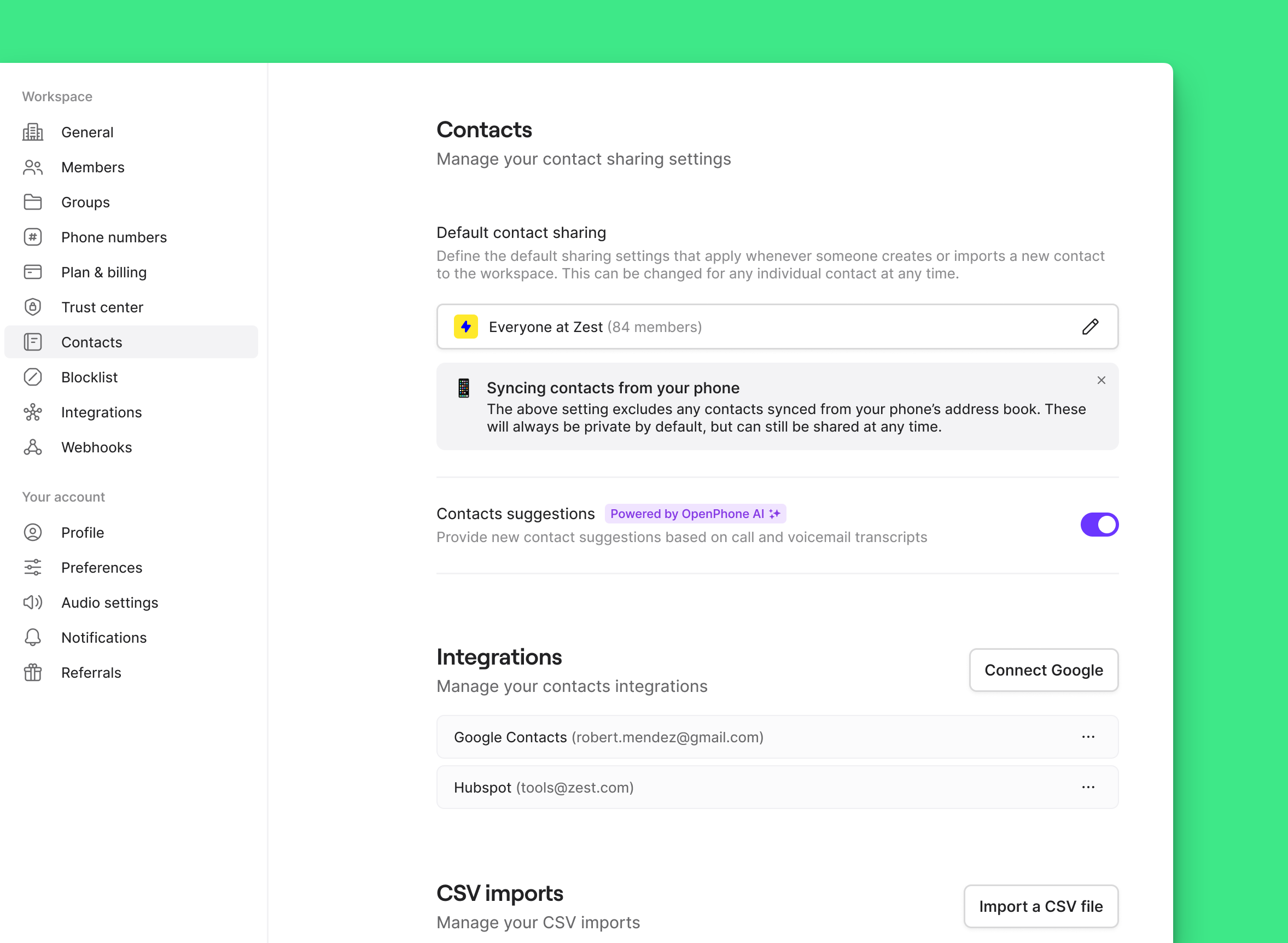
1. **Navigate to Settings** → **Contacts**
2. **Toggle Contact suggestions** on or off
## Managing contact suggestions
### Suggestion options
**Available actions:**
* **Accept**: Create contact with suggested information
* **Edit**: Modify details before creating contact
* **Dismiss**: Reject suggestion and prevent future suggestions for this number
**Contact creation process:**
* Accepted suggestions create contacts using workspace default sharing settings
* Contact information follows your organization's contact management policies
* New contacts are immediately available across your workspace
### Suggestion accuracy
**Quality considerations:**
* Suggestions are AI-generated and may require verification
* Edit contact details to ensure accuracy before accepting
* Dismiss incorrect suggestions to improve future AI performance
* Review suggested information for completeness
## Configuration and settings
### Enabling/disabling suggestions
**Default status:**
AI contact suggestions are enabled by default for all Business plan customers.
**Administrative control:**
1. **Navigate to Settings** → **Contacts**
2. **Toggle Contact suggestions** on or off
 **Permission requirements:**
* **Workspace Owners**: Full control over contact suggestion settings
* **Administrators**: Can enable/disable feature for workspace
* **Members**: Can accept, edit, or dismiss individual suggestions
### Per-number suggestion control
**Individual number management:**
* Dismissing a suggestion for a specific phone number prevents future suggestions for that number
* Useful for known contacts who don't need AI suggestions
* Helps reduce suggestion noise for frequently contacted numbers
## FAQs
Verify that call recording and transcription are enabled for your phone numbers. AI contact suggestions require transcribed content to analyze for contact information.
AI suggestions are based on transcribed speech, which may contain errors. Always review and edit suggestions before accepting them as contacts.
Contact suggestion settings are located in Settings → Contacts. Ensure you have Owner or Admin permissions to modify workspace-wide settings.
Dismissing a suggestion should prevent future suggestions for that specific phone number. If suggestions continue appearing, contact support for assistance.
Check your workspace contact sharing settings. Suggested contacts follow the same sharing rules as manually created contacts.
<>
**Permission requirements:**
* **Workspace Owners**: Full control over contact suggestion settings
* **Administrators**: Can enable/disable feature for workspace
* **Members**: Can accept, edit, or dismiss individual suggestions
### Per-number suggestion control
**Individual number management:**
* Dismissing a suggestion for a specific phone number prevents future suggestions for that number
* Useful for known contacts who don't need AI suggestions
* Helps reduce suggestion noise for frequently contacted numbers
## FAQs
Verify that call recording and transcription are enabled for your phone numbers. AI contact suggestions require transcribed content to analyze for contact information.
AI suggestions are based on transcribed speech, which may contain errors. Always review and edit suggestions before accepting them as contacts.
Contact suggestion settings are located in Settings → Contacts. Ensure you have Owner or Admin permissions to modify workspace-wide settings.
Dismissing a suggestion should prevent future suggestions for that specific phone number. If suggestions continue appearing, contact support for assistance.
Check your workspace contact sharing settings. Suggested contacts follow the same sharing rules as manually created contacts.
<>