> ## Documentation Index
> Fetch the complete documentation index at: https://support.quo.com/llms.txt
> Use this file to discover all available pages before exploring further.
# Voicemail
> Create professional voicemail greetings and manage messages with transcriptions, notifications, and advanced routing
## Overview
Voicemail ensures you never miss important communications, even when you can't answer calls. With Quo, formerly OpenPhone's voicemail system, you can create professional greetings, receive automatic transcriptions, and manage messages efficiently across all your devices. Whether you need different greetings for business hours, holiday messages, or department-specific recordings, voicemail keeps your business accessible 24/7.
***
## Understanding voicemail in Quo
### How voicemail works
When calls go unanswered:
1. Caller hears your custom greeting
2. Records their message
3. System transcribes the audio
4. You receive notifications across devices
5. Message stored in conversation thread
### Key features
* **Custom greetings**: Different messages for different scenarios
* **Automatic transcription**: Read messages without listening
* **Profanity filtering**: Clean transcriptions for professional environments
* **Indefinite storage**: Messages saved until you delete them
* **Multi-device sync**: Access voicemails anywhere
* **Email notifications**: Get transcriptions in your inbox
***
## Setting up voicemail
### Add to your call flow
1. Open the call flow builder
2. Drag **Voicemail** step to canvas
3. Place after:
* Ring users (when no answer)
* Business hours (after hours)
* Phone menu options
4. Configure greeting and settings
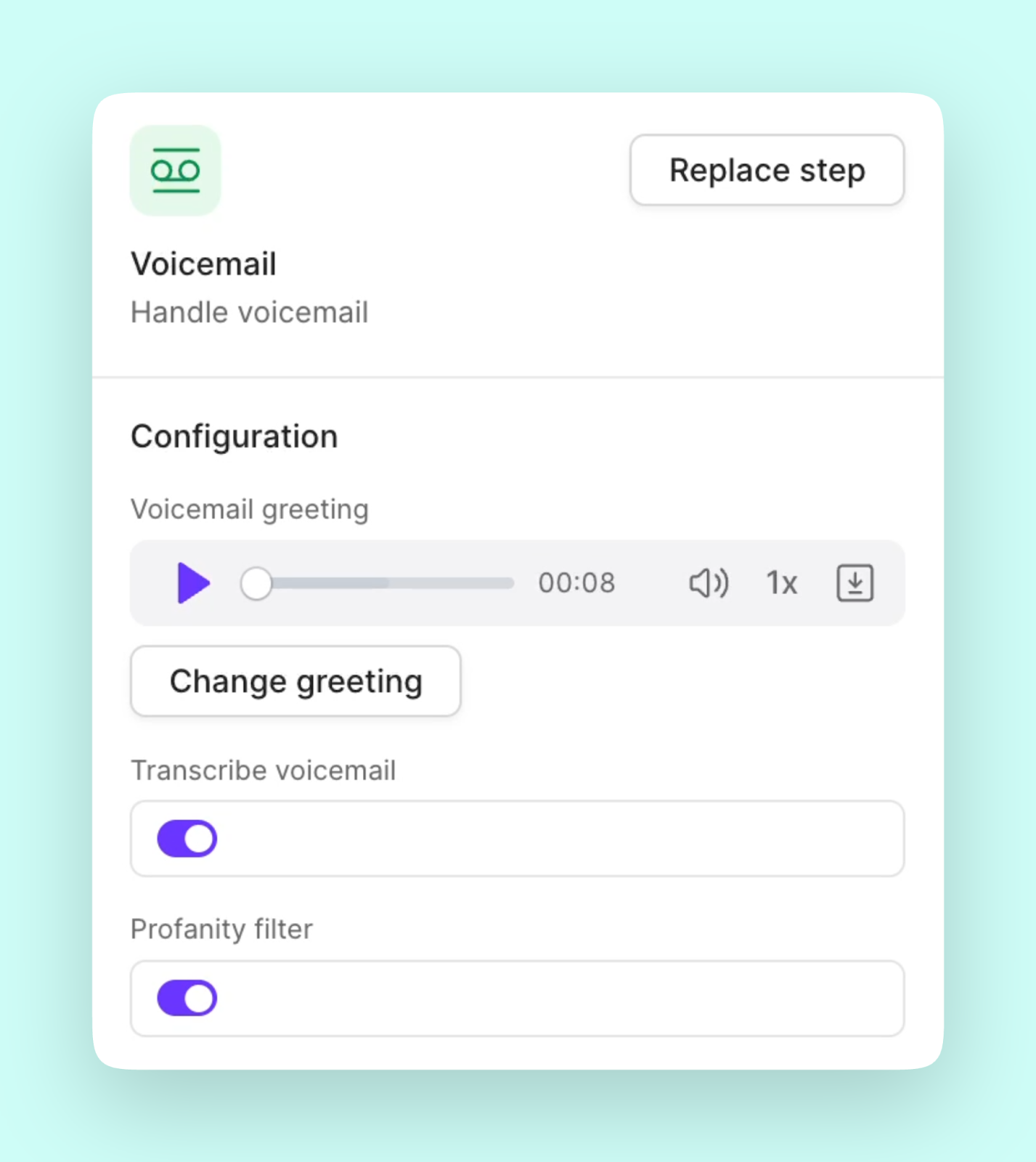 Practice building call flows step-by-step and learn about key features like **Voicemail**, [Business hours](https://support.quo.com/core-concepts/administration/call-flows/business-hours), [AI call handling](https://support.quo.com/core-concepts/ai-automations/sona/overview) and more in the Quo Academy.
### Create your greeting
Select the voicemail step and choose your method:
**Upload a file:** Use a pre-recorded greeting that you've made outside of Quo
1. The uploaded file must be an MP3 or WAV file
2. Preview after uploading to ensure your audio is high-quality
**Record in Quo:** Record a new greeting on your desktop
1. Click **Record** button
2. Use your computer or your phone's own microphone
3. Preview to make sure you're happy with it
**Text to speech:** A quick way to create a professional-sounding greeting
1. Type your greeting text
2. Choose a voice
3. Generate your greeting
For help writing natural-sounding text-to-speech messages, including pacing and pronunciation, see our [guide on using enhanced text to speech](https://support.quo.com/core-concepts/administration/call-flows/guides/text-to-speech-guide).
### Configure settings
Enable additional features:
* **Transcribe voicemail**: Automatic text conversion
* **Profanity filter**: Clean up transcriptions
* **Email notifications**: Forward to inbox
* **Ring duration**: Set time before voicemail
***
## Professional greeting examples
**Standard business greeting**
*"Thank you for calling \[Business Name]. We're currently assisting other customers. Please leave your name, number, and a brief message, and we'll return your call within one business day."*
**After-hours greeting**
*"You've reached \[Business Name]. Our office hours are Monday through Sunday, 9 AM to 5 PM Eastern. Please leave a message and we'll respond on the next business day. For emergencies, press 0."*
**Department-specific greeting**
*"You've reached the \[Department] team at \[Business Name]. All representatives are currently busy. Leave a detailed message including your account number, and we'll call back within 4 hours."*
**Holiday greeting**
\_"Happy holidays from \[Business Name]! We're closed from \[Date] through \[Date]. Please leave a message and we'll respond when we return. For urgent matters, email us at this address. \_
**Personal voicemail**
*"Hi, you've reached \[Name] at \[Business Name]. I'm either on another call or away from my desk. Leave a message and I'll get back to you as soon as possible."*
Need more inspiration? Check out [45 Professional Voicemail Greeting Examples](https://www.quo.com/blog/professional-voicemail-greeting-examples/) for industry-specific scripts.
***
## Managing voicemail settings
1. Click **Settings**
2. Select the phone number to configure
3. Scroll to **Call flow** and click to open your **call flow builder**
4. Click on the **Voicemail** block
5. From here, you can:
* Change your **Voicemail** **greeting**
* Turn on/off **Transcribe voicemail**
* Turn on/off **Profanity filter**
1. Tap your **account icon** on the top left
2. Tap **Settings** ⚙️
3. Tap **Phone numbers**
4. Select your number
5. Tap **Voicemail greeting**
6. Tap the **Plus (+)** in the bottom right corner
7. Record or upload your greeting
8. Selected greeting is displayed in purple with a checkmark ✔️
Practice building call flows step-by-step and learn about key features like **Voicemail**, [Business hours](https://support.quo.com/core-concepts/administration/call-flows/business-hours), [AI call handling](https://support.quo.com/core-concepts/ai-automations/sona/overview) and more in the Quo Academy.
### Create your greeting
Select the voicemail step and choose your method:
**Upload a file:** Use a pre-recorded greeting that you've made outside of Quo
1. The uploaded file must be an MP3 or WAV file
2. Preview after uploading to ensure your audio is high-quality
**Record in Quo:** Record a new greeting on your desktop
1. Click **Record** button
2. Use your computer or your phone's own microphone
3. Preview to make sure you're happy with it
**Text to speech:** A quick way to create a professional-sounding greeting
1. Type your greeting text
2. Choose a voice
3. Generate your greeting
For help writing natural-sounding text-to-speech messages, including pacing and pronunciation, see our [guide on using enhanced text to speech](https://support.quo.com/core-concepts/administration/call-flows/guides/text-to-speech-guide).
### Configure settings
Enable additional features:
* **Transcribe voicemail**: Automatic text conversion
* **Profanity filter**: Clean up transcriptions
* **Email notifications**: Forward to inbox
* **Ring duration**: Set time before voicemail
***
## Professional greeting examples
**Standard business greeting**
*"Thank you for calling \[Business Name]. We're currently assisting other customers. Please leave your name, number, and a brief message, and we'll return your call within one business day."*
**After-hours greeting**
*"You've reached \[Business Name]. Our office hours are Monday through Sunday, 9 AM to 5 PM Eastern. Please leave a message and we'll respond on the next business day. For emergencies, press 0."*
**Department-specific greeting**
*"You've reached the \[Department] team at \[Business Name]. All representatives are currently busy. Leave a detailed message including your account number, and we'll call back within 4 hours."*
**Holiday greeting**
\_"Happy holidays from \[Business Name]! We're closed from \[Date] through \[Date]. Please leave a message and we'll respond when we return. For urgent matters, email us at this address. \_
**Personal voicemail**
*"Hi, you've reached \[Name] at \[Business Name]. I'm either on another call or away from my desk. Leave a message and I'll get back to you as soon as possible."*
Need more inspiration? Check out [45 Professional Voicemail Greeting Examples](https://www.quo.com/blog/professional-voicemail-greeting-examples/) for industry-specific scripts.
***
## Managing voicemail settings
1. Click **Settings**
2. Select the phone number to configure
3. Scroll to **Call flow** and click to open your **call flow builder**
4. Click on the **Voicemail** block
5. From here, you can:
* Change your **Voicemail** **greeting**
* Turn on/off **Transcribe voicemail**
* Turn on/off **Profanity filter**
1. Tap your **account icon** on the top left
2. Tap **Settings** ⚙️
3. Tap **Phone numbers**
4. Select your number
5. Tap **Voicemail greeting**
6. Tap the **Plus (+)** in the bottom right corner
7. Record or upload your greeting
8. Selected greeting is displayed in purple with a checkmark ✔️
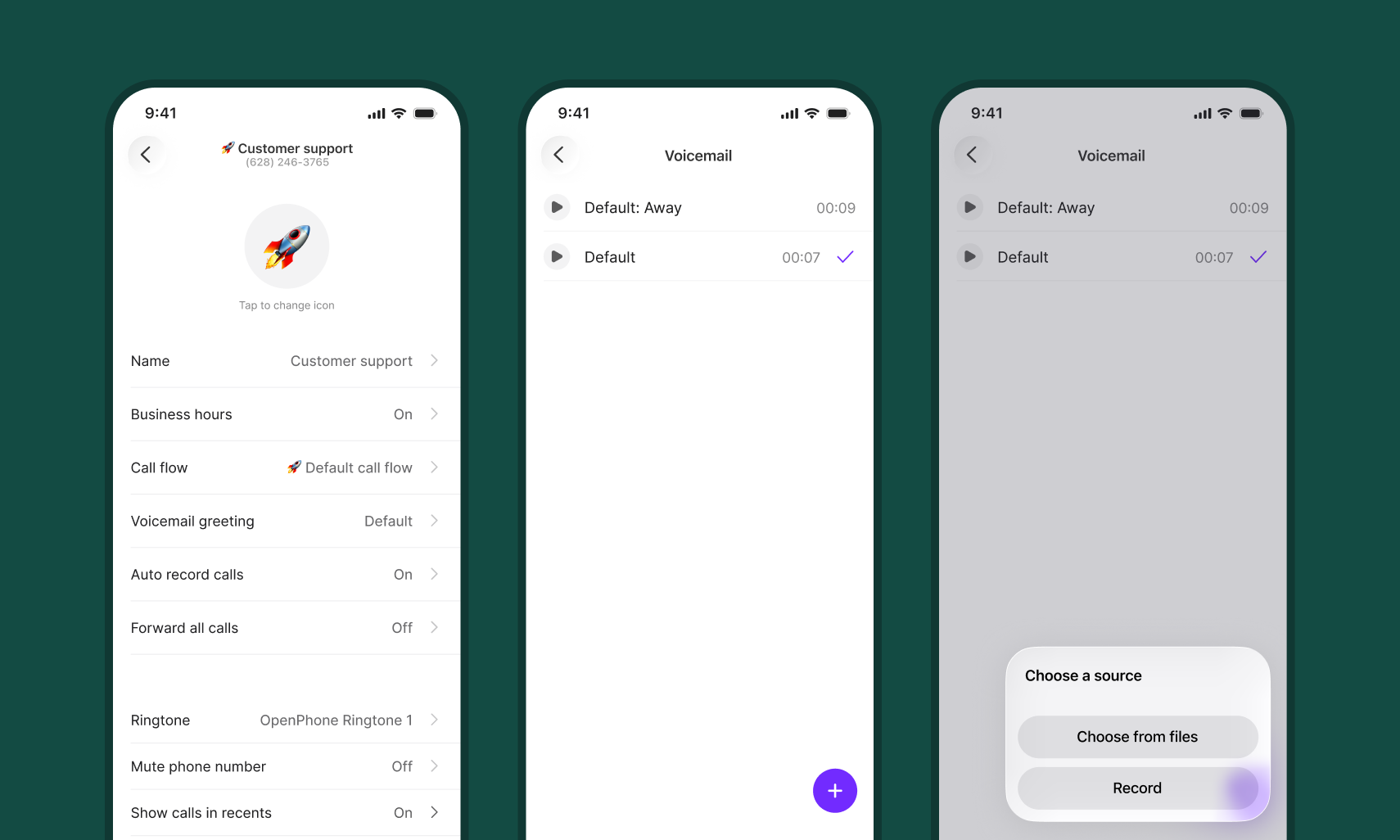 Some settings, like Profanity filter, can only be updated on web/desktop.
***
## Advanced voicemail strategies
### Time-based greetings
Use business hours for different messages:
* **During hours**: Brief, professional greeting
* **After hours**: Detailed info with return timeframe
* **Weekends**: Special weekend message
* **Holidays**: Closure dates and emergency contacts
### Department routing
Create specific voicemail boxes:
```text theme={null}
Phone menu → Department selection → Specific voicemail
Sales → Sales voicemail
Support → Support voicemail with SLA info
Billing → Billing voicemail with payment options
```
### Language options
Serve multilingual customers:
1. Main greeting in primary language
2. Phone menu for language selection
3. Language-specific voicemail boxes
4. Transcriptions in detected language
### Overflow handling
When team is at capacity:
```text theme={null}
Ring users (30 sec) → Play message → Voicemail
"All representatives are busy. Your call is important..."
```
***
## Voicemail features
### Transcription accuracy
Improve transcription quality:
* Clear greeting prompts callers to speak clearly
* Request name spelling for accuracy
* Enable profanity filter for cleaner text
* Review and correct important transcriptions
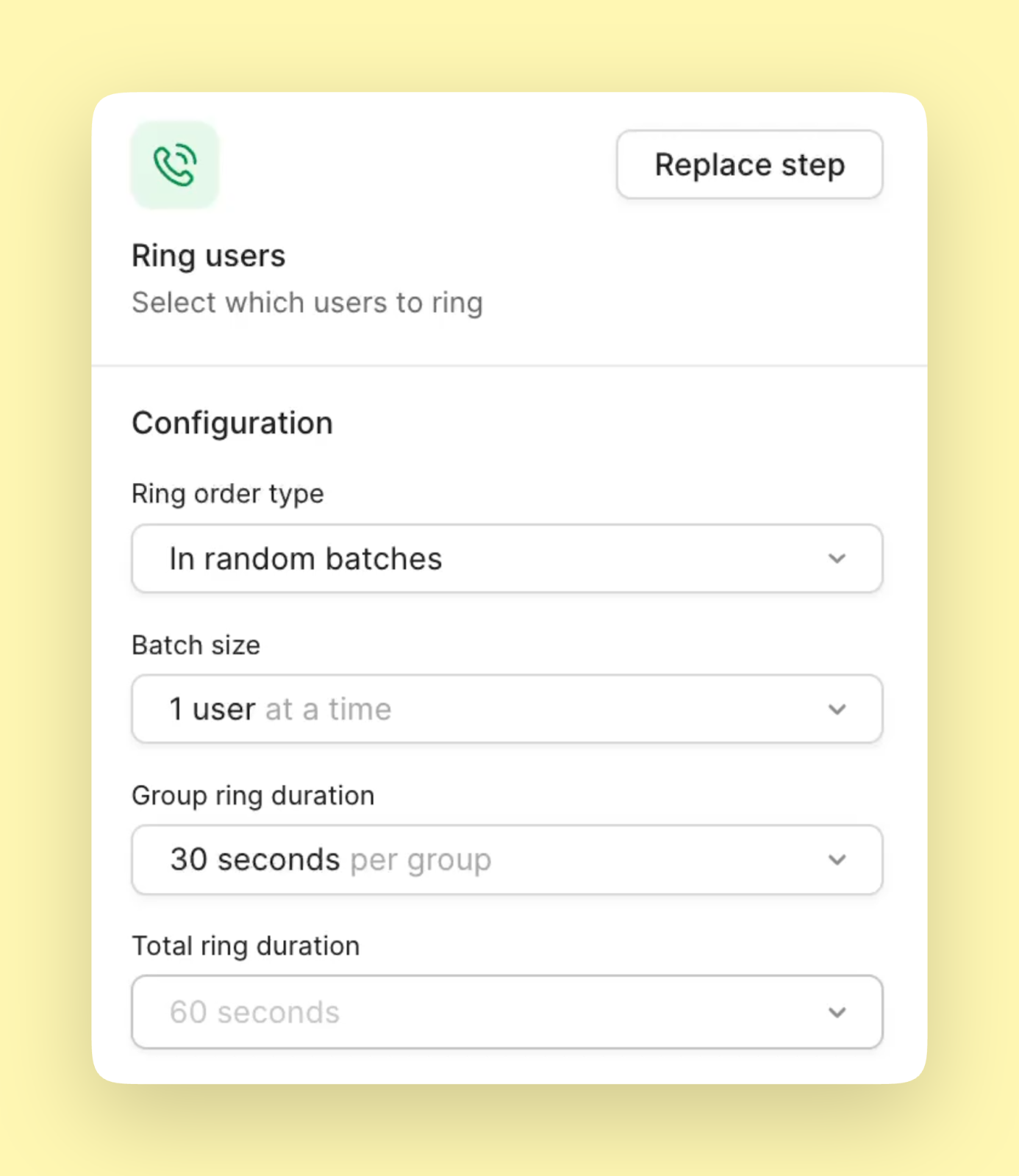
### Ring duration settings
Customize when voicemail activates:
* **Default**: 30 seconds
* **Quick to voicemail**: 15-20 seconds
* **Extended ringing**: 45-60 seconds
* **Per group**: Different times for different ring groups
Some settings, like Profanity filter, can only be updated on web/desktop.
***
## Advanced voicemail strategies
### Time-based greetings
Use business hours for different messages:
* **During hours**: Brief, professional greeting
* **After hours**: Detailed info with return timeframe
* **Weekends**: Special weekend message
* **Holidays**: Closure dates and emergency contacts
### Department routing
Create specific voicemail boxes:
```text theme={null}
Phone menu → Department selection → Specific voicemail
Sales → Sales voicemail
Support → Support voicemail with SLA info
Billing → Billing voicemail with payment options
```
### Language options
Serve multilingual customers:
1. Main greeting in primary language
2. Phone menu for language selection
3. Language-specific voicemail boxes
4. Transcriptions in detected language
### Overflow handling
When team is at capacity:
```text theme={null}
Ring users (30 sec) → Play message → Voicemail
"All representatives are busy. Your call is important..."
```
***
## Voicemail features
### Transcription accuracy
Improve transcription quality:
* Clear greeting prompts callers to speak clearly
* Request name spelling for accuracy
* Enable profanity filter for cleaner text
* Review and correct important transcriptions
### Ring duration settings
Customize when voicemail activates:
* **Default**: 30 seconds
* **Quick to voicemail**: 15-20 seconds
* **Extended ringing**: 45-60 seconds
* **Per group**: Different times for different ring groups
 ### Profanity filtering
Keep transcriptions professional:
1. Go to **Settings** → **Phone numbers**
2. Select your number
3. Scroll to Voicemail section
4. Enable **Filter profanity**
***
## Accessing voicemails
### In conversation threads
All voicemails appear in the relevant conversation:
* Audio player for playback
* Full transcription below
* Download option for archiving
* Timestamp and duration
### Notifications
Stay informed about new messages:
* **Badge icons**: Unread count in inbox
* **Push notifications**: Mobile alerts
* **Email forwards**: Transcriptions in email
* **Slack integration**: Team notifications
### Do Not Disturb mode
Send calls directly to voicemail:
* Set duration: 30 min, 1 hour, 8 hours, or custom
* Texts still received normally
* Voicemail notifications continue
* Doesn't affect shared numbers
***
## Storage and retention
### Message storage
* **Duration**: Indefinite (until deleted)
* **Location**: Within conversation threads
* **Backup**: Automatic cloud storage
* **Export**: Available through data export
### After cancellation
* Messages guaranteed for 14 days
* Export data before cancelling
* Download important voicemails
* Request full data export if needed
***
## Integration options
### Email notifications
Receive voicemails in your inbox:
1. Configure email integration
2. Select voicemail notifications
3. Transcriptions included
4. Multiple recipients supported
### Webhooks and APIs
Automate voicemail handling:
* Trigger CRM updates
* Create support tickets
* Send to translation services
* Archive to cloud storage
### Team collaboration
Share voicemail management:
* Shared number access
* Internal comments on messages
* Assignment to team members
* Status tracking (done/pending)
***
## Recording tips
### Professional quality
Create clear, effective greetings:
* **Quiet environment**: No background noise
* **Speak slowly**: Clear enunciation
* **Friendly tone**: Warm but professional
* **Brief message**: 20-30 seconds ideal
### Script best practices
* State business name immediately
* Set callback expectations
* Request key information
* Offer alternatives (email, website)
* Thank caller for their message
### Regular updates
Keep greetings current:
* Review monthly
* Update for holidays
* Reflect hour changes
* Remove outdated info
***
## FAQs
Callers can leave messages up to 3 minutes long. This provides enough time for detailed messages while preventing excessively long recordings.
Not directly, but you can use phone menus to route different types of callers to different voicemail boxes, each with its own greeting.
Transcriptions are generally accurate but may have errors with names, technical terms, or accented speech. Audio is always available for verification.
Yes, configure email notifications to receive voicemail alerts with transcriptions. The audio file can be accessed by logging into Quo.
Deleting a conversation permanently removes all messages including voicemails. Download important messages before deleting conversations.
Most callers can press # to skip to the recording beep, though this depends on their carrier. Keep greetings concise regardless.
Once deleted, voicemails cannot be recovered. Always download important messages before deleting them from conversations.
Yes, you can set up detailed greetings that provide information, then use transcriptions and notifications to respond promptly to messages.
### Profanity filtering
Keep transcriptions professional:
1. Go to **Settings** → **Phone numbers**
2. Select your number
3. Scroll to Voicemail section
4. Enable **Filter profanity**
***
## Accessing voicemails
### In conversation threads
All voicemails appear in the relevant conversation:
* Audio player for playback
* Full transcription below
* Download option for archiving
* Timestamp and duration
### Notifications
Stay informed about new messages:
* **Badge icons**: Unread count in inbox
* **Push notifications**: Mobile alerts
* **Email forwards**: Transcriptions in email
* **Slack integration**: Team notifications
### Do Not Disturb mode
Send calls directly to voicemail:
* Set duration: 30 min, 1 hour, 8 hours, or custom
* Texts still received normally
* Voicemail notifications continue
* Doesn't affect shared numbers
***
## Storage and retention
### Message storage
* **Duration**: Indefinite (until deleted)
* **Location**: Within conversation threads
* **Backup**: Automatic cloud storage
* **Export**: Available through data export
### After cancellation
* Messages guaranteed for 14 days
* Export data before cancelling
* Download important voicemails
* Request full data export if needed
***
## Integration options
### Email notifications
Receive voicemails in your inbox:
1. Configure email integration
2. Select voicemail notifications
3. Transcriptions included
4. Multiple recipients supported
### Webhooks and APIs
Automate voicemail handling:
* Trigger CRM updates
* Create support tickets
* Send to translation services
* Archive to cloud storage
### Team collaboration
Share voicemail management:
* Shared number access
* Internal comments on messages
* Assignment to team members
* Status tracking (done/pending)
***
## Recording tips
### Professional quality
Create clear, effective greetings:
* **Quiet environment**: No background noise
* **Speak slowly**: Clear enunciation
* **Friendly tone**: Warm but professional
* **Brief message**: 20-30 seconds ideal
### Script best practices
* State business name immediately
* Set callback expectations
* Request key information
* Offer alternatives (email, website)
* Thank caller for their message
### Regular updates
Keep greetings current:
* Review monthly
* Update for holidays
* Reflect hour changes
* Remove outdated info
***
## FAQs
Callers can leave messages up to 3 minutes long. This provides enough time for detailed messages while preventing excessively long recordings.
Not directly, but you can use phone menus to route different types of callers to different voicemail boxes, each with its own greeting.
Transcriptions are generally accurate but may have errors with names, technical terms, or accented speech. Audio is always available for verification.
Yes, configure email notifications to receive voicemail alerts with transcriptions. The audio file can be accessed by logging into Quo.
Deleting a conversation permanently removes all messages including voicemails. Download important messages before deleting conversations.
Most callers can press # to skip to the recording beep, though this depends on their carrier. Keep greetings concise regardless.
Once deleted, voicemails cannot be recovered. Always download important messages before deleting them from conversations.
Yes, you can set up detailed greetings that provide information, then use transcriptions and notifications to respond promptly to messages.