> ## Documentation Index
> Fetch the complete documentation index at: https://support.quo.com/llms.txt
> Use this file to discover all available pages before exploring further.
# Contact routing
> Route inbound calls differently for saved contacts, suggested contact, team members, or new callers.
## Overview
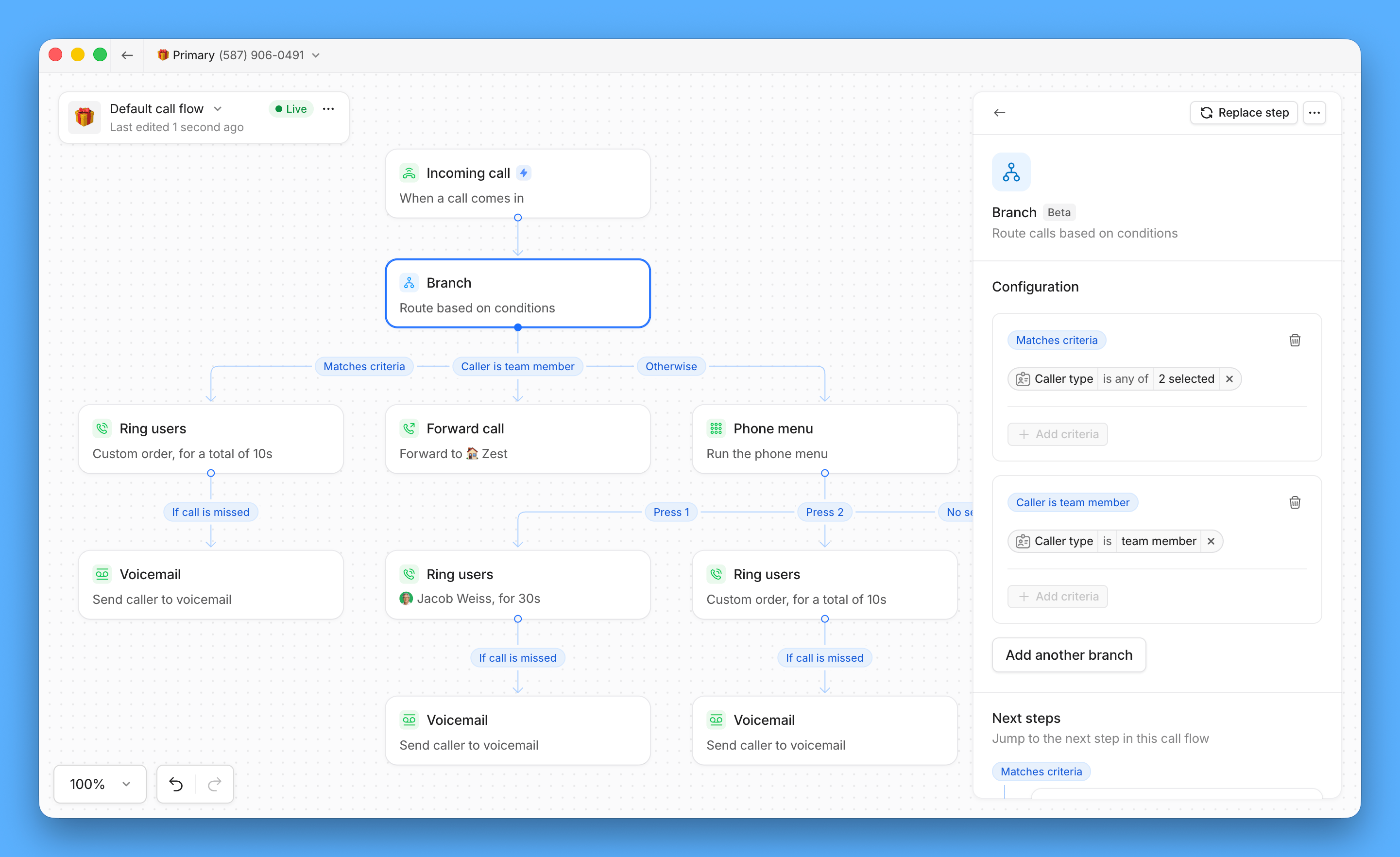
Contact routing lets your call flow treat callers differently based on who they are, before any ringing happens. Add a **Branch** step to your call flow and create separate paths for saved contacts, AI-suggested contacts, team members, and everyone else.
Use it to send known clients straight to their assigned team, keep internal calls off your customer-facing paths, or route unknown callers through screening or a phone menu before they reach anyone.
**Contact routing is currently in beta.**
It’s rolling out to workspaces with **Business** or **Scale** **plans** gradually — if you don’t see it yet, it’s on the way. The feature is actively in development, and we’ll keep sharing improvements as they land.
 ***
### How it works
When a call comes in, the **Branch** step checks the caller's **Caller type** against the branches you've set up:
| Caller type | |
| ------------------------- | --------------------------------------------------------------------------------------------------------- |
| **Saved contact** | The caller is in your Contacts list. |
| **AI contact suggestion** | Quo's AI identified the caller from a previous voicemail or text, but **they're not** saved as a contact. |
| **Team member** | The caller is someone in your shared workspace. |
Any caller that doesn't match a **Caller type** you've selected follows the **Otherwise** branch.
***
### Add a Branch step to your call flow
1. Open the **Call flow builder**
2. Drag the **Branch** step onto your canvas
3. Select a branch path and click **+ Add criteria** to select one or more caller types to route automatically.
* You can choose from **Saved contact**, **AI contact suggestion**, or **Team member**
4. Complete the flows for each branch by dragging and dropping **Steps** like [Ring groups](/core-concepts/administration/call-flows/ring-groups), [Phone menu](/core-concepts/administration/call-flows/phone-menu), [Call forwarding](/core-concepts/administration/call-flows/call-forwarding) or [Voicemail](/core-concepts/administration/call-flows/voicemail) below each path
5. Click **Publish changes**
***
### Rename your branches
Each branch starts with a default label, but you can rename it to match how your team talks about it.
1. Select the **Branch** step
2. Select the branch you want to rename
3. Enter a new label
***
### How it works
When a call comes in, the **Branch** step checks the caller's **Caller type** against the branches you've set up:
| Caller type | |
| ------------------------- | --------------------------------------------------------------------------------------------------------- |
| **Saved contact** | The caller is in your Contacts list. |
| **AI contact suggestion** | Quo's AI identified the caller from a previous voicemail or text, but **they're not** saved as a contact. |
| **Team member** | The caller is someone in your shared workspace. |
Any caller that doesn't match a **Caller type** you've selected follows the **Otherwise** branch.
***
### Add a Branch step to your call flow
1. Open the **Call flow builder**
2. Drag the **Branch** step onto your canvas
3. Select a branch path and click **+ Add criteria** to select one or more caller types to route automatically.
* You can choose from **Saved contact**, **AI contact suggestion**, or **Team member**
4. Complete the flows for each branch by dragging and dropping **Steps** like [Ring groups](/core-concepts/administration/call-flows/ring-groups), [Phone menu](/core-concepts/administration/call-flows/phone-menu), [Call forwarding](/core-concepts/administration/call-flows/call-forwarding) or [Voicemail](/core-concepts/administration/call-flows/voicemail) below each path
5. Click **Publish changes**
***
### Rename your branches
Each branch starts with a default label, but you can rename it to match how your team talks about it.
1. Select the **Branch** step
2. Select the branch you want to rename
3. Enter a new label
 ***
### Combine or separate paths
**Caller type** supports more than one selection per branch, so you can keep saved contacts, AI contact suggestions, and team members on separate branches, or check more than one type on the same branch to merge them.
For example, check both **Saved contact** and **AI contact suggestion** on one branch to route recognized callers together, while keeping **Team member** on its own.
***
### Combine or separate paths
**Caller type** supports more than one selection per branch, so you can keep saved contacts, AI contact suggestions, and team members on separate branches, or check more than one type on the same branch to merge them.
For example, check both **Saved contact** and **AI contact suggestion** on one branch to route recognized callers together, while keeping **Team member** on its own.
 If you don't add a **Team member** branch, calls from team members follow the **Otherwise** branch, the same one unknown callers use. This can send internal calls to voicemail, a phone menu, or Sona instead of ringing through.
***
### Call activity for routed calls
When a call is handled by a contact routing condition, the **Call tab** in your inbox shows why.
This includes calls that went straight to voicemail without ringing, and whether the caller left a message.
If you don't add a **Team member** branch, calls from team members follow the **Otherwise** branch, the same one unknown callers use. This can send internal calls to voicemail, a phone menu, or Sona instead of ringing through.
***
### Call activity for routed calls
When a call is handled by a contact routing condition, the **Call tab** in your inbox shows why.
This includes calls that went straight to voicemail without ringing, and whether the caller left a message.
 ***
## FAQs
If your workspace doesn't have a branch with **Caller type** set to **Team member**, calls from team members follow the **Otherwise** branch instead of ringing you directly. Check that a **Team member** branch exists and covers the right people.
Quo checks whether the caller is a user in your workspace. If you're sharing a line without being added as a user, you won't be recognized as a team member on that call.
Not yet. Contact routing conditions are based on caller identity, not time of day. Use business hours for time-based routing instead.
No. Only users added to your Quo workspace can be recognized as team members.
Need help? [Submit a support request](https://support.quo.com/help/submit-a-request) and we'll jump in.
***
## FAQs
If your workspace doesn't have a branch with **Caller type** set to **Team member**, calls from team members follow the **Otherwise** branch instead of ringing you directly. Check that a **Team member** branch exists and covers the right people.
Quo checks whether the caller is a user in your workspace. If you're sharing a line without being added as a user, you won't be recognized as a team member on that call.
Not yet. Contact routing conditions are based on caller identity, not time of day. Use business hours for time-based routing instead.
No. Only users added to your Quo workspace can be recognized as team members.
Need help? [Submit a support request](https://support.quo.com/help/submit-a-request) and we'll jump in.