> ## Documentation Index
> Fetch the complete documentation index at: https://support.quo.com/llms.txt
> Use this file to discover all available pages before exploring further.
# How to manage notifications and focus settings
> Learn how Do Not Disturb, muting, and silent alerts work together to help you balance focus, responsiveness, and collaboration.
## Overview
Notifications in Quo, formerly OpenPhone are built to help you control when and how you’re notified, whether you want uninterrupted focus time or instant alerts on critical messages.\
In this guide you'll learn understand how each notification layer works and how to design a setup that fits your workflow.
***
## The three layers of notification control
Quo notifications operate on three levels — **Do Not Disturb**, **per-number muting**, and **silent alerts**.\
Each one gives you a different degree of control.
| Tool | Best for | What it does | Team impact |
| ------------------------ | ----------------------- | ------------------------------------------------ | ------------------------------------------------------ |
| **Do Not Disturb** | Focus time or off-hours | Pauses all incoming call rings and notifications | Only affects you. Teammates still receive shared calls |
| **Muting numbers** | Granular control | Mutes alerts for a specific phone number | Others on the shared number still get notifications |
| **Silent notifications** | Light awareness | Sends quiet notifications (no sound/vibration) | Doesn’t affect others |
***
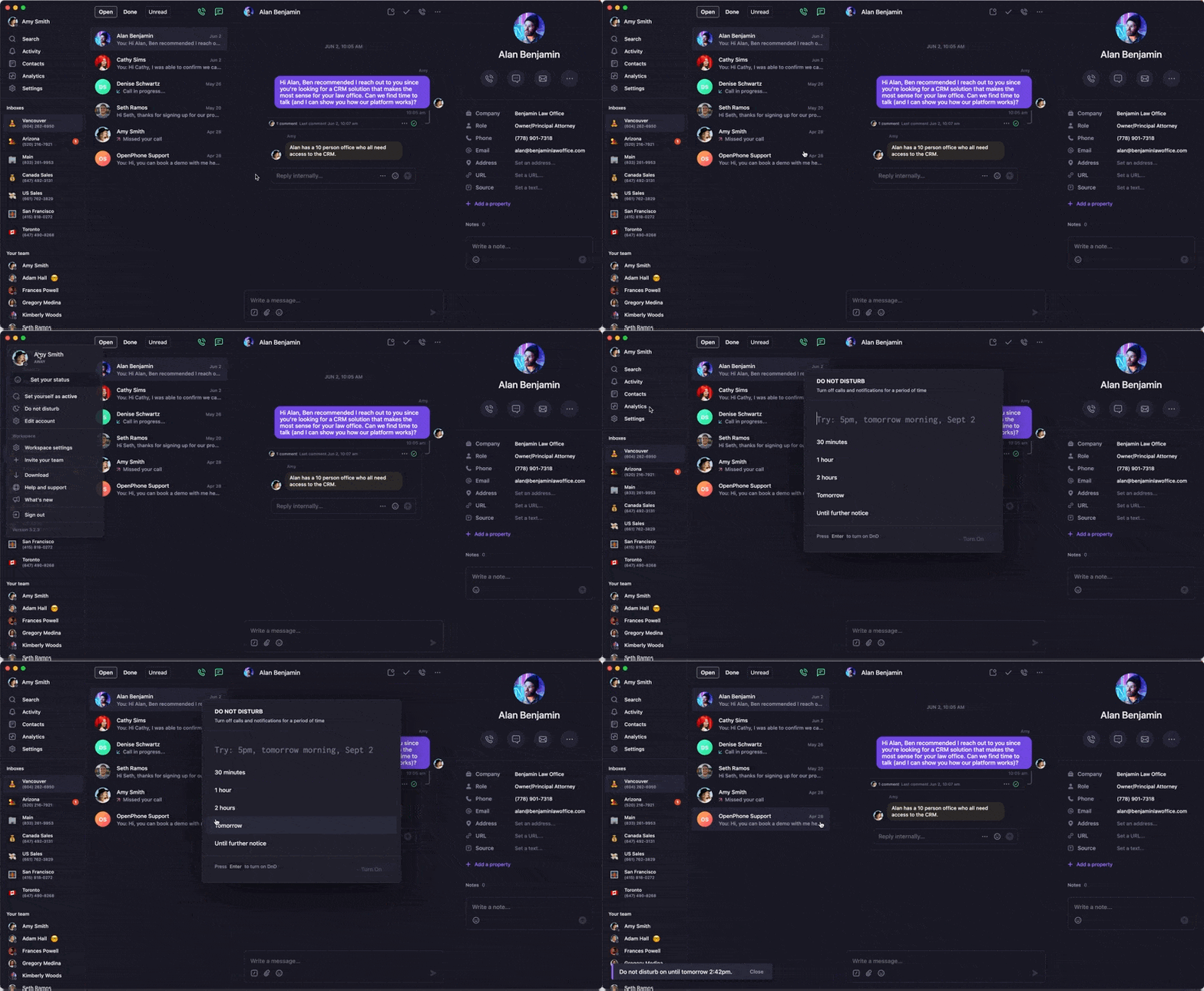
## Using **Do Not Disturb** to protect focus time
Do Not Disturb (DND) is your personal boundary — it ensures you can focus or take time off while Quo quietly handles incoming activity.
When activated:
* Calls go straight to voicemail.
* Texts are received but don’t interrupt.
* You’ll still get missed call badges and voicemail transcriptions.
Do Not Disturb settings sync across all devices — if you enable it on one platform, it applies everywhere.
### What this looks like
 ### When to use it
* During deep work blocks or meetings.
* At the end of your workday or while on vacation.
* When you still want to receive messages passively but not be interrupted.
Want to automate DND? Use your [business hours](https://support.quo.com/core-concepts/administration/call-flows/business-hours) to switch it on and off automatically.
***
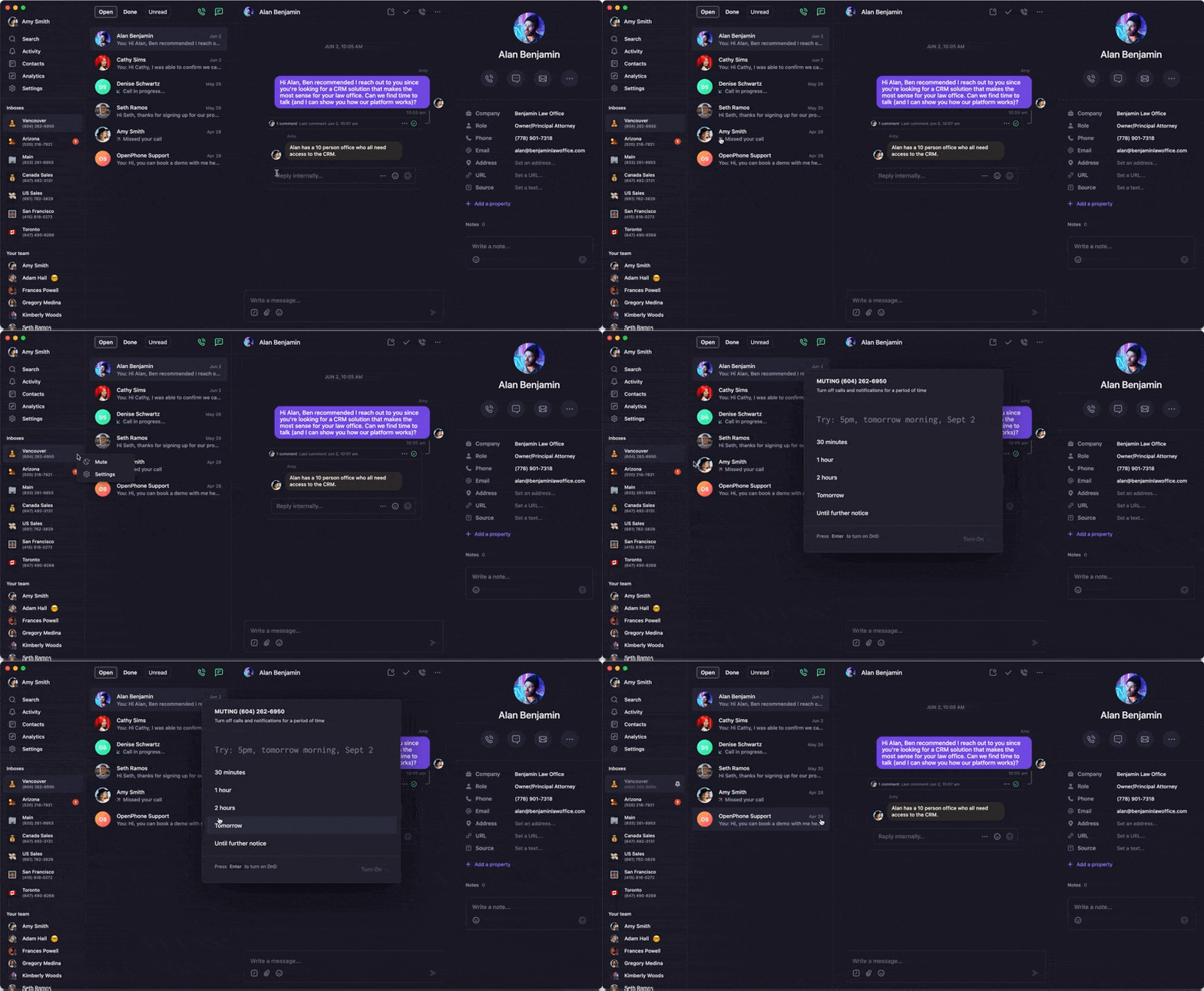
## Muting specific phone numbers
Sometimes you don’t need a full DND — just less noise from certain numbers.\
**Muting** lets you silence alerts for specific lines while staying active elsewhere.
When you mute a number:
* You won’t get notifications for incoming calls or texts on that number.
* You can still make calls or reply when ready.
* For shared numbers, other teammates still receive alerts.
### When to use it
* During deep work blocks or meetings.
* At the end of your workday or while on vacation.
* When you still want to receive messages passively but not be interrupted.
Want to automate DND? Use your [business hours](https://support.quo.com/core-concepts/administration/call-flows/business-hours) to switch it on and off automatically.
***
## Muting specific phone numbers
Sometimes you don’t need a full DND — just less noise from certain numbers.\
**Muting** lets you silence alerts for specific lines while staying active elsewhere.
When you mute a number:
* You won’t get notifications for incoming calls or texts on that number.
* You can still make calls or reply when ready.
* For shared numbers, other teammates still receive alerts.
 ### When to use it
* You manage multiple brands or departments but want to focus on one at a time.
* A shared number is getting high traffic and you’re not on call.
* You’re working with VIP clients and want to prioritize their lines.
Muted numbers only affect your own workspace — teammates on shared numbers still receive calls and messages as usual.
***
## Staying informed with **Silent notifications**
Silent notifications are a middle ground between full alerts and DND.\
They let you see activity without sound or vibration — ideal when you’re presenting, traveling, or taking a light-focus block.
### How silent notifications behave
### When to use it
* You manage multiple brands or departments but want to focus on one at a time.
* A shared number is getting high traffic and you’re not on call.
* You’re working with VIP clients and want to prioritize their lines.
Muted numbers only affect your own workspace — teammates on shared numbers still receive calls and messages as usual.
***
## Staying informed with **Silent notifications**
Silent notifications are a middle ground between full alerts and DND.\
They let you see activity without sound or vibration — ideal when you’re presenting, traveling, or taking a light-focus block.
### How silent notifications behave
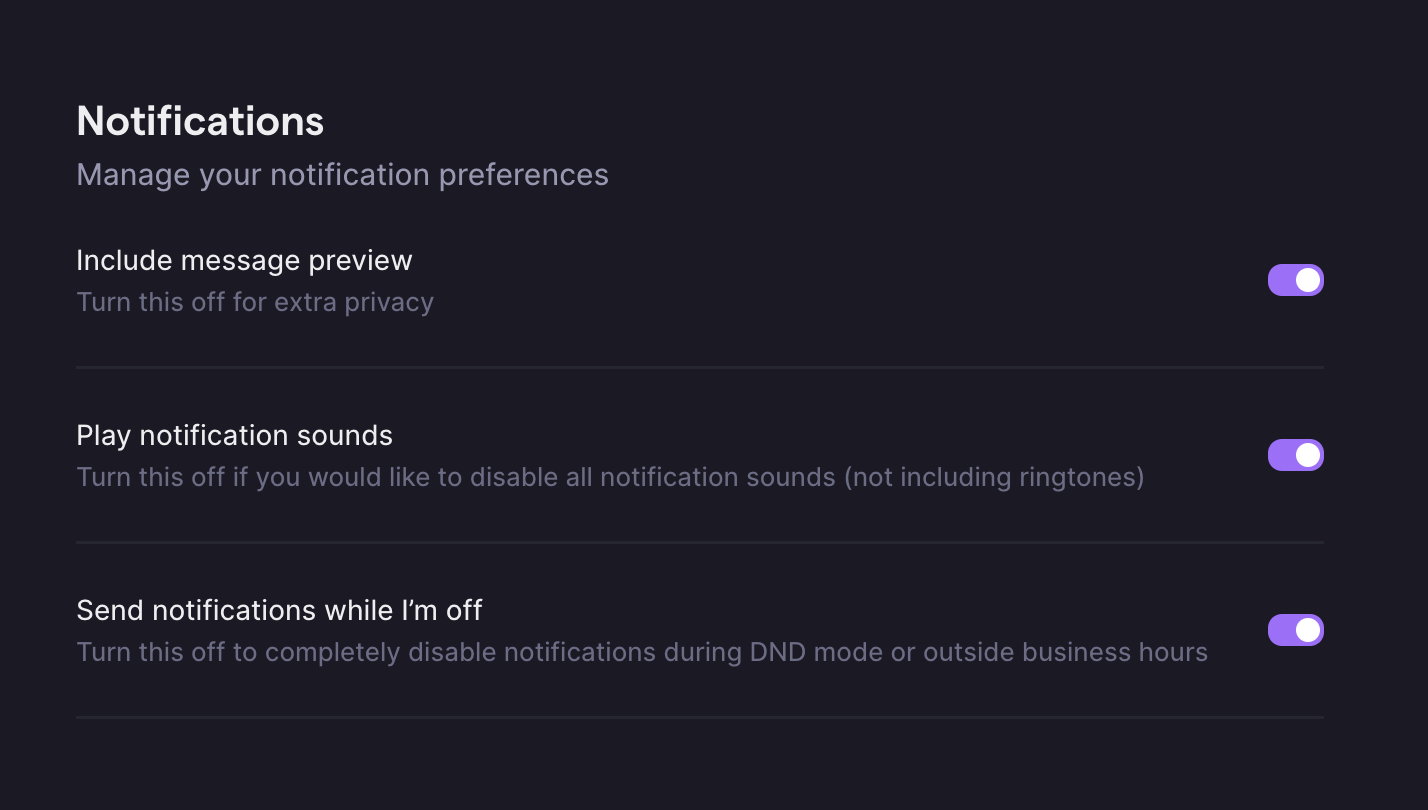 You can enable or disable silent alerts under **Settings → Notifications**:
* **Send notifications while I'm off:**
* On → Receive quiet notifications during DND or off-hours.
* Off → No notifications when unavailable.
* **Include message preview:**
* On → See message text in notifications.
* Off → Receive generic “New message” alerts.
If you’ve muted a number, it overrides silent notifications — no alerts will appear for that number until it’s unmuted.
***
## Device-level Focus and DND settings
If you’re not getting Quo alerts at all, your **phone’s native Focus or DND modes** might be the reason.\
System settings can override in-app preferences.
### iOS
Swipe down from the top-right (iPhone X or newer) or up from the bottom (older models) → Tap the 🌙 icon to toggle DND.
Go to **Settings → Do Not Disturb** and toggle off.
### Android
Swipe down from the top → Look for the Do Not Disturb icon → Tap to turn off.
Go to **Settings → Sound** → **Do Not Disturb** → Toggle off.
### Focus Mode (iOS + Android)
Focus Mode can block Quo notifications entirely.
1. Open **Settings → Focus**
2. Select your active mode
3. Turn it off temporarily
1. Go to **Settings → Digital Wellbeing**
2. Tap **Focus Mode**
3. Tap **Turn off now**
After adjusting your device settings, double-check that your Quo numbers aren’t muted. Muted lines take precedence over system settings.
***
## Putting it all together
Use these tools together to build your ideal balance between focus and responsiveness:
| Scenario | Best tool |
| ------------------------------------------- | ----------------------------------- |
| You’re in a meeting or heads-down work | **Do Not Disturb** |
| You want to ignore one brand or shared line | **Mute that number** |
| You need awareness without sound | **Silent notifications** |
| You’re not receiving alerts at all | **Check device DND/Focus settings** |
***
## FAQs
Do Not Disturb pauses all notifications across Quo and sends calls to voicemail. Muting silences notifications for specific numbers while keeping others active.
No — system-level DND overrides silent notifications. If your phone is silenced, Quo won’t deliver alerts until DND is off.
Not directly. Teammates might notice missed calls on shared lines, but your DND status isn’t shown. Set a custom status if you want to communicate availability.
***
## **Next step**
Ready to fine-tune your settings?[ Manage notification settings](../_tasks/update-notification-settings.mdx) step-by-step.
You can enable or disable silent alerts under **Settings → Notifications**:
* **Send notifications while I'm off:**
* On → Receive quiet notifications during DND or off-hours.
* Off → No notifications when unavailable.
* **Include message preview:**
* On → See message text in notifications.
* Off → Receive generic “New message” alerts.
If you’ve muted a number, it overrides silent notifications — no alerts will appear for that number until it’s unmuted.
***
## Device-level Focus and DND settings
If you’re not getting Quo alerts at all, your **phone’s native Focus or DND modes** might be the reason.\
System settings can override in-app preferences.
### iOS
Swipe down from the top-right (iPhone X or newer) or up from the bottom (older models) → Tap the 🌙 icon to toggle DND.
Go to **Settings → Do Not Disturb** and toggle off.
### Android
Swipe down from the top → Look for the Do Not Disturb icon → Tap to turn off.
Go to **Settings → Sound** → **Do Not Disturb** → Toggle off.
### Focus Mode (iOS + Android)
Focus Mode can block Quo notifications entirely.
1. Open **Settings → Focus**
2. Select your active mode
3. Turn it off temporarily
1. Go to **Settings → Digital Wellbeing**
2. Tap **Focus Mode**
3. Tap **Turn off now**
After adjusting your device settings, double-check that your Quo numbers aren’t muted. Muted lines take precedence over system settings.
***
## Putting it all together
Use these tools together to build your ideal balance between focus and responsiveness:
| Scenario | Best tool |
| ------------------------------------------- | ----------------------------------- |
| You’re in a meeting or heads-down work | **Do Not Disturb** |
| You want to ignore one brand or shared line | **Mute that number** |
| You need awareness without sound | **Silent notifications** |
| You’re not receiving alerts at all | **Check device DND/Focus settings** |
***
## FAQs
Do Not Disturb pauses all notifications across Quo and sends calls to voicemail. Muting silences notifications for specific numbers while keeping others active.
No — system-level DND overrides silent notifications. If your phone is silenced, Quo won’t deliver alerts until DND is off.
Not directly. Teammates might notice missed calls on shared lines, but your DND status isn’t shown. Set a custom status if you want to communicate availability.
***
## **Next step**
Ready to fine-tune your settings?[ Manage notification settings](../_tasks/update-notification-settings.mdx) step-by-step.